YetAnotherConfigLib Needed by Postcard Camera 0.1.1 for 26.3 (NeoForge)
requiredMatching file found Matched file: 3.9.7 for neoforge 26.3
CurseForge · Minecraft mod
Take instant photos of your world, write on the back like a postcard, and hand them to your friends.
Quick answer
Postcard Camera 0.1.1 for 26.3 (NeoForge) targets 26.3 with NeoForge. The project page does not say whether this file belongs on the client, dedicated server, or both. All 1 required mods have matching files.
Where it goes
The project page does not say whether this file belongs on the client, dedicated server, or both.
The source does not explicitly classify this release as client-only or server-only.
Postcard Camera 0.1.1 for 26.3 (NeoForge). Change the file and its required mods may change too.
Install YetAnotherConfigLib first. We found matching files for this game-version and loader setup.
We only count dependency files that match this setup. A file for another loader does not fill the gap.
Before you install it
Built for Postcard Camera 0.1.1 for 26.3 (NeoForge). Pick another file and the loader, install side or required mods may change.
Use Postcard Camera 0.1.1 for 26.3 (NeoForge). It targets 26.3 with NeoForge; another release may have different loader, side or dependency requirements.
Install YetAnotherConfigLib first. We found matching files for this game-version and loader setup.
The project page does not say whether this file belongs on the client, dedicated server, or both.
Use the “Get this file” button beside Postcard Camera 0.1.1 for 26.3 (NeoForge). It opens that exact file at the source.
About this project
Take instant photos of your world, write on the back like a postcard, and hand them to your friends.
This is an early version. Postboxes to post photos to your friends, printing pictures from your computer, hanging photos on walls and a photo album come in later versions.
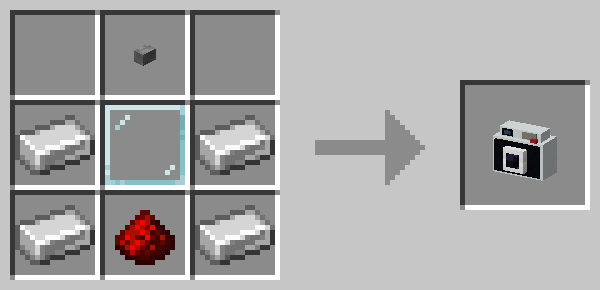
Instant Camera
Instant Film: 3 paper and 1 black dye, in any arrangement, make 3 Instant Film.

Required:
Optional: Mod Menu on Fabric and Quilt, to open the config screen from the mod list.
Quilt on 26.3: for now, clients need Quilt Loader 0.31.0 (a beta). YACL crashes the current stable release, 0.30.1, at startup. 1.21.1 runs on the stable release.
Open the settings from Mod Menu on Fabric and Quilt, or from the Config button in NeoForge's mod list. In a world, operators and the world's owner change them there for everyone.
| Setting | Default | |
|---|---|---|
| Photo size | 256 × 256 | Size of new photos in pixels, 128 to 512. Larger is sharper and takes more space. |
| Photo quality | 85 | JPEG quality of new photos, 50 to 100 |
| Film | Instant Film | What each photo uses up: Instant Film or paper |
| Back of a photo | Postcard | How much can be written on the back: Sign (4 lines), Postcard (6 lines) or Book page (14 lines) |
| Photos per hour | 60 | How many photos each player may take in an hour, up to 1000; 0 for no limit. Operators, and the owner of a singleplayer world, have no limit. |
All under /postcardcamera. Photo IDs in the answers can be clicked to fill in the next command.
| Command | |
|---|---|
list <player> [<page>] |
A player's photos, newest first |
info [<id>] |
Everything about a photo, or the one in your hand: who made it and when, and its title, message and signature |
remove [<id>] |
Removes a photo for good, or the one in your hand. Everyone then sees it as removed. |
removeall <players> |
Removes every photo those players made |
blacklist add|remove|list |
Players on the blacklist can't take photos |
whitelist on|off|add|remove|list |
While the whitelist is on, only players on it, and operators, can take photos |
The server log also names each photo's ID and who took it. The photos and their records are in postcard_camera/photos/ in the world folder, the lists in postcard_camera/access.json; edit that file only while the server is stopped.
Project description from CurseForge.
Pick your setup
Choose the version and loader you play, then open the matching release.
Check the dependencies, then try the file in a copied instance before changing a world you care about.
Recent files
postcard_camera-neoforge-0.1.1-26.3.jar
29 Oct 2026
postcard_camera-neoforge-0.1.1-1.21.1.jar
29 Oct 2026
postcard_camera-fabric-0.1.1-26.3.jar
29 Oct 2026
postcard_camera-fabric-0.1.1-1.21.1.jar
29 Oct 2026
postcard_camera-neoforge-0.1.0+26.3.jar
28 Oct 2026
postcard_camera-neoforge-0.1.0+1.21.1.jar
28 Oct 2026
postcard_camera-fabric-0.1.0+26.3.jar
28 Oct 2026
postcard_camera-fabric-0.1.0+1.21.1.jar
28 Oct 2026
Looking for an older file? The official CurseForge project page is in Resources.
 mod
Adds lootable blueprints, weapon research, and a configurable Tech Tree for unlocking recipes from Timeless and Classics Zero (TaCZ).
 mod
A Mod That Enhances Server Experiences For The Cobblemon Championship's Modpack.
 mod
Allows Guard Villagers to use TaCZ firearms with tactical combat, ammunition management, and configurable ally protection.