Minecraft version
Back to mods 
CurseForge · Minecraft mod
ScriptyZ Flow
Make every item feel alive.
Choose a version Pick your version below, then grab the matching file.
Quick answer
Which ScriptyZ Flow release matches 26.3 NeoForge?
Best match for your filters scriptyzflow-1.0.0.jar
Game version 26.3
Loader NeoForge
ScriptyZ Flow scriptyzflow-1.0.0.jar targets 26.3 with NeoForge. The project page does not say whether this file belongs on the client, dedicated server, or both. No extra mods listed for this file.
Where it goes
Is ScriptyZ Flow required on the client, server, or both?
The project page does not say whether this file belongs on the client, dedicated server, or both.
Client Source doesn’t say
Dedicated server Source doesn’t say
Loader for this release NeoForge
Required install it here Optional supported, not mandatory Not supported do not install here Source doesn’t say do not assume
The source does not explicitly classify this release as client-only or server-only.
What else does ScriptyZ Flow scriptyzflow-1.0.0.jar need?
scriptyzflow-1.0.0.jar on 26.3 NeoForge. Every mod below is checked against that same setup.
This file does not list any required mods. Do not add a library just because a different file uses it.
This file does not list any required or optional mods.
Before you install it
Add ScriptyZ Flow without breaking your instance.
Built for ScriptyZ Flow scriptyzflow-1.0.0.jar on 26.3 NeoForge. Pick another file and the loader, install side or required mods may change.
- 01
Stick to this file
Use scriptyzflow-1.0.0.jar. It targets 26.3 with NeoForge; another release may have different loader, side or dependency requirements.
- 02
Bring the mods it needs
This file does not list any required mods. Do not add a library just because a different file uses it.
- 03
Put it on the correct side
The project page does not say whether this file belongs on the client, dedicated server, or both.
- 04
Pick the file you checked
Use the “Get this file” button beside scriptyzflow-1.0.0.jar. It opens that exact file at the source.
About this project
What does ScriptyZ Flow add?
ScriptyZ-Flow
Make Every Item Feel Alive.
Transform the Minecraft inventory experience with ScriptyZ: Flow — an immersive UI mod built around animated item interactions, evolving rarity visuals, distinctive tooltips, and detailed item presentation.
From the moment you pick up an item to the moment you inspect its enchantments, Flow adds movement, color, and personality to your inventory. Smooth animations, rarity-inspired effects, and unique item-origin details combine to give your Minecraft experience a more polished feel.
Minecraft: 26.3
Mod Loader: NeoForge
Version: 1.0.0
✨ RARITY PROGRESSION
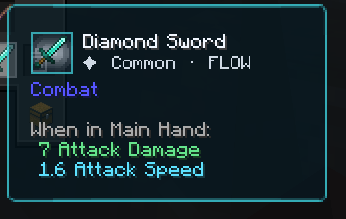
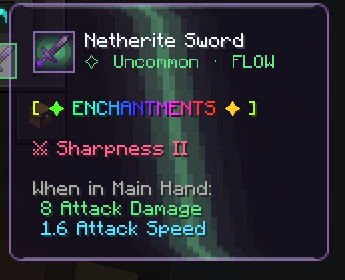
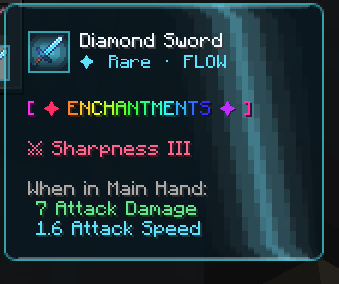
Items can progress through six rarity tiers, from Common all the way to Mythic. Each tier has its own color identity, making the progression easy to recognize and giving the item presentation a more distinctive look.
As enchantments qualify an item for a higher automatically calculated rarity, Flow's rarity system determines the tier and its corresponding visual style.
The Six Rarity Tiers
Common → Uncommon → Rare → Epic → Legendary → Mythic
Watch the Progression
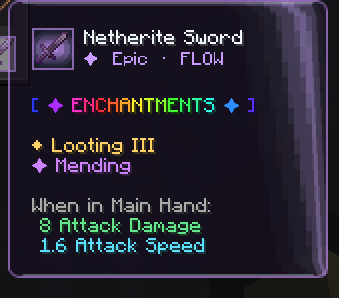
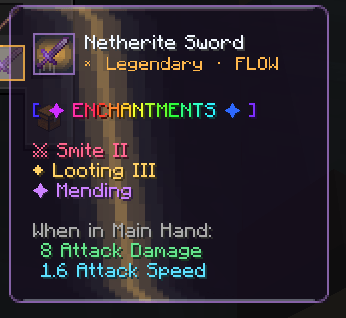
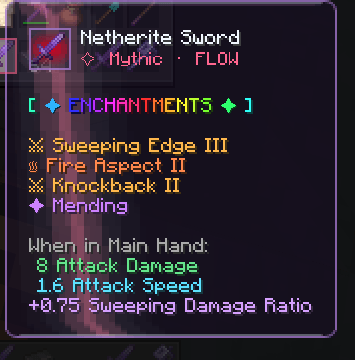
🎨 ENCHANTMENT COLORS
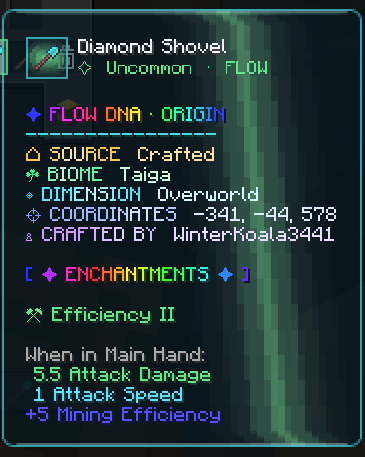
Enchantments receive enhanced visual styling to make item tooltips more expressive and easier to explore. Colored enchantment names complement Flow's rarity-focused appearance and give enchanted equipment a more distinctive presentation.
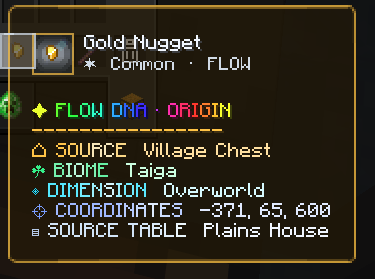
🧬 CHEST DNA & ITEM ORIGIN
Discover an additional layer of item presentation with Chest DNA and Item Origin. Flow provides provenance details designed to give items more identity and make their displayed origins part of the inventory experience.
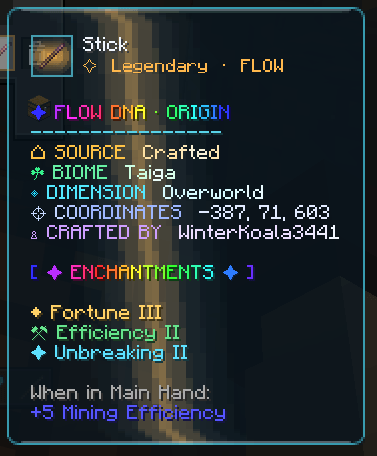
⭐ STAR TRAILS & SLOT EFFECTS
Inventory interactions become more expressive with rarity-colored visual effects. Glowing star trails follow carried items, while slot ripples and sparks add feedback to inventory interactions.
These effects complement the item's rarity color and give movement through menus a more dynamic appearance.
🌀 IMMERSIVE ITEM ANIMATIONS
Flow adds movement to items throughout everyday inventory interactions.
Hover Motion
Items gently float, tilt, and bounce when hovered over, making the inventory feel less static.
Smooth Pickup & Placement
When an item is picked up, it enlarges and stays emphasized while carried. When placed down, it transitions back toward its normal size with a smooth landing animation.
Crafting-Grid Idle Motion
Ingredients in the crafting grid gently float and tilt even when the cursor moves away, adding subtle movement without requiring the player to hover over each item.
🌈 ENHANCED TOOLTIP INTERFACE
Flow gives item tooltips a distinctive visual identity through animated headers, rarity-colored glow, styled enchantment details, and additional item information.
The goal is to make inspecting equipment feel like part of the experience rather than just reading a list of stats.
⚙️ INSTALLATION
Install Minecraft 26.3 and a compatible NeoForge installation.
Download the ScriptyZ: Flow release that matches your Minecraft version.
Place the downloaded
.jarfile into your Minecraft instance'smodsfolder.Start the game using the matching NeoForge profile.
Always check the version and loader compatibility listed on the release file.
💬 FEEDBACK & BUG REPORTS
Found a bug or have an idea for a future feature? Share a clear description of the issue and include your Minecraft version, NeoForge version, and relevant logs or crash reports when possible.
Thank you for checking out ScriptyZ: Flow — make every item feel alive.
Project description from CurseForge.
Pick your setup
ScriptyZ Flow by Minecraft version and loader
Choose the version and loader you play, then open the matching release.
Check the dependencies, then try the file in a copied instance before changing a world you care about.
Recent files
ScriptyZ Flow versions and loaders
scriptyzflow-1.0.0.jar
28 Oct 2026
Client Source doesn’t say Server Source doesn’t say Dependencies No extras listed Listed on Release listing
Check the 26.3 · NeoForge setup NeoForge26.3 release
Looking for an older file? The official CurseForge project page is in Resources.
 mod
CurseForge + Modrinth · Minecraft
World Portal
Create custom world portal to travel between dimensions.
 mod
CurseForge · Minecraft
Roguelite Advancements
Advancement now give permanent player buffs. Health, Damage, Reach, Step Assist, Pick up radius and much more.
 mod
CurseForge · Minecraft
Traveler's Lantern
Hang a lantern on your belt: it lights your way hands-free with smooth moving light and swings as you move. Works client-only on any server.