Minecraft version
Back to mods 
CurseForge · Minecraft mod
Collector
Collects every item on the ground in a cube up to 128x128x128 into an adjacent chest, or a faraway one via the Collector Remote. Just one check per second, no hopper lines, rails or minecarts needed. Made for flying machines.
Choose a version Pick your version below, then grab the matching file.
Quick answer
Which Collector release should I use?
Latest stable file collector-1.0.0.jar
Game version 26.3
Loader Fabric
collector-1.0.0.jar targets 26.3 with Fabric. The project page does not say whether this file belongs on the client, dedicated server, or both. No extra mods listed for this file.
Where it goes
Is Collector required on the client, server, or both?
The project page does not say whether this file belongs on the client, dedicated server, or both.
Client Source doesn’t say
Dedicated server Source doesn’t say
Loader for this release Fabric
Required install it here Optional supported, not mandatory Not supported do not install here Source doesn’t say do not assume
The source does not explicitly classify this release as client-only or server-only.
What else does collector-1.0.0.jar need?
collector-1.0.0.jar. Change the file and its required mods may change too.
This file does not list any required mods. Do not add a library just because a different file uses it.
This file does not list any required or optional mods.
Before you install it
Add Collector without breaking your instance.
Built for collector-1.0.0.jar. Pick another file and the loader, install side or required mods may change.
- 01
Stick to this file
Use collector-1.0.0.jar. It targets 26.3 with Fabric; another release may have different loader, side or dependency requirements.
- 02
Bring the mods it needs
This file does not list any required mods. Do not add a library just because a different file uses it.
- 03
Put it on the correct side
The project page does not say whether this file belongs on the client, dedicated server, or both.
- 04
Pick the file you checked
Use the “Get this file” button beside collector-1.0.0.jar. It opens that exact file at the source.
About this project
What does Collector add?
Collector
Collector is a block that picks up every loose item around it and stores it for you. Drops from mob farms, mined blocks, dead mobs, a chest you broke by accident... anything that ends up on the ground. Put it next to a chest and forget about collecting drops by hand.
It also comes with a Collector Remote, an item that lets a Collector send everything to a storage block anywhere in the world, like a wireless connection. And since Collectors can be moved by pistons, they work great on flying machines.
Quick start
- Craft a Collector and place it.
- Put a chest (or any storage block) touching one of its four sides.
- Drop some items nearby. After a moment, they appear in the chest.
How the Collector works
- What it picks up: any item entity that has touched the ground or is in water (still or flowing). Items still falling through the air are ignored until they land. It doesn't matter who dropped them.
- How often: about once per second.
- Range: a cube centered on the Collector. A single Collector covers 16x16x16 blocks.
- Where items go: it has two modes, explained below.
- If the storage is full: items stay on the ground.
Mode 1: local storage (default)
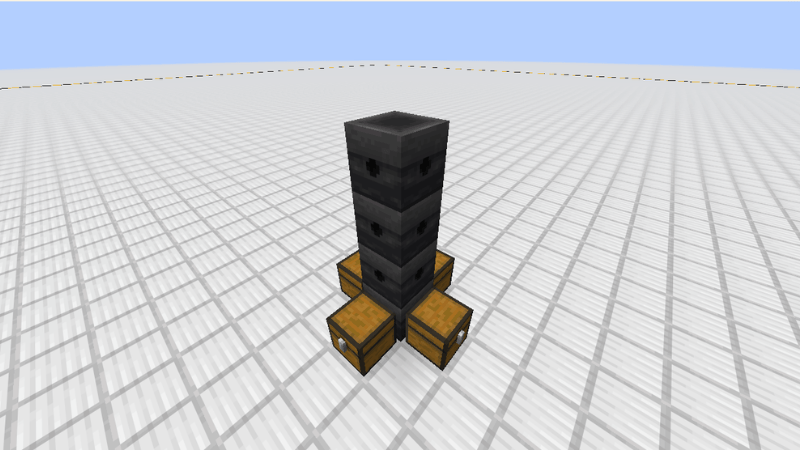
A Collector with no connection stores items in storage blocks touching its four sides (front, back, left and right): chests, barrels, shulker boxes and other blocks that accept items. Storage above or below it doesn't count. With no storage on those sides, it does nothing.
Mode 2: remote storage
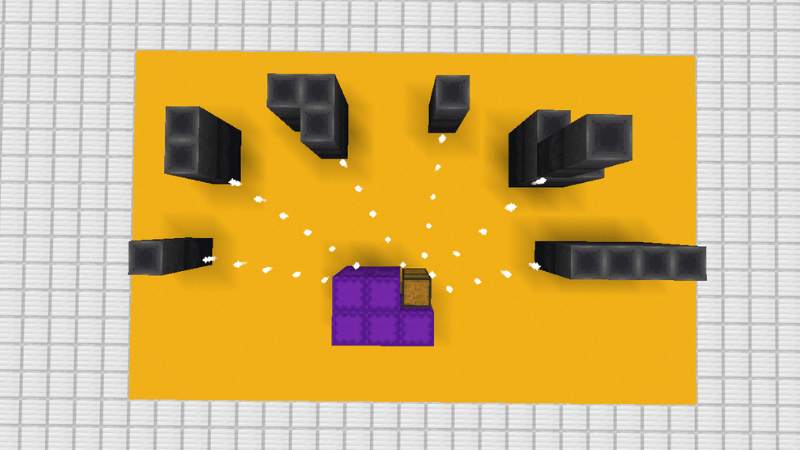
A Collector linked with the Collector Remote sends everything to the storage block it is linked to, no matter how far away it is (same dimension). While it has a connection, it ignores any storage touching it and uses only the remote one. The storage must be in a loaded chunk; otherwise the Collector waits.
Groups
Collectors touching each other (sharing a face, not just a corner) form a group of up to four, and the group's range grows:
Collectors in the group Range
1 - 16x16x16
2 - 32x32x32
3 - 64x64x64
4 - 128x128x128
- Limit of four: you can't place a fifth Collector touching a group of four. If a fifth ends up touching anyway (for example, moved by a piston or placed with a command), the whole group breaks and drops as items.
- Local mode: each Collector in the group uses its own touching storage, but all of them benefit from the larger range.
- Remote mode: the group works as one machine. It has a single connection, and the connected Collector collects for the whole group using the group's range. The other Collectors in the group stay inactive: they can't be linked to another storage and don't use touching storage. All of them change their look together.
The Collector Remote
The Remote links Collectors to storage blocks.
- Select a Collector: right-click it with the Remote. You'll hear a chime, a message appears above your hotbar, and the Remote changes its texture to show it is carrying a Collector.
- Connect it: right-click a storage block. The connection is made, the Remote returns to its normal texture, and the Collector's sides change to show it is linked.
- Disconnect it: sneak + right-click any Collector of a linked group. The whole group is disconnected.
- **Already linked?** Right-clicking a linked group tells you it is connected. Disconnect it first if you want to link it to another storage.
- While a Collector is selected, your next right-click on any block tries to connect it, so chests won't open until you connect it, select another Collector, or switch to a different item.
- Several Collectors, one chest: that's allowed. Link as many Collectors (or groups) as you want to the same storage.
Seeing your connections
- The Remote changes texture while it carries a Collector.
- Linked Collectors have different side textures.
- Linked storage gives off a few sparkles from time to time when you are near it.
- While you hold the Remote, a line of sparkles shows the path between each Collector and its storage (only the part near you is drawn, to keep the game running smoothly).
Flying machines
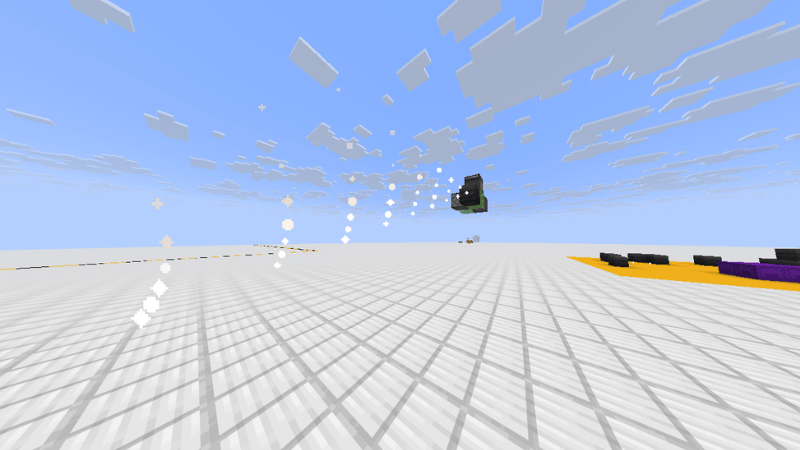
Collectors can be pushed and pulled by pistons, and linked Collectors keep their connection when they move, so you can build machines that collect items while they travel and send everything to a base. A group that is moved stays linked too.
Connections and breaking
- Breaking a Collector removes its connection.
- If the linked storage is destroyed or stops accepting items, the connection is removed after a few seconds and the Collector goes back to using touching storage.
Recipes
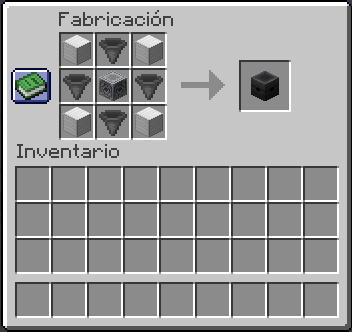
Collector: an iron block in each corner, a hopper in each side slot, and a lodestone in the middle.
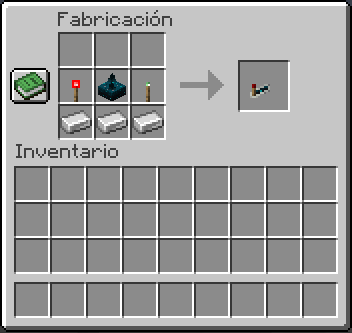
Collector Remote: redstone torch, sculk sensor and copper torch on the top row, and three iron ingots on the row below it.
Good to know
- Very fast piston contraptions may lose a connection. Just reconnect the Collector.
- Connections only work inside one dimension.
- Requires Fabric API.
Project description from CurseForge.
Pick your setup
Collector by Minecraft version and loader
Choose the version and loader you play, then open the matching release.
Check the dependencies, then try the file in a copied instance before changing a world you care about.
Recent files
Collector versions and loaders
collector-1.0.0.jar
29 Oct 2026
Client Source doesn’t say Server Source doesn’t say Dependencies No extras listed Listed on Release listing
Check the 26.3 · Fabric setup Fabric26.3 release
Looking for an older file? The official CurseForge project page is in Resources.
 mod
CurseForge · Minecraft
Pipster
Readable item, fluid, gas and energy pipes for Minecraft, with filters right at the port and channel-based tesseracts. For Fabric and NeoForge.
 mod
CurseForge · Minecraft
Mailwise
Mail for players who are offline: /mail send name text, /mail read, /mail clear. You are told about new mail when you join.
 mod
CurseForge · Minecraft
Levelwise
Five skills (Mining, Woodcutting, Farming, Combat, Exploring) that level with what you do and give real perks. /skills opens a chest menu.