Minecraft version
Back to mods 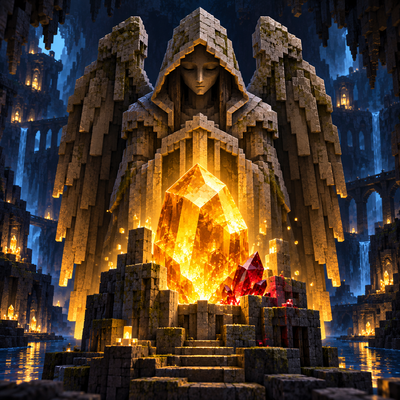
CurseForge · Minecraft mod
Amber and Silence
Discover ruby and amber, craft new equipment, and face the Guardian of Silence—a creature that moves when you look away.
Choose a version Pick your version below, then grab the matching file.
Quick answer
Which Amber and Silence release should I use?
Latest stable file amber-and-silence-1.0.4.jar
Game version 26.3
Loader NeoForge
Amber and Silence amber-and-silence-1.0.4.jar targets 26.3 with NeoForge. The project page does not say whether this file belongs on the client, dedicated server, or both. No extra mods listed for this file.
Where it goes
Is Amber and Silence required on the client, server, or both?
The project page does not say whether this file belongs on the client, dedicated server, or both.
Client Source doesn’t say
Dedicated server Source doesn’t say
Loader for this release NeoForge
Required install it here Optional supported, not mandatory Not supported do not install here Source doesn’t say do not assume
The source does not explicitly classify this release as client-only or server-only.
What else does Amber and Silence amber-and-silence-1.0.4.jar need?
amber-and-silence-1.0.4.jar. Change the file and its required mods may change too.
This file does not list any required mods. Do not add a library just because a different file uses it.
This file does not list any required or optional mods.
Before you install it
Add Amber and Silence without breaking your instance.
Built for Amber and Silence amber-and-silence-1.0.4.jar. Pick another file and the loader, install side or required mods may change.
- 01
Stick to this file
Use amber-and-silence-1.0.4.jar. It targets 26.3 with NeoForge; another release may have different loader, side or dependency requirements.
- 02
Bring the mods it needs
This file does not list any required mods. Do not add a library just because a different file uses it.
- 03
Put it on the correct side
The project page does not say whether this file belongs on the client, dedicated server, or both.
- 04
Pick the file you checked
Use the “Get this file” button beside amber-and-silence-1.0.4.jar. It opens that exact file at the source.
About this project
What does Amber and Silence add?
Amber and Silence
Mine rare resources, build an industrial workshop, program your own computer—and keep an eye on the darkness.
Amber and Silence combines exploration, crafting, early industrial technology and a touch of horror. Discover new minerals, turn them into equipment and alloys, build machines, and experiment with redstone through a programmable computer. But be careful when exploring dark places: something may be watching you.
Discover new resources
Explore the Overworld and collect ruby, amber, tin, nickel, silver, tungsten, zinc and cobalt.
The metallic ores can be found in both stone and deepslate. Mine them to obtain raw metals, then smelt them into ingots for equipment and crafting. Ruby and amber also have their own blocks and uses.
Craft tools, weapons and armor
Turn your discoveries into swords, pickaxes, axes, shovels, hoes and armor. Materials have different durability, effectiveness, protection and enchantability, giving you several options as you progress.
Equipment materials include ruby, amber, tin, nickel, silver, tungsten, zinc, cobalt and bronze.
Build an industrial workshop
Some creations need more than a regular crafting table.
The Industrial Crafting Table has its own exclusive recipes and an in-game recipe book. Use it to assemble advanced components and machines through several crafting steps.
The Alloy Mixer combines two ingots into a new material. It has its own interface, recipe book and progress indicator, and keeps its contents when you close the interface.
Available mixer alloys include:
Brass — copper and zinc
Cobalt Alloy — iron and cobalt
Electrum — gold and silver
Invar — iron and nickel
Cupronickel — copper and nickel
Tungsten Steel — iron and tungsten
You can also craft bronze from copper and tin.
Program an Industrial Computer
Build a display, memory module and processor, then assemble them into an Industrial Computer.
Open its interface to write, save and run basic Lua programs. You can display text, perform calculations, use conditions and short loops, and interact with redstone inputs and outputs.
For example:
print("Hello, Minecraft!")
redstone.setOutput("east", true)
The computer currently supports a limited subset of Lua. Programs run once when started; background programs, custom functions, tables, files and peripherals are not yet available.
Face the Guardian of Silence
The Guardian of Silence is a hostile creature found in dark areas of the Overworld. It remains still while a player watches it, but can move and attack when no one is looking.
Defeating a Guardian may reward you with a Frozen Shard. Combine it with amber and a lantern to craft the Stasis Lantern, which can temporarily immobilize nearby visible Guardians.
Decorate your base
Give your workshop or base its own style with storage blocks, decorative bricks and panels, lamps, and a bouncy amber block.
Compatibility
Minecraft: Java Edition 26.3
Mod loader: NeoForge
Environment: Client and server
Amber and Silence is growing from a mineral and exploration mod into an industrial adventure, with computers and machinery joining the dangers waiting in the dark.
Project description from CurseForge.
Pick your setup
Amber and Silence by Minecraft version and loader
Choose the version and loader you play, then open the matching release.
Check the dependencies, then try the file in a copied instance before changing a world you care about.
Recent files
Amber and Silence versions and loaders
amber-and-silence-1.0.4.jar
3 Nov 2026
Client Source doesn’t say Server Source doesn’t say Dependencies No extras listed Listed on Release listing
Check the 26.3 · NeoForge setup NeoForge26.3 release
amber-and-silence-1.0.3.jar
2 Nov 2026
Client Source doesn’t say Server Source doesn’t say Dependencies No extras listed Listed on Release listing
Check the 26.3 · NeoForge setup NeoForge26.3 release
amber-and-silence-1.0.2.jar
2 Nov 2026
Client Source doesn’t say Server Source doesn’t say Dependencies No extras listed Listed on Release listing
Check the 26.3 · NeoForge setup NeoForge26.3 release
amber-and-silence-1.0.1.jar
29 Oct 2026
Client Source doesn’t say Server Source doesn’t say Dependencies No extras listed Listed on Release listing
Check the 26.3 · NeoForge setup NeoForge26.3 release
Looking for an older file? The official CurseForge project page is in Resources.
 mod
CurseForge · Minecraft
Spartan Weaponry (Unofficial Port)
Spartan Weaponry on 1.21.1 and 1.21.11: 26 weapon types and 436 weapons with traits, longbows, heavy crossbows, thrown weapons, quivers and oils. NeoForge and Fabric.
 mod
CurseForge · Minecraft
Quarry Industrial
Tiered quarries, a nuclear quarry, oil pumpjacks, offshore rigs and cargo drones for Ala Industrial and any Team Reborn Energy mod.
 mod
CurseForge · Minecraft
Universal tree harvester
Fast Tree Harvester allows you to chop down entire trees instantly by destroying a single log block.