GeckoLib Needed by Mikasa Bridge mikasa-npc-1.35.1-dev.jar
requiredMatching file found Matched file: Fabric 1.21.1 4.9.3
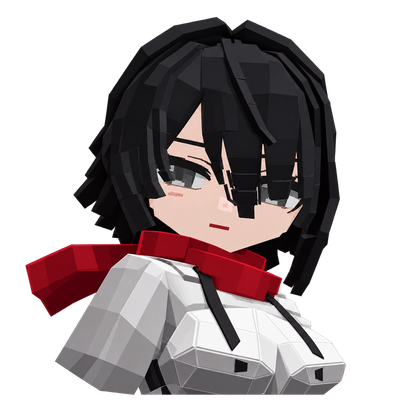
CurseForge · Minecraft mod
Bring Mikasa Ackerman from Attack on Titan into Minecraft as an AI-powered companion, brought to life through ChatGPT and dynamic, AI-driven interactions.
Quick answer
Mikasa Bridge mikasa-npc-1.35.1-dev.jar targets 1.21.1 with Fabric. The project page does not say whether this file belongs on the client, dedicated server, or both. All 2 required mods have matching files.
Where it goes
The project page does not say whether this file belongs on the client, dedicated server, or both.
The source does not explicitly classify this release as client-only or server-only.
mikasa-npc-1.35.1-dev.jar. Change the file and its required mods may change too.
Install GeckoLib, Fabric API first. We found matching files for this game-version and loader setup.
We only count dependency files that match this setup. A file for another loader does not fill the gap.
Before you install it
Built for Mikasa Bridge mikasa-npc-1.35.1-dev.jar. Pick another file and the loader, install side or required mods may change.
Use mikasa-npc-1.35.1-dev.jar. It targets 1.21.1 with Fabric; another release may have different loader, side or dependency requirements.
Install GeckoLib, Fabric API first. We found matching files for this game-version and loader setup.
The project page does not say whether this file belongs on the client, dedicated server, or both.
Use the “Get this file” button beside mikasa-npc-1.35.1-dev.jar. It opens that exact file at the source.
About this project
Bringing Mikasa to life in Minecraft with AI — powered by ChatGPT or Groq.
Mikasa Bridge is my fan-made Minecraft project inspired by Attack on Titan, bringing Mikasa Ackerman into your world as an interactive AI-powered companion.
My goal is to make Mikasa more than just a traditional NPC. I want her to be able to hold conversations, remember previous interactions, understand her surroundings, and interact with the Minecraft world.
The project is still under development, and I'm continuing to improve her behavior, interactions, and abilities.
Mikasa Bridge now supports two AI providers: ChatGPT and Groq.
Players can choose which provider powers Mikasa's intelligence. Both use the same character systems, memory, and in-game capabilities.
Requires an eligible ChatGPT Plus or Pro subscription.
ChatGPT is the recommended option for the most reliable experience with Mikasa Bridge.
Advantages:
Recommended for more consistent AI interactions.
Better suited to the project's current complex conversations and structured actions.
Generally more generous usage availability than Groq's free tier, subject to the applicable plan limits.
Disadvantages:
Requires a paid ChatGPT subscription.
Response times may vary depending on the model and service.
No ChatGPT Plus or Pro subscription required.
Groq allows players to use Mikasa Bridge with their own Groq account and API key, using its available free tier.
Advantages:
Disadvantages:
Stricter usage and token limits.
Some requests may encounter token-limit or structured-response errors.
The integration is still being improved.
Recommendation: ChatGPT Plus or Pro is currently recommended for a more reliable experience, but Groq is a great alternative for players who want to try Mikasa Bridge without a paid ChatGPT subscription.
To talk to Mikasa, stand in front of her and press R.
AI-powered conversations with ChatGPT or Groq
Character personality and persistent memory
Environmental awareness
Context-aware autonomy and initiative
In-game interactions and behaviors
Procedural movements and gestures
Item interactions, including picking up and handing over objects
Custom animations and gameplay mechanics
Multilingual support
Optional voice interaction
Some features are experimental and may not always work as expected.
Java 21
Fabric API 0.116.17 or a newer compatible version
GeckoLib 4.9.3 or a newer compatible version
Windows (required for the current Mikasa Bridge companion application)
Mikasa Bridge Windows is a separate companion application (ESSENTIAL FOR BOTH AI PROVIDERS TO FUNCTION) that can now be installed directly through Minecraft with your permission. Manual installation is also available.
Mikasa Bridge connects Minecraft to ChatGPT or Groq through a separate Windows companion application, allowing the selected AI provider to act as Mikasa's mind.
The AI handles conversations, reasoning, and decision-making, while Minecraft provides information about the environment and executes validated actions.
The goal is to combine these systems to create a character capable of reasoning, adapting, remembering, and interacting dynamically with the Minecraft world.
The Windows companion manages the AI connection and must be running for AI-powered features to work.
Starting with the latest version, installing Mikasa Bridge is easier.
Minecraft can now help you download, install, and manage the separate Mikasa Bridge Windows application.
When the companion is missing, the mod provides an in-game setup screen.
With your permission, Minecraft can:
Download the official companion application from GitHub.
Verify the downloaded files before installation.
Install the application automatically.
Launch the companion when needed.
Check compatibility and offer companion updates.
Replace outdated managed versions without accumulating unnecessary installations.
Preserve existing accounts, memories, and settings during updates.
Downloads and installations require your consent.
When enabled, automatic update checks contact GitHub once per Minecraft launch. These checks can be disabled.
The companion application is downloaded separately and is not embedded inside the mod JAR.
If you prefer, you can still download and install the Windows companion manually.
Visit the official Mikasa Bridge GitHub Releases page to find the available versions.
Microphone (Whisper): Uses local speech recognition so you can speak to Mikasa. No API key is required. A one-time model download is needed.
Mikasa's Voice (Fish Audio): Requires a Fish Audio account and API key to enable voice synthesis.
Both features are optional. You can interact with Mikasa through text without enabling voice services.
Install the Mikasa Bridge mod JAR, Fabric API, and GeckoLib in your Minecraft mods folder.
Launch Minecraft.
Open the Mikasa Bridge setup screen.
Follow the in-game instructions to download and install the Windows companion application, or select an existing installation.
Choose your preferred AI provider: ChatGPT or Groq.
Sign in with ChatGPT or configure your Groq API key.
Start interacting with Mikasa.
The Windows companion is still required, but you no longer need to download and extract it manually when using the integrated installer.
For more details, follow the installation instructions in the README.txt file.
EXPECT BUGS — UNDER DEVELOPMENT
Mikasa Bridge is currently under active development.
I've implemented many of the systems I originally wanted, but there's still a lot I plan to improve.
You may encounter bugs, inconsistent AI behavior, unfinished interactions, provider usage limits, or features that need additional work.
The Groq integration is relatively new and may occasionally encounter token-limit or JSON response errors. These issues are being investigated and improved.
IMPORTANT: During certain conversations, Mikasa can reflect on her own capabilities, identify potential limitations, and suggest improvements based on the information available to her. These observations are not always accurate or verified.
If Mikasa suggests a useful improvement, feel free to share it in the comments on this project page. Your feedback can help guide future development.
I'll continue working on the project and improving it over time.
The original code and assets I've developed remain proprietary unless stated otherwise. Third-party components retain their respective licenses and applicable terms.
Modpack Inclusion: Mikasa Bridge may be included in CurseForge modpacks through the official CurseForge manifest system, provided that the original mod files remain unmodified.
This permission does not authorize modification or separate redistribution of the mod's files.
The separate Mikasa Bridge Windows companion application is not covered by this modpack permission. It can be obtained through the in-game installation system or downloaded manually from the official GitHub repository.
The Windows companion includes Sign in with ChatGPT technology. Clarification regarding certain redistribution conditions is still pending with OpenAI.
Mikasa Bridge is an unofficial fan-made project inspired by Attack on Titan.
This project is not affiliated with, sponsored by, or endorsed by the rights holders of Attack on Titan, Mojang, Microsoft, OpenAI, Groq, or Fish Audio.
All third-party trademarks and intellectual property remain the property of their respective owners.
Project description from CurseForge.
Pick your setup
Choose the version and loader you play, then open the matching release.
Check the dependencies, then try the file in a copied instance before changing a world you care about.
Recent files
5 Nov 2026
4 Nov 2026
2 Nov 2026
Looking for an older file? The official CurseForge project page is in Resources.
 mod
Hire, pay, command, and keep alive a handful of mercenaries who remember your promises, your victories, and the graves you left behind.
 mod
Level up skills to improve yourself and learn how to shape the world.
 mod
An addon for Iron's Spellbooks, with integration with Cataclysm, Legendary Monsters(Optional), Born In Chaos(Optional). Inspired by T.O Magic 'n Extras.