Project 1772655 Needed by LinguaCraft Voices linguacraft-voices-1.1.0.jar
requiredStill checking

CurseForge · Minecraft mod
An optional recommended addon mod for LinguaCraft! (The main mod may not be available as Curseforge has to manually review and approve it for everyone to download)
Quick answer
LinguaCraft Voices linguacraft-voices-1.1.0.jar targets 1.21, 1.20, 1.21.1 with Fabric. The project page does not say whether this file belongs on the client, dedicated server, or both. 1 required mod needs checking.
Where it goes
The project page does not say whether this file belongs on the client, dedicated server, or both.
The source does not explicitly classify this release as client-only or server-only.
linguacraft-voices-1.1.0.jar. Change the file and its required mods may change too.
Install project 1772655 first. 1 required mod still needs checking for this exact setup.
We only count dependency files that match this setup. A file for another loader does not fill the gap.
Before you install it
Built for LinguaCraft Voices linguacraft-voices-1.1.0.jar. Pick another file and the loader, install side or required mods may change.
Use linguacraft-voices-1.1.0.jar. It targets 1.21, 1.20, 1.21.1 with Fabric; another release may have different loader, side or dependency requirements.
Install project 1772655 first. 1 required mod still needs checking for this exact setup.
The project page does not say whether this file belongs on the client, dedicated server, or both.
Use the “Get this file” button beside linguacraft-voices-1.1.0.jar. It opens that exact file at the source.
About this project





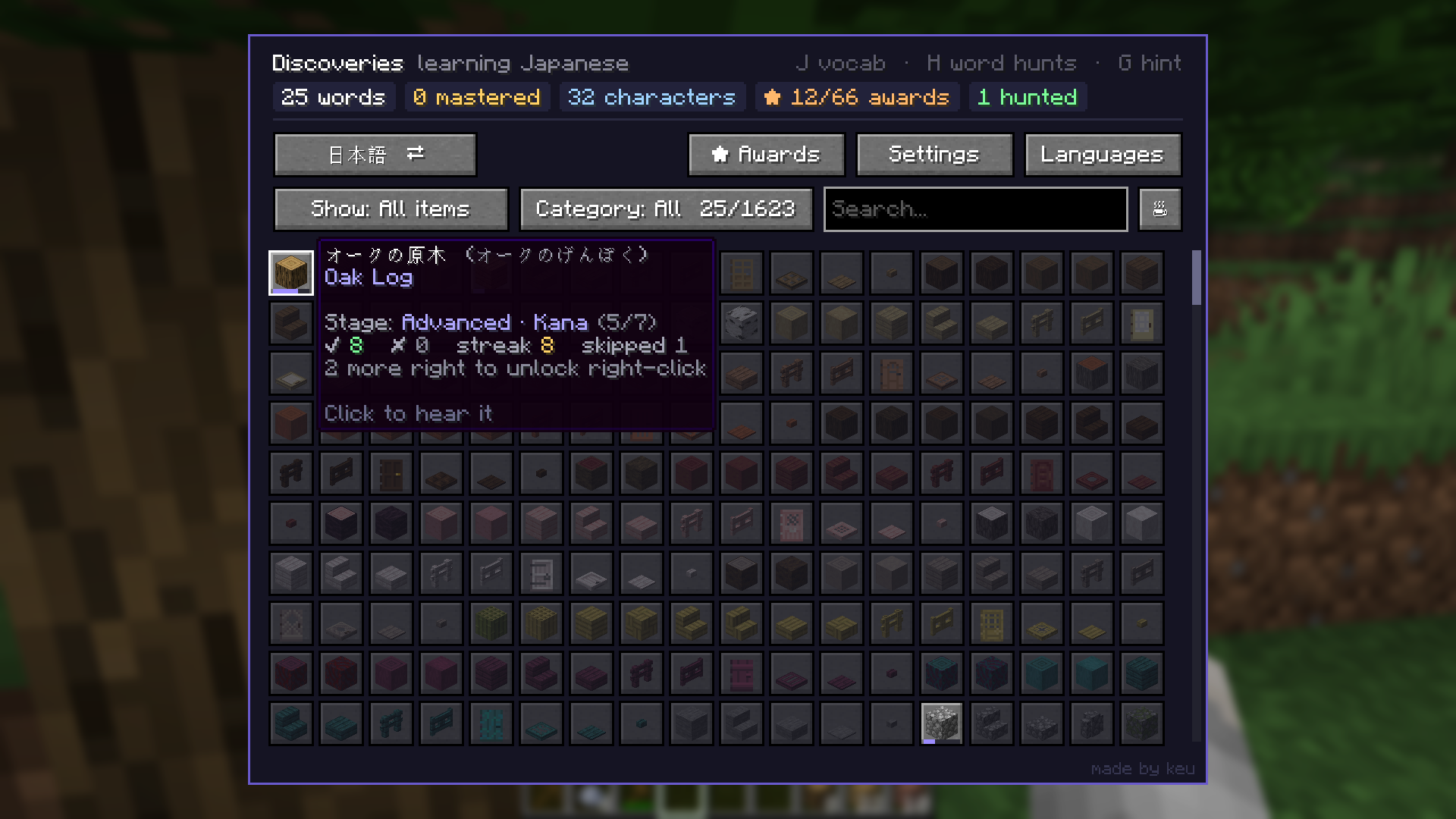
LinguaCraft Voices is the optional, recommended add-on for LinguaCraft. It gives every word in the mod a real spoken voice, so you learn how it sounds as well as how it's written.
This is an add-on. It does nothing on its own: you need LinguaCraft installed too.
Every word, spoken Every block, item, mob and potion effect is spoken in every language LinguaCraft teaches, including Catalan, Georgian, Kazakh, Korean, Portuguese (Portugal) and Chinese (Traditional), new in 1.1.
Hear it when you need it Words play when a prompt asks for them. Press Hear it (or R on the side card) to hear the word again during any prompt, or click any word in your Discoveries (J). Set how loud they are with Voice volume in Settings.
Word hunts come alive A word hunt plays the word you're looking for, louder and faster the closer you get. You can change the volume for each distance in Settings.
Counting, too Add LinguaCraft Counting and amounts are spoken as well: 三块圆石, two stacks of apples, два железных меча.
No internet needed All the audio is in the jar. Nothing is streamed or generated while you play.
With the CurseForge app: install LinguaCraft in a Fabric profile (1.20.1, 1.21.1 or 26.3), then add LinguaCraft Voices to the same profile.
By hand
linguacraft-voices-x.x.x.jar from the Files tab..minecraft/mods folder, next to linguacraft-x.x.x+<your version>.jar.| Minecraft | 1.20.1, 1.21 / 1.21.1 and 26.3. One jar works on all of them. |
| LinguaCraft | 1.2.0 or newer for every language (older versions use the languages they have). |
| Servers | Client only. Nothing to install on a server. |
Do I need it? No. LinguaCraft works fine without it: you'll still see every word, you just won't hear it. But hearing the words is a big part of learning them, which is why it's recommended.
A word sounds wrong. What do I do? Open an issue with the language and the word. Fixes go into the next release.
The audio in this add-on is licensed under CC BY 4.0. You may change it, remix it and share it, including in your own projects, as long as you credit LinguaCraft Voices by keu and keep the voice credits from NOTICE.txt.
LinguaCraft and its voices are free and always will be. If they've helped you learn a few words and you'd like to say thanks, you can buy me a coffee on Ko-fi. It's never expected, but always appreciated.
Made by keu
NOTICE.txt lists the voice used for each language and its licenceLinguaCraft Voices by keu. Audio licensed under CC BY 4.0. NOT AN OFFICIAL MINECRAFT PRODUCT. NOT APPROVED BY OR ASSOCIATED WITH MOJANG OR MICROSOFT.
Project description from CurseForge.
Pick your setup
Choose the version and loader you play, then open the matching release.
Check the dependencies, then try the file in a copied instance before changing a world you care about.
Recent files
5 Nov 2026
30 Oct 2026
Looking for an older file? The official CurseForge project page is in Resources.
 mod
A server only multiplayer support mod for LinguaCraft 1.2+
 mod
This is a gun addition mod inspired by the RSh-12 from Escape from Tarkov
 mod
Silence those noisy neighbors in Minecraft. Control each mob’s volume and how often it makes sounds. Easily create sound zones to quiet your farms while staying immersed in the rest of your Minecraft world.
