Minecraft version
Back to mods 
CurseForge · Minecraft mod
Epopta
Kill, bleed and gain power. Black Flower seals, spells, boss swords and a shield.
Choose a version Pick your version below, then grab the matching file.
Quick answer
Which Epopta release matches 26.2 NeoForge?
Best match for your filters epopta-26.2.jar
Game version 26.2
Loader NeoForge
epopta-26.2.jar targets 26.2 with NeoForge. The project page does not say whether this file belongs on the client, dedicated server, or both. No extra mods listed for this file.
Where it goes
Is Epopta required on the client, server, or both?
The project page does not say whether this file belongs on the client, dedicated server, or both.
Client Source doesn’t say
Dedicated server Source doesn’t say
Loader for this release NeoForge
Required install it here Optional supported, not mandatory Not supported do not install here Source doesn’t say do not assume
The source does not explicitly classify this release as client-only or server-only.
What else does epopta-26.2.jar need?
epopta-26.2.jar on 26.2 NeoForge. Every mod below is checked against that same setup.
This file does not list any required mods. Do not add a library just because a different file uses it.
This file does not list any required or optional mods.
Before you install it
Add Epopta without breaking your instance.
Built for epopta-26.2.jar on 26.2 NeoForge. Pick another file and the loader, install side or required mods may change.
- 01
Stick to this file
Use epopta-26.2.jar. It targets 26.2 with NeoForge; another release may have different loader, side or dependency requirements.
- 02
Bring the mods it needs
This file does not list any required mods. Do not add a library just because a different file uses it.
- 03
Put it on the correct side
The project page does not say whether this file belongs on the client, dedicated server, or both.
- 04
Pick the file you checked
Use the “Get this file” button beside epopta-26.2.jar. It opens that exact file at the source.
About this project
What does Epopta add?
Epopta
A mod of seals, charms and spells for Minecraft. Everything is paid for with Blood, the player's magical energy, and everything is born from a black flower.
Getting started
- Find the Black Flower on the surface of the overworld (on grass and dirt) and turn it into Seal Goo at the crafting table.
- Place the Seal Goo on the ground, on a wall or on the ceiling. It becomes the Void Seal, a black circle with roots. Use the two items of the recipe on the circle, in any order, and the power is yours. Important: you need to right-click the empty circle to insert the recipe items.
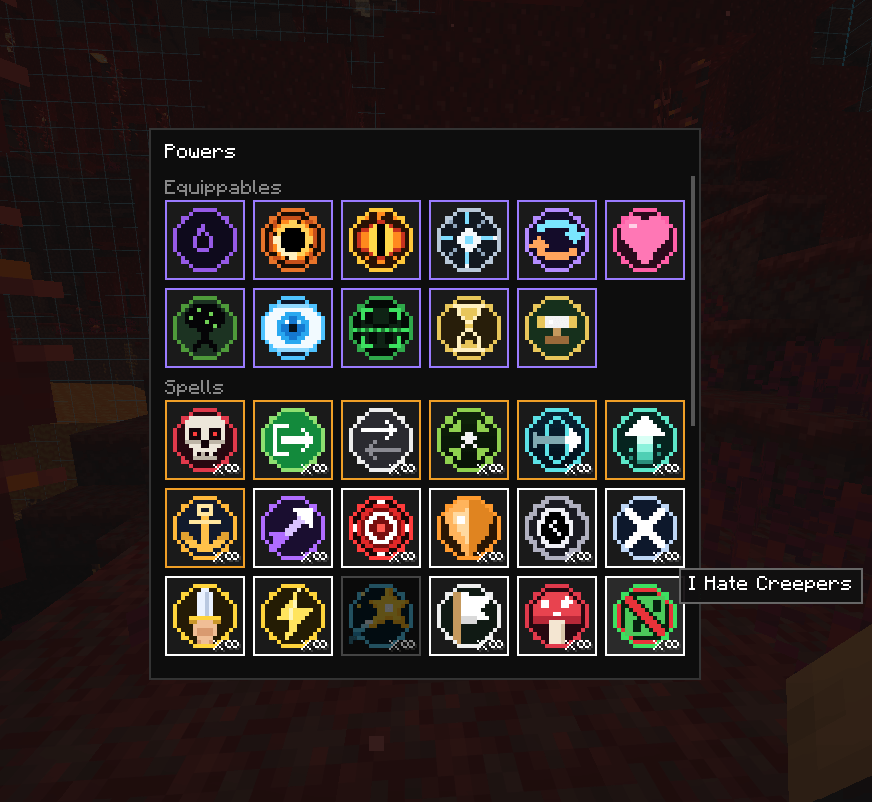
- Use the power: hold R to open the powers screen. Right-click a power's icon to see the two craft items and the cost.
Spells and powers
- Charms: Dodge, Pacifist, Lightning Speed, Shadow Form, Darkness Worm, Stone Skin, Aegis, Super Star (flight), Last Chance, Astral Projection and Double.
- Single-use seals: Pain Swap, Shrink, Last Arrow.
- Permanent seals on the ground: Drain Life, Containment, Magnet, Lure, Sanctuary, Bubble, Sun, Time Stop and the Contract between two players.
- Energy Glove: casts the spells Black Hole, Black Flames, Push, Sun and Door.
Swords and shield
| Item | What it does | Where to get it |
|---|---|---|
| Black Hole Sword | Swallows blocks and stores the charge as damage. The next hit comes out with the charge's damage. | Ender Dragon |
| Eye Sword | Hold right-click to charge and release to fire a laser that pierces terrain and passes through living beings. | Warden |
| Sword of the Black Flames | Whoever takes the hit catches a fire that water can't put out. | Wither (25%) |
| Repulsion Shield | Hold right-click: blocks hits coming from the front and releases a wave that throws enemies away. | Evoker (20%) |
Compass Seal
Points to nearby structures.
Hold R, go to the seals tab and right-click the seal's icon to see the table.
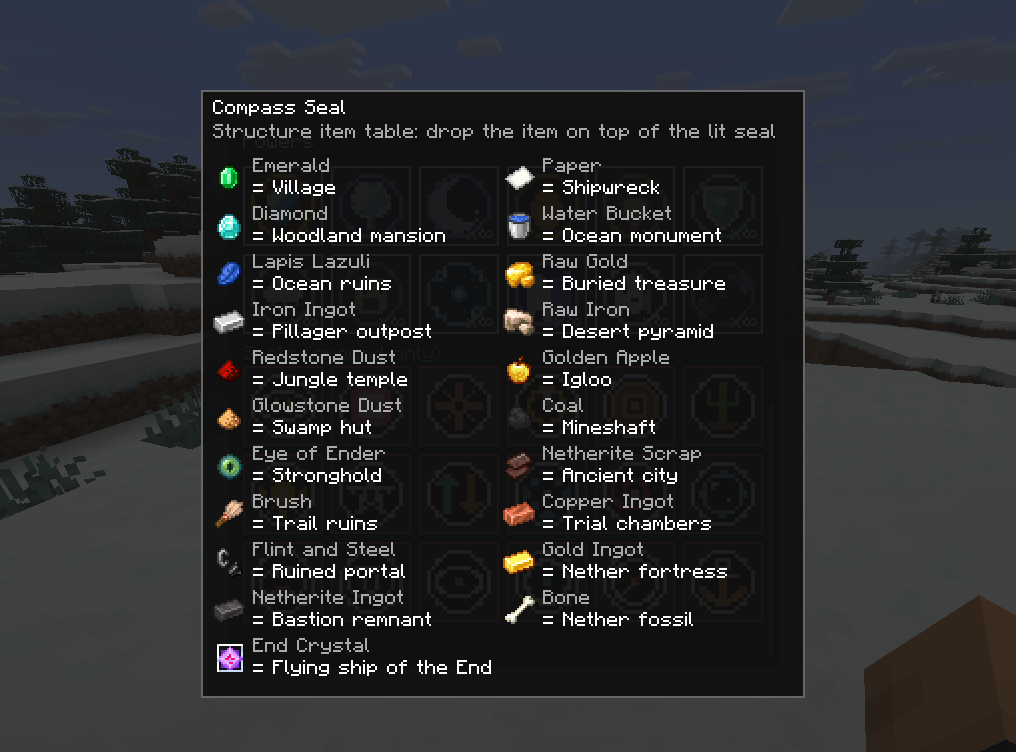
Turn the seal on with right-click and drop the item of the structure you want to find on top of it (150 Blood). A compass appears over the seal and points to it.
Project description from CurseForge.
Pick your setup
Epopta by Minecraft version and loader
Choose the version and loader you play, then open the matching release.
Check the dependencies, then try the file in a copied instance before changing a world you care about.
Recent files
Epopta versions and loaders
epopta-26.2.jar
epopta-26.2-1.0.0.jar
30 Oct 2026
Client Source doesn’t say Server Source doesn’t say Dependencies No extras listed Listed on Release listing
Check the 26.2 · NeoForge setup NeoForge26.2 release
Looking for an older file? The official CurseForge project page is in Resources.
 mod
Modrinth · Minecraft
Waystones Item Cost Extended
Extend Waystones with reversible crafting denomination payments, automatic change, combined multi-item costs, nested containers, and Lightman's Currency wallets.
 mod
CurseForge · Minecraft
The Umbra (UmbraZ)
An optional, brutally hard dimension: the Umbra. Dread, elite monsters, a Warden-forged key, underground villages with levelling traders, new gear tiers and a boss. Requires ArcanaZ.
 mod
CurseForge · Minecraft
Ages Progression
Ages adds configurable progression with milestones to advance and gain access to selected equipment, items, and workstations