Minecraft version
Back to mods 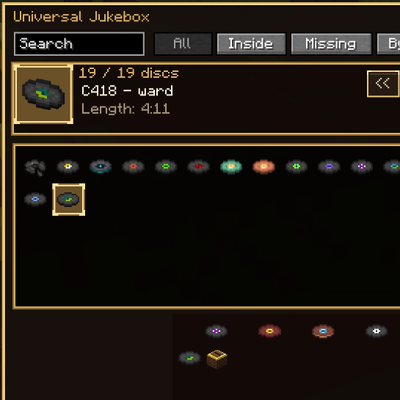
CurseForge · Minecraft mod
Universal Jukebox
A block that stores every music disc (modded, too), catalogs them in a searchable GUI, and plays them.
Choose a version Pick your version below, then grab the matching file.
Quick answer
Which Universal Jukebox release should I use?
Latest stable file universal_jukebox-1.0.0.jar
Game version 1.21.1
Loader NeoForge
Universal Jukebox universal_jukebox-1.0.0.jar targets 1.21.1 with NeoForge. The project page does not say whether this file belongs on the client, dedicated server, or both. No extra mods listed for this file.
Where it goes
Is Universal Jukebox required on the client, server, or both?
The project page does not say whether this file belongs on the client, dedicated server, or both.
Client Source doesn’t say
Dedicated server Source doesn’t say
Loader for this release NeoForge
Required install it here Optional supported, not mandatory Not supported do not install here Source doesn’t say do not assume
The source does not explicitly classify this release as client-only or server-only.
What else does Universal Jukebox universal_jukebox-1.0.0.jar need?
universal_jukebox-1.0.0.jar. Change the file and its required mods may change too.
This file does not list any required mods. Do not add a library just because a different file uses it.
This file does not list any required or optional mods.
Before you install it
Add Universal Jukebox without breaking your instance.
Built for Universal Jukebox universal_jukebox-1.0.0.jar. Pick another file and the loader, install side or required mods may change.
- 01
Stick to this file
Use universal_jukebox-1.0.0.jar. It targets 1.21.1 with NeoForge; another release may have different loader, side or dependency requirements.
- 02
Bring the mods it needs
This file does not list any required mods. Do not add a library just because a different file uses it.
- 03
Put it on the correct side
The project page does not say whether this file belongs on the client, dedicated server, or both.
- 04
Pick the file you checked
Use the “Get this file” button beside universal_jukebox-1.0.0.jar. It opens that exact file at the source.
About this project
What does Universal Jukebox add?
Universal Jukebox adds a new block that collects, catalogs, and plays music discs — without changing the vanilla jukebox.
Store one of every disc you’ve found, browse them in a searchable catalog, and play any stored track from a single place.
Features
- Disc library — Stores one copy of each music disc you deposit
- Auto-discovery — Finds vanilla and modded discs via music disc tags / jukebox playable items
- Catalog GUI — Grid or list view, with filters for All / Inside / Missing / By Mod
- Search — Filter discs by name without closing the GUI
- Playback controls — Previous, play/pause, stop, next, shuffle, and loop (off / all / one)
- Volume slider — Adjust volume from the side of the GUI
- In-world display — Selected disc sits upright in the jukebox while playing
- Vanilla untouched — The normal jukebox still works exactly as before
Crafting
Note Block
Jukebox
Chest
How to use
- Craft and place a Universal Jukebox
- Insert discs (or use Deposit discs to pull matching discs from your inventory)
- Open the catalog, pick a stored disc, then press Play
- Shift-click a stored disc to remove it
Selecting a disc does not stop current playback — press Play when you want to switch tracks.
Compatibility
- Minecraft: 1.21.1
- Loader: NeoForge
- Works in any NeoForge 1.21.1 modpack
- Picks up discs from other mods automatically when they are tagged correctly
Project description from CurseForge.
Pick your setup
Universal Jukebox by Minecraft version and loader
Choose the version and loader you play, then open the matching release.
Check the dependencies, then try the file in a copied instance before changing a world you care about.
Recent files
Universal Jukebox versions and loaders
universal_jukebox-1.0.0.jar
30 Oct 2026
Client Source doesn’t say Server Source doesn’t say Dependencies No extras listed Listed on Release listing
Check the 1.21.1 · NeoForge setup 1.21.1NeoForge release
Looking for an older file? The official CurseForge project page is in Resources.
 mod
CurseForge + Modrinth · Minecraft
ThirstWasFixed
Fixes and integrations for Thirst was Reclaimed
 mod
CurseForge + Modrinth · Minecraft
Integrated API
The library mod for the Integrated Structures series
 mod
CurseForge + Modrinth · Minecraft
ArborFirmaCraft
An addon for TerraFirmaCraft (TFC) adding new trees, new wood types, and tree-tapping recipes.