GeckoLib Needed by pawrought-1.0.0-forge-26.2.jar
requiredMatching file found Matched file: Forge 5.5.8
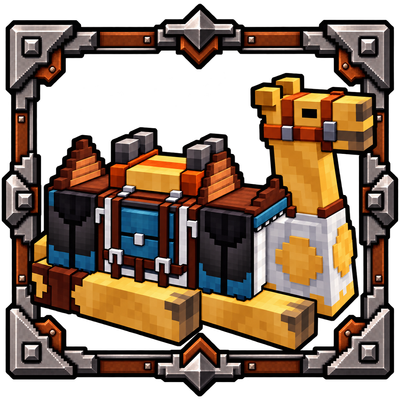
CurseForge · Minecraft mod
Animal armor in a variety of materials, from leather to netherite, for your animal companions.
Quick answer
pawrought-1.0.0-forge-26.2.jar targets 26.2 with Forge. The project page does not say whether this file belongs on the client, dedicated server, or both. All 1 required mods have matching files.
Where it goes
The project page does not say whether this file belongs on the client, dedicated server, or both.
The source does not explicitly classify this release as client-only or server-only.
pawrought-1.0.0-forge-26.2.jar on 26.2 Forge. Every mod below is checked against that same setup.
Install GeckoLib first. We found matching files for this game-version and loader setup.
We only count dependency files that match this setup. A file for another loader does not fill the gap.
Before you install it
Built for pawrought-1.0.0-forge-26.2.jar on 26.2 Forge. Pick another file and the loader, install side or required mods may change.
Use pawrought-1.0.0-forge-26.2.jar. It targets 26.2 with Forge; another release may have different loader, side or dependency requirements.
Install GeckoLib first. We found matching files for this game-version and loader setup.
The project page does not say whether this file belongs on the client, dedicated server, or both.
Use the “Get this file” button beside pawrought-1.0.0-forge-26.2.jar. It opens that exact file at the source.
About this project
Pawrought originally started with the armor models I created for Animal Armor Displays.
But at some point I thought: A diamond armor set with storage bags? That actually looks pretty cool.
Unfortunately, my brain refused to leave it at that and apparently decided I needed versions for every material and every animal.
So here we are.
42 animal armor sets, ranging from leather to netherite, with built-in animal inventories and different storage capacities.
Pawrought currently adds armor for:
Chickens (don't ask me why you would need an armored chicken), Cats, Wolves, Pigs, Sheep, Cows and Camels, including matching saddles for Pigs and Camels.
What started as a few models for another mod somehow turned into a complete animal armor and equipment system.
Craftwork Station:
The Craftwork Station itself can be crafted in a regular Crafting Table.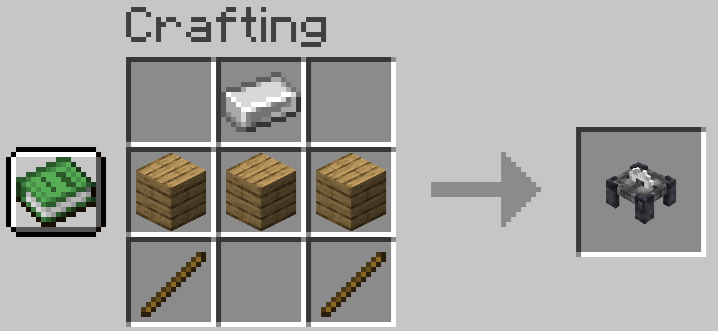
All Pawrought armor, Armor Saddles and other equipment are then crafted using the Crafting Workstation. Its integrated recipe book shows all available Pawrought recipes.
Equipping Armor: Right-click an animal with the corresponding armor to equip it. The same applies to Animal Armor Displays: right-click the matching display with the armor to equip it.
Armor Saddles: Armor Saddles for Pigs and Camels can only be equipped if the animal is already wearing a regular saddle. Equip the normal saddle first, then right-click the animal with the corresponding Armor Saddle.
Opening the Animal Inventory: Sneak + right-click an armored animal to open its inventory. The available number of storage slots depends on the animal.
Storing Items: Items placed inside the animal inventory are stored directly in the armor. They remain inside the armor when it is removed and can only be accessed again by equipping the armor and opening the animal inventory.
Carrying Filled Armor: You can carry armor containing stored items, but there is a limit of 25 occupied storage slots across all armor pieces you are carrying combined. This means 25 occupied slots, not 25 filled armor pieces. A stack of 64 items counts as one occupied slot. (Nice try, you little tricksters.)
Project description from CurseForge.
Pick your setup
Choose the version and loader you play, then open the matching release.
Check the dependencies, then try the file in a copied instance before changing a world you care about.
Recent files
30 Oct 2026
Looking for an older file? The official CurseForge project page is in Resources.
 mod
Dogfight in 30+ flyable jets, WWII warbirds and helicopters, then take warships and submarines to sea. F-22, F-35, Spitfire, Apache, a sailing Nimitz carrier, air refuelling and a campaign. (Formerly known as Fighter Jets Overhaul)
 mod
Blink and SCP-173 moves. Survive night breaches in abandoned Foundation sites: keycard doors, MTF squads, Chaos raiders, sanity and hallucinations, and a growing roster of SCPs hunting you.
 mod
A difficult, survival-based mod that adds body temperature and thirst!