Minecraft version
Back to mods 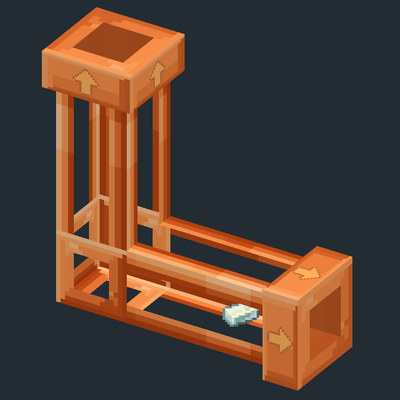
CurseForge · Minecraft mod
Logistical Ducts
Simple item pipes, fluid pipes and FE energy cables inspired by Thermal Dynamics. Six tiers, built-in filters and visible transport.
Choose a version Pick your version below, then grab the matching file.
Quick answer
Which Logistical Ducts release matches 26.3?
Best match for your filters Logistical Ducts Beta 6 - Fabric Preview - Minecraft 26.3.jar
Game version 26.3
Loader Fabric
Logistical Ducts Beta 6 - Fabric Preview - Minecraft 26.3.jar targets 26.3 with Fabric. The project page does not say whether this file belongs on the client, dedicated server, or both. No extra mods listed for this file.
Where it goes
Is Logistical Ducts required on the client, server, or both?
The project page does not say whether this file belongs on the client, dedicated server, or both.
Client Source doesn’t say
Dedicated server Source doesn’t say
Loader for this release Fabric
Required install it here Optional supported, not mandatory Not supported do not install here Source doesn’t say do not assume
The source does not explicitly classify this release as client-only or server-only.
What else does Logistical Ducts Beta 6 - Fabric Preview - Minecraft 26.3.jar need?
Logistical Ducts Beta 6 - Fabric Preview - Minecraft 26.3.jar on 26.3. Every mod below is checked against that same setup.
This file does not list any required mods. Do not add a library just because a different file uses it.
This file does not list any required or optional mods.
Before you install it
Add Logistical Ducts without breaking your instance.
Built for Logistical Ducts Beta 6 - Fabric Preview - Minecraft 26.3.jar on 26.3. Pick another file and the loader, install side or required mods may change.
- 01
Stick to this file
Use Logistical Ducts Beta 6 - Fabric Preview - Minecraft 26.3.jar. It targets 26.3 with Fabric; another release may have different loader, side or dependency requirements.
- 02
Bring the mods it needs
This file does not list any required mods. Do not add a library just because a different file uses it.
- 03
Put it on the correct side
The project page does not say whether this file belongs on the client, dedicated server, or both.
- 04
Pick the file you checked
Use the “Get this file” button beside Logistical Ducts Beta 6 - Fabric Preview - Minecraft 26.3.jar. It opens that exact file at the source.
About this project
What does Logistical Ducts add?
Simple connections. Flexible transport.
Logistical Ducts brings straightforward item pipes, fluid pipes, and energy cables to Minecraft. Inspired by Thermal Dynamics, it focuses on making logistics easy to understand, configure, and expand.
Connect inventories, move resources between machines, and power your builds—with filters and connection controls built directly into the ducts. No separate extractors or filter attachments required.
Three types of ducts
Item ducts
Move items through visible transport networks. Configure filters, choose how resources reach their destinations, and watch your automation work.
Fluid ducts
Transport fluids with a visual flow that reflects how busy the duct is. Each connected network handles one fluid at a time and distributes it between compatible destinations.
Energy ducts
Deliver energy directly to your machines. Cables act as conductors, without storing energy or losing it over distance.
Six tiers of progression
Progress through Iron, Cupria, Auria, Skulia, Choria, and Astria, unlocking greater transfer capacity and more filter slots.
Ready to expand? Right-click a duct with an upgrade to advance it to the next tier without breaking it. Connection settings, filters, and resources already in transit are preserved.
Filtering without extra parts
Open a connection to configure its built-in filters.
Choose between allowlists and blocklists.
Decide whether item filters should ignore durability.
Drag ingredients from JEI into compatible filter slots.
Unlock additional filter slots as you upgrade.
Choose where your items go
Item ducts offer five distribution modes:
Equal Distribution — share items between available destinations.
Nearest — prioritize closer destinations.
Furthest — prioritize more distant destinations.
Random — vary the chosen destination.
Round Robin — take turns between destinations.
Fluid ducts keep things simpler with automatic equal distribution.
Configure your network directly
New inventory connections start disabled, giving you control before anything moves.
Shift + right-click a connection to cycle through Insert → Extract → Disabled.
Shift + right-click a duct arm with an empty hand to disconnect or reconnect adjacent ducts—without breaking them or carrying another tool.
You can also hide unused inventory connections for cleaner builds. Hold Shift to reveal nearby hidden connections when you need them.
Whether you are connecting your first pair of chests or organizing a larger factory, Logistical Ducts keeps the focus on accessible automation, clear controls, and room to grow.
AI assistance is used during development, including coding, visual exploration, documentation, and testing. The creator directs the project and makes the final decisions about its features and design.
Project description from CurseForge.
Pick your setup
Logistical Ducts by Minecraft version and loader
Choose the version and loader you play, then open the matching release.
Minecraft version
26.1.2
1 loader buildCheck the dependencies, then try the file in a copied instance before changing a world you care about.
Recent files
Logistical Ducts versions and loaders
Logistical Ducts Beta 6 - Fabric Preview - Minecraft 26.3.jar
Logistical-Ducts-Beta-6-Fabric-Preview-Minecraft-26.3.jar
21 Nov 2026
Client Source doesn’t say Server Source doesn’t say Dependencies No extras listed Listed on Release listing
Check the 26.3 · Fabric setup Fabric26.3 release
Logistical Ducts Beta 6 - NeoForge - Minecraft 26.3.jar
Logistical-Ducts-Beta-6-NeoForge-Minecraft-26.3.jar
21 Nov 2026
Client Source doesn’t say Server Source doesn’t say Dependencies No extras listed Listed on Release listing
Check the 26.3 · NeoForge setup NeoForge26.3 release
Logistical Ducts Beta 5 - Fabric Preview - Minecraft 26.3.jar
Logistical-Ducts-Beta-5-Fabric-Preview-Minecraft-26.3.jar
21 Nov 2026
Client Source doesn’t say Server Source doesn’t say Dependencies No extras listed Listed on Release listing
Check the 26.3 · Fabric setup Fabric26.3 release
Logistical Ducts Beta 5 - Minecraft 26.3.jar
Logistical-Ducts-Beta-5-Minecraft-26.3.jar
18 Nov 2026
Client Source doesn’t say Server Source doesn’t say Dependencies No extras listed Listed on Release listing
Check the 26.3 · NeoForge setup NeoForge26.3 release
Logistical Ducts Beta 4 - Minecraft 26.3.jar
Logistical-Ducts-Beta-4-Minecraft-26.3.jar
15 Nov 2026
Client Source doesn’t say Server Source doesn’t say Dependencies No extras listed Listed on Release listing
Check the 26.3 · NeoForge setup NeoForge26.3 release
Logistical Ducts Beta 3 - Minecraft 26.3.jar
Logistical-Ducts-Beta-3-Minecraft-26.3.jar
11 Nov 2026
Client Source doesn’t say Server Source doesn’t say Dependencies No extras listed Listed on Release listing
Check the 26.3 · NeoForge setup NeoForge26.3 release
Logistical Ducts Beta 2.jar
Logistical-Ducts-Beta-2.jar
2 Nov 2026
Client Source doesn’t say Server Source doesn’t say Dependencies No extras listed Listed on Release listing
Check the 26.3 · NeoForge setup NeoForge26.3 release
Logistical Ducts Beta 1.jar
Logistical-Ducts-Beta-1.jar
30 Oct 2026
Client Source doesn’t say Server Source doesn’t say Dependencies No extras listed Listed on Release listing
Check the 26.3 · NeoForge setup NeoForge26.3 release
Looking for an older file? The official CurseForge project page is in Resources.
 mod
CurseForge + Modrinth · Minecraft
Sophisticated Storage
Storage mod with multiple tiers and functional upgrades
 mod
CurseForge + Modrinth · Minecraft
Sophisticated Core
Library mod for Sophisticated mods
 mod
CurseForge + Modrinth · Minecraft
Reliquary Reincarnations
Many magical items to help you in your minecraft world