Minecraft version
Back to mods 
CurseForge · Minecraft mod
BlockKino
Youtube Cinema Stream Screen
Choose a version Pick your version below, then grab the matching file.
Quick answer
Which BlockKino release matches 26.3?
Best match for your filters kino-fabric-1.0.3+26.3.jar
Game version 26.3
Loader Fabric
BlockKino kino-fabric-1.0.3+26.3.jar targets 26.3 with Fabric. The project page does not say whether this file belongs on the client, dedicated server, or both. No extra mods listed for this file.
Where it goes
Is BlockKino required on the client, server, or both?
The project page does not say whether this file belongs on the client, dedicated server, or both.
Client Source doesn’t say
Dedicated server Source doesn’t say
Loader for this release Fabric
Required install it here Optional supported, not mandatory Not supported do not install here Source doesn’t say do not assume
The source does not explicitly classify this release as client-only or server-only.
What else does BlockKino kino-fabric-1.0.3+26.3.jar need?
kino-fabric-1.0.3+26.3.jar on 26.3. Every mod below is checked against that same setup.
This file does not list any required mods. Do not add a library just because a different file uses it.
This file does not list any required or optional mods.
Before you install it
Add BlockKino without breaking your instance.
Built for BlockKino kino-fabric-1.0.3+26.3.jar on 26.3. Pick another file and the loader, install side or required mods may change.
- 01
Stick to this file
Use kino-fabric-1.0.3+26.3.jar. It targets 26.3 with Fabric; another release may have different loader, side or dependency requirements.
- 02
Bring the mods it needs
This file does not list any required mods. Do not add a library just because a different file uses it.
- 03
Put it on the correct side
The project page does not say whether this file belongs on the client, dedicated server, or both.
- 04
Pick the file you checked
Use the “Get this file” button beside kino-fabric-1.0.3+26.3.jar. It opens that exact file at the source.
About this project
What does BlockKino add?
Blockkino – Your Own Cinema in Minecraft
Build a screen out of blocks, paste a YouTube link, and watch together with your friends! Blockkino synchronizes playback through the server, turning your Minecraft world into a Cinema
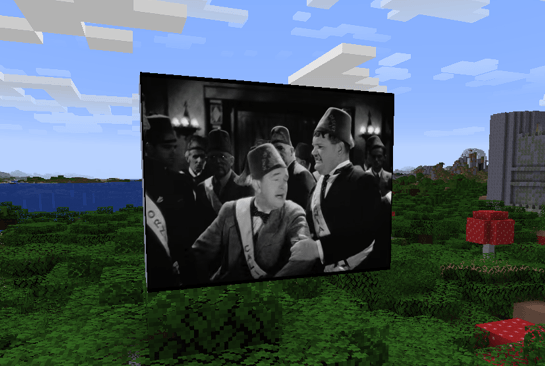
Features
Custom-sized screens: Choose the width and height of your rectangular screen. The size limit can be adjusted in the server configuration.
Watch together: Play, pause, and seek controls manage shared playback. Viewers who join later receive the current playback position.
Dedicated remote control: A craftable item with a custom 3D model opens the cinema controls.
YouTube support: Load videos using YouTube, Shorts, Live, or youtu.be links. Timestamps included in links are supported.
Automatic player switching: If YouTube blocks a video from being embedded, Blockkino automatically switches to the YouTube webpage view.
Built-in ad filter: Toggle it locally using the remote control.
Distance-based audio: Volume decreases as you move away from the screen.
Persistent screens: Your cinemas remain saved across world and server restarts.
Automatic language selection: The menu follows each player’s Minecraft language setting.
Supported languages: German, English, French, Spanish, Italian, Brazilian Portuguese, Polish, and Dutch.
How It Works
Build a complete, vertical, rectangular wall using Cinema Screen Blocks.
Use the Cinema Remote to click two diagonally opposite corners on the same front face.
Paste a YouTube link into the menu and start the video.
Sit back and watch with other players!
You can reopen an existing screen’s controls by interacting with its front face using the remote or an empty hand.
Crafting
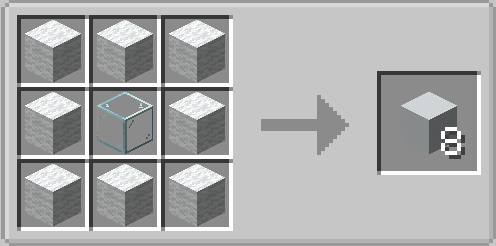
Screen Blocks: Eight white wool blocks surrounding one glass block produce eight Screen Blocks.
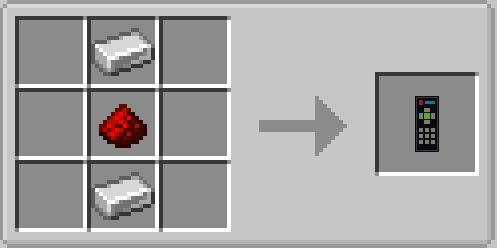
Remote Control: Place an iron ingot, redstone dust, and another iron ingot in a vertical column.
Project description from CurseForge.
Pick your setup
BlockKino by Minecraft version and loader
Choose the version and loader you play, then open the matching release.
Check the dependencies, then try the file in a copied instance before changing a world you care about.
Recent files
BlockKino versions and loaders
kino-fabric-1.0.3+26.3.jar
kino-fabric-1.0.3-26.3.jar
30 Oct 2026
Client Source doesn’t say Server Source doesn’t say Dependencies No extras listed Listed on Release listing
Check the 26.3 · Fabric setup Fabric26.3 release
Looking for an older file? The official CurseForge project page is in Resources.
 mod
CurseForge · Minecraft
Villager Guards Fix
Fixed the unable to sleep issue with the mod Villager Guards for Minecraft 26.3
 mod
CurseForge + Modrinth · Minecraft
Blocksmith - Voxel Weapons
Create your custom weapons voxel by voxel with dynamic stats!
 mod
CurseForge + Modrinth · Minecraft
FoxyFriends
Make foxes your friends: tame them, dress them in armor and let them guard you