Minecraft version
Back to mods 
CurseForge · Minecraft mod
Corner HUD
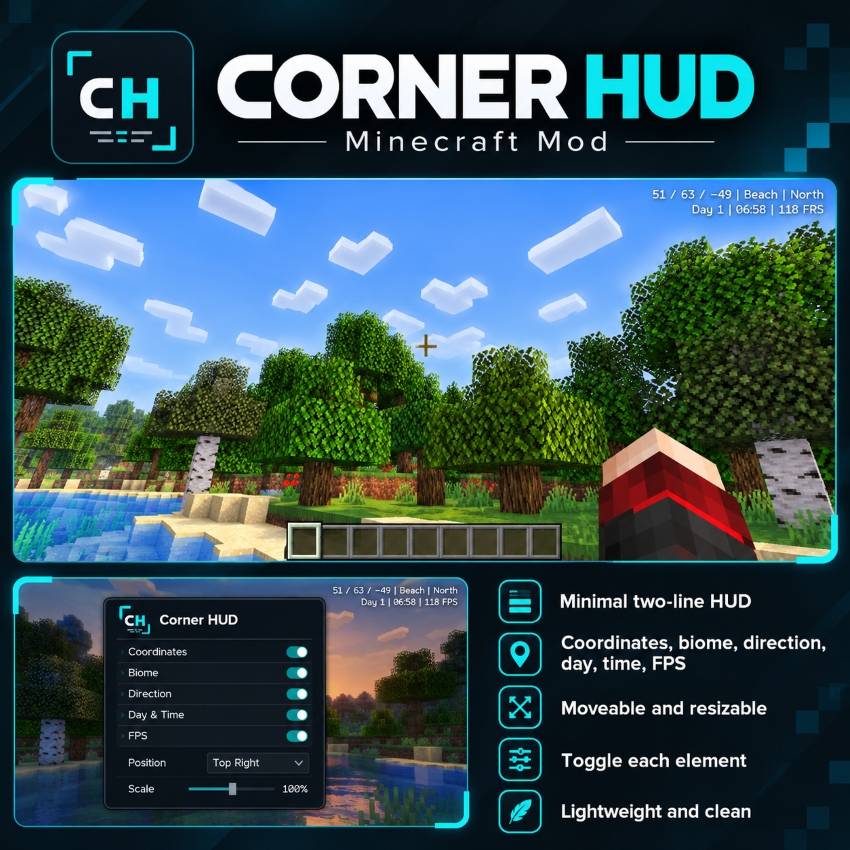
Corner HUD is a lightweight Minecraft mod that displays coordinates, biome, direction, day, time, and FPS in a clean two-line overlay. Choose which details to show, adjust the size and position, or hide the HUD anytime.
Choose a version Pick your version below, then grab the matching file.
Quick answer
Which Corner HUD release should I use?
Latest stable file CornerHUD-1.21.1-Fabric.jar
Game version 1.21.1
Loader Fabric
Corner HUD CornerHUD-1.21.1-Fabric.jar targets 1.21.1 with Fabric. The project page does not say whether this file belongs on the client, dedicated server, or both. No extra mods listed for this file.
Where it goes
Is Corner HUD required on the client, server, or both?
The project page does not say whether this file belongs on the client, dedicated server, or both.
Client Source doesn’t say
Dedicated server Source doesn’t say
Loader for this release Fabric
Required install it here Optional supported, not mandatory Not supported do not install here Source doesn’t say do not assume
The source does not explicitly classify this release as client-only or server-only.
What else does Corner HUD CornerHUD-1.21.1-Fabric.jar need?
CornerHUD-1.21.1-Fabric.jar. Change the file and its required mods may change too.
This file does not list any required mods. Do not add a library just because a different file uses it.
This file does not list any required or optional mods.
Before you install it
Add Corner HUD without breaking your instance.
Built for Corner HUD CornerHUD-1.21.1-Fabric.jar. Pick another file and the loader, install side or required mods may change.
- 01
Stick to this file
Use CornerHUD-1.21.1-Fabric.jar. It targets 1.21.1 with Fabric; another release may have different loader, side or dependency requirements.
- 02
Bring the mods it needs
This file does not list any required mods. Do not add a library just because a different file uses it.
- 03
Put it on the correct side
The project page does not say whether this file belongs on the client, dedicated server, or both.
- 04
Pick the file you checked
Use the “Get this file” button beside CornerHUD-1.21.1-Fabric.jar. It opens that exact file at the source.
About this project
What does Corner HUD add?
Corner HUD — Simple, Clean, Customizable
Corner HUD is a lightweight Minecraft mod that displays coordinates, biome, direction, day, in-game time, and FPS in a minimal two-line layout.
Customize which information appears, adjust the size and position, or hide the HUD whenever you want.
Controls:
- O: Open settings
- H: Show or hide the HUD
Keep your screen clean and your essential information visible.
Corner HUD — Sade, Kullanışlı, Özelleştirilebilir
Corner HUD, Minecraft'ta koordinat, biyom, yön, gün, oyun saati ve FPS bilgilerini iki satırlık, sade bir görünümle sunan hafif bir moddur.
Görüntülenecek bilgileri ayrı ayrı seçebilir, yazı boyutunu ve konumunu değiştirebilir veya HUD'u istediğiniz zaman gizleyebilirsiniz.
Kontroller:
- O: Ayarlar menüsü
- H: HUD'u göster veya gizle
Ekranınızı kalabalıklaştırmadan ihtiyacınız olan bilgilere kolayca ulaşın.
Project description from CurseForge.
Pick your setup
Corner HUD by Minecraft version and loader
Choose the version and loader you play, then open the matching release.
Check the dependencies, then try the file in a copied instance before changing a world you care about.
Recent files
Corner HUD versions and loaders
CornerHUD-1.21.1-Fabric.jar
31 Oct 2026
Client Source doesn’t say Server Source doesn’t say Dependencies No extras listed Listed on Release listing
Check the 1.21.1 · Fabric setup Fabric1.21.1 release
Looking for an older file? The official CurseForge project page is in Resources.
 mod
CurseForge · Minecraft
Create: Towed
Tether animals and mobs to Simulated (Create Aeronautics) contraptions using physics-simulated ropes
 mod
CurseForge · Minecraft
villager news ported
villager news FULLY ported to neo forge
 mod
CurseForge · Minecraft
CobbleSnap
Its Pokemon Snap! for Minecraft, Add it to your Cobblemon Modpack!