Curios API Needed by Apocalypse Inventory apocinv-1.0.2+1.20.1-forge.jar
requiredMatching file found Matched file: curios-forge-5.14.1+1.20.1.jar
CurseForge · Minecraft mod
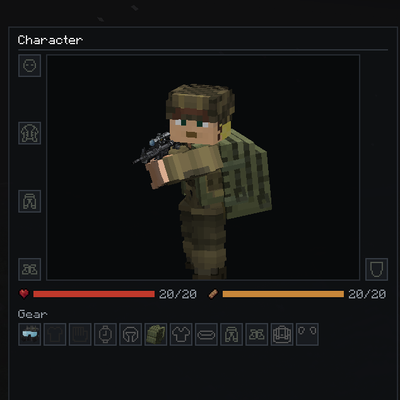
Replaces the vanilla inventory with a full-screen survival layout for gear, Curios, backpacks and containers.
Quick answer
Apocalypse Inventory apocinv-1.0.2+1.20.1-forge.jar targets 1.20.1 with Forge. The project page does not say whether this file belongs on the client, dedicated server, or both. All 1 required mods have matching files.
Where it goes
The project page does not say whether this file belongs on the client, dedicated server, or both.
The source does not explicitly classify this release as client-only or server-only.
apocinv-1.0.2+1.20.1-forge.jar. Change the file and its required mods may change too.
Install Curios API first. We found matching files for this game-version and loader setup.
We only count dependency files that match this setup. A file for another loader does not fill the gap.
Before you install it
Built for Apocalypse Inventory apocinv-1.0.2+1.20.1-forge.jar. Pick another file and the loader, install side or required mods may change.
Use apocinv-1.0.2+1.20.1-forge.jar. It targets 1.20.1 with Forge; another release may have different loader, side or dependency requirements.
Install Curios API first. We found matching files for this game-version and loader setup.
The project page does not say whether this file belongs on the client, dedicated server, or both.
Use the “Get this file” button beside apocinv-1.0.2+1.20.1-forge.jar. It opens that exact file at the source.
About this project
**A full-screen survival inventory built for zombie-apocalypse and survival modpacks.**
Apocalypse Inventory replaces the vanilla inventory with a three-column layout. Your character and gear are on the left, your inventory and worn storage in the middle, and whatever you opened (a chest, a furnace, a crafting table) on the right. Everything is on one screen, so you can loot, equip and craft without switching menus.
17/20). Install the mod on **both the client and the server**.
Settings are in serverconfig/apocinv-server.toml in your world folder (or defaultconfigs/ for modpacks). They are synced to clients automatically.
| Option | What it does |
|---|---|
hiddenCurioSlots |
Hides Curios slots whose ID contains any of these entries (default: ammo). With advanced tooltips on (F3+H), hovering an empty Curios slot shows its ID. |
autoDetectStorageMenus |
Opens all chest-like storage menus in the right panel (default: on). |
containerMenus |
Extra storage menu IDs to show as a slot grid. |
embeddedMenus |
Menu IDs whose own UI is drawn in the right panel (crafting table, furnace, ...). |
excludedContainerMenus |
Menu IDs that always keep their own screen. |
embeddedMenus.**Can I use this in my modpack?**
Yes, go ahead. A link back to this page is appreciated.
**A Curios slot I don't want is showing up.**
Add part of its ID to hiddenCurioSlots. Press F3+H and hover the empty slot to see the ID.
**A modded container opens in a weird way.**
Add its menu ID to excludedContainerMenus, and please report it in the issue tracker.
Project description from CurseForge.
Pick your setup
Choose the version and loader you play, then open the matching release.
Check the dependencies, then try the file in a copied instance before changing a world you care about.
Recent files
apocinv-1.0.2-1.20.1-forge.jar
17 Nov 2026
Looking for an older file? The official CurseForge project page is in Resources.
 mod
The all-in-one hub mod for the Re:Craft modded server. Recraft Core adds a single, fully configurable /menu that ties your whole server together, quick access to commands, links and rich in-game pages.
 mod
Wireless routers that move items, fluids, energy and chemicals between machines, with no pipes and no lag.
 mod
Diagnostic mod for MC 26.1.2. Exports registries to JSON, monitors FPS/MSPT, tracks live events, measures latency (eating/breaking), profiles mod impact with per-mod analysis. All I/O async, always-on tracing, zero game-thread blocking.