Fabric API Needed by Dynamic Item Glow 1.0.0
requiredMatching file found Matched file: [1.21.1] Fabric API 0.116.18+1.21.1
CurseForge · Minecraft mod
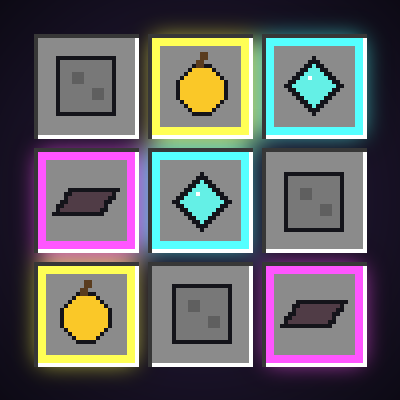
client-side: Valuable loot jumps out at you: colored rarity borders in every inventory and a soft glow under good items dropped on the ground.
Quick answer
Dynamic Item Glow 1.0.0 targets 1.21, 1.21.1 with Fabric. The project page does not say whether this file belongs on the client, dedicated server, or both. All 1 required mods have matching files.
Where it goes
The project page does not say whether this file belongs on the client, dedicated server, or both.
The source does not explicitly classify this release as client-only or server-only.
Dynamic Item Glow 1.0.0. Change the file and its required mods may change too.
Install Fabric API first. We found matching files for this game-version and loader setup.
We only count dependency files that match this setup. A file for another loader does not fill the gap.
Before you install it
Built for Dynamic Item Glow 1.0.0. Pick another file and the loader, install side or required mods may change.
Use Dynamic Item Glow 1.0.0. It targets 1.21, 1.21.1 with Fabric; another release may have different loader, side or dependency requirements.
Install Fabric API first. We found matching files for this game-version and loader setup.
The project page does not say whether this file belongs on the client, dedicated server, or both.
Use the “Get this file” button beside Dynamic Item Glow 1.0.0. It opens that exact file at the source.
About this project
You open a dungeon chest, kill a raid captain or find a death pile, and you're faced with 27 slots of stuff. Which one is the enchanted book? Is that a plain diamond sword or a god sword? Dynamic Item Glow colors every item by how valuable it is – like the loot colors in your favorite RPG – so you can see the good stuff in half a second.
| Tier | Color | Examples |
|---|---|---|
| Common | no border (optional gray) | stone, dirt, plain tools |
| Uncommon | **Yellow** | experience bottles, dragon's breath, renamed items |
| Rare | **Aqua** | enchanted items and books, diamond gear, golden apples, beacons |
| Epic | **Magenta** | netherite gear, enchanted golden apples, dragon eggs, highly enchanted gear |
The tier comes from Minecraft's own item rarity (which already goes up when an item is enchanted), plus a few extras: **netherite** items count as Epic, **diamond** items as Rare, and items with a **custom name** are at least Uncommon.
Everything can be changed in config/dynamic_item_glow.json (created the first time you start the game):
slotBorders, hotbarBorders, groundGlow – turn each part on or off glowBehindItems – the soft glow behind items in slots showCommonBorder – gray border on common items too borderThickness – 1 or 2 pixels animation, animationSpeed – the breathing effect groundGlowMinTier – uncommon, rare or epic: lowest tier that glows on the ground groundBeamHeight – height of the light beam (0 = no beam), groundGlowDistance – max distance in blocks colors – your own hex color for each tier, e.g. "rare": "#55FFFF"Restart the game after editing the file.
This is a **client-side only**, purely visual mod. Install it on your own game and it works in singleplayer and on any multiplayer server – the server does not need it. It only shows information about items you can already see.
dynamic-item-glow .jar file in your .minecraft/mods folder. You are free to include Dynamic Item Glow in any modpack, no need to ask.
*The project logo is an illustration created with AI assistance; it is not an in-game screenshot. The screenshots in the gallery are real, unedited in-game captures.*
Project description from CurseForge.
Pick your setup
Choose the version and loader you play, then open the matching release.
Check the dependencies, then try the file in a copied instance before changing a world you care about.
Recent files
dynamic-item-glow-1.0.0-mc1.21.1.jar
1 Nov 2026
Looking for an older file? The official CurseForge project page is in Resources.
 mod
Cybernetic body upgrades and android progression for Minecraft
 mod
Create custom humanoid and Pokémon NPCs with an in-game editor. Build trainers, shops, and branching dialogues with custom skins, poses, teams, rewards, cooldowns, and per-player battle limits.
 mod
Same items as Cobblemon Utility Items (IVs, EVs, level, shiny, Alpha, fossils and more) but with no crafting recipes, for packs that bring their own. NeoForge and Fabric.