Minecraft version
Back to mods 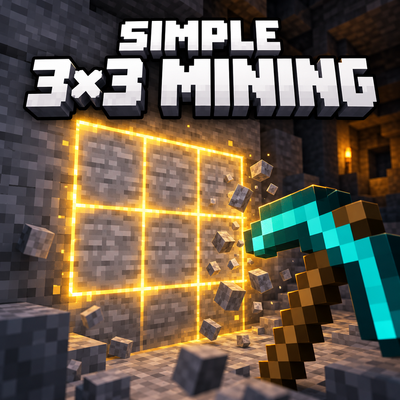
CurseForge · Minecraft mod
Simple 3x3 Mining
Hold Shift to mine a 3x3 area with a pickaxe. Quickly enable or disable it from the settings menu or with a hotkey.
Choose a version Pick your version below, then grab the matching file.
Quick answer
Which Simple 3x3 Mining release matches 26.2 Forge?
Best match for your filters Simple 3x3 Mining 1.0.0 · Forge · 26.2
Game version 26.2
Loader Forge
Simple 3x3 Mining 1.0.0 · Forge · 26.2 targets 26.2 with Forge. The project page does not say whether this file belongs on the client, dedicated server, or both. No extra mods listed for this file.
Where it goes
Is Simple 3x3 Mining required on the client, server, or both?
The project page does not say whether this file belongs on the client, dedicated server, or both.
Client Source doesn’t say
Dedicated server Source doesn’t say
Loader for this release Forge
Required install it here Optional supported, not mandatory Not supported do not install here Source doesn’t say do not assume
The source does not explicitly classify this release as client-only or server-only.
What else does Simple 3x3 Mining 1.0.0 · Forge · 26.2 need?
Simple 3x3 Mining 1.0.0 · Forge · 26.2 on 26.2 Forge. Every mod below is checked against that same setup.
This file does not list any required mods. Do not add a library just because a different file uses it.
This file does not list any required or optional mods.
Before you install it
Add Simple 3x3 Mining without breaking your instance.
Built for Simple 3x3 Mining 1.0.0 · Forge · 26.2 on 26.2 Forge. Pick another file and the loader, install side or required mods may change.
- 01
Stick to this file
Use Simple 3x3 Mining 1.0.0 · Forge · 26.2. It targets 26.2 with Forge; another release may have different loader, side or dependency requirements.
- 02
Bring the mods it needs
This file does not list any required mods. Do not add a library just because a different file uses it.
- 03
Put it on the correct side
The project page does not say whether this file belongs on the client, dedicated server, or both.
- 04
Pick the file you checked
Use the “Get this file” button beside Simple 3x3 Mining 1.0.0 · Forge · 26.2. It opens that exact file at the source.
About this project
What does Simple 3x3 Mining add?
Simple 3x3 Mining
Mine tunnels, floors and ceilings with a 3×3 pickaxe area while keeping ordinary mining available.
Hold Shift + mine with a suitable pickaxe → up to 9 blocks. Without Shift, mine one block as usual.
Quick settings
- Press N to open the settings menu.
- Use the immediate ON/OFF switch or press G for a quick toggle.
- Both keys can be rebound in Minecraft Controls.
- Your preference is saved between sessions and applies to your own player.
- Optional Mod Menu integration on Fabric. The N and G shortcuts are available on every loader.
Survival-friendly behavior
- The area follows the hit face: walls, floors and ceilings.
- Native drops, Silk Touch, Fortune and Unbreaking are preserved.
- Every extra block uses normal pickaxe durability. Mining stops when the tool breaks.
- Appropriate tool tiers, reach, visibility and protection cancellations from Minecraft and the mod loader are respected.
- Ore, block entities, containers, redstone/technical blocks, obsidian and unbreakable blocks are excluded.
- No new items, blocks, recipes, commands or world scanning.
Ore centres stay as ordinary single-block mining, and ores inside a stone area remain untouched, leaving ore veins to a separate Vein Miner.
Installation
Choose the Fabric, Forge or NeoForge JAR that matches your Minecraft version (26.3, 26.2 or 1.21.1). Fabric builds also require Fabric API. For multiplayer 3×3 mining, install the matching build on both client and server.
Simple 3x3 Mining
Зажмите Shift и добудьте подходящий блок киркой: мод дополнительно добудет до восьми соседних блоков в одной плоскости 3×3. Без Shift остаётся обычное копание одного блока.
Меню и быстрое переключение
- N — открыть настройки.
- G — быстро включить или выключить мод.
- В меню — один переключатель Вкл./Выкл., применяемый и сохраняемый сразу.
- Клавиши можно изменить в Настройки → Управление → Назначение клавиш → Simple 3x3 Mining.
- На Fabric настройки также доступны через Mod Menu. Клавиши N и G работают на всех загрузчиках.
По умолчанию мод включён, но добыча 3×3 требует зажатого Shift. Настройка сохраняется между запусками. В мультиплеере каждый игрок переключает свой режим независимо от остальных. Собственных команд нет.
Поведение
Плоскость зависит от стороны исходного удара: стена, пол или потолок. Мод работает в выживании с подходящей киркой и ванильным уровнем инструмента. Учитываются все ванильные кирки поддерживаемой версии, включая медную в 26.x.
Каждый блок проходит обычное серверное ломание Minecraft. Сохраняются ванильные дропы, Silk Touch, Fortune, Unbreaking, опыт и обычный износ инструмента. Efficiency ускоряет исходное ручное копание. Кирка может сломаться; после её поломки дополнительные блоки больше не добываются. Закрытые другими блоками, недоступные по расстоянию или запрещённые проверками ломания блоки пропускаются. Выгруженные чанки принудительно не загружаются.
Исключения
Руды, включая глубинные варианты, золото и кварц Незера и древние обломки, не запускают 3×3 и не добываются автоматически рядом с породой. Это сохраняет отдельную роль Vein Miner.
Автоматически не ломаются блоки с block entity/инвентарём, контейнеры, печи, спавнеры, маяки, технические и редстоун-блоки, рельсы, двери/люки, обсидиан и плачущий обсидиан, неразрушимые блоки и жидкости. Полный серверный список находится в теге simple3x3mining:blocked. Обычные waterlogged-блоки могут добываться с ванильным восстановлением воды.
Установка
- Выберите Fabric, Forge или NeoForge под вашу версию Minecraft (26.3, 26.2 или 1.21.1). Для Fabric дополнительно нужен Fabric API.
- Положите JAR для своей версии Minecraft и загрузчика в папку
mods. - Для добычи 3×3 в мультиплеере установите подходящую сборку также на сервер.
Меню сообщает, если подключённый сервер не поддерживает мод. Для функции 3×3 необходимы мод на клиенте и сервере. Настройки пользователя находятся в config/simple3x3mining.json; вручную редактировать файл не нужно.
Устанавливайте только один JAR, соответствующий версии игры. Архивы source/complete предназначены для хранения и разработки, их не нужно класть в mods.
Совместимость и удаление
Дополнительные блоки проходят события ломания Minecraft и загрузчика и проверки доступа; отменённые события не обходятся. Мод не заявляет универсальную совместимость с отдельными плагинами серверных сборок, которые не используют эти проверки. При смене измерения внутри события продолжение добычи останавливается.
Для удаления достаточно убрать JAR из mods и перезапустить игру/сервер. Новых предметов, блоков, рецептов и постоянных сущностей мод не добавляет.
Project description from CurseForge.
Pick your setup
Simple 3x3 Mining by Minecraft version and loader
Choose the version and loader you play, then open the matching release.
Minecraft version
26.2
3 loader buildsMinecraft version
1.21.2
1 loader buildMinecraft version
1.21.1
3 loader buildsMinecraft version
1.21
1 loader buildCheck the dependencies, then try the file in a copied instance before changing a world you care about.
Recent files
Simple 3x3 Mining versions and loaders
Simple 3x3 Mining 1.0.0 · Forge · 26.2
simple-3x3-mining-forge-1.0.0-mc26.2.jar
17 Nov 2026
Client Source doesn’t say Server Source doesn’t say Dependencies No extras listed Listed on Release listing
Check the 26.2 · Forge setup Forge26.2 release
Looking for an older file? The official CurseForge project page is in Resources.
 mod
CurseForge · Minecraft
Command Shortcuts
Adds compact, easy-to-type command shortcuts for gamemodes, teleportation, items, time, weather, healing, and custom aliases.
 mod
Modrinth · Minecraft
SPiNDLE
Copper is life, overworld is full.
 mod
CurseForge · Minecraft
Anvil reset scroll
This mod introduces Reset Scroll. It allows you to keep your gear forever without worrying about the vanilla anvil repair limits.No Anvil Expensive,No Expensive Never Too Expensive