Fabric API Needed by Simple 3x3 Mining simple-3x3-mining-fabric-1.0.0+mc1.21.1.jar
requiredNo matching file
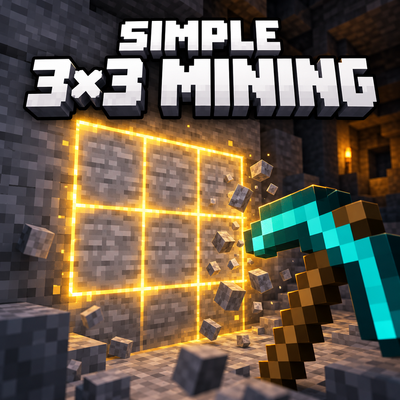
CurseForge · Minecraft mod
Hold Shift to mine a 3x3 area with a pickaxe. Quickly enable or disable it from the settings menu or with a hotkey.
Quick answer
Simple 3x3 Mining simple-3x3-mining-fabric-1.0.0+mc1.21.1.jar targets 1.21, 1.21.1, 1.21.2 with Fabric. The project page does not say whether this file belongs on the client, dedicated server, or both. 1 required mod needs a matching file.
Where it goes
The project page does not say whether this file belongs on the client, dedicated server, or both.
The source does not explicitly classify this release as client-only or server-only.
simple-3x3-mining-fabric-1.0.0+mc1.21.1.jar on 1.21.2. Every mod below is checked against that same setup.
Install Fabric API first, but 1 required mod has no matching file for this setup. Do not mix loader builds to force a match.
We only count dependency files that match this setup. A file for another loader does not fill the gap.
Before you install it
Built for Simple 3x3 Mining simple-3x3-mining-fabric-1.0.0+mc1.21.1.jar on 1.21.2. Pick another file and the loader, install side or required mods may change.
Use simple-3x3-mining-fabric-1.0.0+mc1.21.1.jar. It targets 1.21, 1.21.1, 1.21.2 with Fabric; another release may have different loader, side or dependency requirements.
Install Fabric API first, but 1 required mod has no matching file for this setup. Do not mix loader builds to force a match.
The project page does not say whether this file belongs on the client, dedicated server, or both.
Use the “Get this file” button beside simple-3x3-mining-fabric-1.0.0+mc1.21.1.jar. It opens that exact file at the source.
About this project
Mine tunnels, floors and ceilings with a 3×3 pickaxe area while keeping ordinary mining available.
Hold Shift + mine with a suitable pickaxe → up to 9 blocks. Without Shift, mine one block as usual.
Ore centres stay as ordinary single-block mining, and ores inside a stone area remain untouched, leaving ore veins to a separate Vein Miner.
Choose the Fabric, Forge or NeoForge JAR that matches your Minecraft version (26.3, 26.2 or 1.21.1). Fabric builds also require Fabric API. For multiplayer 3×3 mining, install the matching build on both client and server.
Зажмите Shift и добудьте подходящий блок киркой: мод дополнительно добудет до восьми соседних блоков в одной плоскости 3×3. Без Shift остаётся обычное копание одного блока.
По умолчанию мод включён, но добыча 3×3 требует зажатого Shift. Настройка сохраняется между запусками. В мультиплеере каждый игрок переключает свой режим независимо от остальных. Собственных команд нет.
Плоскость зависит от стороны исходного удара: стена, пол или потолок. Мод работает в выживании с подходящей киркой и ванильным уровнем инструмента. Учитываются все ванильные кирки поддерживаемой версии, включая медную в 26.x.
Каждый блок проходит обычное серверное ломание Minecraft. Сохраняются ванильные дропы, Silk Touch, Fortune, Unbreaking, опыт и обычный износ инструмента. Efficiency ускоряет исходное ручное копание. Кирка может сломаться; после её поломки дополнительные блоки больше не добываются. Закрытые другими блоками, недоступные по расстоянию или запрещённые проверками ломания блоки пропускаются. Выгруженные чанки принудительно не загружаются.
Руды, включая глубинные варианты, золото и кварц Незера и древние обломки, не запускают 3×3 и не добываются автоматически рядом с породой. Это сохраняет отдельную роль Vein Miner.
Автоматически не ломаются блоки с block entity/инвентарём, контейнеры, печи, спавнеры, маяки, технические и редстоун-блоки, рельсы, двери/люки, обсидиан и плачущий обсидиан, неразрушимые блоки и жидкости. Полный серверный список находится в теге simple3x3mining:blocked. Обычные waterlogged-блоки могут добываться с ванильным восстановлением воды.
mods.Меню сообщает, если подключённый сервер не поддерживает мод. Для функции 3×3 необходимы мод на клиенте и сервере. Настройки пользователя находятся в config/simple3x3mining.json; вручную редактировать файл не нужно.
Устанавливайте только один JAR, соответствующий версии игры. Архивы source/complete предназначены для хранения и разработки, их не нужно класть в mods.
Дополнительные блоки проходят события ломания Minecraft и загрузчика и проверки доступа; отменённые события не обходятся. Мод не заявляет универсальную совместимость с отдельными плагинами серверных сборок, которые не используют эти проверки. При смене измерения внутри события продолжение добычи останавливается.
Для удаления достаточно убрать JAR из mods и перезапустить игру/сервер. Новых предметов, блоков, рецептов и постоянных сущностей мод не добавляет.
Project description from CurseForge.
Pick your setup
Choose the version and loader you play, then open the matching release.
Check the dependencies, then try the file in a copied instance before changing a world you care about.
Recent files
simple-3x3-mining-fabric-1.0.0-mc1.21.1.jar
1 Nov 2026
Looking for an older file? The official CurseForge project page is in Resources.
 mod
Backup mod that keeps your worlds safe with automatic and manual backups, with an easy in-game UI to create, manage, and restore them.
 mod
Sick of wasting time with Minecraft’s slow launcher just to change your skin? Quick Skin lets you swap skins instantly even on “offline” servers and gives you access to every official Minecraft cape.
 mod
A Carpet mod (fabric-carpet) extension, a collection of carpet mod style useful tools and interesting features