Minecraft version
Back to mods 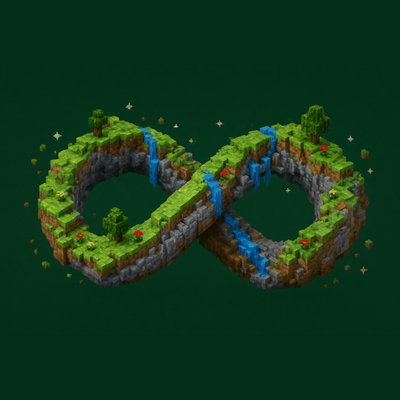
CurseForge · Minecraft mod
Spatial Loop
The content is finite, but the space has no boundary. You can walk forever in one direction, yet the scenery and creatures repeat periodically — you are actually passing through the same region again and again.
Choose a version Pick your version below, then grab the matching file.
Quick answer
Which Spatial Loop release matches 1.19.2 Forge?
Best match for your filters SpatialLoop-forge-1.19.2-0.1.2.jar
Game version 1.19.2
Loader Forge
Spatial Loop SpatialLoop-forge-1.19.2-0.1.2.jar targets 1.19.2 with Forge. The project page does not say whether this file belongs on the client, dedicated server, or both. No extra mods listed for this file.
Where it goes
Is Spatial Loop required on the client, server, or both?
The project page does not say whether this file belongs on the client, dedicated server, or both.
Client Source doesn’t say
Dedicated server Source doesn’t say
Loader for this release Forge
Required install it here Optional supported, not mandatory Not supported do not install here Source doesn’t say do not assume
The source does not explicitly classify this release as client-only or server-only.
What else does Spatial Loop SpatialLoop-forge-1.19.2-0.1.2.jar need?
SpatialLoop-forge-1.19.2-0.1.2.jar on 1.19.2 Forge. Every mod below is checked against that same setup.
This file does not list any required mods. Do not add a library just because a different file uses it.
This file does not list any required or optional mods.
Before you install it
Add Spatial Loop without breaking your instance.
Built for Spatial Loop SpatialLoop-forge-1.19.2-0.1.2.jar on 1.19.2 Forge. Pick another file and the loader, install side or required mods may change.
- 01
Stick to this file
Use SpatialLoop-forge-1.19.2-0.1.2.jar. It targets 1.19.2 with Forge; another release may have different loader, side or dependency requirements.
- 02
Bring the mods it needs
This file does not list any required mods. Do not add a library just because a different file uses it.
- 03
Put it on the correct side
The project page does not say whether this file belongs on the client, dedicated server, or both.
- 04
Pick the file you checked
Use the “Get this file” button beside SpatialLoop-forge-1.19.2-0.1.2.jar. It opens that exact file at the source.
About this project
What does Spatial Loop add?
Spatial Loop
Have you ever wondered what Minecraft would be like if the world were spherical? Given its block-based sandbox setup, that seems rather unlikely.
Even so, an approximately spherical world is possible. At its core, it only requires a looping space.
The idea shows up in fiction too: the classic "ghost wall" phenomenon, or the maze-like formations in xianxia stories — both are examples of spatial loops.
This mod adds a world-generation option that defines the size of the looping area, along with client-side settings for a spherical world.
What it does
The spatial loop in this mod means: the content is finite, but the space has no boundary. You can walk forever in one direction, yet the scenery and creatures repeat periodically — you are actually passing through the same region again and again.
The design idea comes from a simple thought: imagine a jigsaw puzzle piece whose top and bottom edges match, and whose left and right edges also match. Countless copies of that piece can tile into a finite, endless, continuous plane.
To achieve this, the mod reworks world generation. When creating a world, you set the spatial-loop chunk radius. That setting makes the world-generation noise repeat periodically; together with other changes, a single "puzzle piece" whose terrain and biomes match across both axes is complete.
But this does not mean the world is made of infinitely repeated space.
In practice, with this mod, no matter how far you travel — even to six-digit x/z coordinates — the save file barely grows, and terrain loads surprisingly fast. The reason is simple: however many times it repeats, it is always the same space.
The mod also reworks server-side chunk loading. Chunk data reads are resolved by taking the modulo of the chunk coordinates; the chunk data sent to players is always periodically repeated, and so are entities and other NBT data stored on chunks.
In other words, if player A sees a pig a hundred thousand blocks away, it is the same pig player B sees. If player B turns around, they can even see player A, despite the coordinates being a hundred thousand blocks apart.
So you can keep walking forward, but you will never leave this space. Go out through the north and come back in through the south — there is no boundary, and nothing to tell you where the loop happens, because terrain, chunks, ores, and cave structures are all continuous.
It is also useful for tech modpacks that tone down exploration but still have players addicted to mining: this mod lets you limit basic resources.
Spherical world
A true spherical world may still be a long way off, but spatial looping plus a chunk-bending visual effect can approximate one.
The mod provides a fairly flexible client config: bending mode, bending strength, and whether the strength adapts to the spatial-loop chunk radius.
Bending mode means the inner-surface and outer-surface modes; the two screenshots make it obvious.
Note: this visual effect may not suit everyone. A static screenshot may look fine, but it can cause dizziness in game. Consider carefully whether to enable it.
Compatibility
For view distance, the mod follows a "a chunk must never exist in two loop copies at once" design. To ensure old chunks are unloaded before new ones load, the player's view distance is forced into a safe range.
As a result, mods that change view distance, and mods that add extra view distance such as Distant Horizons and Voxy, are inherently incompatible.
For terrain, Tectonic has been tested and is fully compatible. In general, any mod that does not aggressively rewrite vanilla terrain generation should be fine.
For biomes, Biomes O' Plenty and its dependency TerraBlender are compatible, though there may be slightly harsh transitions at boundaries; unless viewed from above, it does not affect the experience much.
Project description from CurseForge.
Pick your setup
Spatial Loop by Minecraft version and loader
Choose the version and loader you play, then open the matching release.
Minecraft version
1.21.1
2 loader buildsMinecraft version
1.20.1
2 loader buildsMinecraft version
1.19.2
1 loader buildMinecraft version
1.18.2
1 loader buildCheck the dependencies, then try the file in a copied instance before changing a world you care about.
Recent files
Spatial Loop versions and loaders
SpatialLoop-forge-1.19.2-0.1.2.jar
14 Nov 2026
Client Source doesn’t say Server Source doesn’t say Dependencies No extras listed Listed on Release listing
Check the 1.19.2 · Forge setup Forge1.19.2 release
SpatialLoop-forge-1.19.2 0.1.1
SpatialLoop-forge-1.19.2-0.1.1.jar
1 Nov 2026
Client Source doesn’t say Server Source doesn’t say Dependencies No extras listed Listed on Release listing
Check the 1.19.2 · Forge setup Forge1.19.2 release
Looking for an older file? The official CurseForge project page is in Resources.
 mod
CurseForge · Minecraft
Apocalypse Structures: Radio Towers and Airdrops
adds radio towers and airdrops
 mod
CurseForge · Minecraft
VS: Clockwork
The power of mechanical contraptions meets the wackiness of physics- with a magical twist!
 mod
CurseForge + Modrinth · Minecraft
Buried Wrecks
A mod that adds buried shipwrecks to the underground