Minecraft version
Back to mods 
CurseForge · Minecraft mod
Miso's Little Guide
Customizable welcome screens, mascot dialogue, tutorials, and onboarding for Minecraft modpacks.
Choose a version Pick your version below, then grab the matching file.
Quick answer
Which Miso's Little Guide release should I use?
Latest stable file misos_guide-forge-1.20.1-1.7.3.jar
Game version 1.20.1
Loader Forge
Miso's Little Guide misos_guide-forge-1.20.1-1.7.3.jar targets 1.20.1 with Forge. The project page does not say whether this file belongs on the client, dedicated server, or both. No extra mods listed for this file.
Where it goes
Is Miso's Little Guide required on the client, server, or both?
The project page does not say whether this file belongs on the client, dedicated server, or both.
Client Source doesn’t say
Dedicated server Source doesn’t say
Loader for this release Forge
Required install it here Optional supported, not mandatory Not supported do not install here Source doesn’t say do not assume
The source does not explicitly classify this release as client-only or server-only.
What else does Miso's Little Guide misos_guide-forge-1.20.1-1.7.3.jar need?
misos_guide-forge-1.20.1-1.7.3.jar. Change the file and its required mods may change too.
This file does not list any required mods. Do not add a library just because a different file uses it.
This file does not list any required or optional mods.
Before you install it
Add Miso's Little Guide without breaking your instance.
Built for Miso's Little Guide misos_guide-forge-1.20.1-1.7.3.jar. Pick another file and the loader, install side or required mods may change.
- 01
Stick to this file
Use misos_guide-forge-1.20.1-1.7.3.jar. It targets 1.20.1 with Forge; another release may have different loader, side or dependency requirements.
- 02
Bring the mods it needs
This file does not list any required mods. Do not add a library just because a different file uses it.
- 03
Put it on the correct side
The project page does not say whether this file belongs on the client, dedicated server, or both.
- 04
Pick the file you checked
Use the “Get this file” button beside misos_guide-forge-1.20.1-1.7.3.jar. It opens that exact file at the source.
About this project
What does Miso's Little Guide add?
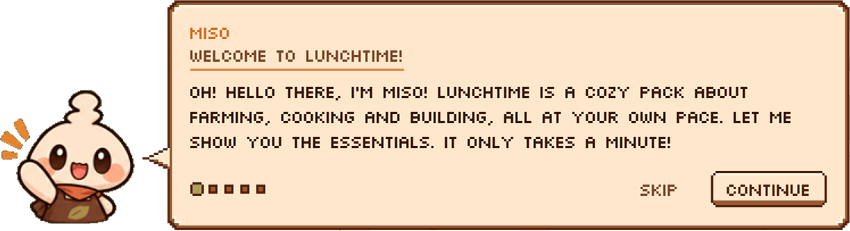
Miso's Little Guide
Give your modpack a little personality!
Miso's Little Guide is a mod that lets you create your own welcome screens, tutorials, dialogues and little character interactions for your modpack. You don't need to know how to code to get started, and you can customize pretty much the entire experience.
Miso is the default mascot, but you can replace her with your own character, change the themes, write your own dialogues, add buttons, sounds, animations and much more.
Basically, you can make your modpack feel a little more alive instead of just throwing players into a world and hoping they figure everything out ahahaha.
✨ Features
- Custom Mascots: Use Miso or replace her with your own character and textures.
- Dialogue & Tutorials: Create welcome messages, tutorials, conversations and onboarding sequences.
- Themes & Customization: Change the look of the guide using themes and presets.
- Buttons & Interactions: Add buttons and actions for players to interact with.
- Sounds & Animations: Add sounds, different mascot expressions and animations to your guide.
- Made for Modpack Creators: Everything is set up so you can create and customize your own guide packs without having to change the mod's code.
Getting Started
Install the mod and launch your game once.
Find the guide-pack folder that gets created.
Create your own guide pack or start with the included example.
Add your mascot, dialogue, assets and whatever else you want.
Launch the game and test it!
There's a README and a starter guide pack included to help you get started. You can also check the GitHub documentation if you need more details.
I'll add more screenshots and tutorials later!
Frequently Asked Questions
Can I replace Miso with my own character?
- YES! You can use your own mascot and textures. Miso is just the default one.
Can I customize the guide without knowing Java?
- Yep! You can create and edit guide packs using the files provided by the mod. Check the README and GitHub documentation to see how everything works.
Can I change the entire experience?
- YES. You can customize pretty much everything, from the first bubble players see to the last dialogue and even the chat message at the end.
Will the guide appear every time I launch the game?
- NUH UH. It plays once by default, so players won't have to sit through the whole thing every time they open their game.
Can I add my own sounds, textures and animations?
- Of course! You can use your own PNGs, mascot expressions, animations and audio.
So basically, what can I customize?
- IN SHORT YOU CAN CUSTOMIZE EVERYTHING IN THIS MOD.
Found a bug or have a suggestion?
If something isn't working properly or you have an idea for something you'd like to see added, you can report it on the GitHub issue tracker or come say hi on Discord.
Credits
Project description from CurseForge.
Pick your setup
Miso's Little Guide by Minecraft version and loader
Choose the version and loader you play, then open the matching release.
Check the dependencies, then try the file in a copied instance before changing a world you care about.
Recent files
Miso's Little Guide versions and loaders
misos_guide-forge-1.20.1-1.7.3.jar
9 Nov 2026
Client Source doesn’t say Server Source doesn’t say Dependencies No extras listed Listed on Release listing
Check the 1.20.1 · Forge setup 1.20.1Forge release
misos_guide-forge-1.20.1-1.7.2.jar
8 Nov 2026
Client Source doesn’t say Server Source doesn’t say Dependencies No extras listed Listed on Release listing
Check the 1.20.1 · Forge setup 1.20.1Forge release
misos_guide-forge-1.20.1-1.7.0.jar
7 Nov 2026
Client Source doesn’t say Server Source doesn’t say Dependencies No extras listed Listed on Release listing
Check the 1.20.1 · Forge setup 1.20.1Forge release
Looking for an older file? The official CurseForge project page is in Resources.