Minecraft version
Back to mods 
CurseForge · Minecraft mod
Carbons
GPU-powered item rendering optimization for Minecraft
Choose a version Pick your version below, then grab the matching file.
Quick answer
Which Carbons release matches 26.1.2?
Best match for your filters Carbon 26.1.2.10
Game version 26.1.2
Loader NeoForge
Carbons Carbon 26.1.2.10 targets 26.1.2 with NeoForge. The project page does not say whether this file belongs on the client, dedicated server, or both. No extra mods listed for this file.
Where it goes
Is Carbons required on the client, server, or both?
The project page does not say whether this file belongs on the client, dedicated server, or both.
Client Source doesn’t say
Dedicated server Source doesn’t say
Loader for this release NeoForge
Required install it here Optional supported, not mandatory Not supported do not install here Source doesn’t say do not assume
The source does not explicitly classify this release as client-only or server-only.
What else does Carbons Carbon 26.1.2.10 need?
Carbon 26.1.2.10 on 26.1.2. Every mod below is checked against that same setup.
This file does not list any required mods. Do not add a library just because a different file uses it.
This file does not list any required or optional mods.
Before you install it
Add Carbons without breaking your instance.
Built for Carbons Carbon 26.1.2.10 on 26.1.2. Pick another file and the loader, install side or required mods may change.
- 01
Stick to this file
Use Carbon 26.1.2.10. It targets 26.1.2 with NeoForge; another release may have different loader, side or dependency requirements.
- 02
Bring the mods it needs
This file does not list any required mods. Do not add a library just because a different file uses it.
- 03
Put it on the correct side
The project page does not say whether this file belongs on the client, dedicated server, or both.
- 04
Pick the file you checked
Use the “Get this file” button beside Carbon 26.1.2.10. It opens that exact file at the source.
About this project
What does Carbons add?
Carbon
Carbon is a client-side performance mod that caches item model geometry on the GPU and batches matching items through instanced rendering. It reduces repeated rendering work, especially in scenes with large numbers of dropped items.
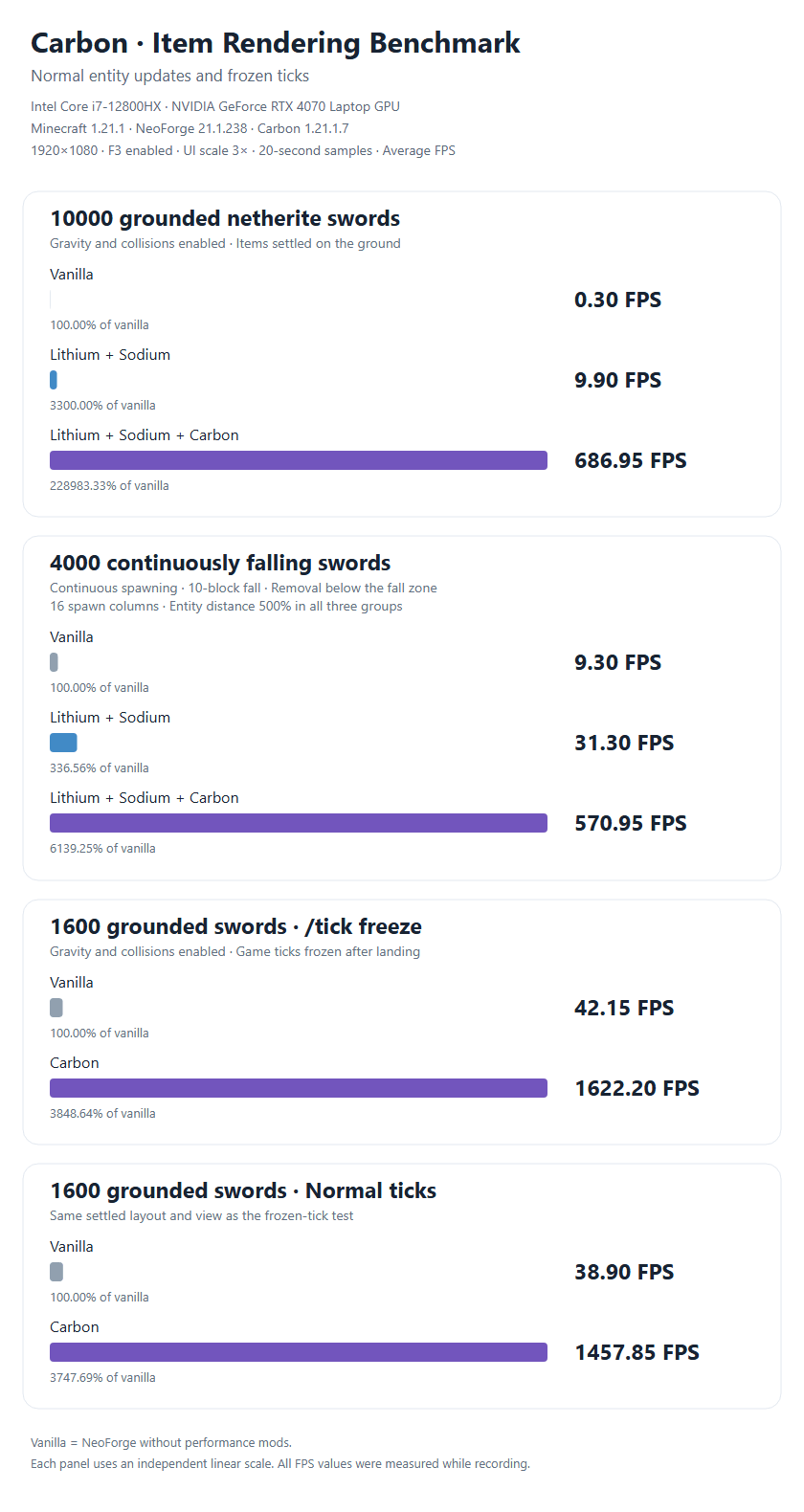
Features
- Optimized dropped items: Handles rotation, bobbing, and scaling on the GPU, and reuses scene data when it has not changed.
- Support across display contexts: Optimizes compatible standard item models in your hand, in GUIs, and in other contexts that use Minecraft's standard item rendering pipeline.
- Enchantment glint and shadows: Batches ordinary enchantment glint and vanilla circular item shadows alongside item rendering.
- Optional visual physics: Adds tumbling while items move and lets them settle naturally when they land. This only affects appearance; movement, collisions, and pickup behavior remain unchanged.
- Rendering fallback: Uses the original rendering path for models or effects that cannot be safely batched.
Shader Compatibility
Tested with Iris 1.8.14-beta.1+mc1.21.1 and Photon v1.4, including shader shadows. Compatibility with other shader packs may vary.
Configuration
Configure Carbon through its in-game configuration screen or config/carbon-client.toml. Optional visual physics is disabled by default. Use /carbon stats to inspect rendering and cache statistics.
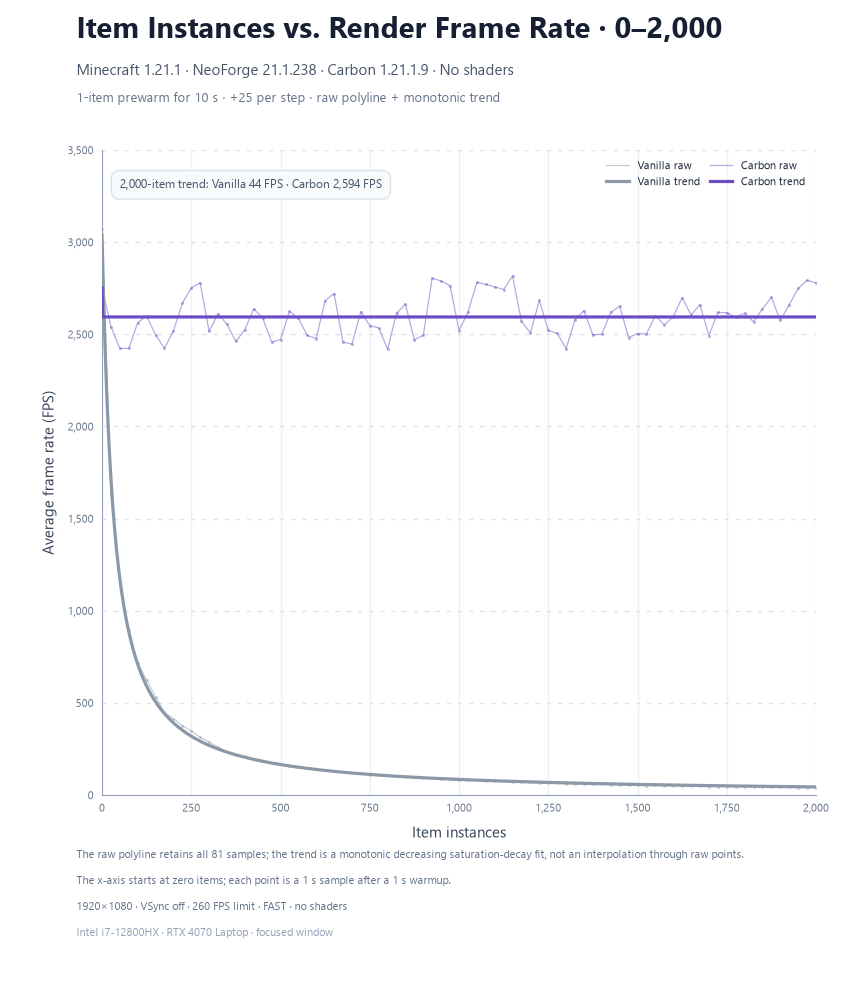
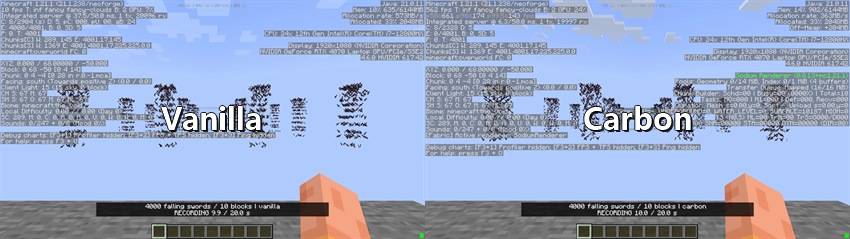
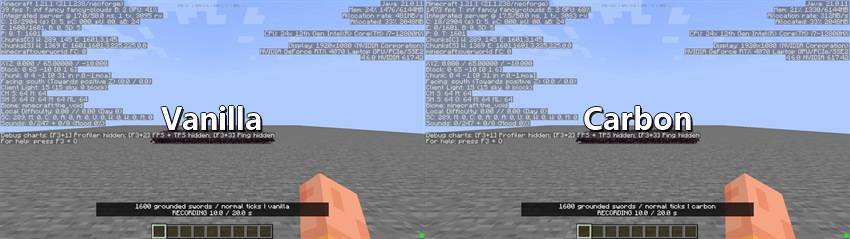
Project description from CurseForge.
Pick your setup
Carbons by Minecraft version and loader
Choose the version and loader you play, then open the matching release.
Minecraft version
1.21.1
1 loader buildMinecraft version
1.20.1
1 loader buildCheck the dependencies, then try the file in a copied instance before changing a world you care about.
Recent files
Carbons versions and loaders
Carbon 26.1.2.10
carbon-26.1.2.10.jar
12 Nov 2026
Client Source doesn’t say Server Source doesn’t say Dependencies No extras listed Listed on Release listing
Check the 26.1.2 · NeoForge setup NeoForge26.1.2 release
Carbon 26.1.2.9-B
carbon-26.1.2.9-B.jar
7 Nov 2026
Client Source doesn’t say Server Source doesn’t say Dependencies No extras listed Listed on Release listing
Check the 26.1.2 · NeoForge setup NeoForge26.1.2 release
Carbon 26.1.2.9-A
carbon-26.1.2.9-A.jar
6 Nov 2026
Client Source doesn’t say Server Source doesn’t say Dependencies No extras listed Listed on Release listing
Check the 26.1.2 · NeoForge setup NeoForge26.1.2 release
Carbon 26.1.2.9
carbon-26.1.2.9.jar
5 Nov 2026
Client Source doesn’t say Server Source doesn’t say Dependencies No extras listed Listed on Release listing
Check the 26.1.2 · NeoForge setup NeoForge26.1.2 release
Carbon 26.1.2.8-A
carbon-26.1.2.8-A.jar
4 Nov 2026
Client Source doesn’t say Server Source doesn’t say Dependencies No extras listed Listed on Release listing
Check the 26.1.2 · NeoForge setup NeoForge26.1.2 release
Carbon 26.1.2.8
carbon-26.1.2.8.jar
4 Nov 2026
Client Source doesn’t say Server Source doesn’t say Dependencies No extras listed Listed on Release listing
Check the 26.1.2 · NeoForge setup NeoForge26.1.2 release
carbon-26.1.2.7
carbon-26.1.2.7.jar
3 Nov 2026
Client Source doesn’t say Server Source doesn’t say Dependencies No extras listed Listed on Release listing
Check the 26.1.2 · NeoForge setup NeoForge26.1.2 release
Looking for an older file? The official CurseForge project page is in Resources.
 mod
CurseForge · Minecraft
Smooth Loading Screens
Reduces startup freezes and keeps the Create World loading screen responsive!
 mod
CurseForge + Modrinth · Minecraft
LDLib
LDLib is a libarary mod for custom rendering, modular gui.
 mod
CurseForge + Modrinth · Minecraft
TofuCraftReload
This mod is a remake of Old Mod TofuCraft made by tsuteto. add soybean As a new all-purpose food!