Minecraft version
Back to mods 
CurseForge · Minecraft mod
CodeBadger: Skillsmith
Level up skills to improve yourself and learn how to shape the world.
Choose a version Pick your version below, then grab the matching file.
Quick answer
Which CodeBadger: Skillsmith release matches 1.21.1 NeoForge?
Best match for your filters skillsmith-1.0.1-1.21.1.jar
Game version 1.21.1
Loader NeoForge
CodeBadger: Skillsmith skillsmith-1.0.1-1.21.1.jar targets 1.21.1 with NeoForge. The project page does not say whether this file belongs on the client, dedicated server, or both. No extra mods listed for this file.
Where it goes
Is CodeBadger: Skillsmith required on the client, server, or both?
The project page does not say whether this file belongs on the client, dedicated server, or both.
Client Source doesn’t say
Dedicated server Source doesn’t say
Loader for this release NeoForge
Required install it here Optional supported, not mandatory Not supported do not install here Source doesn’t say do not assume
The source does not explicitly classify this release as client-only or server-only.
What else does CodeBadger: Skillsmith skillsmith-1.0.1-1.21.1.jar need?
skillsmith-1.0.1-1.21.1.jar on 1.21.1 NeoForge. Every mod below is checked against that same setup.
This file does not list any required mods. Do not add a library just because a different file uses it.
This file does not list any required or optional mods.
Before you install it
Add CodeBadger: Skillsmith without breaking your instance.
Built for CodeBadger: Skillsmith skillsmith-1.0.1-1.21.1.jar on 1.21.1 NeoForge. Pick another file and the loader, install side or required mods may change.
- 01
Stick to this file
Use skillsmith-1.0.1-1.21.1.jar. It targets 1.21.1 with NeoForge; another release may have different loader, side or dependency requirements.
- 02
Bring the mods it needs
This file does not list any required mods. Do not add a library just because a different file uses it.
- 03
Put it on the correct side
The project page does not say whether this file belongs on the client, dedicated server, or both.
- 04
Pick the file you checked
Use the “Get this file” button beside skillsmith-1.0.1-1.21.1.jar. It opens that exact file at the source.
About this project
What does CodeBadger: Skillsmith add?
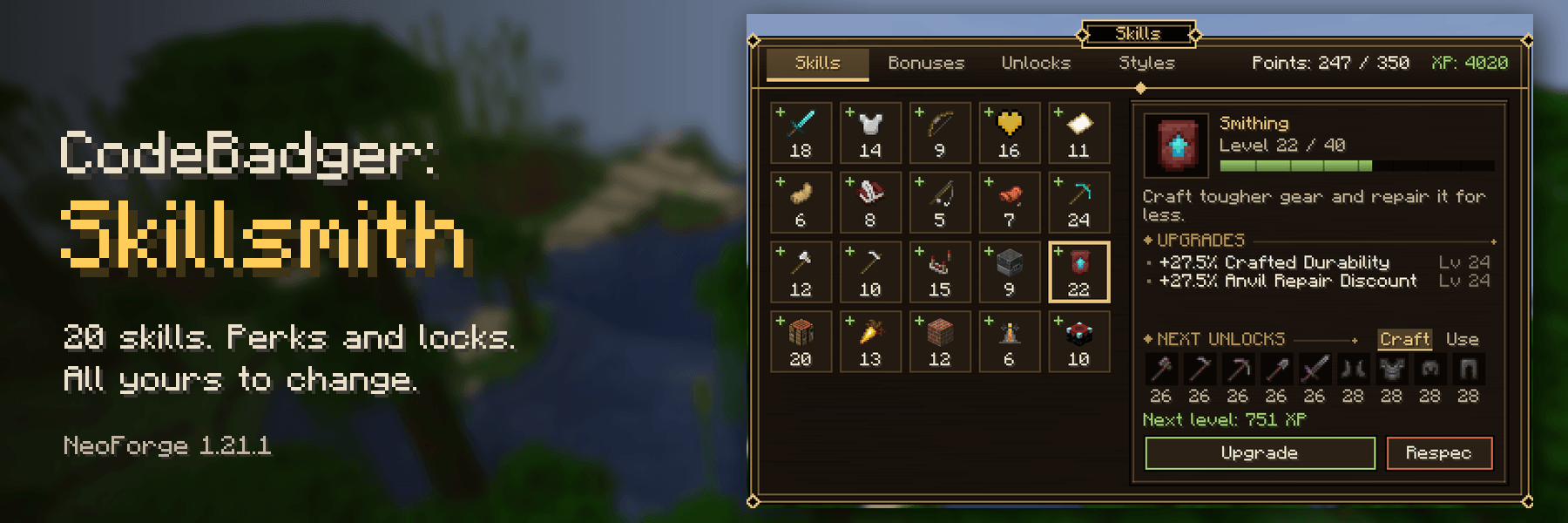 A skill system for NeoForge 1.21.1, inspired by Reskillable, where almost everything is yours to change.
Players level 20 skills from 0 to 40. Each skill gives perks as it levels, and locks items, recipes, potions, enchantments, blocks, dimensions and mob interactions until the player is skilled enough. Skills, perks, locks and XP all live in plain JSON files in your config folder. You can rebalance the whole mod, add your own skills or gate another mod's content without writing any code.
Two ways to level, or both
Vanilla XP mode (default) Players spend their vanilla experience to level skills from the skill screen. Each skill level costs the same XP that vanilla charges for that level, and every player has a budget of 350 points (1 per level). That's 17.5 points per skill, so the budget grows on its own when an addon adds skills. Players can spread their points across many skills or specialize in a few, and change their minds later with a respec: reset a skill to level 0 (or its starting level, if your pack gives it one) to free its points, with nothing refunded and a cooldown before it can be leveled again. 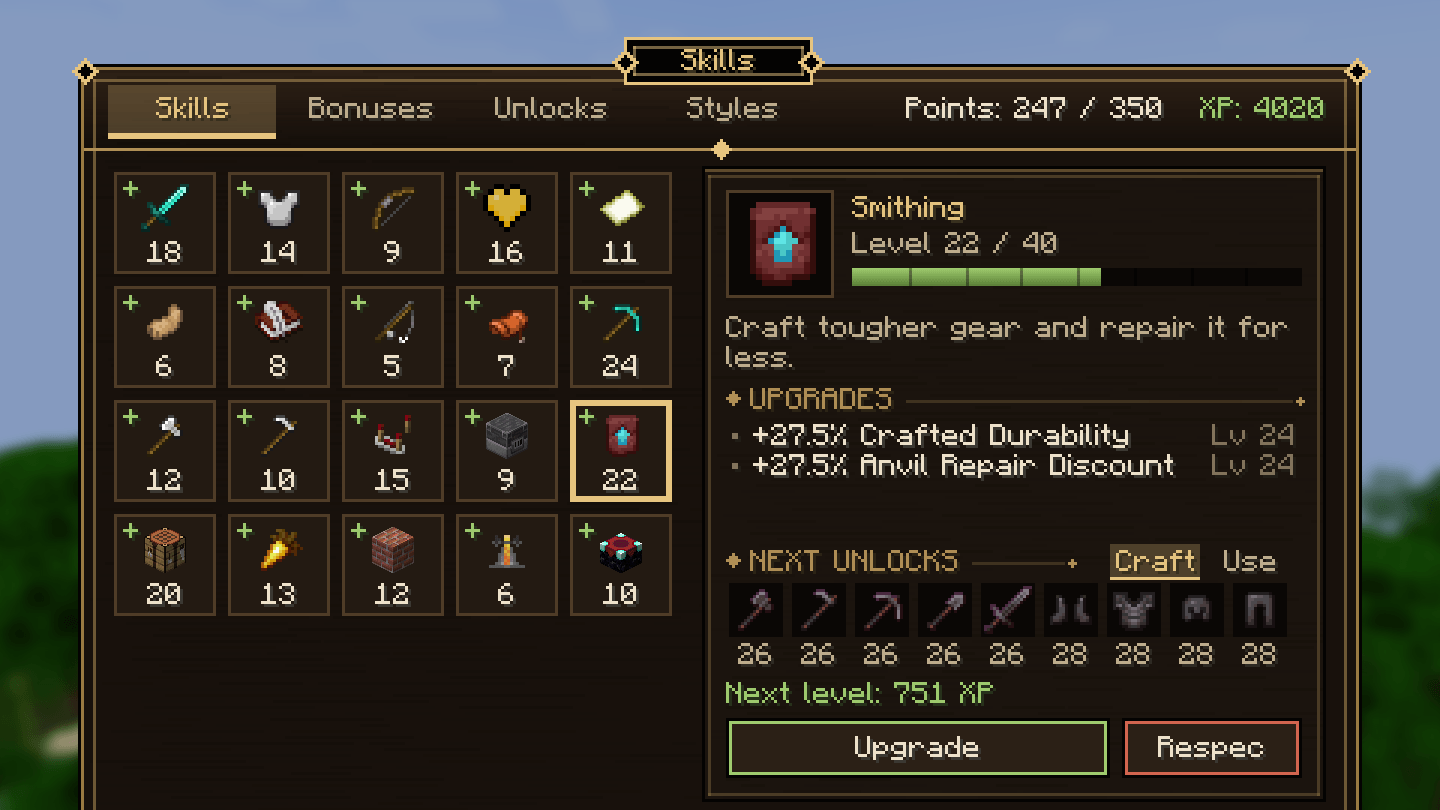 Skill XP mode Each skill earns its own XP from doing things: mining natural ores (and a little from stone) trains Mining, blocking hits with armor and shields trains Defense, exploring new ground trains Exploration, with bonus XP for harder places like ores in the Nether. Skills level up on their own, with no point limit. Instead, each skill has a level cap that it raises by prestiging: reach the cap, prestige, and the skill starts over at level 0 with a higher cap and a small permanent bonus. Progress scales forever, and limits can be turned on if you want an end point.
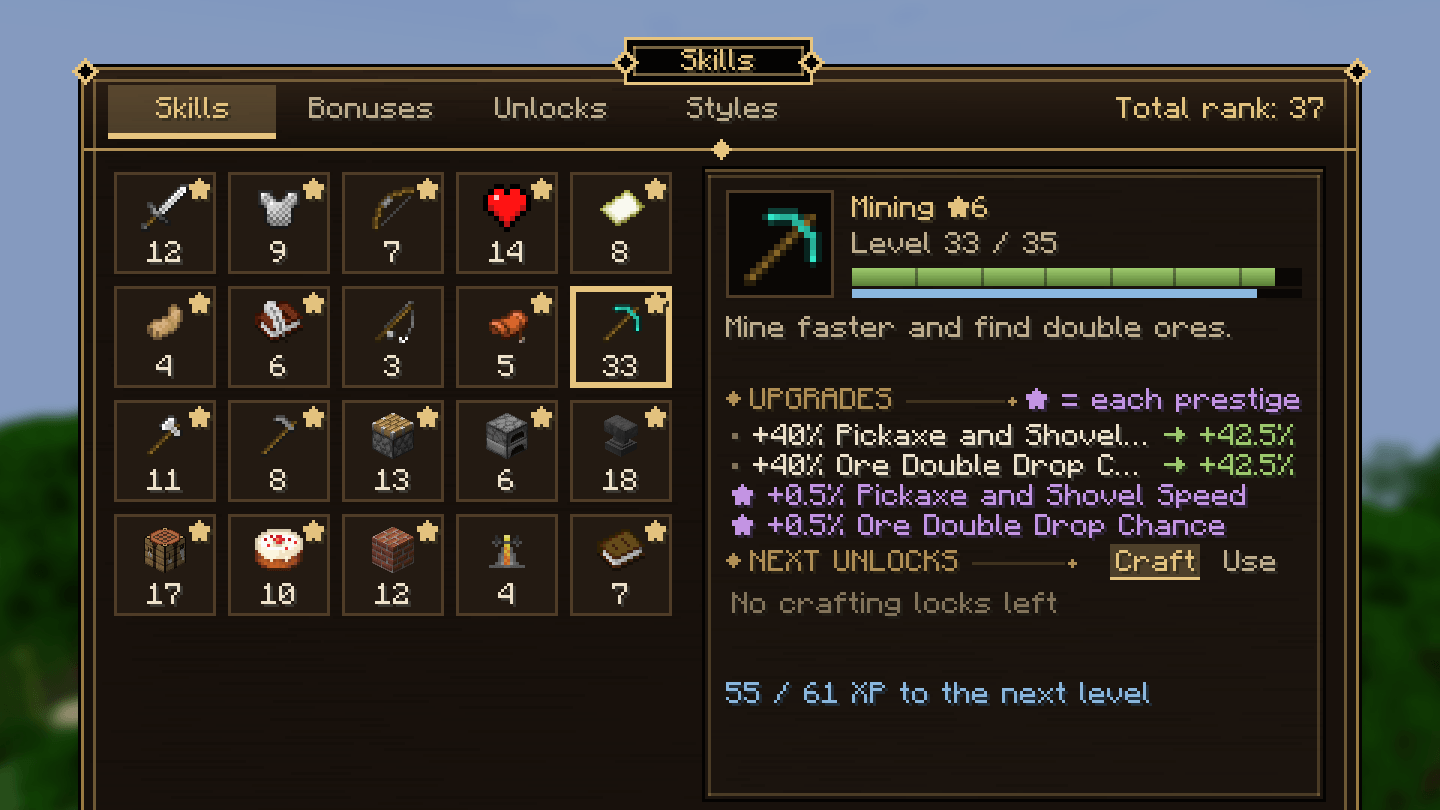 Mix them Any skill can use the other mode. For example, let Exploration level on its own from travelling while every other skill is bought with vanilla XP. Each skill-XP skill can prestige or simply level to its max, and takes its share out of the point budget, so mixing doesn't make points go further.
The 20 skills
| Skill | What it does |
|---|---|
| Attack | Hit harder with melee weapons |
| Defense | Get more protection from your armor |
| Dexterity | Deal more ranged damage and survive longer falls |
| Constitution | Raise your maximum health |
| Exploration | Move faster and step up whole blocks |
| Luck | Land critical hits more often, and harder |
| Learning | Learn faster and gain more experience |
| Fishing | Get bites sooner and reel in better loot |
| Husbandry | Get more from animals and breed twins |
| Mining | Mine faster and find double ores |
| Gathering | Chop faster and get double logs |
| Farming | Grow crops faster and harvest double |
| Tinkering | Craft redstone devices, sometimes saving ingredients |
| Smelting | Get extra output when smelting ores and metals |
| Smithing | Craft tougher gear and repair it for less |
| Crafting | Craft everyday items, sometimes with extra output. Unlocks a 3x3 crafting tab |
| Culinary | Cook food that fills you more and lasts longer |
| Building | Use workstations and reach farther when building |
| Alchemy | Brew longer, stronger potions |
| Enchanting | Enchant for fewer levels, save lapis and roll higher enchantments |
Every skill, its perks and how often they apply can be changed or removed, and you can add new skills. A skill's levels can need other skills too: for example, Attack 8 can need Dexterity 4 or Learning 5.
Skill locks
- Crafting locks: you need the skill to craft the item. Netherite gear needs Smithing, redstone devices need Tinkering, workstations need Building, and bread, cake and other made foods need Culinary.
- Use locks: you need the skill to use, place, wear, wield or mine with the item. That includes rings, amulets and other items worn in Curios or Accessories slots.
- Block locks: placing or breaking a block can need skills. Planting crops, mushrooms and nether plants needs Farming, and so does harvesting wheat and nether wart. Root crops (carrots, potatoes and beetroots) can be harvested by anyone, and carrots and potatoes can be planted by anyone too. The soil under a locked crop can't be broken or trampled to pop it off.
- Brewing locks: potions need Alchemy (and some need Constitution).
- Enchantment locks: higher enchantment levels need Enchanting.
- Anvil rules: repairing and enchanting at an anvil can need skills, with a different level for each repair material: stone tools need Mining, leather needs Crafting, and gold, iron, diamond and netherite need more and more Smithing.
- Dimension locks: travelling to the Nether, the End or a modded dimension can need skills.
- Mob locks: attacking, trading with, riding, breeding, taming, shearing, leashing or naming a mob can need skills.
More than one way in. A lock can combine skills with AND, OR and NOT, so players aren't stuck behind a single skill. An axe needs Gathering or Attack, iron armor needs Defense 10 or Constitution 15, a lead needs Crafting or Husbandry, and a mace needs Attack 24, or Attack 16 and Constitution 16.
Tooltips show what's needed, in green when you have it and red when you don't. Try something locked anyway and a message says what's missing, shown above the screen if one is open. Machines say why too: a modded cooking pot that won't cook tells nearby players its owner needs Culinary 14, or that nobody owns it. 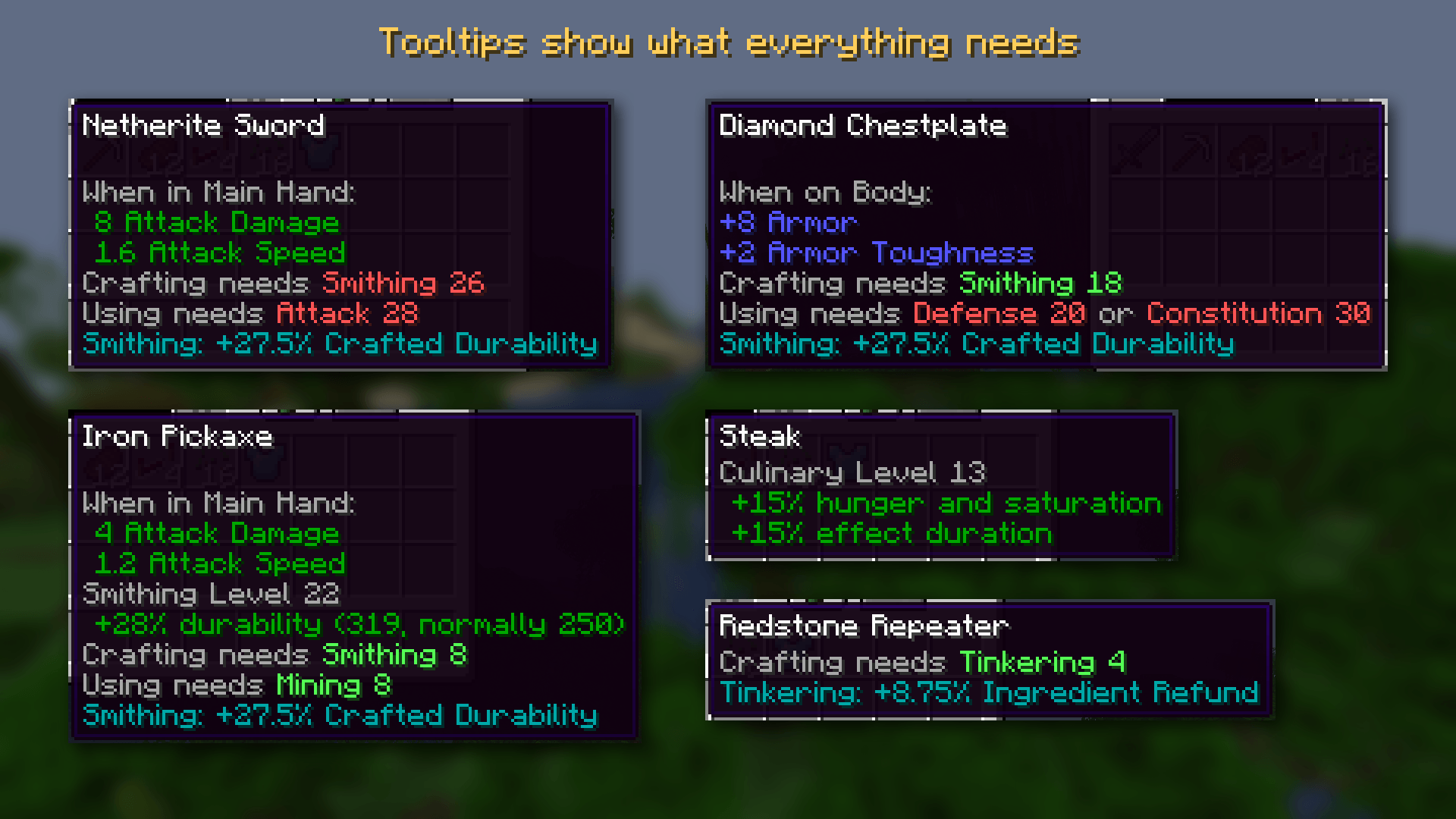
No automation loopholes
Crafting locks apply at every vanilla workstation: the crafting table, smithing table, stonecutter, loom, cartography table, anvil, enchanting table, Crafter, brewing stand, furnaces and campfires.
Automated blocks like the Crafter, brewing stand and furnaces check the skills of the player who placed them, even while that player is offline. A block nobody placed can't make anything locked, and neither can one that was copied by a schematic or moved by a contraption. Its owner is tied to the spot in the world, not to the block. 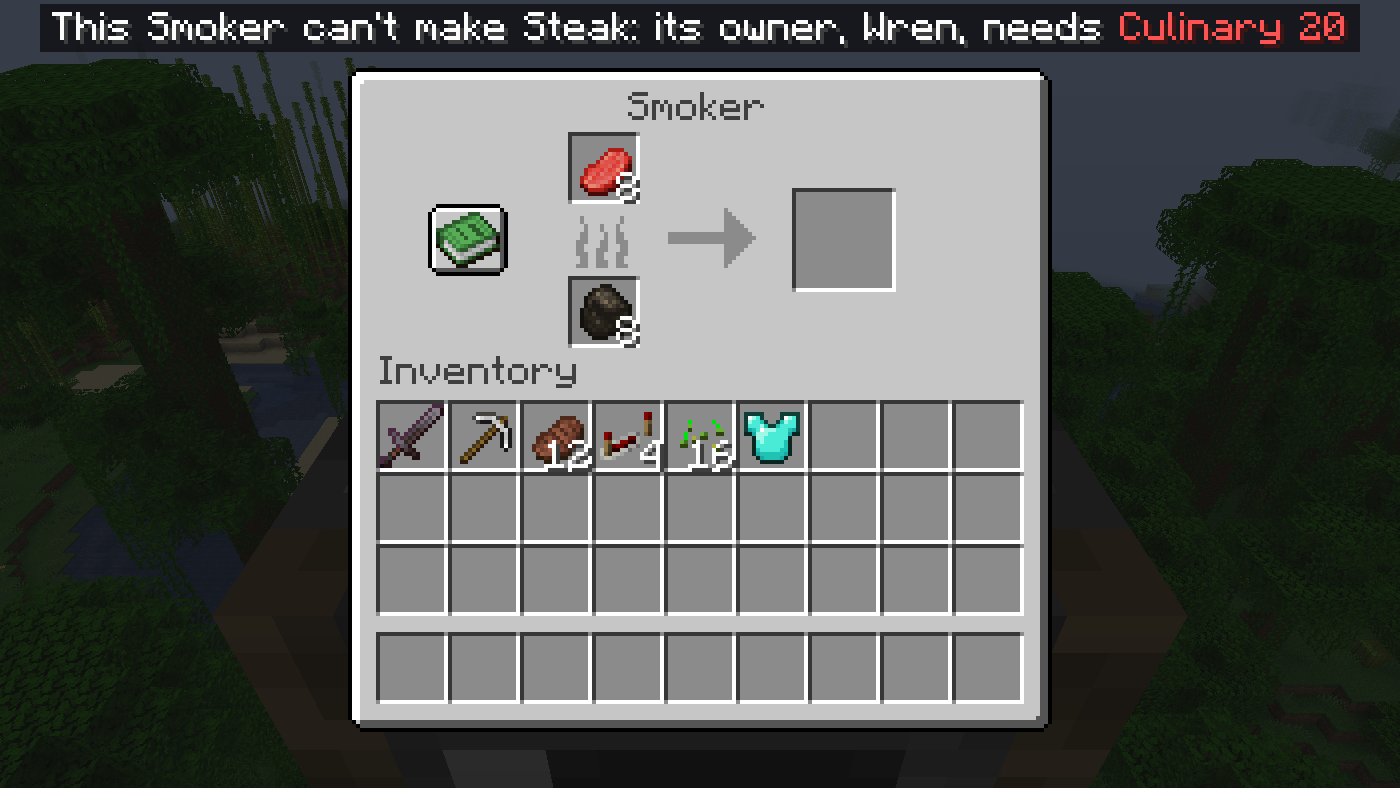
No easy farming
- Double drops only count natural blocks. Ores, logs and crops have to have generated or grown naturally, so placing and re-mining blocks earns nothing.
- Loops are detected. Recipes that can be crafted back and forth (ingots and blocks, or longer chains), blocks that break back into their ingredients (snow, clay) and re-wettable sponges give no refunds, extra output, bonus output or skill XP.
- Crafting perks only cover their own recipes. Tinkering's refunds apply to redstone devices, and Crafting's extra output to everyday items like planks, torches and slabs, from lists you can edit.
- Cooked food, brewed potions and smithed gear remember their maker. They're stamped with the cook's, brewer's or smith's skill, and the bonus follows the item.
- If you use skill XP mode (or give some skills their own skill XP), that XP has to come from real play:
- Alchemy only counts potions a brewing stand actually brewed.
- Building only counts blocks that stay placed.
- Defense and Constitution only train from mob and player hits, not cactus or falls.
- Slime bounces don't count as falls.
- Travel only counts ground you haven't crossed recently, so AFK minecart and boat loops stop paying after one lap. Riding counts, and elytra flight is capped.
- Any XP source can be given a per-minute limit.
Built for modpacks
- Everything is JSON in
config/skillsmith/: skills, perks, locks, anvil rules, XP sources and messages. It's written tall and simple (one setting per line), with full docs copied into the folder on first launch and commented-out examples in the files that start empty. - Split by mod: every folder can hold one file per mod. Entries for mods that aren't installed are skipped quietly, and
requires_mod/unless_modturn skills, perks or sources on or off depending on which mods are present. A later file can replace a built-in perk or XP source by using its id. - 40+ perk types: any attribute (vanilla, NeoForge or modded), plus coded perks like double drops, critical hits, breeding twins, crop growth, ingredient refunds, potion strength and more. Perks can also run commands when a level is reached.
- Wildcards:
minecraft:golden_*covers every golden item and*:*_oreevery ore from every mod. A lock on one item by name still overrides a wildcard, so you can lock a whole family (or a whole mod) and give a few items their own levels. - Item lists: name a list of items once (
@tinkering) and use it in any perk or XP source. Mods and packs can add to a list without replacing it. - AND, OR and NOT work in every lock, anvil rule and skill level requirement.
- Per-skill XP settings: give any skill its own XP curve, cost multiplier, prestige step, rank limit or lock scaling, so Mining can level faster than Attack.
- Gate modded machines and crafting screens by listing them in
gates/workstations/, with no data pack or code needed. What players take out of them can earn skill XP (split between skills by item or food) and gets the same crafting bonuses as vanilla: Smithing durability and the Culinary and Alchemy stamps. - Messages and sounds: every level-up, prestige, respec, lock and death message can be rewritten, moved to chat, the action bar or a title, and given its own sound. Resource packs can reword and re-sound them too.
- Per world or shared: one config for every world, or a separate copy for each world.
- Mistakes don't break servers: a typo in a config file is reported in the log with the file and entry, and that entry is skipped.
/skillsmith reloadapplies config changes without restarting.- Pack-making tools:
/skillsmith whyshows every lock on an item and the file each came from,/skillsmith uncovered <mod>lists a mod's items you haven't locked yet, and/skillsmith exportwrites everything to Markdown and CSV for your pack's wiki. - Milestone rewards: give items the first time a skill reaches a level, straight from
skills.json. - Per-skill rules: starting levels, more points per level for strong skills, skills that can't be respecced or lost on death, and hidden background skills, each optional in
skills.json. - Your own words: any lock can have its own message ("Only a master smith can shape netherite: you need Smithing 30"), showing just what's missing or the whole lock in green and red. Machines and workstations can have their own messages too.
- Places: XP sources and perks can count only in certain dimensions or biomes, like faster mining in the Nether. Out of the box, Nether and End ores, ocean fishing and exploring the End give bonus XP.
- Quests and advancements: the
codebadger_skillsmith:skilladvancement trigger lets data packs, and quest mods with advancement tasks like FTB Quests, check skill levels and prestige ranks.
For servers
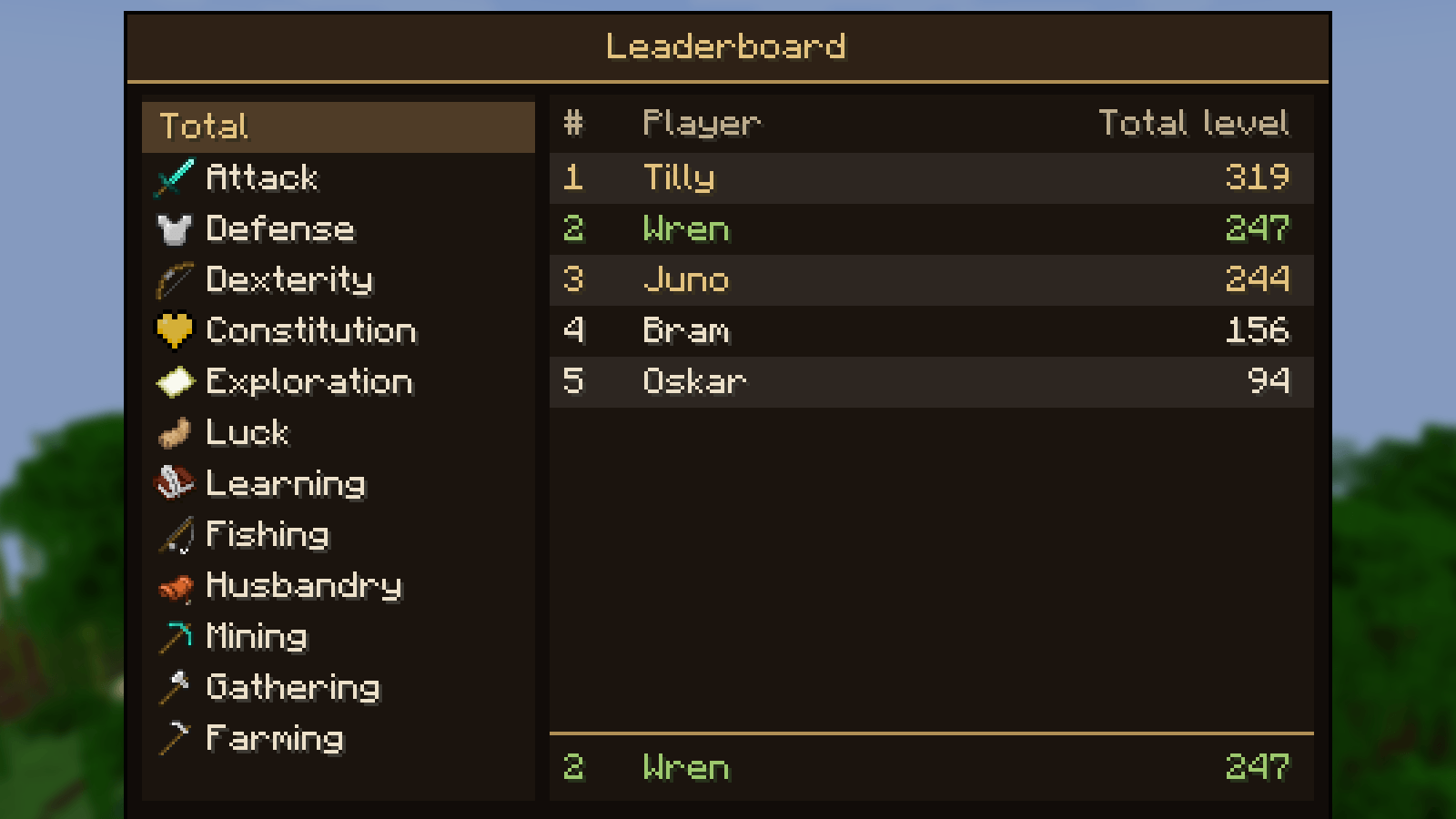
- Leaderboard: its own screen (J, rebindable) and
/skillsmith top, by skill or total level. Turn it off in the config to keep levels private. - XP boost events:
/skillsmith boost 2 60runs a double skill XP hour for every skill or just one. It's announced, survives restarts and ends on its own. - Offline players:
/skillsmith offline <name> ...changes a player who isn't online, applied when they join. - Creative ignores locks (and so do machines a Creative player owns), or turn that off to test your pack's locks without leaving Creative.
General settings (skillsmith-common.toml)
XP mode, points per skill, XP cost multiplier, level loss on death (off by default), respecs, the skill XP curve (linear, or vanilla's own XP curve), prestige range and limits, how locks scale in skill XP mode, loop exceptions, whether Creative ignores locks, the leaderboard, and whether the config is shared or per world.
Skill screen
Press K (rebindable) to open it.
- Skills: every skill as a card in a scrolling grid, with an icon that grows with it (Attack goes from a wooden sword to a netherite one, and Constitution from a heart to an absorption heart), and a panel for the selected one showing its upgrades, what its next level needs, the next items and potions it unlocks, and the button to level or prestige it. When you mix modes, a toggle switches the grid between skills bought with vanilla XP and skills that level with skill XP.
- Bonuses: every bonus a skill can give, and where each one comes from.
- Unlocks: search every locked item and potion by name, and filter by skill, lock type and level.
- Styles: pick how the screen looks: Slate, Gilded, Floating, Parchment or Runestone.
The screen fits itself to small windows and large GUI scales.
XP popups: small "+12 Mining" notices show as skills earn skill XP. Each player can turn them off.
Tooltips tell you the rest: what an item needs to craft, use, plant, harvest or brew; which skill perks affect crafting it ("Tinkering: +25% Ingredient Refund"); what a cook's or brewer's stamp adds ("+25% hunger and saturation"); and the smith's level and how much tougher they made a tool or piece of armor ("Smithing Level 20, +25% durability (313, normally 250)"), even when someone else made it.
Make your own styles: a resource pack or mod can add styles, from a quick recolor to a completely new look with its own images for the window, panels, cards, buttons and tabs. No code is needed, and mods can also draw pieces in code. Skill icons can be any item or GUI sprite, or several layered together. 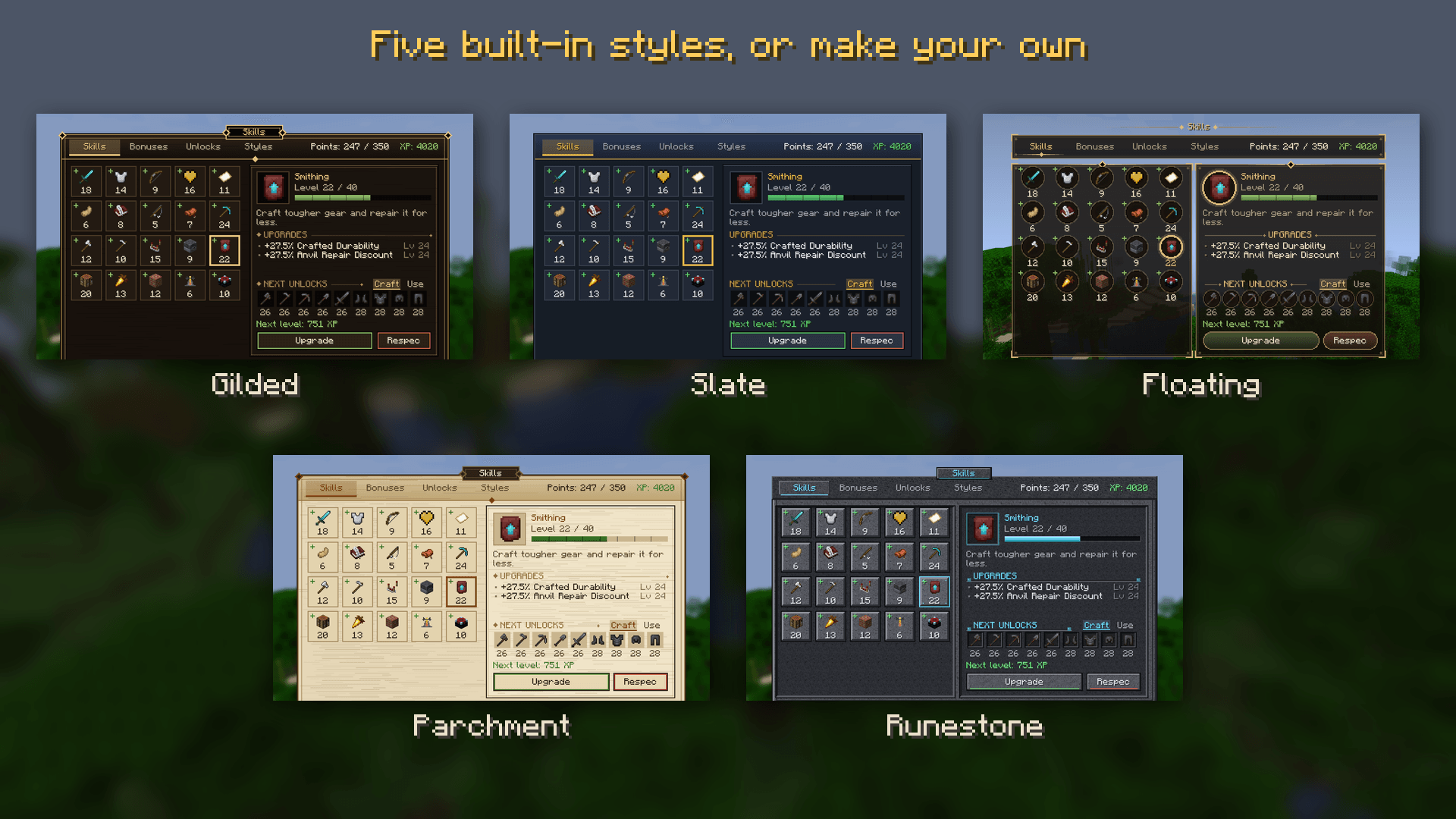
Commands
| Command | Who | What it does |
|---|---|---|
/skillsmith info [player] |
Everyone (others: operators) | Show levels, points and costs |
/skillsmith levelup &lt;skill&gt; |
Everyone | Level up a skill bought with vanilla XP |
/skillsmith respec &lt;skill&gt; |
Everyone | Reset a skill bought with vanilla XP to level 0 (or its starting level), with a cooldown |
/skillsmith prestige &lt;skill&gt; |
Everyone | Prestige a skill at its cap |
/skillsmith why [item] |
Everyone | Every lock on an item (or the one in hand) and where it came from |
/skillsmith top [skill] |
Everyone | The leaderboard, by skill or total level |
/skillsmith set &lt;players&gt; &lt;skill&gt; &lt;level&gt; |
Operators | Set a skill level |
/skillsmith xp &lt;players&gt; &lt;skill&gt; &lt;amount&gt; |
Operators | Give skill XP |
/skillsmith setprestige &lt;players&gt; &lt;skill&gt; &lt;rank&gt; |
Operators | Set a prestige rank |
/skillsmith reset &lt;players&gt; [skill] |
Operators | Reset skills |
/skillsmith reload |
Operators | Reload the config |
/skillsmith uncovered &lt;mod&gt; |
Operators | List a mod's items that have no lock |
/skillsmith export |
Operators | Write every skill, perk, lock and XP source to Markdown and CSV |
/skillsmith boost &lt;multiplier&gt; &lt;minutes&gt; [skill] |
Operators | Start a timed skill XP boost (boost stop ends it) |
/skillsmith offline &lt;name&gt; &lt;change&gt; |
Operators | Change a player who isn't online (set, xp, setprestige or reset), applied when they join |
Addons and other mods
Compat addons can bring ready-made setups for other mods. Their default files are copied into your config the first time they're installed (and never again, so your changes and deletions stick). An addon can:
- add new skills (the point budget grows to fit them on its own), replace built-in ones, or add perks and level requirements to them;
- add perks, XP sources, locks, machines, item lists, messages and anvil rules, or replace built-in ones (a lock can add to the built-in one or replace it, even with no lock at all);
- add new kinds of XP sources and perks, which you then tune in JSON like any other;
- explain what it adds and changes in a readme in
config/skillsmith/readmes/, kept up to date with the addon.
Skillsmith has a public API (com.codebadger.skillsmith.api.SkillsmithApi) for reading skills and perks, checking locks (with their AND, OR and NOT), reading block owners, giving skill XP, listening for XP, level and prestige events, and registering machines, crafting screens, XP source types and perk types. Machines that craft without a player can apply their owner's crafting bonuses and explain refused recipes, addon skills can add their own bonuses to crafted items and stamp them (with a fixed level, or one that grows with whoever holds the item), and addons can word locks exactly as Skillsmith does, including a pack's own lock messages. To mark a machine with no dependency at all, send an InterModComms message:
InterModComms.sendTo("codebadger_skillsmith", "restricted_crafter", () -> "mymod:my_machine");
Built-in support: Apothic Enchanting's table follows Skillsmith's enchantment locks, Enchanting perks and Enchanting XP, just like the vanilla table.
Requirements
- Minecraft 1.21.1
- NeoForge 21.1.1 or newer
- Required on both client and server
License
MIT. Modpacks are welcome.
Project description from CurseForge.
Pick your setup
CodeBadger: Skillsmith by Minecraft version and loader
Choose the version and loader you play, then open the matching release.
Check the dependencies, then try the file in a copied instance before changing a world you care about.
Recent files
CodeBadger: Skillsmith versions and loaders
skillsmith-1.0.1-1.21.1.jar
12 Nov 2026
Client Source doesn’t say Server Source doesn’t say Dependencies No extras listed Listed on Release listing
Check the 1.21.1 · NeoForge setup 1.21.1NeoForge release
skillsmith-1.0.0-1.21.1.jar
11 Nov 2026
Client Source doesn’t say Server Source doesn’t say Dependencies No extras listed Listed on Release listing
Check the 1.21.1 · NeoForge setup 1.21.1NeoForge release
skillsmith-1.0.0-beta.6.jar
10 Nov 2026
Client Source doesn’t say Server Source doesn’t say Dependencies No extras listed Listed on Release listing
Check the 1.21.1 · NeoForge setup 1.21.1NeoForge beta
skillsmith-1.0.0-beta.5.jar
9 Nov 2026
Client Source doesn’t say Server Source doesn’t say Dependencies No extras listed Listed on Release listing
Check the 1.21.1 · NeoForge setup 1.21.1NeoForge beta
skillsmith-1.0.0-beta.4.jar
8 Nov 2026
Client Source doesn’t say Server Source doesn’t say Dependencies No extras listed Listed on Release listing
Check the 1.21.1 · NeoForge setup 1.21.1NeoForge beta
skillsmith-1.0.0-beta.3.jar
8 Nov 2026
Client Source doesn’t say Server Source doesn’t say Dependencies No extras listed Listed on Release listing
Check the 1.21.1 · NeoForge setup 1.21.1NeoForge beta
skillsmith-1.0.0-beta.2.jar
8 Nov 2026
Client Source doesn’t say Server Source doesn’t say Dependencies No extras listed Listed on Release listing
Check the 1.21.1 · NeoForge setup 1.21.1NeoForge beta
skillsmith-1.0.0-beta.1.jar
7 Nov 2026
Client Source doesn’t say Server Source doesn’t say Dependencies No extras listed Listed on Release listing
Check the 1.21.1 · NeoForge setup 1.21.1NeoForge beta
Looking for an older file? The official CurseForge project page is in Resources.
 mod
CurseForge · Minecraft
Custom Mobs Framework
An advanced, high-performance, and fully configurable mob creation system, you just need to bring the models.
 mod
CurseForge · Minecraft
Better Revive X PlayerRevive
Connects Better Revive with PlayerRevive, providing a clean handoff between both revival systems while preventing repeated bleed-out and death loops.
 mod
CurseForge · Minecraft
Pseudocore: Curios
Wear a Pseudocore on your belt, release its stored mob with a keybind and recall it again, with Gear Evolution chains for every core tier. For the Tensura RPG pack.