Minecraft version
Back to mods 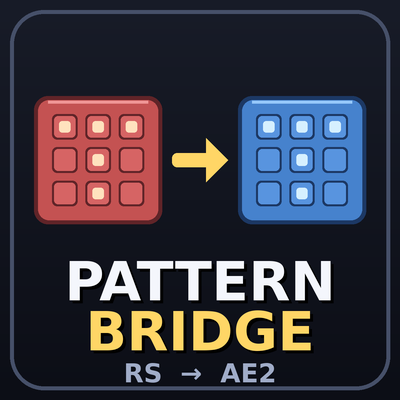
CurseForge · Minecraft mod
Pattern Bridge
Convert Refined Storage 2 patterns into Applied Energistics 2 patterns with one block. Supports crafting, processing, stonecutter and smithing patterns, with per-side import/export automation.
Choose a version Pick your version below, then grab the matching file.
Quick answer
Which Pattern Bridge release should I use?
Latest stable file patternbridge-1.21.1-1.0.1
Game version 1.21.1
Loader NeoForge
Pattern Bridge patternbridge-1.21.1-1.0.1 targets 1.21.1 with NeoForge. The project page does not say whether this file belongs on the client, dedicated server, or both. No extra mods listed for this file.
Where it goes
Is Pattern Bridge required on the client, server, or both?
The project page does not say whether this file belongs on the client, dedicated server, or both.
Client Source doesn’t say
Dedicated server Source doesn’t say
Loader for this release NeoForge
Required install it here Optional supported, not mandatory Not supported do not install here Source doesn’t say do not assume
The source does not explicitly classify this release as client-only or server-only.
What else does Pattern Bridge patternbridge-1.21.1-1.0.1 need?
patternbridge-1.21.1-1.0.1. Change the file and its required mods may change too.
This file does not list any required mods. Do not add a library just because a different file uses it.
This file does not list any required or optional mods.
Before you install it
Add Pattern Bridge without breaking your instance.
Built for Pattern Bridge patternbridge-1.21.1-1.0.1. Pick another file and the loader, install side or required mods may change.
- 01
Stick to this file
Use patternbridge-1.21.1-1.0.1. It targets 1.21.1 with NeoForge; another release may have different loader, side or dependency requirements.
- 02
Bring the mods it needs
This file does not list any required mods. Do not add a library just because a different file uses it.
- 03
Put it on the correct side
The project page does not say whether this file belongs on the client, dedicated server, or both.
- 04
Pick the file you checked
Use the “Get this file” button beside patternbridge-1.21.1-1.0.1. It opens that exact file at the source.
About this project
What does Pattern Bridge add?
Pattern Bridge
Convert Refined Storage 2 patterns into Applied Energistics 2 patterns, in one block.
Moving a base from Refined Storage to Applied Energistics 2 means re-encoding every pattern by hand. Pattern Bridge adds a single block, the Pattern Converter, that does it for you.
How it works
- Place the Pattern Converter and right-click it.
- Put your encoded Refined Storage patterns in the top row.
- Put blank AE2 patterns in the second row.
- The converted AE2 patterns appear in the third row, and your original RS patterns are returned in the fourth.
One pattern is converted every half second, and each conversion uses one blank AE2 pattern.
Supported pattern types
| Refined Storage 2 | Applied Energistics 2 |
|---|---|
| Crafting | Crafting (fuzzy mode becomes "allow substitutes") |
| Processing | Processing (items and fluids) |
| Stonecutter | Stonecutting |
| Smithing table | Smithing table |
Custom names carry over to the converted pattern.
Automation
The panel on the right side of the GUI lets you set every side of the block to Off, In or Out:
- In pulls RS patterns and blank AE2 patterns from the inventory next to that side.
- Out lets pipes and hoppers take converted patterns and returned originals out.
- Auto Output pushes finished patterns straight into the inventory next to every Out side.
- The panel lists which sides are importing and which are exporting.
Sides are relative to the front of the block, so settings stay correct however you place or rotate it. The block faces you when placed.
Limitations
Conversion is not perfect, because the two mods store patterns differently.
- Refined Storage "allowed alternatives" on processing inputs have no Applied Energistics equivalent. They are listed in the converted pattern's tooltip instead.
- Resources other than items and fluids (for example chemicals) can't be converted.
- A pattern whose recipe no longer exists stays in the input row.
Requirements
- Minecraft 1.21.1
- NeoForge 21.1.265
- Applied Energistics 2 (19.2.17)
- Refined Storage 2 (2.0.9)
Notes
Pattern Bridge is an unofficial addon. It is not affiliated with or endorsed by the Refined Storage or Applied Energistics 2 teams.
Found a bug or have a request? Please report it on the issue tracker.
Project description from CurseForge.
Pick your setup
Pattern Bridge by Minecraft version and loader
Choose the version and loader you play, then open the matching release.
Check the dependencies, then try the file in a copied instance before changing a world you care about.
Recent files
Pattern Bridge versions and loaders
patternbridge-1.21.1-1.0.1
patternbridge-1.21.1-1.0.1.jar
3 Nov 2026
Client Source doesn’t say Server Source doesn’t say Dependencies No extras listed Listed on Release listing
Check the 1.21.1 · NeoForge setup 1.21.1NeoForge release
patternbridge-1.0.0
patternbridge-1.0.0.jar
2 Nov 2026
Client Source doesn’t say Server Source doesn’t say Dependencies No extras listed Listed on Release listing
Check the 1.21.1 · NeoForge setup 1.21.1NeoForge release
Looking for an older file? The official CurseForge project page is in Resources.
 mod
CurseForge + Modrinth · Minecraft
VO: Better Dogs
Enhances vanilla wolves with unique personalities (Aggressive, Pacifist, Normal), smarter AI, safety behaviors, and combat improvements.
 mod
CurseForge · Minecraft
IE Conveyor Refinements
A tiny mod to brush-up IE conveyors. right-click to pick up items, improve rendering.
 mod
CurseForge + Modrinth · Minecraft
VO: Creative Fly Speed
Allows players to adjust their flight speed in Creative and Spectator modes with dynamic mouse-scroll tuning, sprint momentum, and anti-rubberbanding.