

Minecraft version
Back to mods 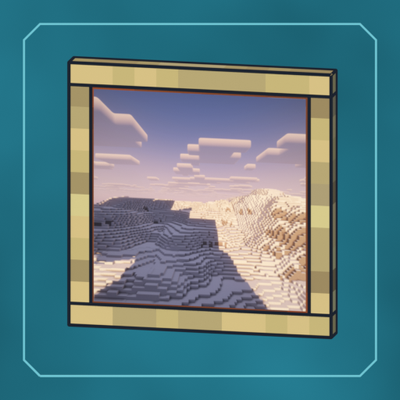
CurseForge · Minecraft mod
Easy Panorama
Create main-menu panoramas from your world with one capture button. Supports shaders and exports resource packs and FancyMenu-compatible panoramas.
Choose a version Pick your version below, then grab the matching file.
Quick answer
Which Easy Panorama release matches 26.3 Forge?
Best match for your filters easy-panorama-forge-26.3-1.0.8.jar
Game version 26.3
Loader Forge
Easy Panorama easy-panorama-forge-26.3-1.0.8.jar targets 26.3 with Forge. The project page does not say whether this file belongs on the client, dedicated server, or both. No extra mods listed for this file.
Where it goes
Is Easy Panorama required on the client, server, or both?
The project page does not say whether this file belongs on the client, dedicated server, or both.
Client Source doesn’t say
Dedicated server Source doesn’t say
Loader for this release Forge
Required install it here Optional supported, not mandatory Not supported do not install here Source doesn’t say do not assume
The source does not explicitly classify this release as client-only or server-only.
What else does Easy Panorama easy-panorama-forge-26.3-1.0.8.jar need?
easy-panorama-forge-26.3-1.0.8.jar on 26.3 Forge. Every mod below is checked against that same setup.
This file does not list any required mods. Do not add a library just because a different file uses it.
This file does not list any required or optional mods.
Before you install it
Add Easy Panorama without breaking your instance.
Built for Easy Panorama easy-panorama-forge-26.3-1.0.8.jar on 26.3 Forge. Pick another file and the loader, install side or required mods may change.
- 01
Stick to this file
Use easy-panorama-forge-26.3-1.0.8.jar. It targets 26.3 with Forge; another release may have different loader, side or dependency requirements.
- 02
Bring the mods it needs
This file does not list any required mods. Do not add a library just because a different file uses it.
- 03
Put it on the correct side
The project page does not say whether this file belongs on the client, dedicated server, or both.
- 04
Pick the file you checked
Use the “Get this file” button beside easy-panorama-forge-26.3-1.0.8.jar. It opens that exact file at the source.
About this project
What does Easy Panorama add?

Found the view? Keep it.
Easy Panorama turns a view from your world into a main-menu background by capturing all six directions around you. You can use a build, a landscape, or a spot you've picked out for your modpack.

| Getting started Choose the download for your Minecraft version and loader. When sharing the result, include the FancyMenu panorama and layout, or the enabled resource pack. Players don't need your original shader. From 1.0.5, duplicate cleanup runs when the main menu opens, even if the capture controls are hidden. |
|---|
| One capture button Stand somewhere safe and let the chunks load, then press F8. Pick a resolution and capture the panorama without your hands or the HUD in the way. |
Keep your shader look You can capture with a shader running. Check the finished panorama: moving clouds and some effects can leave visible seams. |
|---|---|
| Works with FancyMenu If you use FancyMenu, save to its panorama folder and select the result as your Cubic Panorama. Your existing title and buttons can stay as they are. |
Resource packs and duplicate cleanup Without FancyMenu, export a resource-pack ZIP. Version 1.0.5 also checks older exports on startup and removes verified duplicates. It keeps edited files and active backgrounds that can't be safely switched. |
Need a hand? Join the Discord. For bugs, include your version and what happened.
Created by Struppi0508
Sharing a video or stream? Please link the official project.
Project description from CurseForge.
Pick your setup
Easy Panorama by Minecraft version and loader
Choose the version and loader you play, then open the matching release.
Minecraft version
1.21.1
3 loader buildsMinecraft version
1.20.1
2 loader buildsCheck the dependencies, then try the file in a copied instance before changing a world you care about.
Recent files
Easy Panorama versions and loaders
easy-panorama-forge-26.3-1.0.8.jar
22 Nov 2026
Client Source doesn’t say Server Source doesn’t say Dependencies No extras listed Listed on Release listing
Check the 26.3 · Forge setup Forge26.3 release
easy-panorama-forge-26.3-1.0.6.jar
3 Nov 2026
Client Source doesn’t say Server Source doesn’t say Dependencies No extras listed Listed on Release listing
Check the 26.3 · Forge setup Forge26.3 release
easy-panorama-forge-26.3-1.0.5.jar
3 Nov 2026
Client Source doesn’t say Server Source doesn’t say Dependencies 1 required · 1 unchecked Listed on Release listing
Check the 26.3 · Forge setup Forge26.3 release
easy-panorama-forge-26.3-1.0.3.jar
3 Nov 2026
Client Source doesn’t say Server Source doesn’t say Dependencies No extras listed Listed on Release listing
Check the 26.3 · Forge setup Forge26.3 beta
Looking for an older file? The official CurseForge project page is in Resources.
 mod
CurseForge · Minecraft
AppleStats :timmer+ AppleSkin+ Jade +GUI Clock+Coordinates+Horse Stat
HUD:A lightweight Jade alternative ,effect timmer ,Target Info,Saturation and Coordinates Monitor ,Waila,HWYLA,show Horse speed and jump stats,death location,Death Finder
 mod
CurseForge · Minecraft
Breed faster Happy Ghasts
Breed faster Happy Ghasts, boost flight speed with Speed Potions or Snowballs, and inspect mount stats with a Book and Quill.
 mod
CurseForge · Minecraft
No Trade Cycling, Just Pick
Stop rerolling villagers. Press Pick trade and select any 2 trades its profession can offer (max-level enchanted books included). Fast trade and saves time.