Create Needed by Create: Engine Engineer Create Engine Engineer 2.2.0
requiredMatching file found Matched file: Create 6.0.10 for mc1.21.1

CurseForge · Minecraft mod
Build real engines piece by piece: V8s, flat sixes, Wankels, twin-turbos. Tune them, hear them roar, and turn their power into Create rotation.
Quick answer
Create: Engine Engineer Create Engine Engineer 2.2.0 targets 1.21.1 with NeoForge. The project page does not say whether this file belongs on the client, dedicated server, or both. All 1 required mods have matching files.
Where it goes
The project page does not say whether this file belongs on the client, dedicated server, or both.
The source does not explicitly classify this release as client-only or server-only.
Create Engine Engineer 2.2.0 on NeoForge. Every mod below is checked against that same setup.
Install Create first. We found matching files for this game-version and loader setup.
We only count dependency files that match this setup. A file for another loader does not fill the gap.
Before you install it
Built for Create: Engine Engineer Create Engine Engineer 2.2.0 on NeoForge. Pick another file and the loader, install side or required mods may change.
Use Create Engine Engineer 2.2.0. It targets 1.21.1 with NeoForge; another release may have different loader, side or dependency requirements.
Install Create first. We found matching files for this game-version and loader setup.
The project page does not say whether this file belongs on the client, dedicated server, or both.
Use the “Get this file” button beside Create Engine Engineer 2.2.0. It opens that exact file at the source.
About this project
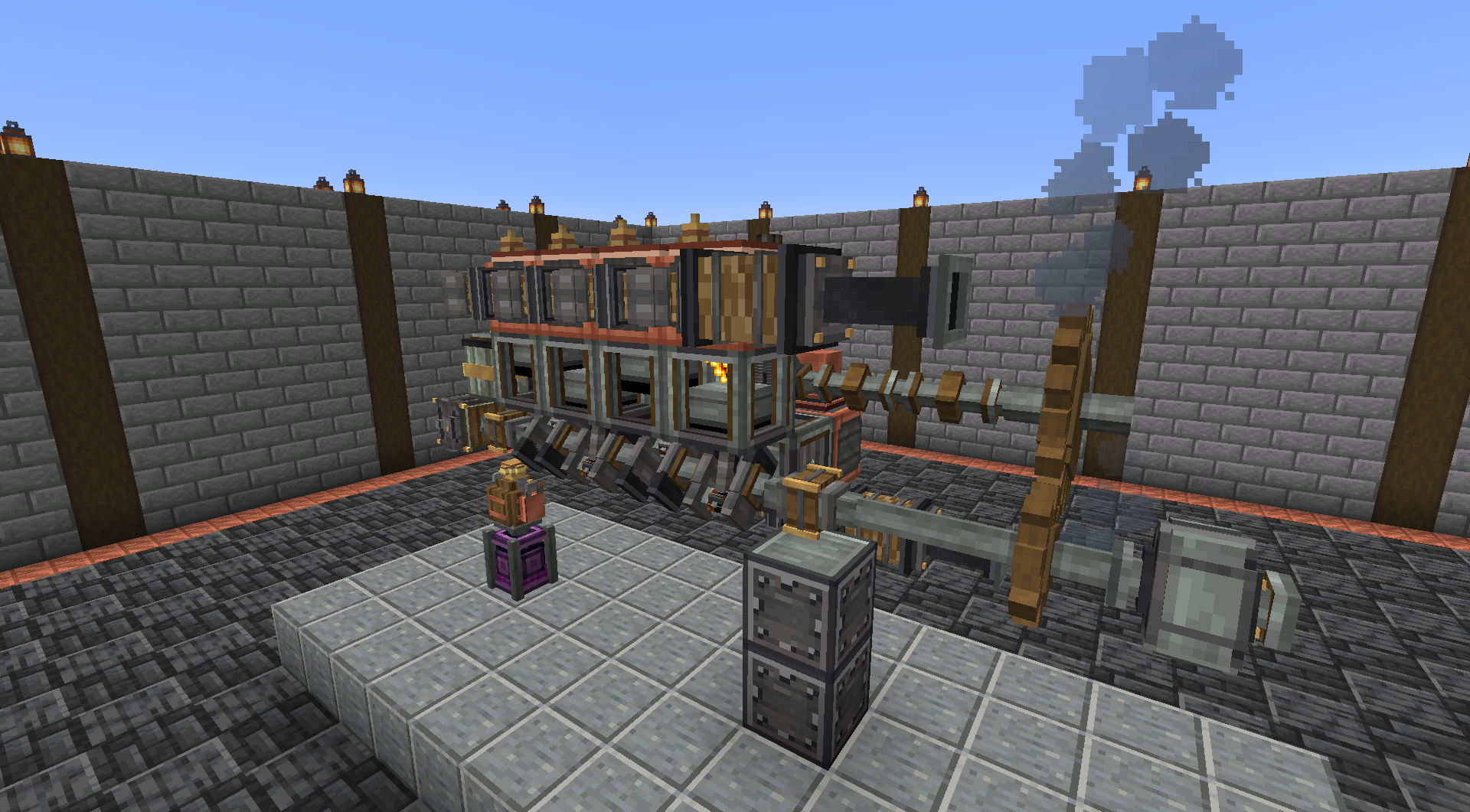
An addon for Create with working internal combustion engines. Place the crankshaft, cylinders, heads, pistons, cams and valves yourself, pipe in air and fuel, and the engine you built fires in order, sounds like what it is, and drives your Create machines.
🔊 It has a voice. The exhaust note is made from the engine's speed and firing order, so a V-twin lopes, a six hums and a dead cylinder limps. Turbos whistle, blow off and crackle. Turn your sound up.
| Layouts | Inline, V, flat and Wankel, with coupled crankshafts up to a V12 |
| Fuels | Diesel, plant oil, gasoline, kerosene, ethanol, methanol and biodiesel, plus other mods' fuels |
| Power | Turbos, superchargers, intercoolers, flywheels and a 13-gear transmission |
| Tools | Bank Builder, Timing Tool, Blueprints, Dynamometer, Black Box recorder, Engineer's Goggles |
| Learning | A Ponder scene for every part, and advancement tracks |
| Works with | Create Aeronautics (thin air), Create: Diesel Generators (fuels), Pollution of the Realms, JEI, EMI, KubeJS, CC: Tweaked |
| For packs and addons | Config presets, data-driven parts and fuels, a /ce command, and a frozen public API |
| Needs | Minecraft 1.21.1, NeoForge, Create 6.0.10 (required on client and server) |
| Stage | What you build |
|---|---|
| Start | A single diesel cylinder and a flywheel. The early game is forgiving, and nothing ever overheats or wears out |
| Grow | An inline six or a V8, laid out in one click with the Bank Builder, fed by your own plant-oil and ethanol chain |
| Tune | Turbos, superchargers, precision parts, a transmission, and the Dynamometer to prove it worked |
| Master | Coupled-crank V12s, Wankel rotaries, a Refinery column, and engines that heat your boilers and basins |
c:diesel, c:gasoline, c:ethanol, c:kerosene, c:methanol or c:plantoil, or given an entry in the fuel data mapCreate caps rotation at 256 RPM by default, and engines hit that ceiling. Raise it: in serverconfig/create-server.toml under [kinetics], set maxRotationSpeed to 512 (higher works too). The engine simulation is built to stay cheap at speed, and its torque rating follows the limit you set.
The server config (serverconfig/create_engines-v2-server.toml) has [balance] multipliers, [features] switches and [compat] settings, so a pack can rebalance without code. Turning a feature off never removes blocks; they stop doing that job. Three presets ship in the jar (casual, standard, expert), and /ce preset <name> applies one. The client config (create_engines-v2-client.toml) thins out engine sound and particles on a big engine. A 1.x config is read once and carried over, and the log says what moved.
Everything else is data: fuel properties are a datapack data map (data_maps/fluid/fuel.json), so other mods' fluids can be made into fuels; the four precision parts are part_effects/<part>.json; a cylinder or the rotary chamber can be retuned with the part_stats data map; and refining routes are a data recipe type, create_engines:refining. In game, /ce (game master) shows what the config and the data packs are really doing: /ce config, /ce fuels, /ce parts and /ce api. The guides are in the repository: PACKS.md, CONFIG.md and DATA.md.
A public API under its own version (1.1.0, frozen at 2.0): read any engine (EngineApi.viewAt), listen to its state changes and milestones, and register an EngineSourceProvider with a TorqueSource to put another kind of engine on a crankshaft, with boost, goggle lines and blueprint support. A working example is built and tested with the mod. See ADDONS.md and API.md.
All optional; none is needed to play.
Nearly all of the code, models, textures, sounds, Ponder scenes and docs were written by an AI (Claude) at my direction. I have played, tested and reworked almost all of it over many passes, and it ships with unit tests and in-world GameTests. If something breaks, please report it on the issue tracker. Block, item and fluid IDs, config keys and ranges, advancement IDs, the data-map formats and the public API stay stable within a major version. 2.0 was the one release that renamed things (advancement IDs, config files); it carries your advancements, config and casing dye across, and a release that changes how an existing engine behaves says so in its changelog.
Project description from CurseForge.
Pick your setup
Choose the version and loader you play, then open the matching release.
Check the dependencies, then try the file in a copied instance before changing a world you care about.
Recent files
create_engines-2.2.0-1.21.1.jar
24 Nov 2026
create_engines-2.1.0-1.21.1.jar
24 Nov 2026
create_engines-2.0.2-1.21.1.jar
23 Nov 2026
create_engines-2.0.1-1.21.1.jar
22 Nov 2026
create_engines-2.0.0-1.21.1.jar
21 Nov 2026
create_engines-1.4.0-1.21.1.jar
18 Nov 2026
create_engines-1.3.0-1.21.1.jar
17 Nov 2026
create_engines-1.2.1-1.21.1.jar
15 Nov 2026
create_engines-1.2.0-1.21.1.jar
15 Nov 2026
create_engines-1.1.0-1.21.1.jar
15 Nov 2026
create_engines-1.0.1-1.21.1.jar
14 Nov 2026
create_engines-1.0.0-1.21.1.jar
13 Nov 2026
Looking for an older file? The official CurseForge project page is in Resources.
 mod
Carefully tested, configurable fixes for unresolved mod bugs and cross-mod compatibility conflicts.
 mod
A companion mod to my other mod "Life On The Prairie" this time focused on the Rainforests of the Still Life world
 mod
Add a boost of energy to your Minecraft world with the Monster Energy Mod! This mod introduces multiple energy drink variants inspired by Monster designed to enhance the gameplay.