Minecraft version
Back to mods 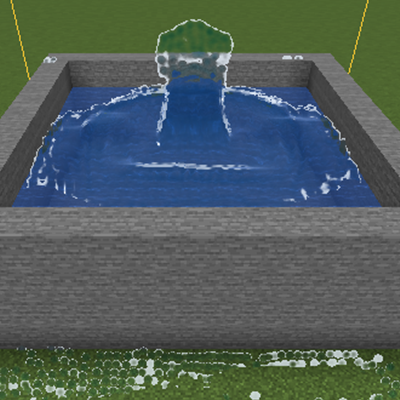
CurseForge · Minecraft mod
Agua Realista GPU
Realistic GPU-simulated water: refraction, foam, splashes and lava, with quality profiles for every PC.
Choose a version Pick your version below, then grab the matching file.
Quick answer
Which Agua Realista GPU release should I use?
beta file aguarealista-0.1.0-beta.5.jar
Game version 1.21.1
Loader NeoForge
Agua Realista GPU aguarealista-0.1.0-beta.5.jar targets 1.21.1 with NeoForge. The project page does not say whether this file belongs on the client, dedicated server, or both. No extra mods listed for this file.
Where it goes
Is Agua Realista GPU required on the client, server, or both?
The project page does not say whether this file belongs on the client, dedicated server, or both.
Client Source doesn’t say
Dedicated server Source doesn’t say
Loader for this release NeoForge
Required install it here Optional supported, not mandatory Not supported do not install here Source doesn’t say do not assume
The source does not explicitly classify this release as client-only or server-only.
What else does Agua Realista GPU aguarealista-0.1.0-beta.5.jar need?
aguarealista-0.1.0-beta.5.jar. Change the file and its required mods may change too.
This file does not list any required mods. Do not add a library just because a different file uses it.
This file does not list any required or optional mods.
Before you install it
Add Agua Realista GPU without breaking your instance.
Built for Agua Realista GPU aguarealista-0.1.0-beta.5.jar. Pick another file and the loader, install side or required mods may change.
- 01
Stick to this file
Use aguarealista-0.1.0-beta.5.jar. It targets 1.21.1 with NeoForge; another release may have different loader, side or dependency requirements.
- 02
Bring the mods it needs
This file does not list any required mods. Do not add a library just because a different file uses it.
- 03
Put it on the correct side
The project page does not say whether this file belongs on the client, dedicated server, or both.
- 04
Pick the file you checked
Use the “Get this file” button beside aguarealista-0.1.0-beta.5.jar. It opens that exact file at the source.
About this project
What does Agua Realista GPU add?
Agua Realista (Realistic Water) - BETA
Minecraft 1.21.1 | NeoForge 21.1.255 | Client-side
Water that behaves and looks like Blender fluid animations: a GPU particle (FLIP) simulation rendered as one continuous surface with refraction, sky reflections, foam and splashes.
Agua que se comporta y se ve como en las animaciones de Blender: simulacion de fluidos por particulas en tu GPU, dibujada como una superficie continua con refraccion, reflejo del cielo, espuma y salpicaduras.
Features
- Real GPU simulation (compute shaders): water falls, pools, sloshes and settles against blocks.
- Continuous surface: refraction, depth absorption, Fresnel, sky reflection and sun/moon highlights that follow the time of day and weather.
- Foam and splashes on edges, loose droplets and wave crests.
- Viscous, emissive lava (/aguareal lava).
- Collides with your world: full and partial blocks (slabs, stairs...).
- Vanilla bridge: turns normal water into particles and back into blocks when it calms down.
- Entities: items and players float and are pushed by the current.
- Adapts to your PC: Auto / Low / Medium / High / Ultra / Custom profiles, adaptive quality for your target FPS, and distant water is paused.
Quality profiles
- Low: up to 40,000 particles (integrated / modest GPUs)
- Medium: up to 120,000 (mid-range GPUs)
- High: up to 280,000 (mid-high GPUs)
- Ultra: up to 600,000 (powerful GPUs)
- Auto: measures your GPU the first time and picks one
On an RTX 5050 the High profile uses about 1 ms of GPU per frame with 100,000 particles.
Requirements
- GPU and driver with OpenGL 4.3 (compute shaders). If unsupported, the mod tells you and does nothing.
- Java 21, Minecraft 1.21.1, NeoForge 21.1.255.
Commands (/aguareal ...)
spawn, clear, move, absorb, settle, auto, entities, lava, profile <profile>, bench, debug, points. All options are also in Mods > Agua Realista > Config.
Beta status - please read
This is an early beta:
- Single player / local client only: the simulated water is visual/local. Vanilla water <-> particles conversion only works in single-player worlds.
- Limited domain: the simulation fills a fixed box (shown as amber lines) that does not follow the player.
- With a shader pack active (Iris/Oculus) the mod pauses itself. NOT tested with Sodium, Iris or Create.
- Tested with Fabulous graphics and Overworld/Nether on a single GPU (NVIDIA RTX 5050). If you try it on another one, please tell me how it goes.
- Auto mode (/aguareal auto) is off by default.
- Back up your worlds: converting water to blocks modifies the world.
Reporting problems
Please include your GPU, driver, the profile used and your latest.log.
Project description from CurseForge.
Pick your setup
Agua Realista GPU by Minecraft version and loader
Choose the version and loader you play, then open the matching release.
Check the dependencies, then try the file in a copied instance before changing a world you care about.
Recent files
Agua Realista GPU versions and loaders
aguarealista-0.1.0-beta.5.jar
9 Nov 2026
Client Source doesn’t say Server Source doesn’t say Dependencies No extras listed Listed on Release listing
Check the 1.21.1 · NeoForge setup 1.21.1NeoForge beta
aguarealista-0.1.0-beta.4.jar
9 Nov 2026
Client Source doesn’t say Server Source doesn’t say Dependencies No extras listed Listed on Release listing
Check the 1.21.1 · NeoForge setup 1.21.1NeoForge beta
aguarealista-0.1.0-beta.3.jar
9 Nov 2026
Client Source doesn’t say Server Source doesn’t say Dependencies No extras listed Listed on Release listing
Check the 1.21.1 · NeoForge setup 1.21.1NeoForge beta
aguarealista-0.1.0-beta.2.jar
4 Nov 2026
Client Source doesn’t say Server Source doesn’t say Dependencies No extras listed Listed on Release listing
Check the 1.21.1 · NeoForge setup 1.21.1NeoForge beta
Agua Realista 0.1.0-beta.1
aguarealista-0.1.0-beta.1.jar
4 Nov 2026
Client Source doesn’t say Server Source doesn’t say Dependencies No extras listed Listed on Release listing
Check the 1.21.1 · NeoForge setup 1.21.1NeoForge beta
Looking for an older file? The official CurseForge project page is in Resources.
 mod
CurseForge + Modrinth · Minecraft
ModernFix
All-in-one mod that improves performance, reduces memory usage, and fixes many bugs. Compatible with all your favorite performance mods!
 mod
CurseForge + Modrinth · Minecraft
Animus
Putting more Magic in your Blood Magic.
 mod
CurseForge · Minecraft
Pro Fullbright
A lightweight Fabric mod that makes dark areas fully visible, perfect for caves, mining, and nighttime exploration.