Minecraft version
Back to mods 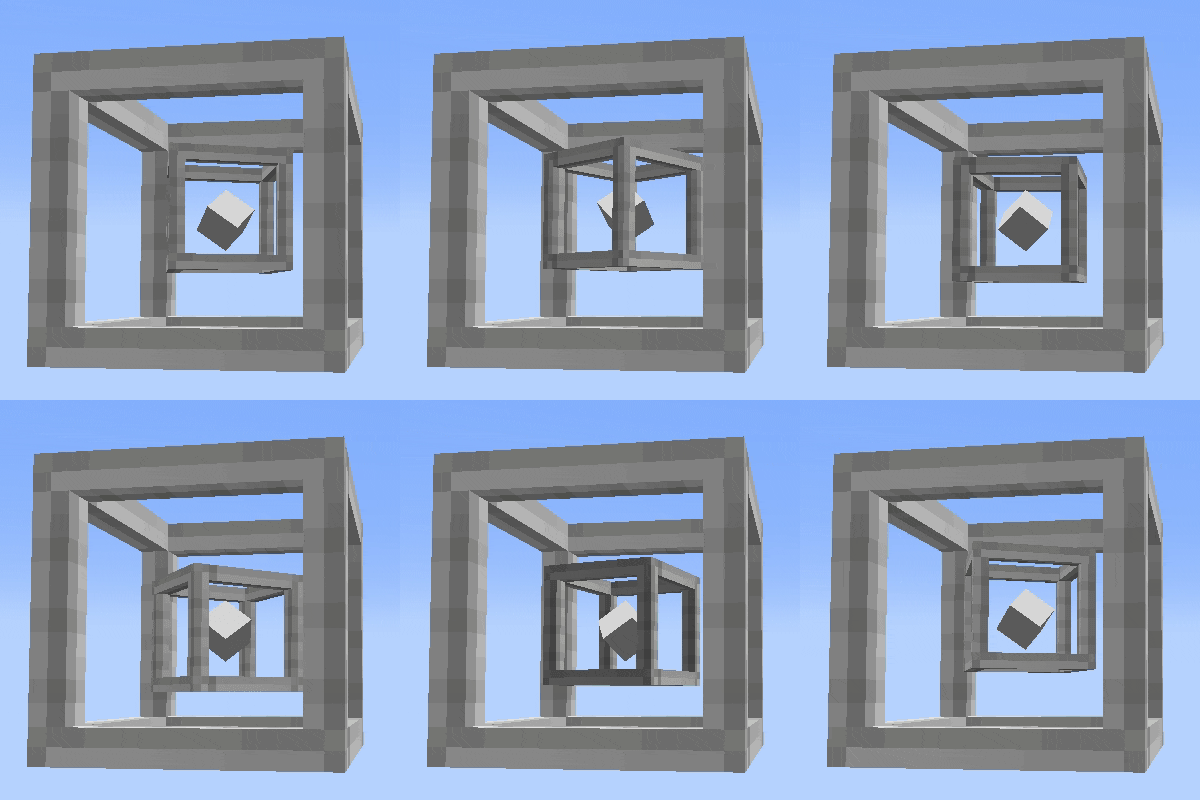
CurseForge · Minecraft mod
Gash's Super Pylons
Modular Minecraft pylons for storage, farming, and processing, with upgrades and wires for items, fluids, energy, and XP.
Choose a version Pick your version below, then grab the matching file.
Quick answer
Which Gash's Super Pylons release should I use?
Latest stable file gash_super_pylons-neoforge-26.1.2-1.0.0.jar
Game version 26.1.2
Loader NeoForge
Gash's Super Pylons gash_super_pylons-neoforge-26.1.2-1.0.0.jar targets 26.1.2 with NeoForge. The project page does not say whether this file belongs on the client, dedicated server, or both. No extra mods listed for this file.
Where it goes
Is Gash's Super Pylons required on the client, server, or both?
The project page does not say whether this file belongs on the client, dedicated server, or both.
Client Source doesn’t say
Dedicated server Source doesn’t say
Loader for this release NeoForge
Required install it here Optional supported, not mandatory Not supported do not install here Source doesn’t say do not assume
The source does not explicitly classify this release as client-only or server-only.
What else does Gash's Super Pylons gash_super_pylons-neoforge-26.1.2-1.0.0.jar need?
gash_super_pylons-neoforge-26.1.2-1.0.0.jar. Change the file and its required mods may change too.
This file does not list any required mods. Do not add a library just because a different file uses it.
This file does not list any required or optional mods.
Before you install it
Add Gash's Super Pylons without breaking your instance.
Built for Gash's Super Pylons gash_super_pylons-neoforge-26.1.2-1.0.0.jar. Pick another file and the loader, install side or required mods may change.
- 01
Stick to this file
Use gash_super_pylons-neoforge-26.1.2-1.0.0.jar. It targets 26.1.2 with NeoForge; another release may have different loader, side or dependency requirements.
- 02
Bring the mods it needs
This file does not list any required mods. Do not add a library just because a different file uses it.
- 03
Put it on the correct side
The project page does not say whether this file belongs on the client, dedicated server, or both.
- 04
Pick the file you checked
Use the “Get this file” button beside gash_super_pylons-neoforge-26.1.2-1.0.0.jar. It opens that exact file at the source.
About this project
What does Gash's Super Pylons add?
Gash's Super Pylons
everything has guideme and pounder
Turn a Super Pylon into a storage hub, a farm machine, a resource generator, or a link in an automation network. Install upgrades to choose what it does, adjust how it works, and connect it to other pylons and machines. The animated core shows what the pylon is holding, and the icons along the frame show which upgrades are installed and in what order they come out.
Start with one pylon
Craft a Super Pylon with eight iron ingots around chiseled stone bricks. A basic pylon holds up to 2,048 identical items, including their item data. Right-click to deposit items, hit the pylon to withdraw one, or sneak and hit it to take a stack. In Creative, look for the mod's own tab with the Super Pylon icon.
Build your automation
Generate and process resources. Produce cobblestone, deepslate, blackstone, netherrack, sand, glass, water, or lava. Use Smelt and Pulverize to process compatible materials, including outputs from item generators.
Automate farms and block interactions. Plant seeds and saplings, accelerate growth, harvest crops, and fell trees. The Harvester stores tree drops that fit and leaves the excess on the ground. Use Break to mine, Placer to place blocks, Clicker to interact even with an empty hand, and Dropper to eject items at the center of a block.
Store and move four kinds of resources. Connect pylons with yellow item wires, blue fluid wires, red energy wires, and green XP wires. Select the source and then the destination. Select the same pair again to disconnect and recover the installed wire. Insert and Extract transfer resources between a pylon and neighboring machines.
Tune each setup. Use six tiers of Speed, Quantity, Range, Capacity, and Energy. Range extends farming coverage vertically as well as horizontally. Add a Chunk Loader to keep nearby chunks active, or use Void to dispose of incoming items, fluids, energy, and XP.
Configure and customize
Use the Wrench to change the working side of upgrades. The 27-slot Filter supports exact items and item tags, with drag-and-drop from JEI when installed. The Paint Tool copies block textures onto the frame, and the Copy Paste Tool transfers an upgrade setup using the upgrades in your inventory.
Fluid tanks start at 32 buckets. The XP Tank stores experience and exchanges it for Bottles o' Enchanting. Bind auxiliary pylons to see the Enchanter and Anvil workshop effects, or install the Super Upgrade to make four Nether Stars orbit the core.
Gash's Super Pylons
Transforme um Super Pylon em um depósito, uma máquina de fazenda, um gerador de recursos ou um ponto da sua rede de automação. Instale upgrades para definir o que ele faz, ajuste o funcionamento e conecte o pylon a outras máquinas. O núcleo animado mostra o que está armazenado, e os ícones na borda indicam os upgrades instalados e a ordem em que saem.
Comece com um pylon
Fabrique o Super Pylon com oito barras de ferro ao redor de tijolos de pedra talhados. O pylon básico armazena até 2.048 itens exatamente iguais, incluindo os dados do item. Clique com o botão direito para depositar, bata no pylon para retirar um item ou agache e bata para retirar uma pilha. No Criativo, procure a aba do mod com o ícone do Super Pylon.
Monte sua automação
Gere e processe recursos. Produza pedregulho, ardósia, pedra-negra, netherrack, areia, vidro, água ou lava. Use Smelt e Pulverize para processar materiais compatíveis, inclusive o que sai dos geradores de itens.
Automatize fazendas e interações com blocos. Plante sementes e mudas, acelere o crescimento, colha plantações e derrube árvores. O Harvester guarda os drops das árvores que couberem no pylon e deixa o excedente no chão. Use Break para minerar, Placer para colocar blocos, Clicker para interagir até de mão vazia e Dropper para soltar itens no centro de um bloco.
Armazene e transfira quatro tipos de recurso. Conecte pylons com cabos amarelos para itens, azuis para fluidos, vermelhos para energia e verdes para XP. Selecione a origem e depois o destino. Selecione o mesmo par novamente para desconectar e recuperar o cabo instalado. Insert e Extract transferem recursos entre o pylon e máquinas vizinhas.
Ajuste cada pylon. Use seis tiers de Speed, Quantity, Range, Capacidade e Energia. O Range amplia a área da fazenda tanto na horizontal quanto na vertical. Instale o Chunk Loader para manter os chunks próximos ativos ou o Void para descartar itens, fluidos, energia e XP recebidos.
Configure e personalize
Use a Wrench para mudar o lado de trabalho dos upgrades. O Filter de 27 espaços aceita itens exatos e tags. Com o JEI instalado, você também pode arrastar os itens para o filtro. A Paint Tool copia texturas de blocos para a estrutura, e a Copy Paste Tool replica uma configuração usando os upgrades do seu inventário.
Os tanques de fluido começam com capacidade de 32 baldes. O XP Tank armazena experiência e permite trocá-la por frascos de experiência. Vincule pylons auxiliares para ver os efeitos do Enchanter e da Anvil, ou instale o Upgrade Super para fazer quatro estrelas do Nether orbitarem o núcleo.
Description will be edited with records on a soon future Descrição com gravações/capturas em um futuro proximo
Project description from CurseForge.
Pick your setup
Gash's Super Pylons by Minecraft version and loader
Choose the version and loader you play, then open the matching release.
Minecraft version
1.21.1
1 loader buildMinecraft version
1.20.1
2 loader buildsCheck the dependencies, then try the file in a copied instance before changing a world you care about.
Recent files
Gash's Super Pylons versions and loaders
gash_super_pylons-neoforge-26.1.2-1.0.0.jar
6 Nov 2026
Client Source doesn’t say Server Source doesn’t say Dependencies No extras listed Listed on Release listing
Check the 26.1.2 · NeoForge setup NeoForge26.1.2 release
gash_super_pylons-neoforge-1.21.1-1.0.0.jar
6 Nov 2026
Client Source doesn’t say Server Source doesn’t say Dependencies No extras listed Listed on Release listing
Check the 1.21.1 · NeoForge setup 1.21.1NeoForge release
gash_super_pylons-forge-1.20.1-1.0.0.jar
6 Nov 2026
Client Source doesn’t say Server Source doesn’t say Dependencies No extras listed Listed on Release listing
Check the 1.20.1 · Forge setup 1.20.1Forge release
gash_super_pylons-neoforge-26.1.2-0.16.3.jar
5 Nov 2026
Client Source doesn’t say Server Source doesn’t say Dependencies No extras listed Listed on Release listing
Check the 1.20.1 · Forge setup 1.20.1Forge release
gash_super_pylons-neoforge-1.21.1-0.16.3.jar
5 Nov 2026
Client Source doesn’t say Server Source doesn’t say Dependencies No extras listed Listed on Release listing
Check the 1.21.1 · NeoForge setup 1.20.11.21.1NeoForge release
gash_super_pylons-forge-1.20.1-0.16.3.jar
5 Nov 2026
Client Source doesn’t say Server Source doesn’t say Dependencies No extras listed Listed on Release listing
Check the 1.20.1 · Forge setup 1.20.1Forge release
gash_super_pylons-forge-1.20.1-0.13.0.jar
5 Nov 2026
Client Source doesn’t say Server Source doesn’t say Dependencies No extras listed Listed on Release listing
Check the 1.20.1 · Forge setup 1.20.1Forge release
gash_super_pylons-neoforge-1.21.1-0.13.0.jar
5 Nov 2026
Client Source doesn’t say Server Source doesn’t say Dependencies No extras listed Listed on Release listing
Check the 1.21.1 · NeoForge setup 1.21.1NeoForge release
gash_super_pylons-neoforge-26.1.2-0.13.0.jar
5 Nov 2026
Client Source doesn’t say Server Source doesn’t say Dependencies No extras listed Listed on Release listing
Check the 26.1.2 · NeoForge setup NeoForge26.1.2 release
Looking for an older file? The official CurseForge project page is in Resources.
 mod
CurseForge · Minecraft
Unified Mana - Shared Mana for Spell Mods
One unified mana pool for every supported magic mod, displayed on a single HUD bar!
 mod
CurseForge · Minecraft
RailPlus
Additional rail types for minecraft
 mod
CurseForge · Minecraft
Pocket Repose
Adds a bigger on the inside suitcase.