Minecraft version
Back to mods 
CurseForge · Minecraft mod
Server Atlas
Browse Minecraft servers in-game with search, favorites, local notes, and reusable filters for version, ping, and player count.
Choose a version Pick your version below, then grab the matching file.
Quick answer
Which Server Atlas release matches 26.3?
beta file Server Atlas 2.2.0 Beta 1 (Forge, Minecraft 26.3)
Game version 26.3
Loader Forge
Server Atlas 2.2.0 Beta 1 (Forge, Minecraft 26.3) targets 26.3 with Forge. The project page does not say whether this file belongs on the client, dedicated server, or both. No extra mods listed for this file.
Where it goes
Is Server Atlas required on the client, server, or both?
The project page does not say whether this file belongs on the client, dedicated server, or both.
Client Source doesn’t say
Dedicated server Source doesn’t say
Loader for this release Forge
Required install it here Optional supported, not mandatory Not supported do not install here Source doesn’t say do not assume
The source does not explicitly classify this release as client-only or server-only.
What else does Server Atlas 2.2.0 Beta 1 (Forge, Minecraft 26.3) need?
Server Atlas 2.2.0 Beta 1 (Forge, Minecraft 26.3) on 26.3. Every mod below is checked against that same setup.
This file does not list any required mods. Do not add a library just because a different file uses it.
This file does not list any required or optional mods.
Before you install it
Add Server Atlas without breaking your instance.
Built for Server Atlas 2.2.0 Beta 1 (Forge, Minecraft 26.3) on 26.3. Pick another file and the loader, install side or required mods may change.
- 01
Stick to this file
Use Server Atlas 2.2.0 Beta 1 (Forge, Minecraft 26.3). It targets 26.3 with Forge; another release may have different loader, side or dependency requirements.
- 02
Bring the mods it needs
This file does not list any required mods. Do not add a library just because a different file uses it.
- 03
Put it on the correct side
The project page does not say whether this file belongs on the client, dedicated server, or both.
- 04
Pick the file you checked
Use the “Get this file” button beside Server Atlas 2.2.0 Beta 1 (Forge, Minecraft 26.3). It opens that exact file at the source.
About this project
What does Server Atlas add?
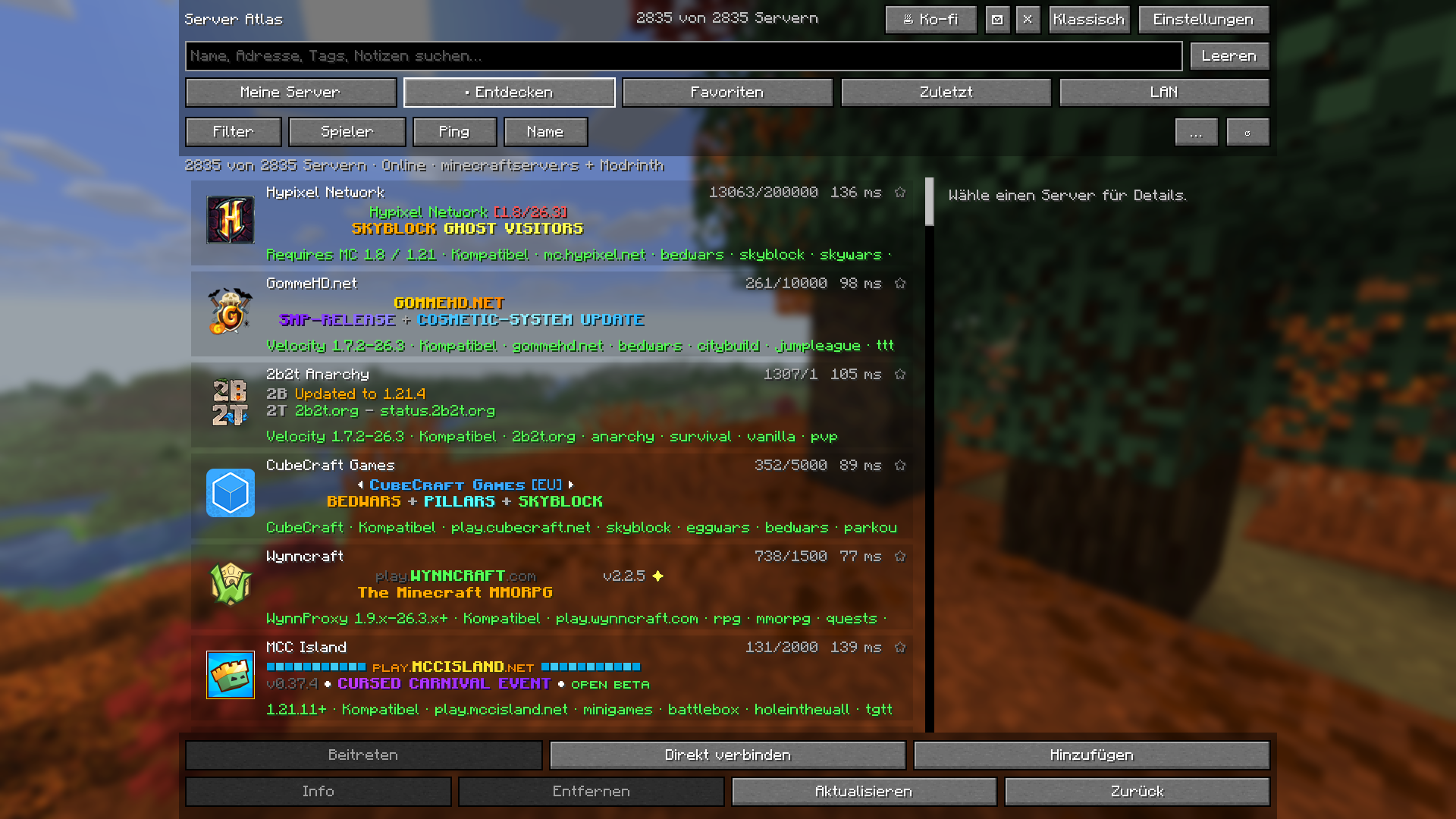
Discover Minecraft Java servers without leaving the game. Server Atlas brings a familiar Minecraft-style browser with translucent server rows, public discovery, filters, favorites and local notes.
Features
- My Servers, Discover, Favorites, Recent and LAN.
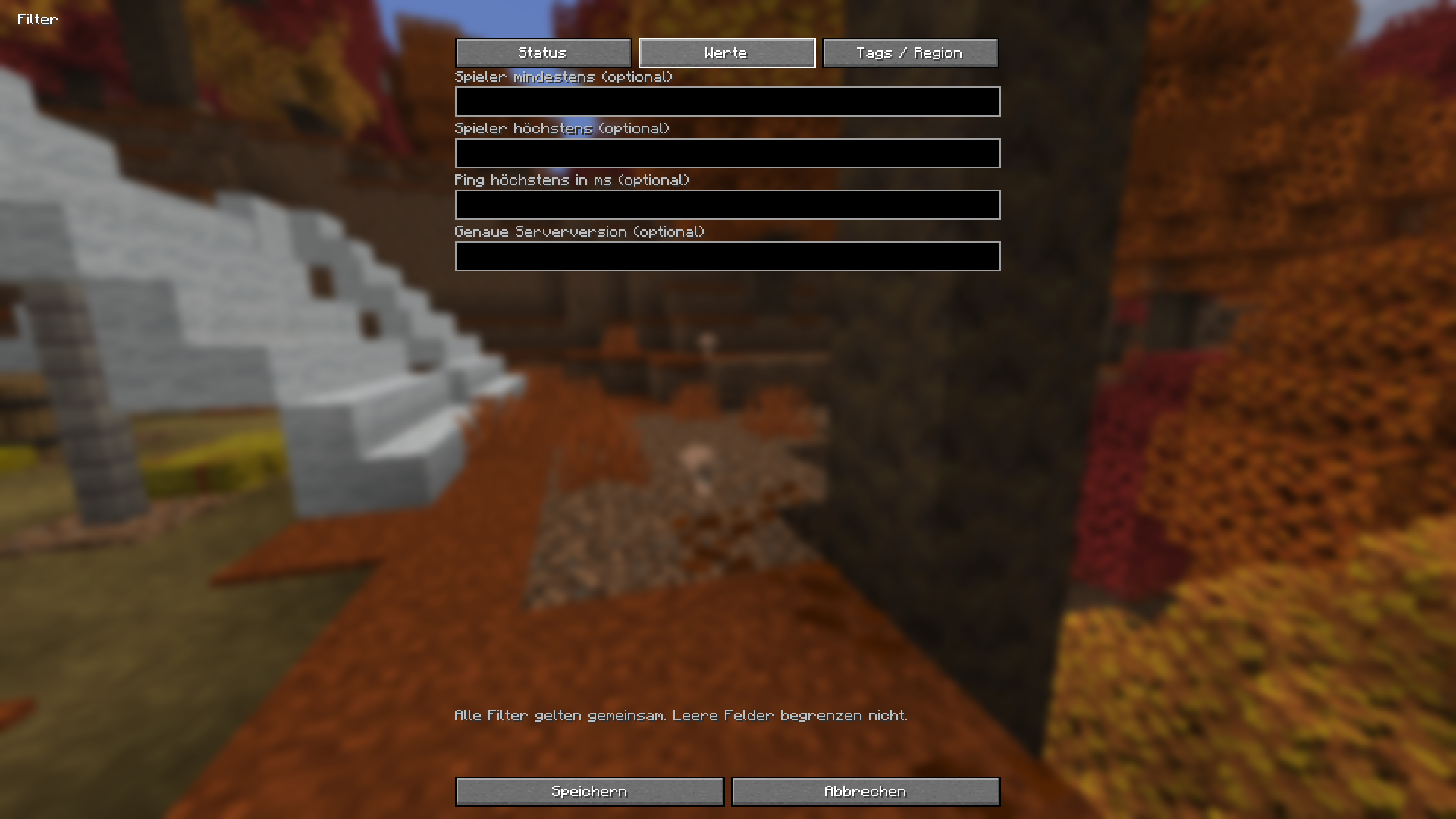
- Search names, addresses, MOTDs, tags, groups and notes; combine version, status, player-count, ping, language and region filters.
- 2,835 bundled public server addresses, with cached pages from Modrinth and minecraftserve.rs.
- Real server ping, player counts, colored MOTDs, icons and a local ping history.
- Native Minecraft widgets, reusable filter profiles, custom ordering, add/edit/delete/undo and JSON/NBT import/export.
- English and German, following Minecraft's language setting.
Installation
Minecraft 26.3 and Java 25 are required. Install Fabric Loader 0.20.1+ or Minecraft Forge 66.1.5 or later in the 66.x series, place the matching JAR in that instance's mods folder, and open Multiplayer. Install only the JAR for your loader. Required Fabric API modules are bundled. This is a client-only mod; servers need no installation. Classic returns to the original server screen.
Public beta
The Java 2.2.0 editions are public betas. Each loader build passes 96 integration checks. The final Fabric JAR was tested in an isolated standard profile with only this mod; the Forge interface was tested in its development client. The packaged Forge JAR still needs a separate test in a standard installation.
Privacy
Your saved servers, favorites and notes stay local. Directory requests do not contain your personal addresses, notes or search text. Visible servers receive standard status requests directly. Each public directory has a persistent one-request-per-minute limit, a five-minute cache and stale-cache fallback. Online discovery can be disabled. Feedback/server suggestions currently save a local draft only; automatic email is not configured.
Links
Website · Source · Issues · Support development
Credits
The mod is MIT licensed. Codex contributed to the Fabric and Forge ports and helped write the project description. The compass logo is AI-generated artwork. Both screenshots are actual game captures.
Project description from CurseForge.
Pick your setup
Server Atlas by Minecraft version and loader
Choose the version and loader you play, then open the matching release.
Check the dependencies, then try the file in a copied instance before changing a world you care about.
Recent files
Server Atlas versions and loaders
Server Atlas 2.2.0 Beta 1 (Forge, Minecraft 26.3)
server-browser-forge-2.2.0-mc26.3.jar
5 Nov 2026
Client Source doesn’t say Server Source doesn’t say Dependencies No extras listed Listed on Release listing
Check the 26.3 · Forge setup Forge26.3 beta
Server Atlas 2.2.0 Beta 1 (Fabric, Minecraft 26.3)
server-browser-fabric-2.2.0-mc26.3.jar
5 Nov 2026
Client Source doesn’t say Server Source doesn’t say Dependencies No extras listed Listed on Release listing
Check the 26.3 · Fabric setup Fabric26.3 beta
Looking for an older file? The official CurseForge project page is in Resources.
 mod
CurseForge · Minecraft
Mo Glass
Minecraft mod that adds glass stairs and glass slabs. They look great in any build and connect seamlessly with vanilla glass blocks.
 mod
CurseForge · Minecraft
Minemories
export 3D snapshot of your worlds and modded adventures
 mod
CurseForge · Minecraft
SBC - Hypixel Skyblock Companion
The all-in-one Hypixel SkyBlock companion: Replaces the stack of mods you’d normally run: tooltips and prices, a picture warp menu, a minimap, trackers, garden, mining, rift, dungeon and slayer helpers, profile viewer. One mod, one look, one settings menu.