Minecraft version
Back to mods 
CurseForge · Minecraft mod
Immersive RPG Interactions
A mod that let you interact with the world differently
Choose a version Pick your version below, then grab the matching file.
Quick answer
Which Immersive RPG Interactions release should I use?
Latest stable file immersiverpginteractions-1.0.1.jar
Game version 1.21.1
Loader NeoForge
Immersive RPG Interactions immersiverpginteractions-1.0.1.jar targets 1.21.1 with NeoForge. The project page does not say whether this file belongs on the client, dedicated server, or both. No extra mods listed for this file.
Where it goes
Is Immersive RPG Interactions required on the client, server, or both?
The project page does not say whether this file belongs on the client, dedicated server, or both.
Client Source doesn’t say
Dedicated server Source doesn’t say
Loader for this release NeoForge
Required install it here Optional supported, not mandatory Not supported do not install here Source doesn’t say do not assume
The source does not explicitly classify this release as client-only or server-only.
What else does Immersive RPG Interactions immersiverpginteractions-1.0.1.jar need?
immersiverpginteractions-1.0.1.jar. Change the file and its required mods may change too.
This file does not list any required mods. Do not add a library just because a different file uses it.
This file does not list any required or optional mods.
Before you install it
Add Immersive RPG Interactions without breaking your instance.
Built for Immersive RPG Interactions immersiverpginteractions-1.0.1.jar. Pick another file and the loader, install side or required mods may change.
- 01
Stick to this file
Use immersiverpginteractions-1.0.1.jar. It targets 1.21.1 with NeoForge; another release may have different loader, side or dependency requirements.
- 02
Bring the mods it needs
This file does not list any required mods. Do not add a library just because a different file uses it.
- 03
Put it on the correct side
The project page does not say whether this file belongs on the client, dedicated server, or both.
- 04
Pick the file you checked
Use the “Get this file” button beside immersiverpginteractions-1.0.1.jar. It opens that exact file at the source.
About this project
What does Immersive RPG Interactions add?
Immersive RPG Interactions
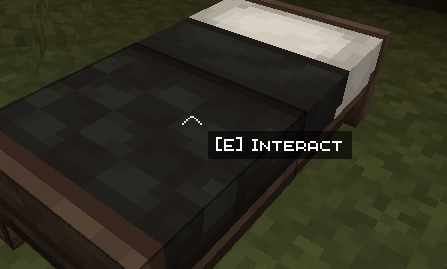
Doors, chests, villagers and other blocks and mobs show an "Interact" prompt near your crosshair, like in RPG games. Press the interaction key to act, without using right click.
What it does
- Crosshair prompt: when you aim at something you can interact with, the text "[key] Interact" appears next to the centre of the screen.
- Dedicated key: the default is E, but you can change it in Options → Controls, under the "Immersive RPG Interactions" category.
- Right click only places: when you aim at an interactable, right click won't open it. Hold Shift to place blocks next to chests and doors, just like in vanilla.
- Interaction priority: when you aim at an interactable, the interaction key takes priority over other commands on the same key (for example, a map opened by another mod).
- Automatic detection: the mod recognises many blocks and mobs with an interaction on its own, including those from other mods, with no configuration.
- Customisable: you can add blocks or entities with a datapack, using the tag
immersiverpginteractions:interactable.
Examples
- Doors and gates.
- Chests, trapped chests and barrels.
- Villagers, to open trades.
- Campfires, to cook food with E.
- Fences, to tie a mob with a lead.
Limitations
- Automatic detection may show the prompt on some decorative blocks from other mods that do nothing. If you notice one, please report it.
- Some mods handle interaction in non-standard ways and may not be recognised.
- While you aim at an interactable, right click is blocked: you can't eat or use a bow while looking at a chest or door.
Project description from CurseForge.
Pick your setup
Immersive RPG Interactions by Minecraft version and loader
Choose the version and loader you play, then open the matching release.
Minecraft version
1.20.1
1 loader buildCheck the dependencies, then try the file in a copied instance before changing a world you care about.
Recent files
Immersive RPG Interactions versions and loaders
immersiverpginteractions-1.0.1.jar
13 Nov 2026
Client Source doesn’t say Server Source doesn’t say Dependencies No extras listed Listed on Release listing
Check the 1.21.1 · NeoForge setup 1.21.1NeoForge release
immersiverpginteractions-0.1.0.jar
13 Nov 2026
Client Source doesn’t say Server Source doesn’t say Dependencies No extras listed Listed on Release listing
Check the 1.20.1 · Forge setup 1.20.1Forge release
immersiverpginteractions-1.0.0.jar
6 Nov 2026
Client Source doesn’t say Server Source doesn’t say Dependencies No extras listed Listed on Release listing
Check the 1.21.1 · NeoForge setup 1.21.1NeoForge release
Looking for an older file? The official CurseForge project page is in Resources.
 mod
CurseForge + Modrinth · Minecraft
SeasonHud
Display the current season on the Hud or under the minimap
 mod
CurseForge · Minecraft
Instance Pack Manager
Automatically loads and enables every data pack and resource pack in the instance's datapacks/ and resourcepacks/ folders, in every world.
 mod
CurseForge · Minecraft
Create: Crushing Recipe Fix / Balancer
Fixes overlapping Create Crushing Wheel recipes by removing exact duplicates and giving each unique recipe an equal chance to run.