Minecraft version
Back to mods 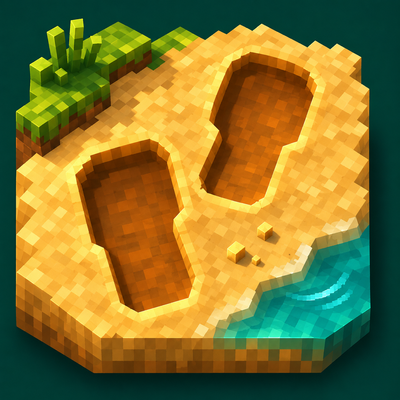
CurseForge · Minecraft mod
World Effects
Adds detailed footprints and material-specific movement, jump, and landing particles to make your world feel more alive.
Choose a version Pick your version below, then grab the matching file.
Quick answer
Which World Effects release matches 26.3 Forge?
Best match for your filters world-effects-1.4.1-26.3-forge.jar
Game version 26.3
Loader Forge
World Effects world-effects-1.4.1-26.3-forge.jar targets 26.3 with Forge. The project page does not say whether this file belongs on the client, dedicated server, or both. No extra mods listed for this file.
Where it goes
Is World Effects required on the client, server, or both?
The project page does not say whether this file belongs on the client, dedicated server, or both.
Client Source doesn’t say
Dedicated server Source doesn’t say
Loader for this release Forge
Required install it here Optional supported, not mandatory Not supported do not install here Source doesn’t say do not assume
The source does not explicitly classify this release as client-only or server-only.
What else does World Effects world-effects-1.4.1-26.3-forge.jar need?
world-effects-1.4.1-26.3-forge.jar on 26.3 Forge. Every mod below is checked against that same setup.
This file does not list any required mods. Do not add a library just because a different file uses it.
This file does not list any required or optional mods.
Before you install it
Add World Effects without breaking your instance.
Built for World Effects world-effects-1.4.1-26.3-forge.jar on 26.3 Forge. Pick another file and the loader, install side or required mods may change.
- 01
Stick to this file
Use world-effects-1.4.1-26.3-forge.jar. It targets 26.3 with Forge; another release may have different loader, side or dependency requirements.
- 02
Bring the mods it needs
This file does not list any required mods. Do not add a library just because a different file uses it.
- 03
Put it on the correct side
The project page does not say whether this file belongs on the client, dedicated server, or both.
- 04
Pick the file you checked
Use the “Get this file” button beside world-effects-1.4.1-26.3-forge.jar. It opens that exact file at the source.
About this project
What does World Effects add?
World Effects
Make every step feel alive.
World Effects adds material-aware footprints, movement particles and water reactions to Minecraft. Leave a trail through sand and snow, kick up small fragments as you sprint, and watch ripples spread across the water.
Features
- Full footprints on sand, snow, dirt and mud, with material-specific shading, left and right soles, and gradual fading.
- Custom movement particles: sand grains, snow powder, earth fragments, grass fragments, gravel chips and mud droplets.
- Jump and landing reactions that follow actual ground contact, including repeated jumping and sprint jumping.
- Selective vanilla particle replacement for supported movement effects, with a setting to restore the original particles.
- Water effects: ripples, swimming reactions and boat wakes.
- Vegetation contact details: small grass accents that bend and recover as you move.
- Quality presets and customization: adjust footprint size, lifetime, density, effect distance and particle limits.
Footprints follow supported ground, including suitable snow layers, slabs and stair surfaces. When a full impression cannot fit near an edge, it is skipped. Firm grass and gravel receive material-specific movement reactions instead of ordinary soft-ground impressions.
Installation
- Use Minecraft Java Edition 1.21.1 and Java 21.
- Download the file for your loader: Forge, NeoForge or Fabric.
- Place it in your profile's
modsfolder. Fabric users also need Fabric API.
World Effects is a client-side cosmetic mod. It works in singleplayer and multiplayer without requiring installation on the server. Effects do not change terrain blocks or gameplay mechanics.
Configuration
Open the settings with:
/tinyreactions config
Choose a quality preset or customize individual effects. English and Russian settings are included.
No shader is required. Shader packs are optional and are not included.
Project description from CurseForge.
Pick your setup
World Effects by Minecraft version and loader
Choose the version and loader you play, then open the matching release.
Minecraft version
26.2
3 loader buildsMinecraft version
26.1.2
3 loader buildsMinecraft version
26.1.1
3 loader buildsMinecraft version
26.1
3 loader buildsMinecraft version
1.21.11
3 loader buildsMinecraft version
1.21.10
3 loader buildsMinecraft version
1.21.9
3 loader buildsMinecraft version
1.21.8
3 loader buildsMinecraft version
1.21.7
3 loader buildsMinecraft version
1.21.6
3 loader buildsMinecraft version
1.21.5
3 loader buildsShowing the newest 12 of 18 game versions. Older files are in the list below.
Check the dependencies, then try the file in a copied instance before changing a world you care about.
Recent files
World Effects versions and loaders
world-effects-1.4.1-26.3-forge.jar
7 Nov 2026
Client Source doesn’t say Server Source doesn’t say Dependencies No extras listed Listed on Release listing
Check the 26.3 · Forge setup Forge26.3 release
Looking for an older file? The official CurseForge project page is in Resources.
 mod
CurseForge · Minecraft
Block Jackpot: Casino Machines
Build your own Minecraft casino with eight games, craftable machines, player-managed banks, item wagers and live table spectating.
 mod
CurseForge · Minecraft
Smooth Loading Screen
A transition between the world select screen and in-game
 mod
Modrinth · Minecraft
Custom Capes
This Mod adds the ability to add custom capes to your player including gifs and normal images with a resolution up to 2048x1024 you can also see other capes and vice versa and it also works with elytra models and wavey capes