Fabric API Needed by Mob Forms - Morph into Modded & Vanilla Mobs Mob Forms 1.1.1+26.3
requiredMatching file found Matched file: [26.3] Fabric API 0.166.2+26.3
CurseForge · Minecraft mod
Kill, collect and morph into mobs with their real behaviors, abilities , variants and survival mechanics — including modded mobs and multiplayer support!
Quick answer
Mob Forms - Morph into Modded & Vanilla Mobs Mob Forms 1.1.1+26.3 targets 26.3 with Fabric. The project page does not say whether this file belongs on the client, dedicated server, or both. All 1 required mods have matching files.
Where it goes
The project page does not say whether this file belongs on the client, dedicated server, or both.
The source does not explicitly classify this release as client-only or server-only.
Mob Forms 1.1.1+26.3. Change the file and its required mods may change too.
Install Fabric API first. We found matching files for this game-version and loader setup.
We only count dependency files that match this setup. A file for another loader does not fill the gap.
Before you install it
Built for Mob Forms - Morph into Modded & Vanilla Mobs Mob Forms 1.1.1+26.3. Pick another file and the loader, install side or required mods may change.
Use Mob Forms 1.1.1+26.3. It targets 26.3 with Fabric; another release may have different loader, side or dependency requirements.
Install Fabric API first. We found matching files for this game-version and loader setup.
The project page does not say whether this file belongs on the client, dedicated server, or both.
Use the “Get this file” button beside Mob Forms 1.1.1+26.3. It opens that exact file at the source.
About this project
MOB FORMS
Become Any Mob
Defeat a mob. Take its form. Live as it for real.
Minecraft versions: 1.20.1 · 1.20.4 · 1.21.11 · 26.2 · 26.3
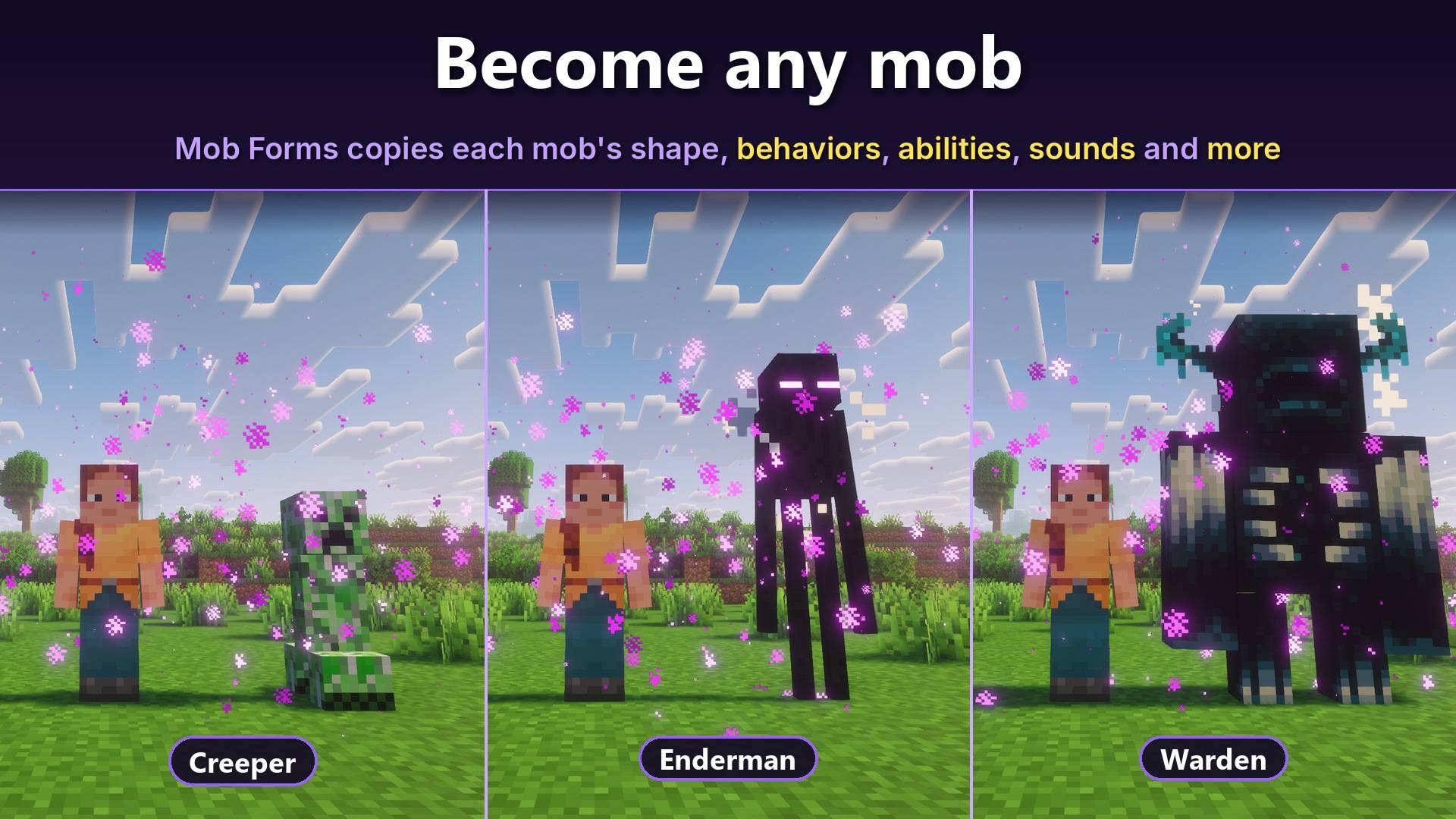
Mob Forms is more than a simple skin swap. Every transformation gives you the mob's actual body, behavior, movement, abilities, sounds and personality.
Experience its real size, health, damage, movement speed, animations and unique mechanics. The world reacts to you just as it would to the real creature.
Hunt as a Warden, soar as a Ghast, explode as a Creeper, live inside a real beehive as a Bee, or let your friends ride you as a Horse.
Every supported Minecraft version includes the same Mob Forms features.
✦ HIGHLIGHTS
Mob Forms Survival: A complete game mode where you survive as one mob, or choose up to 9 forms.
Almost every mob is playable: Including babies, biome variants, professions, colors and more.
Two unique abilities: Use your mob's abilities with the R and J keys.
Authentic mob behavior: Real movement speeds, immunities, transformations, particles, anger and hidden mechanics.
Unique survival mechanics: Every form has its own diet, inventory size and way of living.
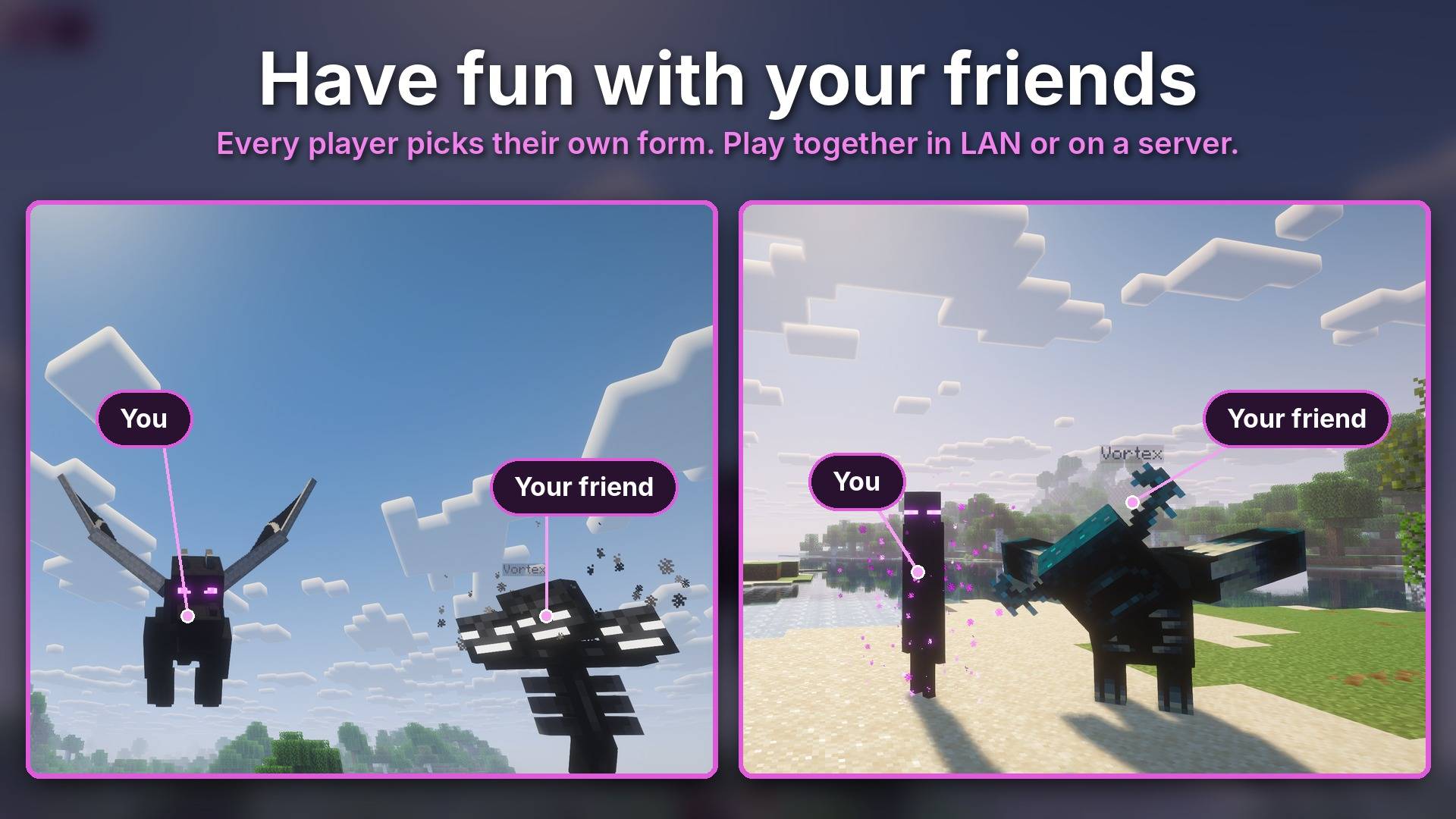
Multiplayer features: Ride other players like real mobs, use saddles and harnesses, and play together in LAN or on servers.
Admin permissions: The host controls the rules and decides what other admins can change.
Modded mob support: Creatures from other mods can also become playable forms.
Highly configurable: Customize your experience with many gameplay rules and translations in 61 languages.
✦ HOW TO GET STARTED
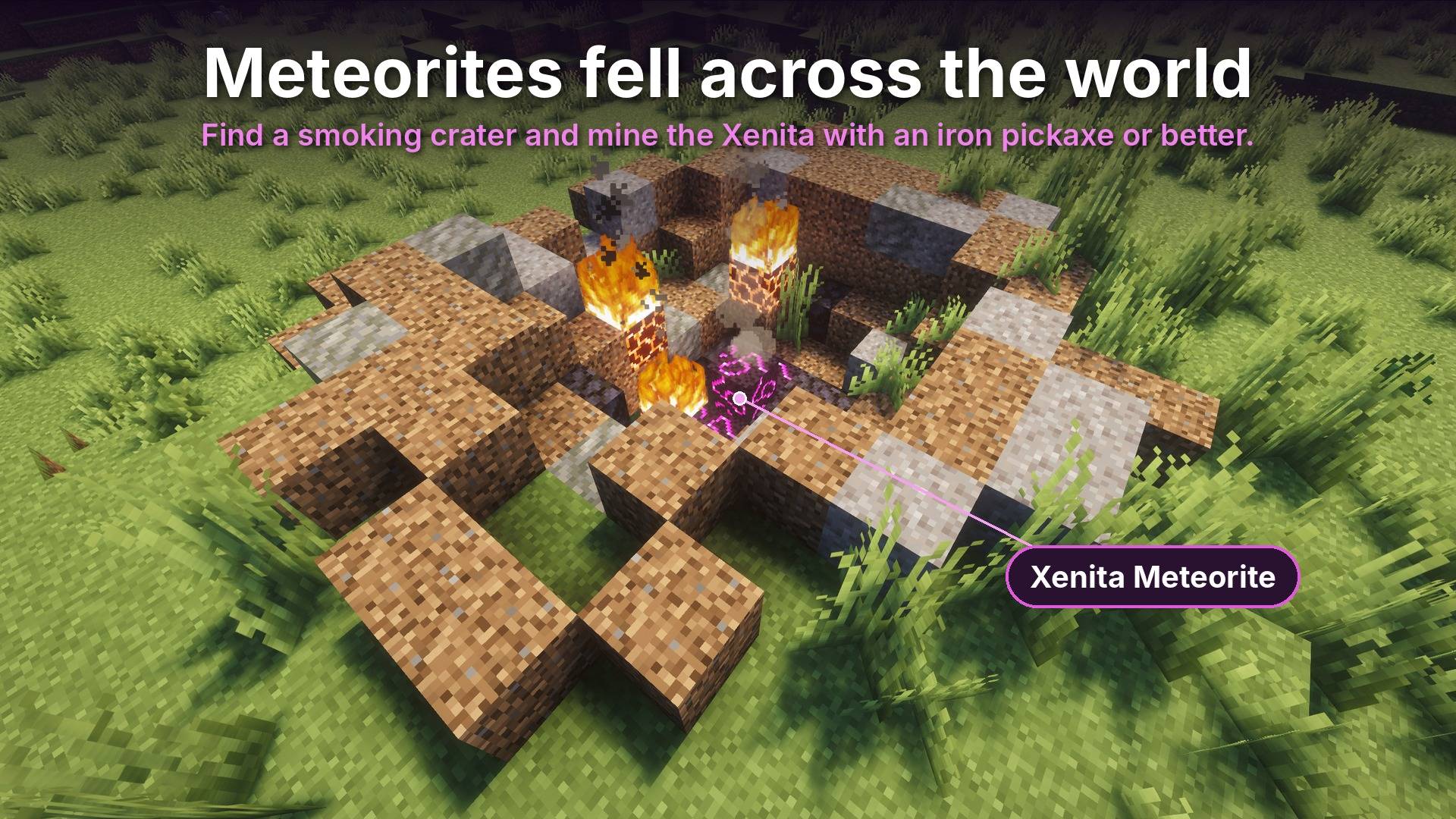
Meteorite craters can appear in any Overworld biome. Each crater contains 2 to 5 Xenita blocks in the center.
Look for the campfire smoke rising from the crater to find one.
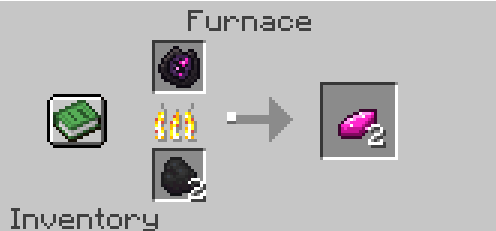
Mine Xenita with an iron pickaxe or better, then smelt Raw Xenita into ingots.
Be careful: The fires inside the crater never go out on their own. Extinguish them by hitting them, using water, or breaking the block underneath.
Craft it using:
Gold Ingots in the corners.
Xenita Ingots on the sides.
Redstone Dust in the center.
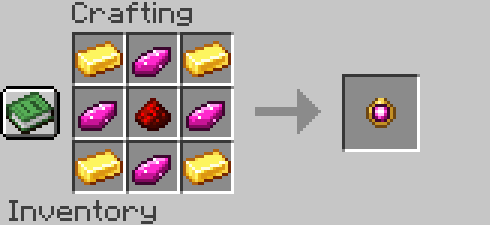
Kill a mob while the Shapeshifter Amulet is in your inventory to permanently unlock its form.
Every variant counts as a separate form, so you can collect babies, different colors, biome variants and more.
Right-click with the amulet to open the form selector.
You can organize your collection by:
Sorting: Normal, A–Z or Recent.
Filtering: All, Hostile or Neutral.
The amulet has 13 uses:
Most forms cost 1 use.
Powerful forms cost 5 uses.
Boss forms cost 8 uses.
Press H to return to human form for free.
✦ SERVERS & MULTIPLAYER
Mob Forms is designed to be played with friends. Its multiplayer features work in both LAN worlds and dedicated servers.
Ride Your Friends
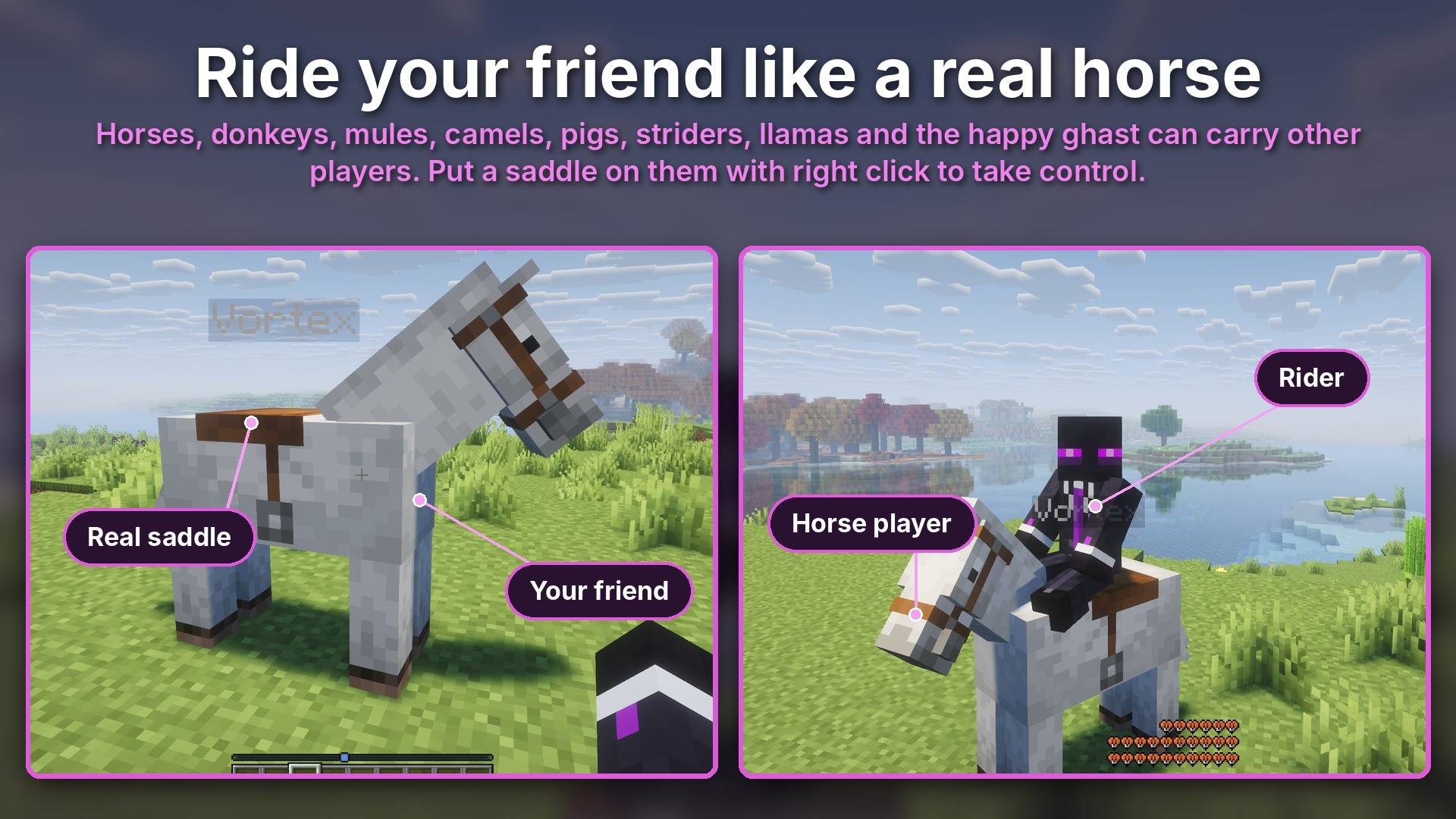
Players can ride other transformed players, just like real mobs.
Examples:
Skeletons can ride Spider players.
Baby Zombies can ride Chicken players.
Players can ride Horse, Donkey, Mule, Skeleton Horse, Zombie Horse, Camel, Pig, Strider and Llama players.
Saddles work like they do in vanilla Minecraft:
Right-click to put on a saddle.
Use shears to remove it.
Only saddled mobs can be controlled.
Pigs use a Carrot on a Stick, while Striders use a Warped Fungus on a Stick.
Saddles are visible on the transformed mob.
Happy Ghast: Equip a harness to let up to 4 players ride it. The first player to mount controls its movement.
Horse: Press R to rear up and throw off your riders. Every rideable mob can also throw off its rider.
Jockeys: Unlock Spider Jockey and Chicken Jockey forms by killing an actual jockey.
Admin Permissions
The host has full control over the mod's rules.
In LAN worlds, the host is the player who opened the world to LAN.
On dedicated servers, the host role belongs to the server operators.
Open Admin Permissions inside Mod Rules to view players and assign admins.
The host always has the highest level of authority:
Nobody can remove the host.
Admins can appoint other admins.
Only the host can remove admins.
The host decides whether admins can modify rules and exactly which rules they can access.
Admin command:
/mobforms unlock <players>
Unlocks every form for the specified players. Available to the host and admins.
Lock Options: Permanently lock a world's rules, similar to Minecraft's difficulty lock.
Play Together
Player Names: Display each transformed player's name above their mob.
Locator Bar: Available in 1.21.11, 26.2 and 26.3. Choose whether transformed players appear on the locator bar.
Chat Messages: Transformed players appear with their mob name. For example: Lucas (Enderman) died.
Beehive Players: Players inside a beehive are hidden from the outside and become truly bee-sized.
Joining Players: Players who join a world can immediately see everyone who is already transformed.
✦ MOB FORMS SURVIVAL
A complete alternative game mode where you experience Minecraft as a mob instead of a human.
Select Mob Forms Survival below the game mode when creating a world. In the world list, it appears as Mob Forms Survival Mode.
Choose Your Forms
Choose one mob or up to 9 different forms. Switch between them using the Quick Transform bar.
The selection screen includes:
Search functionality.
Sorting and filters.
Each mob's health.
Variant selection when you first join the world.
A Different Kind of Survival
No way back: No amulets, no form selector, no H key and no transformation commands.
Survival and Hardcore: Both are supported.
Locked World Rules: Gameplay rules remain locked.
Starting Conditions: If your selected mob is a monster, the world starts at night.
Aquatic Life: Only aquatic mobs spawn in water.
Mob Achievements: Every mob has its own achievement tab, with hints and progress tracking without revealing all the secrets.
✦ CONTROLS
Every key can be changed in Controls → Mob Forms.
Key
Function
Right-click with the amulet
Open the form selector
R
Main ability
J
Second ability (available for certain forms)
H
Return to human form (not available in Mob Forms Survival)
G (tap / hold)
Open the selector / Quick Transform wheel
F
Bee actions
Left Alt
Walk at the mob's real walking speed
Right-click a player
Ride them, or equip a saddle or harness
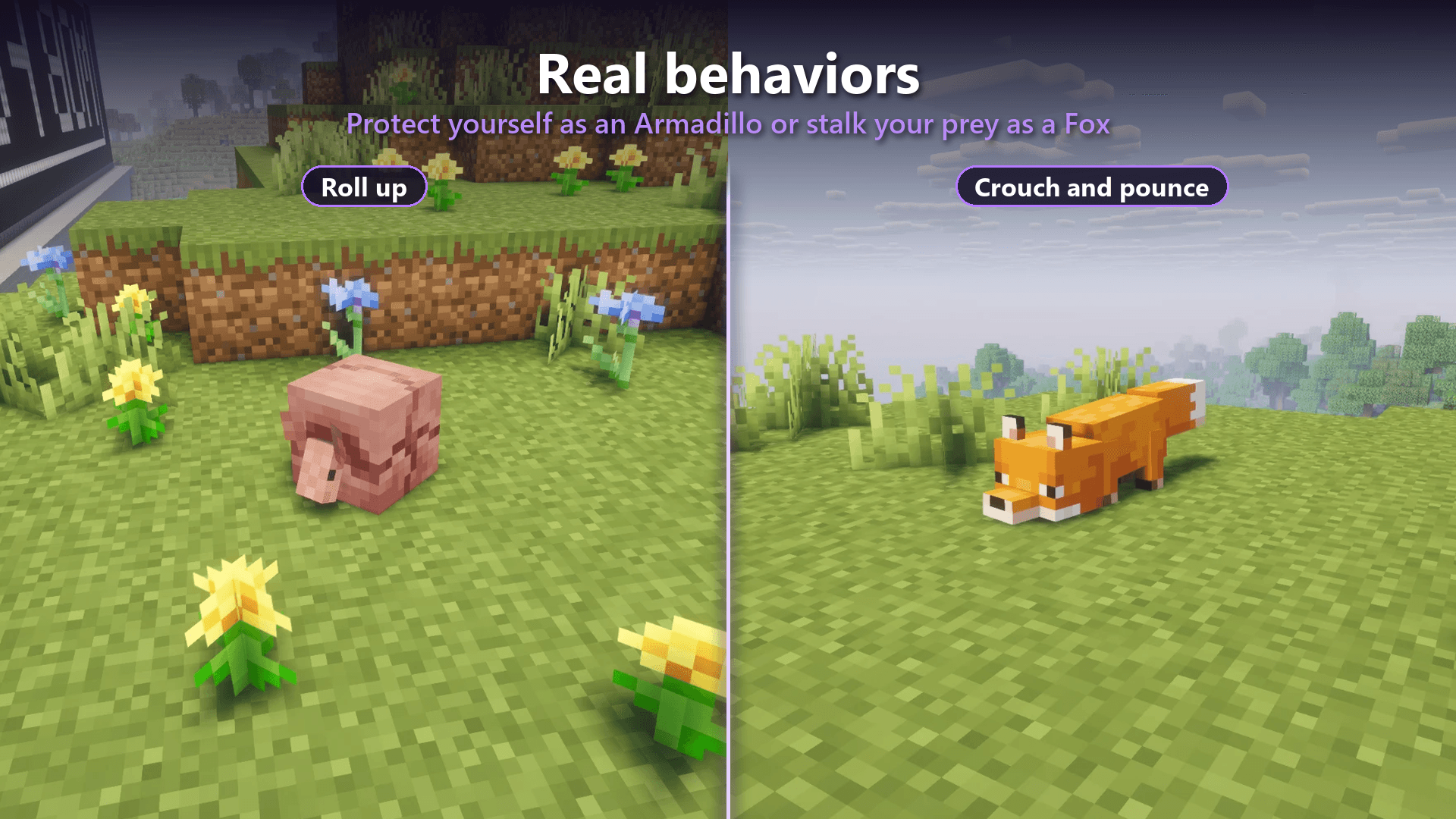
Crouch
Special actions (Armadillo rolls up, Fox pounces, etc.)
✦ MOB ABILITIES
Every ability has its own icon and cooldown. Visit Mobs Info in-game to learn what each mob can do.
Mob
Ability
Creeper
Explode (you can disable dying during the explosion)
Enderman
Teleport
Blaze / Ghast / Ender Dragon
Fireballs
Wither
Wither skulls
Warden
Sonic boom
Guardian / Elder Guardian
Laser beam
Evoker
Summon a line of fangs
Shulker
Homing bullets
Breeze
Wind Charges
Witch / Llama / Snow Golem / Drowned
Potions / Spit / Snowballs / Tridents
Squid / Glow Squid
Ink cloud
Pufferfish / Axolotl
Inflate / Play dead
Horse / Donkey / Mule
Rear up and throw off riders
Every rideable mob
Throw off riders
Infinite Arrows: Skeletons, Strays, Bogged, Parched and Pillagers can shoot without consuming arrows.
Special Attacks: Iron Golems launch enemies, Goats ram their targets, Bees and Cave Spiders inflict poison, Wither Skeletons apply Wither, and many other mobs have their own special attacks.
✦ LIVE LIKE THE REAL MOB
Every transformation recreates the creature's characteristics, not just its appearance.
Body & Movement
Real Size: Each mob has its actual height and body proportions.
Real Health & Damage: Health, attack damage and attack speed are based on the mob.
Unique Movement: Flying mobs fly, aquatic mobs swim, Spiders climb and Slimes hop.
Real Speeds: Every mob walks and runs at its actual movement speed.
Small Mobs: One-block-tall creatures can fit through one-block gaps.
You can customize how movement works in Real Mob Movement.
Sounds & Animations
Experience authentic mob sounds, animations and particles, including in first person.
Baby mobs also have their characteristic high-pitched voices.
Personality & Behavior
Mobs behave according to their original mechanics:
Endermen get angry when provoked.
Zombified Piglins call their horde for help.
Wild Wolves bring their pack.
Bees become angry when attacked, when they attack something, or when someone breaks a nearby hive.
Hidden Rules & Habits
Many original Minecraft mechanics are recreated:
Piglins zombify outside the Nether.
Zombies can turn into Drowned.
Lightning can transform certain mobs.
Undead mobs are hurt by Healing.
Zombies burn in daylight.
Endermen hate water.
Chickens lay eggs.
Sheep regrow their wool.
And much more!
Unique Mob Mechanics
Bee: Collect pollen, produce honey and fly inside a real beehive while the outside world keeps running. Inside the hive, your name, size and jumps are all scaled to a real Bee.
Creaking: Your heart hides inside a nearby log. If the heart is destroyed, you die.
Warden: Its antennas light up when it hears something nearby.
✦ THE WORLD REACTS TO YOU
The world treats you according to the mob you become.
Hostile mobs only attack you if they would normally attack your chosen form.
As a Zombie, Villagers flee from you.
As a Villager, Zombies hunt you.
Golems attack you when your form is considered hostile.
You can also enable Hostile Mobs in Mod Rules to make monsters attack you regardless of your current form.
✦ REAL SURVIVAL
Surviving as a mob means adapting to its actual needs.
Diet
Every form has its own food requirements, and the hunger bar reflects its diet.
Animals can also eat directly from the world, including grass, crops and berries.
Inventory
Inventory size depends on the mob's body and characteristics, ranging from 36 slots for humanoid mobs down to just 1 slot for fish.
Hands & Interaction
Only mobs with hands can craft and interact with certain objects, such as doors, chests and buttons.
Difficulty
Choose between the Easy, Medium and Hard presets, or customize every survival rule individually.
✦ SETTINGS & CUSTOMIZATION
All gameplay options are organized in one convenient Mod Rules tab.
Customize your experience with options such as:
Transforming and unlocking mobs without the amulet.
Amulet transformation costs.
Hostile mob behavior.
Real mob diets.
Hard healing.
Armor restrictions.
Aquatic mobs on land.
Creeper self-destruction.
Bee death after stinging.
Piglin zombification.
Warden blindness and roars.
The original Giant Zombie.
Interface
Choose between:
Mob Forms: The custom Mob Forms interface.
Mob Forms Complete: A complete interface overhaul that also restyles vanilla buttons, sliders and backgrounds.
Vanilla Style: The normal Minecraft interface.
First Person
Customize which hands and paws are visible in first person.
Enderman in Creative
By default, water and rain do not teleport Endermen while in Creative Mode. This option can be changed in Mod Rules.
✦ MORE FEATURES
Health Display: Choose between mob-colored health bars, mob icons, unique hearts or normal hearts.
Favorites & Quick Transform: Save up to 9 favorite forms and switch between them using a radial wheel.
Mobs Info: View stats, food, abilities and other details for every mob.
Achievements: Discover hidden achievements with progress tracking (for example, 3/10), including the master achievement Mob Forms King. Mob Forms Survival also includes a separate achievement tab for every mob.
Xenita Gear: Craft tools stronger than iron and a special sword capable of transforming mobs.
✦ MODDED MOB SUPPORT
Creatures from other mods can be collected and used just like vanilla forms, including in Mob Forms Survival.
Modded forms can have their own:
Health and damage.
Diet and inventory size.
Strength and abilities.
Animations.
Mob-specific icons.
If a modded creature cannot be used, Mob Forms safely skips it instead of crashing.
✦ INSTALLATION
Mob Forms requires Fabric Loader and Fabric API.
Minecraft Version
Fabric Loader
Fabric API
Java
1.20.1
0.15.0+
Required
17+
1.20.4
0.15.0+
Required
17+
1.21.11
0.20.1+
Required
21+
26.2
0.20.1+
Required
25+
26.3
0.20.1+
Required
25+
Installation Steps
Install Fabric Loader for your Minecraft version.
Download and install Fabric API.
Download the Mob Forms .jar file for the same Minecraft version.
Place both files inside your .minecraft/mods folder.
On Windows, you can open the folder by pressing Win + R and entering:
%appdata%.minecraft
Multiplayer: For LAN, every player must install the mod. For dedicated servers, install it on the server and on every player's game.
Version Compatibility: Mobs introduced in newer Minecraft versions, such as Armadillos, Breezes, Creakings and Happy Ghasts, are naturally unavailable in 1.20.1 and 1.20.4.
✦ SPECIAL THANKS
Special thanks to Fuzs, creator of Mutant Monsters, for kindly granting permission to feature one of the mod's creatures in Mob Forms screenshots and promotional images.
We would also like to acknowledge the original creators and contributors behind Mutant Monsters:
Shcott21 — Original creator of Mutant Creatures and creator of most of its original models.
Chumbanotz — Creator of Mutant Beasts, which brought the mutants to modern Minecraft.
tdstress — Responsible for overhauling the textures to fit Minecraft's newer art style.
All original content, models, textures, sounds and code remain the property of their respective creators.
Mob Forms does not include, copy or redistribute any of Mutant Monsters' code, textures, models, sounds or other files. It only recognizes the creatures when both mods are installed and uses the content that the original mod itself provides in-game.
✦ CREDITS & LICENSE
Mob Forms was created by LucasPY855. All rights reserved.
You may not modify, redistribute, re-upload or sell this mod, use its code, or remove its credits without written permission from the author.
You are welcome to download and play Mob Forms for personal use through its official project pages.
Minecraft is a trademark of Mojang AB. Mob Forms is an independent project and is not affiliated with, endorsed by or sponsored by Mojang or Microsoft.
THANKS FOR PLAYING MOB FORMS!
Discover. Transform. Survive.
Project description from CurseForge.
Pick your setup
Choose the version and loader you play, then open the matching release.
Check the dependencies, then try the file in a copied instance before changing a world you care about.
Recent files
mobforms-1.1.1-26.3.jar
12 Nov 2026
mobforms-1.1.1-26.2.jar
12 Nov 2026
mobforms-1.1.1-1.21.11.jar
12 Nov 2026
mobforms-1.1.1-1.20.4.jar
12 Nov 2026
mobforms-1.1.1-1.20.1.jar
12 Nov 2026
mobforms-1.1.0-26.3.jar
11 Nov 2026
mobforms-1.1.0-26.2.jar
11 Nov 2026
mobforms-1.1.0-1.21.11.jar
11 Nov 2026
mobforms-1.0.9-26.3.jar
11 Nov 2026
mobforms-1.0.9-26.2.jar
11 Nov 2026
mobforms-1.0.9-1.21.11.jar
11 Nov 2026
mobforms-1.0.8-26.3.jar
10 Nov 2026
Looking for an older file? The official CurseForge project page is in Resources.
 mod
Brazilian colonial villages that build and govern themselves: trades, markets, partys, politics, diplomacy and three eras.
 mod
Adds 4 Classes to the Last Ascension RPG Modpack that gives the player certain buffs depending on their choice.
 mod
MCEndgame aims to make Minecraft's endgame more engaging through repeatable dungeon content, meaningful gear progression, and ARPG-inspired itemization.