Fabric API Needed by Mob Forms - Morph (Modded & Vanilla) Mob Forms 1.0.8+26.3
requiredMatching file found Matched file: [26.3] Fabric API 0.166.2+26.3
CurseForge · Minecraft mod
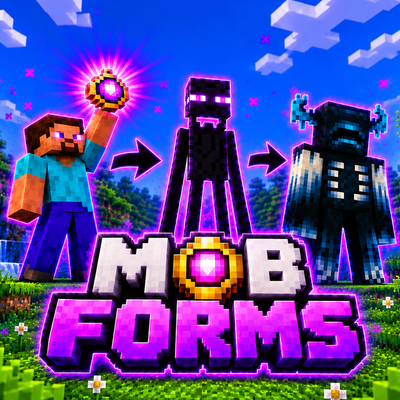
Collect and transform into Minecraft mobs with their real abilities, behaviors, variants and survival mechanics — including modded mobs and multiplayer support.
Quick answer
Mob Forms - Morph (Modded & Vanilla) Mob Forms 1.0.8+26.3 targets 26.3 with Fabric. The project page does not say whether this file belongs on the client, dedicated server, or both. All 1 required mods have matching files.
Where it goes
The project page does not say whether this file belongs on the client, dedicated server, or both.
The source does not explicitly classify this release as client-only or server-only.
Mob Forms 1.0.8+26.3. Change the file and its required mods may change too.
Install Fabric API first. We found matching files for this game-version and loader setup.
We only count dependency files that match this setup. A file for another loader does not fill the gap.
Before you install it
Built for Mob Forms - Morph (Modded & Vanilla) Mob Forms 1.0.8+26.3. Pick another file and the loader, install side or required mods may change.
Use Mob Forms 1.0.8+26.3. It targets 26.3 with Fabric; another release may have different loader, side or dependency requirements.
Install Fabric API first. We found matching files for this game-version and loader setup.
The project page does not say whether this file belongs on the client, dedicated server, or both.
Use the “Get this file” button beside Mob Forms 1.0.8+26.3. It opens that exact file at the source.
About this project
Become Any Mob
Defeat a mob. Take its form. Live as it for real.
Minecraft 1.21.11 · 26.2 · 26.3
Mob Forms is not a simple skin swap. When you transform, you take on a mob's size, health, damage, speed, sounds, animations, abilities and even personality. The world reacts to what you are, too. Hunt as a Warden, soar as a Ghast, explode as a Creeper, live inside a real beehive as a Bee, or sneak through a village as a Zombie — as long as you have earned that form.
HIGHLIGHTS Mob Forms Survival — NEW GAME MODE: choose one mob, or up to 9, when creating a world and play the entire game as them. No amulets, no turning human again, and unique achievements for every mob. Almost every mob is playable: collect the real variants too — baby Zombies, Villagers from every biome and profession, Husks, Strays, Bogged, every cat, every sheep color and many more. Compatible with other mods: mobs added by other mods can become playable forms, with their own health, diet, inventory size, strength and animations. Real mob behavior: forms follow the rules of their original mobs, including transformations, immunities, reactions and hidden behaviors. Abilities on the R key: use Creeper explosions, Blaze fireballs, the Warden's sonic boom, the Guardian's laser, Shulker bullets and much more. Real personalities: anger an Enderman, trigger a Zombified Piglin horde, or let a wild Wolf's pack defend you. A living Bee experience: collect pollen, make honey, and fly inside a real beehive. A new resource: discover Xenita in meteorites and use it to craft the Shapeshifter Amulet and special equipment. Achievements: discover 13 standard achievements, plus individual achievements for every mob in Mob Forms Survival. Undiscovered achievements remain hidden as ???. The world reacts to your form: Villagers run from Zombies, Zombies hunt Villagers, and other mobs react according to their real behavior. True survival mechanics: each form has its own diet, inventory size and way of living. Custom health display: choose mob-colored health bars, mob icons, unique hearts, stacked hearts or the normal Minecraft hearts. Favorites and Quick Transform: save your favorite forms and switch between them with a radial wheel. Highly configurable: enable or disable individual features, choose Easy, Medium, Hard or Custom rules, and customize the interface — or use a normal Minecraft look.
MOB FORMS SURVIVAL — A NEW WAY TO PLAY When creating a world, select the new Mob Forms Survival option underneath the game mode selection. Choose your form: play as one mob, or select up to 9 mobs and switch between them using the Quick Transform bar. Choose your variant: the first time you join, select the variant of each chosen mob — color, baby, type and more. No way back: you remain a mob for the entire playthrough. There are no amulets, no form selector, no H key and no collecting new mobs. Survival or Hardcore: the mode always uses Survival rules, and Hardcore is also available. Water mobs spawn in water: if your chosen mob lives in water, you spawn and respawn in surface water. World rules stay locked: choose the rules when creating the world. They remain fixed, and this mode only displays settings that can affect its gameplay.
COMPATIBILITY WITH OTHER MODS Mob Forms can work with mobs added by other mods. Collect them like any other mob and transform into them — including in Mob Forms Survival. Each supported mob gets its own health, diet, inventory size, amulet cost and strength, based on the mob itself. Many modded mobs can use their own movement and attack animations. Some can also have abilities on the R key.
SERVERS AND MULTIPLAYER Mob Forms works in multiplayer. Install it on the server and every player's game. Server-controlled rules: only server admins (or the owner of a LAN world) can change the difficulty and gameplay rules. Every player follows the same settings. Lock options: lock a world's rules so nobody can change them — not even the person who enabled the lock. Clear feedback: players who cannot change a locked option see a message explaining that it is locked. Everyone sees the action: forms, animations, anger, hordes, abilities and achievements work for every player. Beehives work in multiplayer: Bees can enter real beehives while the world outside continues running for everyone.
HOW TO GET STARTED
CONTROLS You can rebind every key in Minecraft's Controls menu, under the dedicated Mob Forms section. Key / Action Function Right-click with the amulet Open the form selector. R Use your current form's ability. H Return to human form. Not available in Mob Forms Survival. G (tap) Open the selector. If the amulet is required to transform, the selector tells you. G (hold) Open the Quick Transform radial wheel. F Bee actions. Hold it and your Bee flies to the flower or beehive you are looking at. Left Alt Walk slowly like the mob, using its natural wandering pace. Set this to hold, toggle or always active.
FAVORITES AND QUICK TRANSFORM Click the star on a form to add it to your Favorites tab. Click the lightning icon to add a form to the Quick Transform bar. You can save up to 9 forms and rearrange them with the arrows. Hold G to open the radial wheel. Point at a form and release the key to transform. You can also click a form or press 1–9.
ACHIEVEMENTS Mob Forms includes 13 achievements, saved separately for each world. Mob Forms Survival also adds individual achievements for every mob. They appear in Minecraft's normal advancements screen, too. Open the achievement list using the Achievements button in the selector, next to Mobs Info. There are no spoilers: achievements you have not unlocked appear as ???. Only the first achievement is revealed to give you a starting point: “What is this?”
LIVE LIKE A REAL BEE The Bee form has its own gameplay mechanics: Collect pollen: hold F and your Bee flies to the flower you are looking at, stops in the correct position and collects its pollen. You can drip nectar onto crops to make them grow. Enter a real beehive: fly to a beehive and your Bee becomes tiny, enters through the opening and can fly around inside, between honeycomb walls and drops of honey. The outside world keeps running: you can see the real world through the entrance, and everything outside continues working. This also works on servers. Make honey: while carrying pollen, stay inside the hive for 5 seconds to increase its honey level by one. Leave the hive: fly out through the opening, press F or right-click. If the beehive is broken, you immediately return to normal size.
PROTECT YOUR HEART — THE CREAKING As a Creaking, your Creaking Heart hides inside the nearest log. Mobs that want to kill you will target the heart and try to destroy it. If it breaks, you die. Visible heart damage: cracks appear as the heart takes damage. Health warning: a notification tells you how much health the heart has left.
MOBS WITH PERSONALITY Your form does not just look like the mob — it behaves like it, too. Enderman: when hit, you lose your temper. You shake, make the famous stare scream, move faster and hit harder for a while. If you are carrying a block, you swing it with your arms when attacking. Zombified Piglin: when hit, you raise your arms and move faster. You never fight alone: every nearby Zombified Piglin joins the hunt. Wolf and Bee: they become angry only when another creature attacks them, never because of lava, fire or falling. As a wild Wolf, the nearby pack attacks whoever hurt you. Anger belongs to the form: changing into another mob removes your current anger. Shulker: you cannot move. Hide inside your shell for +20 armor and to make arrows bounce off, peek out to attack, and teleport away when hurt. Ender Dragon: use real flight animations, wing flaps and growls. Your wings push away anything they touch, and your head can bite. Warden: you are blind, just like the real Warden, and locate targets through sound. Hear vibrations, click your tendrils and roar. Other natural movement: Rabbits hop, Frogs jump, croak, shoot their tongues and swim, while Foxes crouch before pouncing.
ABILITIES — THE R KEY Every mob with an ability displays an on-screen icon and cooldown. Each form has its own cooldown. Mob Ability Cooldown Creeper Swells, flashes white and explodes. You explode with it, too! This can be disabled. — Enderman Teleport 3 s Blaze Small fireball 1 s Ghast Large fireball with its real mouth animation 3 s Wither Wither skull 2 s Ender Dragon Dragon fireball 5 s Witch Potion of Harming 3 s Snow Golem Snowball 1 s Llama Spit 2 s Breeze Wind Charge 2 s Evoker Line of fangs 5 s Warden Sonic boom 5 s Drowned Trident 2 s Guardian / Elder Guardian Charging laser beam 5 s Shulker Homing bullet — just look toward your target 2 s Pufferfish Inflate and sting everything around you 10 s Axolotl Play dead, regenerate and become ignored by attackers 60 s Mobs Info explains what each ability does. Infinite Arrows Hold the mob's weapon and shoot without consuming arrows: Skeleton: normal arrows with a bow. Stray: Slowness arrows with a bow. Bogged: Poison arrows with a bow. Parched: Weakness arrows with a bow. Pillager: normal arrows with a crossbow. Special Attacks Iron Golem: raises its arms and launches enemies into the air. Hoglin and Zoglin: headbutt enemies and throw them away. Ravager: brutal bite with extra knockback. Warden: crushing hit with strong knockback. Goat: ram that sends enemies flying. Polar Bear: rises onto two legs to strike. Bee and Cave Spider: inflict poison, except on Easy difficulty. Wither Skeleton: applies Wither. Husk: causes Hunger when attacking with an empty hand.
HIDDEN MOB BEHAVIORS Forms follow the same hidden rules as their real counterparts. Conversions: a Piglin, Piglin Brute or Hoglin outside the Nether becomes zombified after 15 seconds. A Zombie that stays underwater becomes a Drowned, a Husk becomes a Zombie, and a Skeleton trapped in powder snow becomes a Stray. Lightning: a Villager becomes a Witch, a Pig becomes a Zombified Piglin, a Mooshroom changes color, a Creeper becomes charged, a Turtle dies and a Copper Golem loses its rust. Growing up: baby mobs grow into adults, and a Tadpole becomes a Frog. A Zombie Villager can be cured with Weakness and a Golden Apple. Undead rules: Healing potions hurt you, while Harming potions heal you. Smite deals extra damage, as do Bane of Arthropods and Impaling for the forms they affect.
LIVE LIKE THE REAL MOB Body and Movement Real body: use the mob's actual height, health, attack damage and walking speed. Baby mobs use their own speed, so baby Zombies are faster than adults. Real pace: Villagers, Wandering Traders, Illagers and Piglins stroll slowly like their real counterparts and reach their chase speed when sprinting. Flight: flying mobs can fly, each at its own speed. Ghasts float slowly, while Chickens glide. Water movement: aquatic mobs swim smoothly. Fish, Dolphins, Guardians and Tadpoles outside water only flop in place. Dolphins hold their breath for about 2 minutes and leap at the surface. Axolotls dry out unless it rains. Turtles move slowly on land and can breathe underwater forever. Climbing and hopping: Slimes and Magma Cubes move by hopping. Spiders climb walls, and cobwebs do not slow them down. Armadillo: crouch to roll up and take less damage. Sounds and Animations Sounds: real footsteps, ambient sounds, hurt sounds and death sounds. Baby mobs have high-pitched voices, and your form keeps the voice of the mob you unlocked. Animations: walking, attacking, drawing a bow and special animations. These also work in first person, using the mob's own arms, paws or fins. Mobs that raise both hands show both hands in first person. Mob-Specific Habits Zombies and Skeletons burn in daylight unless they wear a helmet. Endermen take damage from water and teleport to dodge projectiles. Chickens lay eggs; Sheep regrow their wool and can be sheared; Pandas sneeze. Snow Golems melt in hot places, while Striders get cold outside lava. Ravagers break leaves, and Vexes fly through walls. Arrows bounce off the Breeze. Parrots and Allays dance to music. Elder Guardians curse nearby players with Mining Fatigue.
YOUR HEALTH, YOUR WAY Choose how your health is displayed in Settings → Interface: Bar: a health bar in the mob's own color. It refills with an effect when you change form. This is the default style. Bar with icon: the mob's head appears in the corner beside a health bar in its color. Mob hearts (stacked): the mob's hearts appear in rows, stacked like normal Minecraft hearts. Normal (fit): normal hearts, adjusted to fit the mob's health. Mob hearts: every mob has its own heart design and color. Mob icons: a row of the mob's head icons. Off: use the normal Minecraft hearts.
REAL SURVIVAL Every rule can be enabled or disabled individually, or applied together using the Easy, Medium and Hard presets. Real diet: every form eats its favorite food. Skeletons eat bones, Cows eat wheat, and Foxes eat berries and meat. The hunger bar displays that food instead of drumsticks. You can choose whether other food is forbidden, allowed with a penalty or allowed freely. Eat from the world: animals can eat grass, crops, berries, flowers or their food when it is lying on the ground. A small hint tells you when something is edible. Inventory by body size: humanoids keep 36 slots; Donkeys and Llamas get 24; large mobs get 9; medium mobs get 4; small mobs get 2; Fish and the Allay get 1; and bosses get 3. The inventory screen shrinks to fit. Your other items are safely stored until you turn human again. Hands: only forms with hands can craft and use things such as doors, chests and buttons. Amulet cost: powerful forms and bosses consume more amulet uses.
MOBS INFO Open Mobs Info from the top-right corner of the form selector. It displays every mob with its head icon and information about: Health, attack damage and movement speed. Favorite food and abilities. Inventory slots and amulet cost. Special traits and other details. Use the search bar to find any mob. Forms you have not unlocked appear as ???. Hover over a favorite food to see what it is and where to find it. The Details section explains important facts about each mob — for example, that a Bee dies after stinging.
THE WORLD REACTS TO YOU Hostile mobs only attack you if they would attack the real mob you are. As a Zombie: Villagers run away from you. A Villager you kill becomes a Zombie Villager. As a Villager: Zombies hunt you down. Other reactions: Piglins, Axolotls, Frogs, Dolphins, Wolves and many more respond to your form just as they would to the real mob.
XENITA GEAR Xenita Meteorite: the block found in meteorite craters. It drops Raw Xenita and includes a small note: “Where did this fall from? It's still warm.” Xenita tools: sword, pickaxe, axe, shovel and hoe. They are stronger than iron tools, with 400 durability, faster mining and more damage. Xenita Sword: each hit has a 35% chance to turn a mob into a related mob or change its variant (such as a Sheep's color). Examples include Zombie → Husk or Drowned, Skeleton → Stray or Bogged, Spider → Cave Spider, Cow → Mooshroom, Pig → Zombified Piglin and Villager → Witch. Block of Xenita: works as a beacon base. Block of Raw Xenita: compact storage for your ore.
SETTINGS AND CUSTOMIZATION Open Options → Mob Forms Options…, or click the lilac button in the form selector. Settings are organized into tabs: Difficulty: choose Easy, Medium, Hard or Custom; configure the main rules; and use Lock Options to permanently lock selected world settings. The game asks for confirmation first, and a locked option cannot be undone. Locks apply only to that world. Mod Rules: configure real mob behavior, real movement, Warden blindness, real diet, eating other food, inventory by body size, crafting and using items only with hands, amulet cost, hard healing, hostile mobs, transforming without an amulet, unlocking mobs without an amulet, Piglin zombification outside the Nether, dying when exploding as a Creeper, form ambient sounds, aquatic mobs walking on land, and armor (compatible mobs only or all mobs). Controls: rebind the ability, return-to-human, Bee action and walk keys. Choose whether Walk Like the Mob works while holding the key, toggling it or keeping it always active. Interface: choose the Mob Forms or Normal interface, interface color, colored background, health style and preview, ability icon, ability text and screen corner, new-mob notifications and achievement notifications. First Person: choose whether both hands are shown only for mobs that raise them, for all mobs or not at all; customize the first-person hands. Credits: find the mod author and project links.
INSTALLATION Requirements Minecraft version Fabric Loader Java 1.21.11 0.20.1 or newer 21 or newer 26.2 0.20.1 or newer 25 26.3 0.20.1 or newer 25 You also need Fabric API for your Minecraft version. Make sure to download the Mob Forms .jar file that matches your Minecraft version. Installation Steps Install Fabric Loader for your Minecraft version. Download Fabric API for the same Minecraft version. Download the Mob Forms .jar file for your Minecraft version. Open your .minecraft folder and go to mods. Create the folder if it does not exist. Copy both the Mob Forms .jar and Fabric API .jar files into the mods folder. Open the Minecraft Launcher and select your Fabric profile. Windows: type %appdata%\.minecraft into the File Explorer address bar to open your Minecraft folder.
CREDITS AND LICENSE Mob Forms was created by LucasPY855. All rights reserved. More projects: CurseForge · Modrinth You may not modify the mod, re-upload it, sell it, use its code or remove its credits without written permission from the author. You may download and play it for personal use from its official project pages. Minecraft is a trademark of Mojang AB. This mod is not affiliated with Mojang or Microsoft.
THANKS FOR PLAYING MOB FORMS
Discover. Transform. Survive.
Project description from CurseForge.
Pick your setup
Choose the version and loader you play, then open the matching release.
Check the dependencies, then try the file in a copied instance before changing a world you care about.
Recent files
mobforms-1.0.8-26.3.jar
10 Nov 2026
mobforms-1.0.8-26.2.jar
10 Nov 2026
mobforms-1.0.8-1.21.11.jar
10 Nov 2026
mobforms-1.0.7-26.3.jar
10 Nov 2026
mobforms-1.0.7-26.2.jar
10 Nov 2026
mobforms-1.0.7-1.21.11.jar
10 Nov 2026
mobforms-1.0.6-26.3.jar
9 Nov 2026
mobforms-1.0.6-26.2.jar
9 Nov 2026
mobforms-1.0.6-1.21.11.jar
9 Nov 2026
mobforms-1.0.5-1.21.11.jar
9 Nov 2026
mobforms-1.0.5-26.2.jar
9 Nov 2026
mobforms-1.0.5-26.3.jar
9 Nov 2026
Looking for an older file? The official CurseForge project page is in Resources.
 mod
Beyond the If Mirror, a world where it all went wrong. Go prepared, find suppressant before your time runs out, and be ready not to come back - a Nookworks add-on.
 mod
Benjamon is a modwhere you can catch benjamons
 mod
Bauble Heart Canisters