Minecraft version
Back to mods 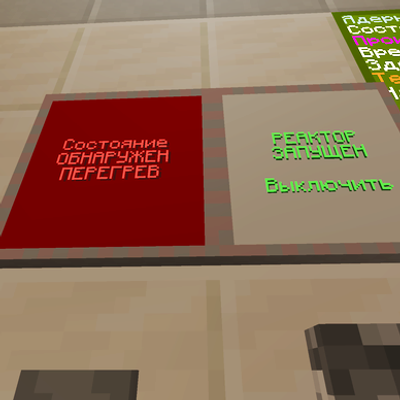
CurseForge · Minecraft mod
Redstone Info Panels
Adds configurable redstone information panels, wireless analog redstone receivers, and a linker tool for connecting them to redstone signal sources.
Choose a version Pick your version below, then grab the matching file.
Quick answer
Which Redstone Info Panels release should I use?
Latest stable file redstoneinfopanels-1.0.0.jar
Game version 1.19.2
Loader Forge
Redstone Info Panels redstoneinfopanels-1.0.0.jar targets 1.19.2 with Forge. The project page does not say whether this file belongs on the client, dedicated server, or both. No extra mods listed for this file.
Where it goes
Is Redstone Info Panels required on the client, server, or both?
The project page does not say whether this file belongs on the client, dedicated server, or both.
Client Source doesn’t say
Dedicated server Source doesn’t say
Loader for this release Forge
Required install it here Optional supported, not mandatory Not supported do not install here Source doesn’t say do not assume
The source does not explicitly classify this release as client-only or server-only.
What else does Redstone Info Panels redstoneinfopanels-1.0.0.jar need?
redstoneinfopanels-1.0.0.jar. Change the file and its required mods may change too.
This file does not list any required mods. Do not add a library just because a different file uses it.
This file does not list any required or optional mods.
Before you install it
Add Redstone Info Panels without breaking your instance.
Built for Redstone Info Panels redstoneinfopanels-1.0.0.jar. Pick another file and the loader, install side or required mods may change.
- 01
Stick to this file
Use redstoneinfopanels-1.0.0.jar. It targets 1.19.2 with Forge; another release may have different loader, side or dependency requirements.
- 02
Bring the mods it needs
This file does not list any required mods. Do not add a library just because a different file uses it.
- 03
Put it on the correct side
The project page does not say whether this file belongs on the client, dedicated server, or both.
- 04
Pick the file you checked
Use the “Get this file” button beside redstoneinfopanels-1.0.0.jar. It opens that exact file at the source.
About this project
What does Redstone Info Panels add?
Redstone Info Panels
Redstone Info Panels adds configurable information displays and wireless redstone communication to Minecraft.
Create a Redstone Info Panel to display custom text based on the current redstone signal strength. Configure individual messages, text colors, sizes, and panel colors for all 16 signal levels from 0 to 15.
The mod also includes a Wireless Redstone Receiver. Unlike many similar wireless redstone blocks, this receiver supports the full analog redstone signal range from 0 to 15, allowing it to transmit signal strength—not just an on/off state. This makes it useful for wireless control of lamps, machines, circuits, and other devices that require variable signal levels.
Use the Redstone Linker to connect panels and receivers to redstone signal sources.
Features
- Configurable redstone information panels
- Custom text for all 16 redstone signal strengths
- Support for text size, text color, and panel face color
- Wireless redstone receiver with full analog signal support
- Redstone signal transmission from 0 to 15
- Link panels and receivers to signal sources using the Linker
- Blocks can be mined by hand or with any tool
- All block settings are preserved when the block is broken
- Placing the block again restores its previous configuration
- Reset a configured block by placing its item into a crafting grid
- Works with both configured and unconfigured block items when resetting settings
- Compatible with Minecraft 1.19.2 and Forge 43.5.0
Project description from CurseForge.
Pick your setup
Redstone Info Panels by Minecraft version and loader
Choose the version and loader you play, then open the matching release.
Check the dependencies, then try the file in a copied instance before changing a world you care about.
Recent files
Redstone Info Panels versions and loaders
redstoneinfopanels-1.0.0.jar
6 Nov 2026
Client Source doesn’t say Server Source doesn’t say Dependencies No extras listed Listed on Release listing
Check the 1.19.2 · Forge setup Forge1.19.2 release
Looking for an older file? The official CurseForge project page is in Resources.
