Minecraft version
Back to mods 
CurseForge · Minecraft mod
Polycore
Multicore optimization: faster chunk generation on every core, a lag analyzer that finds what slows your server, and a TPS Guard. Same world as vanilla.
Choose a version Pick your version below, then grab the matching file.
Quick answer
Which Polycore release matches 26.1 Forge?
Best match for your filters Polycore 0.5.0 (Forge 26.1 – 26.1.2)
Game version 26.1, 26.1.1, 26.1.2
Loader Forge
Polycore 0.5.0 (Forge 26.1 – 26.1.2) targets 26.1, 26.1.1, 26.1.2 with Forge. The project page does not say whether this file belongs on the client, dedicated server, or both. No extra mods listed for this file.
Where it goes
Is Polycore required on the client, server, or both?
The project page does not say whether this file belongs on the client, dedicated server, or both.
Client Source doesn’t say
Dedicated server Source doesn’t say
Loader for this release Forge
Required install it here Optional supported, not mandatory Not supported do not install here Source doesn’t say do not assume
The source does not explicitly classify this release as client-only or server-only.
What else does Polycore 0.5.0 (Forge 26.1 – 26.1.2) need?
Polycore 0.5.0 (Forge 26.1 – 26.1.2) on 26.1 Forge. Every mod below is checked against that same setup.
This file does not list any required mods. Do not add a library just because a different file uses it.
This file does not list any required or optional mods.
Before you install it
Add Polycore without breaking your instance.
Built for Polycore 0.5.0 (Forge 26.1 – 26.1.2) on 26.1 Forge. Pick another file and the loader, install side or required mods may change.
- 01
Stick to this file
Use Polycore 0.5.0 (Forge 26.1 – 26.1.2). It targets 26.1, 26.1.1, 26.1.2 with Forge; another release may have different loader, side or dependency requirements.
- 02
Bring the mods it needs
This file does not list any required mods. Do not add a library just because a different file uses it.
- 03
Put it on the correct side
The project page does not say whether this file belongs on the client, dedicated server, or both.
- 04
Pick the file you checked
Use the “Get this file” button beside Polycore 0.5.0 (Forge 26.1 – 26.1.2). It opens that exact file at the source.
About this project
What does Polycore add?

Polycore: multicore optimization for Minecraft
Minecraft leaves most of your CPU cores idle. Polycore spreads the work across all of them, finds what slows your server down, and steps in when it lags. Same seed, same world: nothing about gameplay changes.
Faster world generation
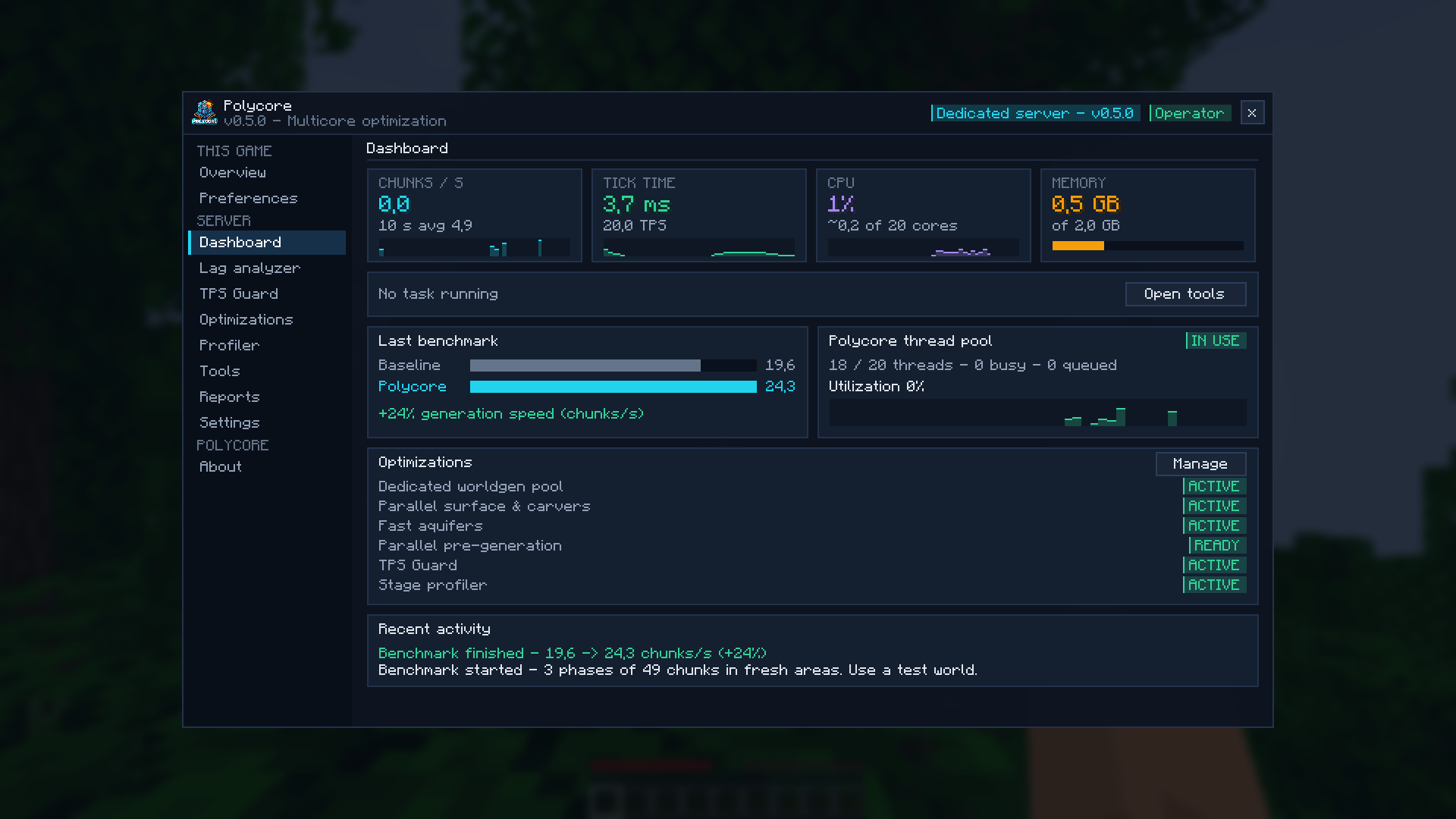
- Dedicated worldgen pool: terrain noise and biomes are computed on Polycore's own threads, never more than your CPU has.
- Parallel surface and carvers: vanilla runs these stages one chunk at a time; Polycore runs them in parallel (the same stages Paper and Moonrise treat as parallel-safe).
- Fast aquifers: underground water and lava are decided for every air block; Polycore reuses the work shared by neighbouring blocks (noise stage about 10% faster).
- Parallel pre-generation:
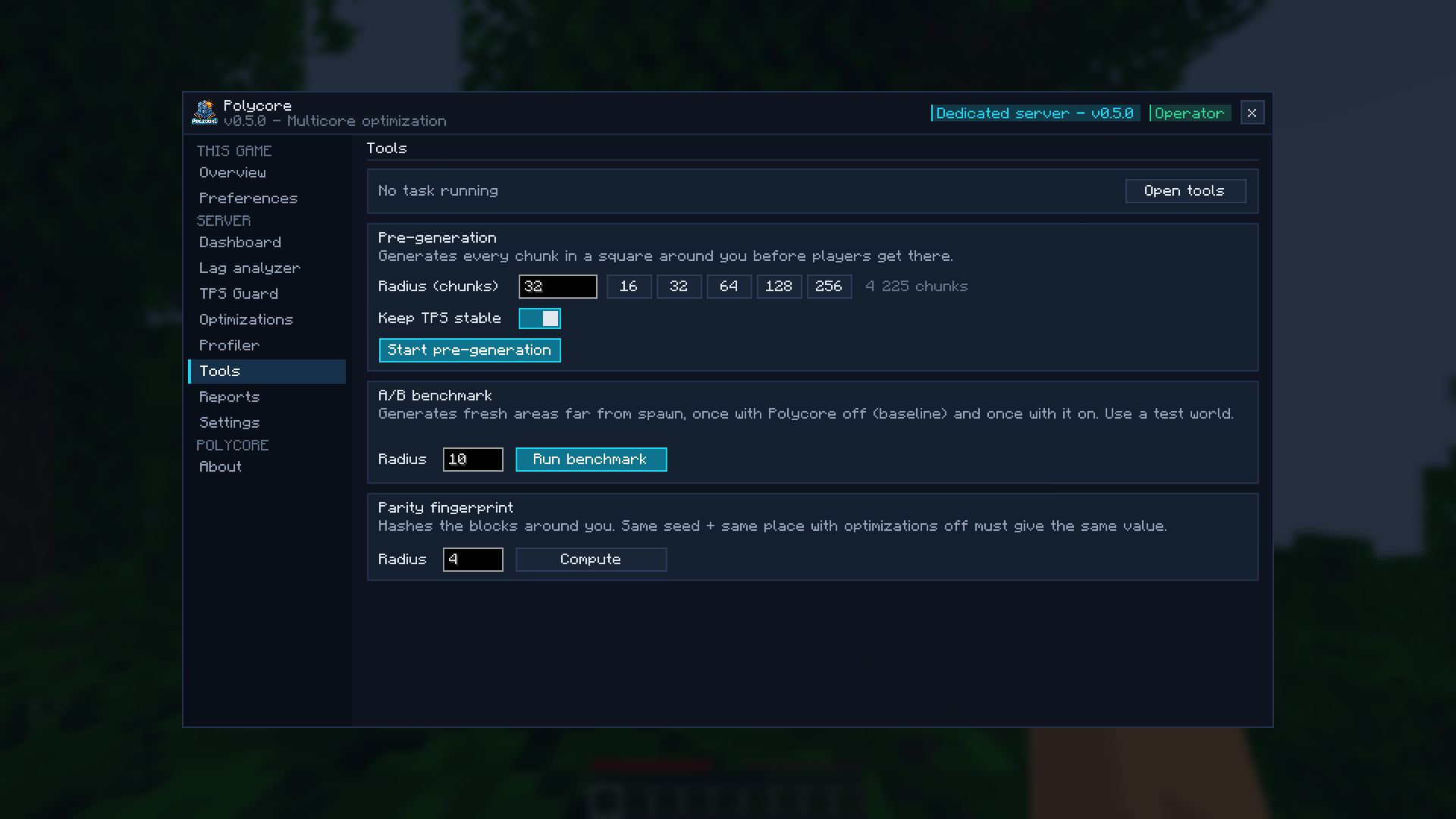
/polycore pregen start <radius>keeps every core busy, skips existing chunks, and slows down by itself when the server lags.
Measured on a 20-thread CPU: 28.6 → 67.4 chunks/s (+135%). Your gain depends on your CPU: the built-in A/B benchmark measures it on your own machine.
Find what lags your server
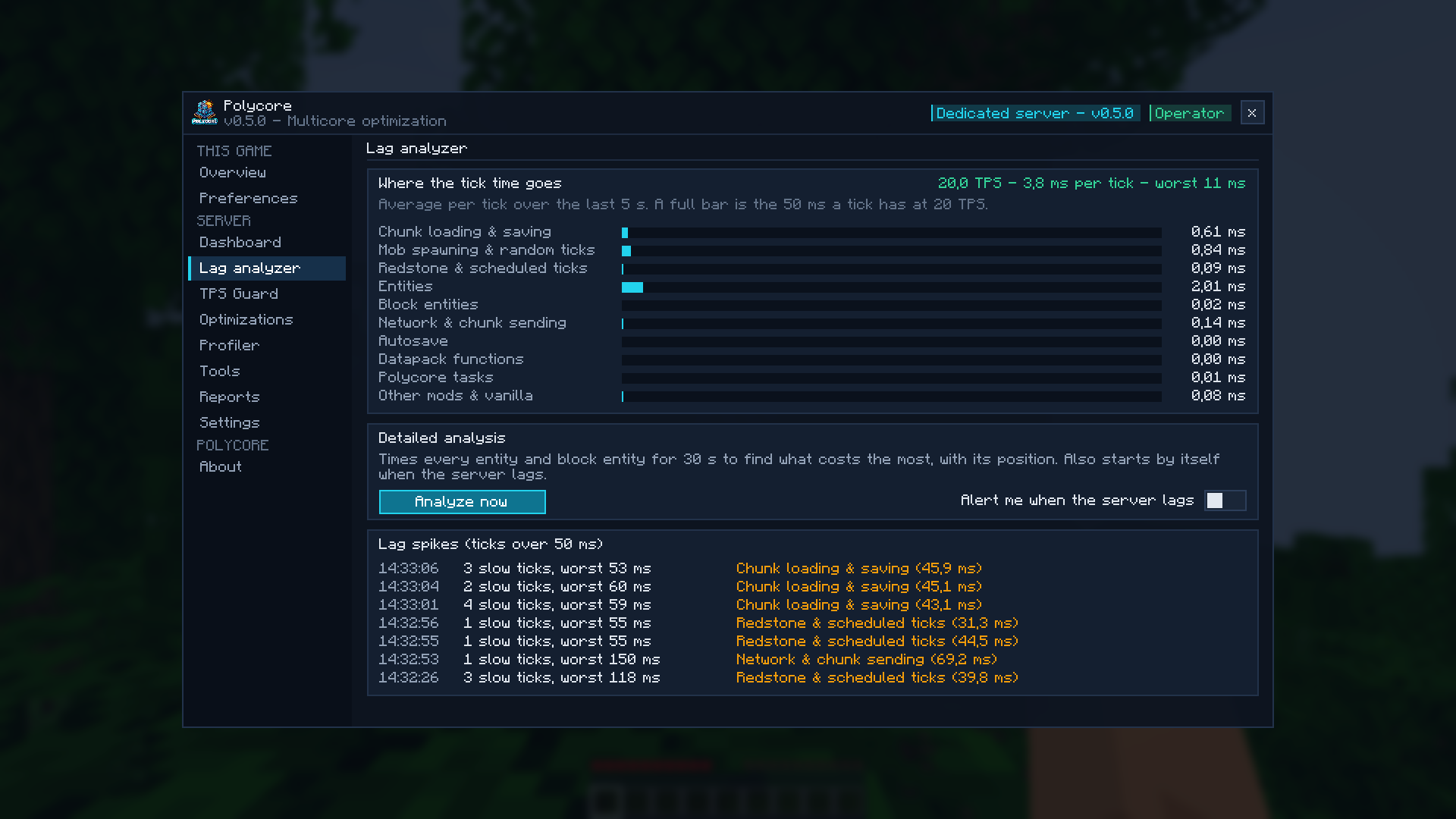
The lag analyzer shows where every tick goes: entities, block entities, chunk loading and saving, mob spawning, redstone, network, other mods. A detailed analysis times every entity and block entity for 30 s and lists the costliest ones with their coordinates (operators can teleport to them in one click), plus the cost per type, per mod and per chunk. It also starts by itself when the server lags, and keeps a log of lag spikes.
On a real 110+ mod Create server, it found that two decorative mobs from an animal mod were eating a third of every tick. Removing them took ticks from 47 ms down to 38 ms.
TPS Guard
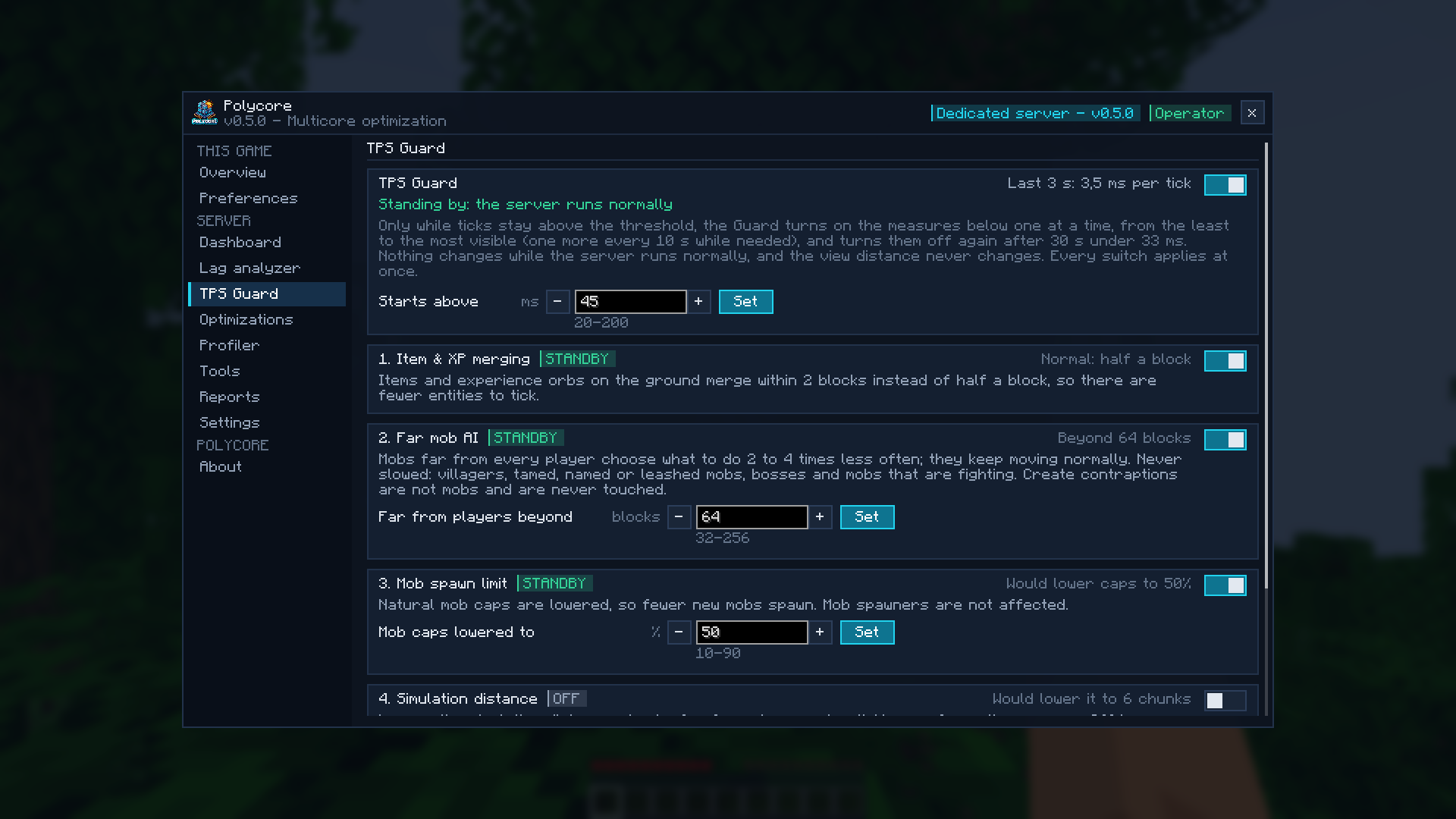
Only while the server falls behind, the TPS Guard turns on gentle measures one at a time, least visible first, and turns them off again once the server is fine:
- items and XP orbs merge from further away;
- mobs far from every player think less often (they still move normally; villagers, pets, named mobs and bosses are never touched);
- natural mob caps are lowered;
- optional: lower simulation distance.
It never touches the view distance. Every measure can be switched on or off from the menu, instantly, without a restart.
In-game menu
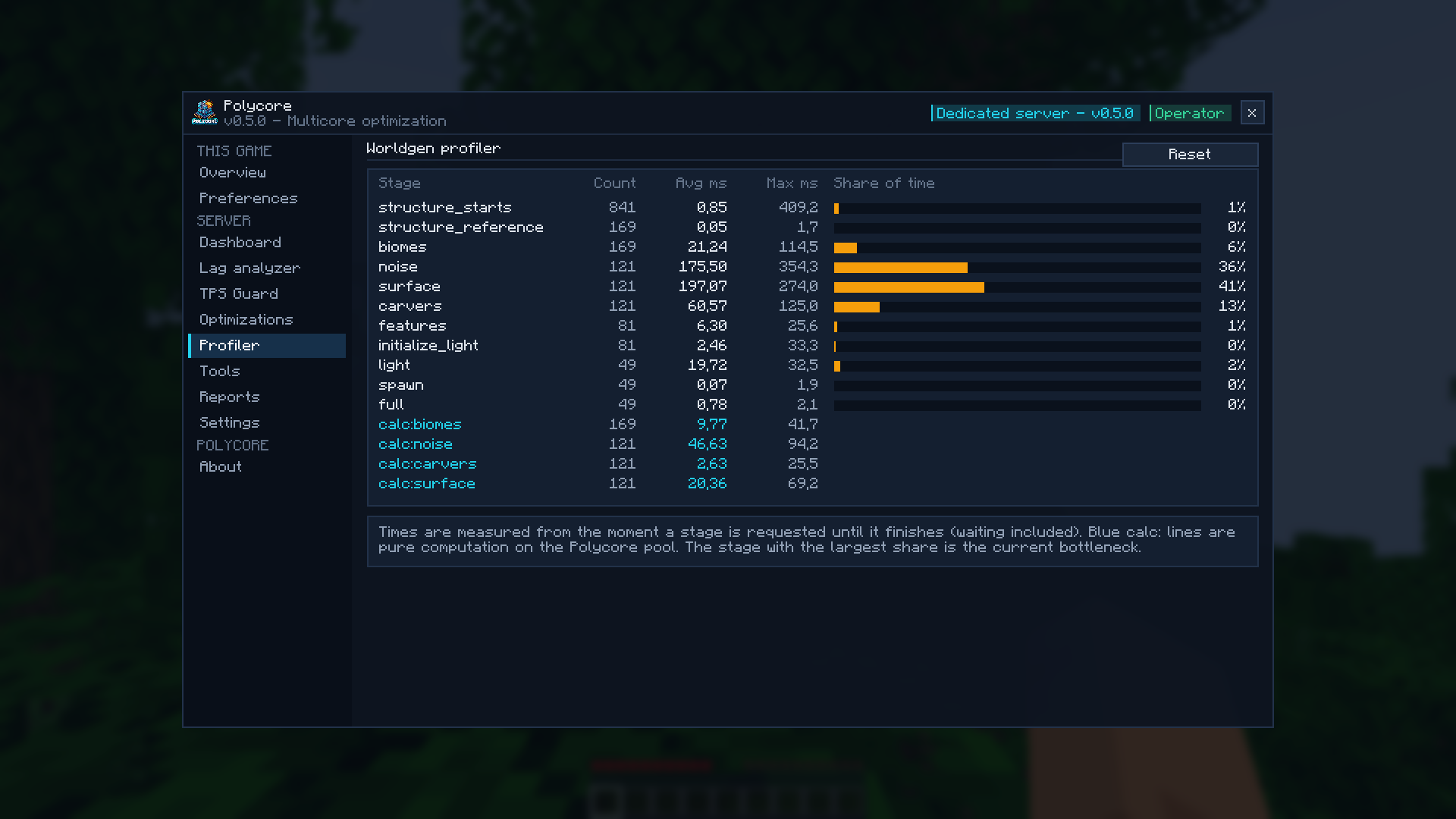
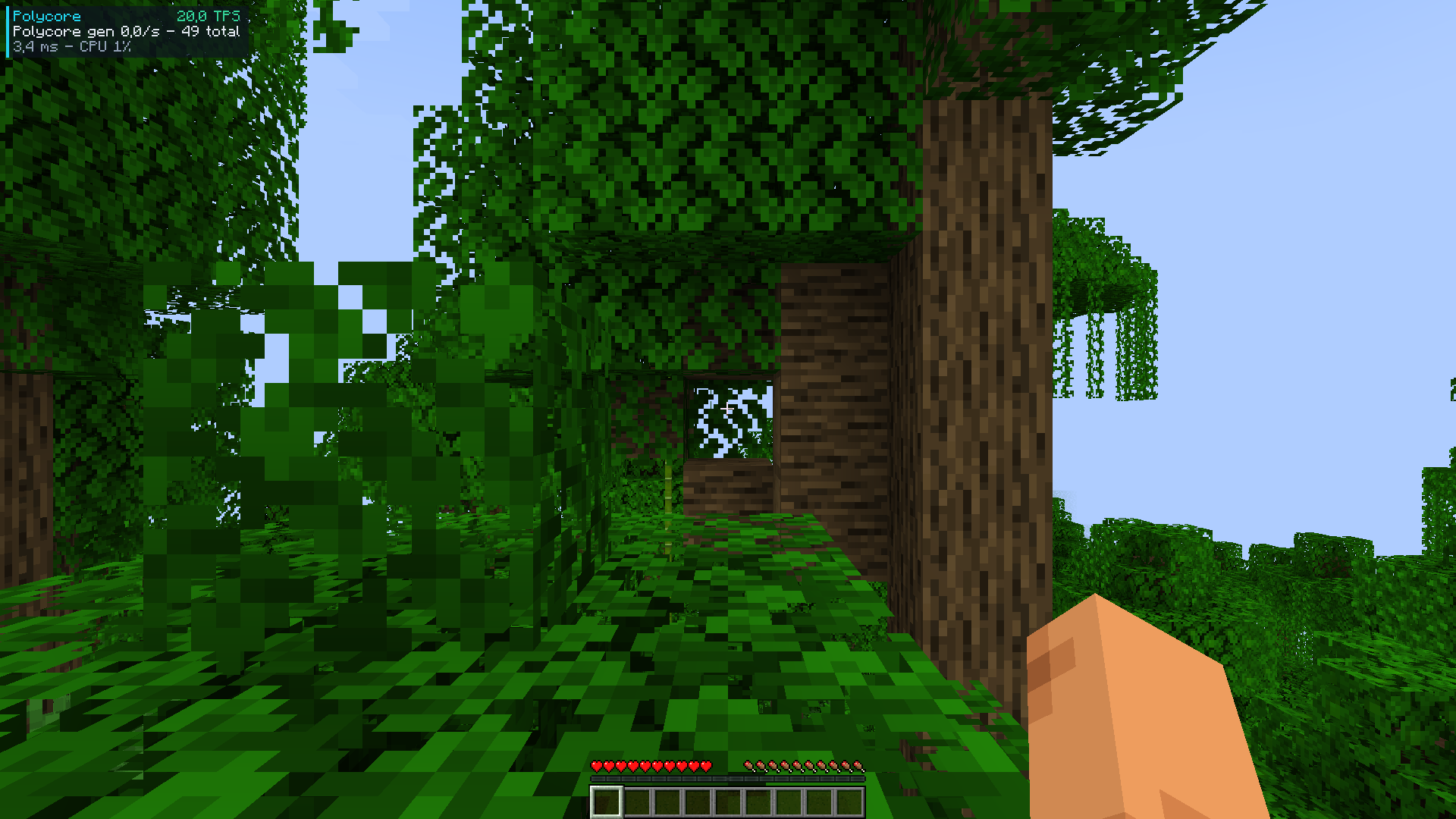
Press K (or /polycore): live dashboard, lag analyzer, TPS Guard, optimizations, profiler, tools, reports and settings. Operators can change everything; other players get a read-only view. Players without the client mod get a chest menu. Feedback goes through toasts, never the chat. Optional compact HUD with TPS and tick time.
Plays nice with other mods
Polycore never replaces Minecraft's code, it only adds to it. At every start it checks which game methods other mods change; if another mod changes the same code as one of Polycore's optimizations, that optimization stays off and the menu says which mod and why. Remove that mod and it comes back by itself.
Proof that the world is unchanged: /polycore hash fingerprints the terrain. Same seed and place, with or without Polycore, must give the same value.
Server and client
- Server (a dedicated server, or your own game in singleplayer): this is where Polycore does its work. Faster chunk generation, fast aquifers, the lag analyzer and the TPS Guard all run there. Installing it on the server alone gives you every optimization.
- Client (each player's game): adds the full Polycore menu (key K), toasts, the HUD and one-click actions (teleport to a lag source, copy a report). It makes running and watching a server much easier, especially for operators. It does not change your FPS: Polycore optimizes the server side.
- Mixing is fine: players without Polycore can join a Polycore server (operators then get a chest menu with
/polycore), and players with Polycore can join servers that do not have it. - Singleplayer: your game runs its own server, so installing Polycore once gives you everything.
Screenshots
Requirements
Polycore runs on Minecraft 1.18.2 to 26.3, with NeoForge, Fabric or Forge. Each file is for one loader and one range of Minecraft versions, both written in its name (polycore-<loader>-<minecraft versions>-<version>.jar): pick the one that matches your game.
| Minecraft | NeoForge | Fabric | Forge | Java |
|---|---|---|---|---|
| 26.3 | yes | yes | yes | 25 |
| 26.2 | yes | yes | yes | 25 |
| 26.1 – 26.1.2 | yes | yes | yes | 25 |
| 1.21.11 | yes | yes | yes | 21 |
| 1.21.9 – 1.21.10 | yes | yes | 1.21.10 | 21 |
| 1.21.6 – 1.21.8 | 1.21.7 and 1.21.8 | yes | 1.21.8 | 21 |
| 1.21.5 | yes | yes | yes | 21 |
| 1.21.2 – 1.21.4 | yes | yes | 1.21.3 and 1.21.4 | 21 |
| 1.21 – 1.21.1 | yes | yes | 1.21.1 | 21 |
| 1.20.5 – 1.20.6 | yes | yes | 1.20.6 | 21 |
| 1.20.2 – 1.20.4 | 1.20.4 | yes | 1.20.2 and 1.20.4 | 17 |
| 1.20 – 1.20.1 | — | yes | yes | 17 |
| 1.19.4 | — | yes | yes | 17 |
| 1.19.3 | — | yes | yes | 17 |
| 1.19 – 1.19.2 | — | yes | 1.19.1 – 1.19.2 | 17 |
| 1.18.2 | — | yes | yes | 17 |
- Fabric: Fabric API is required (install it next to Polycore).
- NeoForge and Forge: nothing else to install.
- Server side is enough for every optimization; install it on the client too for the menu (key K) and the HUD. Players without Polycore can join a Polycore server.
- Not supported: Minecraft 1.18, 1.18.1 and 1.19 (their loaders cannot load the library Polycore embeds), and the loader/version pairs marked — or missing above (details).
Feedback and modpacks
Bug reports and benchmark results are welcome in the comments or on GitHub. Please include your CPU, your mod list and, for performance, the report from polycore-reports/.
You're welcome to use Polycore in modpacks: just let the author know (a comment is enough).
Made by Aprilox · All rights reserved: free to use; sharing it, modified or not, requires notifying the author (license).
Project description from CurseForge.
Pick your setup
Polycore by Minecraft version and loader
Choose the version and loader you play, then open the matching release.
Minecraft version
26.2
3 loader buildsMinecraft version
26.1.2
3 loader buildsMinecraft version
26.1.1
3 loader buildsMinecraft version
26.1
3 loader buildsMinecraft version
1.21.11
3 loader buildsMinecraft version
1.21.10
3 loader buildsMinecraft version
1.21.9
2 loader buildsMinecraft version
1.21.8
3 loader buildsMinecraft version
1.21.7
2 loader buildsMinecraft version
1.21.6
1 loader buildMinecraft version
1.21.5
3 loader buildsShowing the newest 12 of 30 game versions. Older files are in the list below.
Check the dependencies, then try the file in a copied instance before changing a world you care about.
Recent files
Polycore versions and loaders
Polycore 0.5.0 (Forge 26.1 – 26.1.2)
polycore-forge-26.1-26.1.2-0.5.0.jar
8 Nov 2026
Client Source doesn’t say Server Source doesn’t say Dependencies No extras listed Listed on Release listing
Check the 26.1 · Forge setup Forge26.126.1.126.1.2 release
Looking for an older file? The official CurseForge project page is in Resources.
 mod
CurseForge · Minecraft
Better Allay
Customize how allay differentiates between potions and tipped arrows. Optionally can make allays pick up items even when mob griefing is off and set time for how long allay likes noteblock.
 mod
CurseForge · Minecraft
Reimagined Anvils
Rethought and tweaked Anvil usage to have a more fair reparing and xp cost
 mod
CurseForge + Modrinth · Minecraft
Manure
💩 Animals periodically drop manure, by default twice a day. Can be used as a bone meal substitute.