Minecraft version
Back to mods 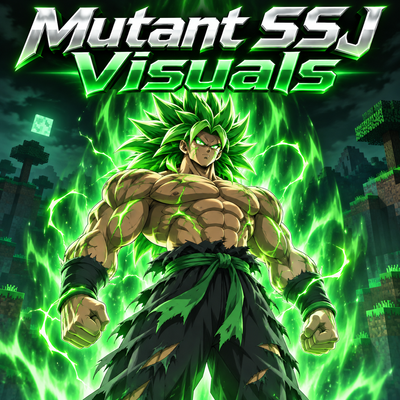
CurseForge · Minecraft mod
Mutant SSJ Visuals
A Dragon Mine Z addon inspired by Broly’s mutation, with customizable Saiyan visuals, green transformations, gradual power release, and form-specific bonuses.
Choose a version Pick your version below, then grab the matching file.
Quick answer
Which Mutant SSJ Visuals release should I use?
Latest stable file mutantssjvisuals-1.29.0.jar
Game version 1.20.1
Loader Forge
Mutant SSJ Visuals mutantssjvisuals-1.29.0.jar targets 1.20.1 with Forge. The project page does not say whether this file belongs on the client, dedicated server, or both. No extra mods listed for this file.
Where it goes
Is Mutant SSJ Visuals required on the client, server, or both?
The project page does not say whether this file belongs on the client, dedicated server, or both.
Client Source doesn’t say
Dedicated server Source doesn’t say
Loader for this release Forge
Required install it here Optional supported, not mandatory Not supported do not install here Source doesn’t say do not assume
The source does not explicitly classify this release as client-only or server-only.
What else does Mutant SSJ Visuals mutantssjvisuals-1.29.0.jar need?
mutantssjvisuals-1.29.0.jar. Change the file and its required mods may change too.
This file does not list any required mods. Do not add a library just because a different file uses it.
This file does not list any required or optional mods.
Before you install it
Add Mutant SSJ Visuals without breaking your instance.
Built for Mutant SSJ Visuals mutantssjvisuals-1.29.0.jar. Pick another file and the loader, install side or required mods may change.
- 01
Stick to this file
Use mutantssjvisuals-1.29.0.jar. It targets 1.20.1 with Forge; another release may have different loader, side or dependency requirements.
- 02
Bring the mods it needs
This file does not list any required mods. Do not add a library just because a different file uses it.
- 03
Put it on the correct side
The project page does not say whether this file belongs on the client, dedicated server, or both.
- 04
Pick the file you checked
Use the “Get this file” button beside mutantssjvisuals-1.29.0.jar. It opens that exact file at the source.
About this project
What does Mutant SSJ Visuals add?
💚 YOUR POWER KEEPS RISING. SO DO YOU. 💚
The battle drags on. Every blow fuels your rage, and every limit starts to feel too small. Your hair begins to turn green, your aura shifts, and lightning tears across the battlefield. 🌿⚡
Broly’s mutation is awakening: this is more than a new look — it’s the experience of fighting as a Mutant Saiyan and pushing closer to your full potential. 🟢 (Configurable.)
Reach your chosen power-release limit and keep fighting, and the pressure can trigger an automatic transformation. What if the next form requires more mastery than you have? There’s a chance your body will break through that limit for a short time. The form awakens, your power surges — and when the effect ends, you return to base form. 🔥
🟢 HOW IT WORKS
- 🔋 Power release can rise gradually during combat, up to the limit set by the player.
- 🟩 After reaching the chosen limit — between 100% and 132% — fighting for long enough can trigger an automatic transformation. Progression follows the form group selected in Dragon Mine Z.
- ⚡ If the next form is blocked only by its mastery requirement, there is a chance to access it temporarily. The chance, duration, and cooldown can be adjusted. Players who have not unlocked any forms also have a temporary-form option.
- 💥 Over Charge can be toggled on or off. When enabled, its burst happens only after a successful transformation.
- 💪 Attribute bonuses can scale with power release and are added to the transformation’s existing values.
🌿 MUTANT VISUALS
Colors can shift gradually with every percentage of power release. Hair, aura, eyes, and lightning each have independent palettes, with editable colors from 0% to 132%. Each form can have its own settings or share a preset. Visual changes do not require the aura to be active. 🎨
🛠️ SET UP YOUR EXPERIENCE
The config lets you toggle power release, automatic transformations, temporary forms, Over Charge, attribute bonuses, and each visual effect separately. You can also choose which forms are affected, adjust timing and power limits, control body models, and set how stacked-form auras appear.
📁 Settings are stored in config/mutantssjvisuals.json.
🟢 Made for Dragon Mine Z 2.2.1, Minecraft 1.20.1, and Forge.
Project description from CurseForge.
Pick your setup
Mutant SSJ Visuals by Minecraft version and loader
Choose the version and loader you play, then open the matching release.
Check the dependencies, then try the file in a copied instance before changing a world you care about.
Recent files
Mutant SSJ Visuals versions and loaders
mutantssjvisuals-1.29.0.jar
7 Nov 2026
Client Source doesn’t say Server Source doesn’t say Dependencies No extras listed Listed on Release listing
Check the 1.20.1 · Forge setup 1.20.1Forge release
mutantssjvisuals-1.12.0.jar
7 Nov 2026
Client Source doesn’t say Server Source doesn’t say Dependencies No extras listed Listed on Release listing
Check the 1.20.1 · Forge setup 1.20.1Forge beta
Looking for an older file? The official CurseForge project page is in Resources.
 mod
CurseForge + Modrinth · Minecraft
Chopper's Delight
An add-on for Farmer's Delight adding Cutting Boards for all wood types, which can be decorated with banners. Includes compatibility with Every Compat, Biomes O' Plenty and Oh The Biomes You'll Go.
 mod
CurseForge + Modrinth · Minecraft
MiniMePets
Turn wolfs and cats into small players using a nametag
 mod
CurseForge · Minecraft
ONE PUNCH MINE -α-
[Alpha] ONE PUNCH MINE adds One Punch Man characters to Minecraft! Choose to be a Hero or Monster, defeat enemies, and boost your stats. Note: This is an Alpha version, so most features are WIP. Stay tuned!