Minecraft version
Back to mods 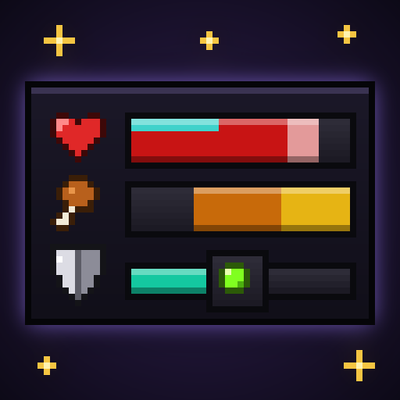
CurseForge · Minecraft mod
Better UX
Better User Experience, health bar, hunger bar, no more fire all over the screen, customize the HUD how ever you like and more.
Choose a version Pick your version below, then grab the matching file.
Quick answer
Which Better UX release should I use?
Latest stable file betterux-forge-3.1.0.jar
Game version 26.3
Loader Forge
Better UX betterux-forge-3.1.0.jar targets 26.3 with Forge. The project page does not say whether this file belongs on the client, dedicated server, or both. No extra mods listed for this file.
Where it goes
Is Better UX required on the client, server, or both?
The project page does not say whether this file belongs on the client, dedicated server, or both.
Client Source doesn’t say
Dedicated server Source doesn’t say
Loader for this release Forge
Required install it here Optional supported, not mandatory Not supported do not install here Source doesn’t say do not assume
The source does not explicitly classify this release as client-only or server-only.
What else does Better UX betterux-forge-3.1.0.jar need?
betterux-forge-3.1.0.jar. Change the file and its required mods may change too.
This file does not list any required mods. Do not add a library just because a different file uses it.
This file does not list any required or optional mods.
Before you install it
Add Better UX without breaking your instance.
Built for Better UX betterux-forge-3.1.0.jar. Pick another file and the loader, install side or required mods may change.
- 01
Stick to this file
Use betterux-forge-3.1.0.jar. It targets 26.3 with Forge; another release may have different loader, side or dependency requirements.
- 02
Bring the mods it needs
This file does not list any required mods. Do not add a library just because a different file uses it.
- 03
Put it on the correct side
The project page does not say whether this file belongs on the client, dedicated server, or both.
- 04
Pick the file you checked
Use the “Get this file” button beside betterux-forge-3.1.0.jar. It opens that exact file at the source.
About this project
What does Better UX add?
Overview
How many hearts is "a few hearts"? How long until you starve? Will this armor survive a creeper? Vanilla's rows of little icons make you guess. Better UX turns them into clean bars with the real numbers on them, so one glance tells you everything.
- Health: one bar with your exact health. Golden apple hearts show as a strip across the top, and after a hit a pale trail shows how much it cost you. The bar changes colour when you're poisoned, withering or freezing.
- Hunger: your hunger and your saturation, the hidden "fullness" vanilla never shows. Hold any food to see exactly what eating it will give you.
- Armor: two small shields show how much damage your armor really blocks, Protection enchantments included.
- On fire: the flames move to your health bar instead of covering your screen, so you can actually find the water.
- Underwater: your air becomes a timer that counts the seconds you have left and flashes red when you start drowning.
- Riding: your horse's health shows right where your hunger was.
- Experience, bosses and potions: your level sits on a sleek experience bar, boss bars show health in percent, and potion effects show how long they last and how strong they are.
- A cleaner screen: numbers fade away when nothing is happening and come back the moment something changes.
The first time you join a world, a quick visual tour shows you what everything means. Better UX is lighter than the vanilla HUD it replaces, so there's no FPS cost. Press J any time to switch back to the plain vanilla HUD, and again to bring yours back.
Presets
Pick a style in one click, then make it your own.
| Preset | Feels like |
|---|---|
| Minecraft | Everything where you're used to it, just clearer. Numbers fade when nothing is happening. |
| ARPG | Health in the bottom-left corner and hunger in the bottom-right, like an action RPG. Numbers always on. |
| MMORPG | A character frame in the top-left corner with your portrait, health and hunger, like your favourite MMO. Your portrait turns to look where you're aiming and wears your helmet. Numbers always on. |
| Custom | Your own design. Change anything and you're on Custom, which saves automatically, so your latest changes are never lost. |
Found a layout you love? Press Save to keep it in its own slot and switch back to it any time. Saving always makes a new slot, so you never overwrite one by accident, and a saved slot stays exactly as you left it.
Edit Mode
Press U and the whole HUD becomes editable while you watch. A panel on the side lists every part of the HUD, and you can dock it to either side of the screen so it never gets in the way.
- Move: drag anything anywhere. It snaps neatly into place and stays put at any window size.
- Resize: make the bars shorter or longer.
- Flip: choose which way a bar empties, or which side of the shield its number sits on.
- Hide: make any part invisible.
- Go vanilla: switch a single part back to its vanilla version. Want the classic hearts with everything else upgraded? Easy.
- Tweak: slide your level along the experience bar, turn the portrait's helmet on or off, or choose whether numbers fade, always show or stay hidden.
- Reset: put any part back where it started.
Not sure what something does? Press the ? button in edit mode to replay the tour. Both keys can be changed under Options → Controls → Better UX.
Project description from CurseForge.
Pick your setup
Better UX by Minecraft version and loader
Choose the version and loader you play, then open the matching release.
Check the dependencies, then try the file in a copied instance before changing a world you care about.
Recent files
Better UX versions and loaders
betterux-forge-3.1.0.jar
7 Nov 2026
Client Source doesn’t say Server Source doesn’t say Dependencies No extras listed Listed on Release listing
Check the 26.3 · Forge setup Forge26.3 release
betterux-fabric-3.0.0.jar
7 Nov 2026
Client Source doesn’t say Server Source doesn’t say Dependencies No extras listed Listed on Release listing
Check the 26.3 · Fabric setup Fabric26.3 release
Looking for an older file? The official CurseForge project page is in Resources.
 mod
CurseForge + Modrinth · Minecraft
Safra
Don’t mess with the server Play Minecraft with your friends in 2 clicks via P2P
 mod
CurseForge + Modrinth · Minecraft
Pulsar Lighting Engine
Bringing a Starlight-based lighting engine to CleanroomLoader
 mod
CurseForge · Minecraft
Kinda Enough Items
Every recipe and every use of every item, in Minecraft's own style: search, click, craft. Growth times, drops and other mods' machines included.