Minecraft version
Back to mods 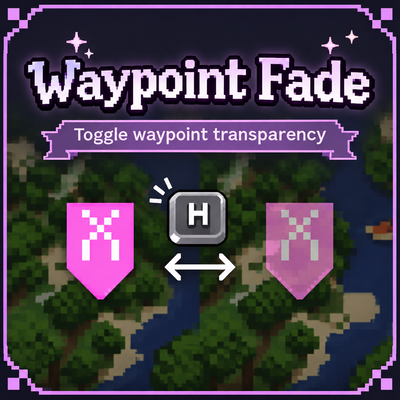
CurseForge · Minecraft mod
Waypoint Fade
Mark visited Xaero waypoints with H: fade them to 25% opacity and keep them on your world map for less clutter.
Choose a version Pick your version below, then grab the matching file.
Quick answer
Which Waypoint Fade release should I use?
Latest stable file WaypointFade.jar
Game version 1.21.1
Loader NeoForge
Waypoint Fade WaypointFade.jar targets 1.21.1 with NeoForge. The project page does not say whether this file belongs on the client, dedicated server, or both. No extra mods listed for this file.
Where it goes
Is Waypoint Fade required on the client, server, or both?
The project page does not say whether this file belongs on the client, dedicated server, or both.
Client Source doesn’t say
Dedicated server Source doesn’t say
Loader for this release NeoForge
Required install it here Optional supported, not mandatory Not supported do not install here Source doesn’t say do not assume
The source does not explicitly classify this release as client-only or server-only.
What else does Waypoint Fade WaypointFade.jar need?
WaypointFade.jar. Change the file and its required mods may change too.
This file does not list any required mods. Do not add a library just because a different file uses it.
This file does not list any required or optional mods.
Before you install it
Add Waypoint Fade without breaking your instance.
Built for Waypoint Fade WaypointFade.jar. Pick another file and the loader, install side or required mods may change.
- 01
Stick to this file
Use WaypointFade.jar. It targets 1.21.1 with NeoForge; another release may have different loader, side or dependency requirements.
- 02
Bring the mods it needs
This file does not list any required mods. Do not add a library just because a different file uses it.
- 03
Put it on the correct side
The project page does not say whether this file belongs on the client, dedicated server, or both.
- 04
Pick the file you checked
Use the “Get this file” button beside WaypointFade.jar. It opens that exact file at the source.
About this project
What does Waypoint Fade add?
I missed being able to fade waypoints with H. I used that feature to mark places I had already visited, keeping my map readable without deleting the markers or losing track of my adventures.
So I created Waypoint Fade — a small, standalone addon developed with AI assistance.
How it works
- Open Xaero’s World Map and hover over a local waypoint.
- Press H to switch it to World Map Local and fade it to 25% opacity.
- Press H again to restore its original visibility and opacity.
Faded waypoints remain on your world map, letting you distinguish visited locations from places you still want to explore. Your fade selections are saved between sessions.
Compatibility
Built for Minecraft 1.21.1 — NeoForge.
Requires both:
- Xaero’s Minimap 26.6.0
- Xaero’s World Map 1.47.0
Tested in singleplayer and while connected to a multiplayer server. This is a client-side addon; install it on your client, not on the server.
Credits
Created by Kataby44, with AI assistance for development and debugging.
All credit for Xaero’s Minimap and Xaero’s World Map belongs to xaero96. This is an unofficial addon and does not include or replace either original mod.
Project description from CurseForge.
Pick your setup
Waypoint Fade by Minecraft version and loader
Choose the version and loader you play, then open the matching release.
Check the dependencies, then try the file in a copied instance before changing a world you care about.
Recent files
Waypoint Fade versions and loaders
WaypointFade.jar
7 Nov 2026
Client Source doesn’t say Server Source doesn’t say Dependencies No extras listed Listed on Release listing
Check the 1.21.1 · NeoForge setup 1.21.1NeoForge release
Looking for an older file? The official CurseForge project page is in Resources.
 mod
CurseForge · Minecraft
Isles Unbound Fluid HUD
Shows Ex Deorum fluid levels in Jade and adds the Isles Unbound island menu, team market, and mining gate.
 mod
CurseForge · Minecraft
Apothic Pots
Place an Apothic Spawners spawner in a Botany Pot and it grows that mob's loot. Spawner stats apply and mob kills are simulated.
 mod
CurseForge · Minecraft
Create Riftborne
An addon for Create Aeronautics. A Rift Engine for ship teleportation, Stress generation, gravity tools, teleporters, a hostile Rift dimension to explore, and a lot more.