Minecraft version
Back to mods 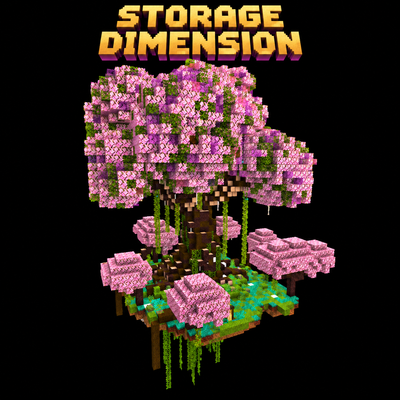
CurseForge · Minecraft mod
MFS's Storage Dimension
Storage Dimension gives each player a personal magical storage dimension. Access your floating island with a bound key, upgrade your storage, and share access with friends. Use Rift Hoppers to automatically store items.
Choose a version Pick your version below, then grab the matching file.
Quick answer
Which MFS's Storage Dimension release should I use?
Latest stable file StorageDimension-1.21.1-1.1.0
Game version 1.21.1
Loader NeoForge
MFS's Storage Dimension StorageDimension-1.21.1-1.1.0 targets 1.21.1 with NeoForge. The project page does not say whether this file belongs on the client, dedicated server, or both. No extra mods listed for this file.
Where it goes
Is MFS's Storage Dimension required on the client, server, or both?
The project page does not say whether this file belongs on the client, dedicated server, or both.
Client Source doesn’t say
Dedicated server Source doesn’t say
Loader for this release NeoForge
Required install it here Optional supported, not mandatory Not supported do not install here Source doesn’t say do not assume
The source does not explicitly classify this release as client-only or server-only.
What else does MFS's Storage Dimension StorageDimension-1.21.1-1.1.0 need?
StorageDimension-1.21.1-1.1.0. Change the file and its required mods may change too.
This file does not list any required mods. Do not add a library just because a different file uses it.
This file does not list any required or optional mods.
Before you install it
Add MFS's Storage Dimension without breaking your instance.
Built for MFS's Storage Dimension StorageDimension-1.21.1-1.1.0. Pick another file and the loader, install side or required mods may change.
- 01
Stick to this file
Use StorageDimension-1.21.1-1.1.0. It targets 1.21.1 with NeoForge; another release may have different loader, side or dependency requirements.
- 02
Bring the mods it needs
This file does not list any required mods. Do not add a library just because a different file uses it.
- 03
Put it on the correct side
The project page does not say whether this file belongs on the client, dedicated server, or both.
- 04
Pick the file you checked
Use the “Get this file” button beside StorageDimension-1.21.1-1.1.0. It opens that exact file at the source.
About this project
What does MFS's Storage Dimension add?
Your own pocket dimension. Your storage. Your rules.
Storage Dimension adds a personal floating island dedicated to storing your items. Step through a magical portal, leave the clutter behind, and keep your resources together in a space that belongs to you.
A dimension of your own
Every player has a personal storage dimension linked to their identity. Your Riftkeeper’s Key always opens your island—even if someone else picks it up, they cannot use it to access your storage.
Upgrade your storage
Progress through storage upgrades using the Rift Table and expand your capacity as your collection grows.
Share access with friends
Create Bound Rift Keys and choose exactly what each key allows: viewing, depositing, withdrawing, or entering your dimension. Manage permissions and revoke access whenever you need to.
Automate your item storage
Connect your farms to Rift Hoppers to send items directly into your personal storage. Each hopper binds to the player who places it.
Keep a portal open
Place a Rift Anchor to maintain a permanent portal at a fixed location, while keeping your key available for access on your travels.
A magical setting
Enjoy a decorative floating island designed around your storage. Building and mining are disabled inside, keeping the island intact and the focus on organizing your collection.
An in-game guidebook explains the essentials, from your first key to upgrades, automation, and shared access.
**Made for Minecraft 1.21.1 — NeoForge.
Disclaimer: AI has been used during the making of this mod.**
Project description from CurseForge.
Pick your setup
MFS's Storage Dimension by Minecraft version and loader
Choose the version and loader you play, then open the matching release.
Check the dependencies, then try the file in a copied instance before changing a world you care about.
Recent files
MFS's Storage Dimension versions and loaders
StorageDimension-1.21.1-1.1.0
StorageDimension-1.21.1-1.1.0.jar
24 Nov 2026
Client Source doesn’t say Server Source doesn’t say Dependencies No extras listed Listed on Release listing
Check the 1.21.1 · NeoForge setup 1.21.1NeoForge release
StorageDimension-1.21.1-1.0
StorageDimension-1.21.1-1.0.jar
7 Nov 2026
Client Source doesn’t say Server Source doesn’t say Dependencies No extras listed Listed on Release listing
Check the 1.21.1 · NeoForge setup 1.21.1NeoForge release
Looking for an older file? The official CurseForge project page is in Resources.
 mod
CurseForge + Modrinth · Minecraft
Multiblocked2
Mbd2 is an extremely flexible yet vanilla-esque multiblock mod, that embraces aspects of MultiblockTweaker and Modular Machinery.
 mod
Modrinth · Minecraft
Rune Enchanting
Replace the enchanting system with a rune system. Find runes in the world and apply them to items
 mod
CurseForge · Minecraft
Asterion
Descend into a forgotten Labyrinth, explore a mysterious new dimension, uncover ancient secrets, forge powerful equipment, and defeat the Minotaur.