Fabric API Needed by ChunkHelper 1.0.6
requiredMatching file found Matched file: [26.3] Fabric API 0.166.2+26.3
CurseForge · Minecraft mod
A small client-side Fabric mod for Minecraft 26.3 that shows which chunks an ender pearl or a player at a given position would keep loaded.
Quick answer
ChunkHelper 1.0.6 targets 26.3 with Fabric. The project page does not say whether this file belongs on the client, dedicated server, or both. All 1 required mods have matching files.
Where it goes
The project page does not say whether this file belongs on the client, dedicated server, or both.
The source does not explicitly classify this release as client-only or server-only.
ChunkHelper 1.0.6. Change the file and its required mods may change too.
Install Fabric API first. We found matching files for this game-version and loader setup.
We only count dependency files that match this setup. A file for another loader does not fill the gap.
Before you install it
Built for ChunkHelper 1.0.6. Pick another file and the loader, install side or required mods may change.
Use ChunkHelper 1.0.6. It targets 26.3 with Fabric; another release may have different loader, side or dependency requirements.
Install Fabric API first. We found matching files for this game-version and loader setup.
The project page does not say whether this file belongs on the client, dedicated server, or both.
Use the “Get this file” button beside ChunkHelper 1.0.6. It opens that exact file at the source.
About this project
A small client-side Fabric mod for Minecraft 26.3 that shows which chunks an ender pearl or a player at a given position would keep loaded. Use it when you build pearl stasis chambers, chunk loaders or AFK spots, so you know which chunks around a point really tick.
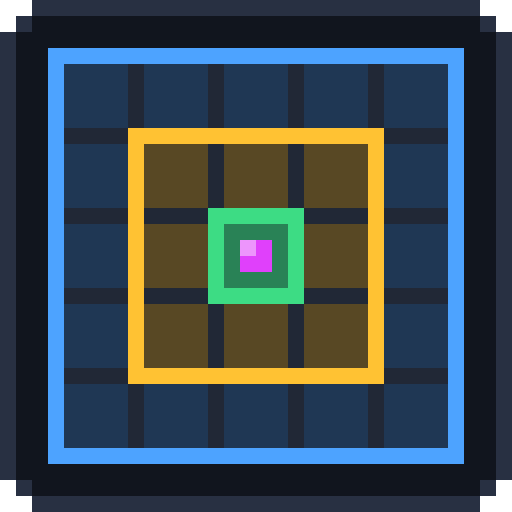
The outline is drawn in the world in the style of the F3+G chunk borders: three nested squares on the chunk borders, one per load state, plus a beam and a label on the exact point.
/ch <x> <z> pearl     show the chunks an ender pearl at this position loads
/ch <x> <z> player    show the chunks a player at this position loads
/ch clear             remove the outline
/ch                   short usage hint
/chunkhelper works the same as /ch.
<x> <z> are block coordinates. ~ is relative to you, so /ch ~ ~ pearl uses your current position and /ch ~10 ~ pearl a point 10 blocks east./ch command replaces the previous one.After each command, the chat shows the chunk position and the size of every zone, for example:
[ChunkHelper] Ender pearl at -38 120 (chunk -3 7)
  ■ entity ticking 1x1   ■ block ticking 3x3   ■ loaded 5x5
| Color | Zone | What runs there |
|---|---|---|
| 🟩 Green | Entity ticking | Everything: entities, mob AI, random ticks (crops, ...), redstone |
| 🟨 Yellow | Block ticking | Redstone, scheduled block ticks and block entities. Entities are frozen and no random ticks happen |
| 🟦 Blue | Loaded (inactive) | The chunk is loaded and accessible, but nothing ticks |
Each zone includes the zones inside it. For example, the blue square also contains the yellow and green ones.
Chunks are loaded through tickets. A ticket gives its chunk a level, and the level goes up by 1 per chunk outwards (square / chessboard distance). Level 31 or lower means entity ticking, 32 means block ticking and 33 means loaded but inactive.
Ender pearl A pearl puts one ticket with radius 2 (level 31) on the chunk it is in:
| Zone | Size |
|---|---|
| Entity ticking | 1×1 (only the pearl's chunk) |
| Block ticking | 3×3 |
| Loaded | 5×5 |
Player A player gets two kinds of tickets:
31 - simulation distanceEntities only tick where both reach level 31, so the zones are:
| Zone | Radius in chunks | Example: view 12, simulation 10 |
|---|---|---|
| Entity ticking | min(view, simulation) |
21×21 |
| Block ticking | min(view, simulation) + 1 |
23×23 |
| Loaded | view + 2 |
29×29 |
The mod uses the view and simulation distance the server sends to the client, not your own video settings. In singleplayer, these are your render distance and simulation distance.
Note: This is a preview of what a pearl or player would load at that point, based on the vanilla rules. It does not check whether those chunks are loaded right now.
Project description from CurseForge.
Pick your setup
Choose the version and loader you play, then open the matching release.
Check the dependencies, then try the file in a copied instance before changing a world you care about.
Recent files
chunkhelper-1.0.6.jar
7 Nov 2026
Looking for an older file? The official CurseForge project page is in Resources.
 mod
Reduced delay between music tracks, next track keybind, now playing widget and more
 mod
Bellows make furnaces burn twice as fast, water wheels and windmills work them for you, and a grinder turns every ore into two dusts.
 mod
HUD:A lightweight Jade alternative ,effect timmer ,Target Info,Saturation and Coordinates Monitor ,Waila,HWYLA,show Horse speed and jump stats,death location,Death Finder