Minecraft version
Back to mods 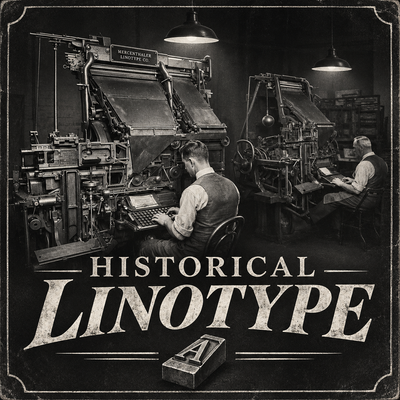
CurseForge · Minecraft mod
Historical Linotype
Bring 1930s printing technology to Minecraft! Mass-produce vanilla books with a historical Linotype machine, authentic mechanical sounds, and vintage atmosphere.
Choose a version Pick your version below, then grab the matching file.
Quick answer
Which Historical Linotype release should I use?
Latest stable file historicallinotype-1.1.0.jar
Game version 1.20.1
Loader Forge
Historical Linotype historicallinotype-1.1.0.jar targets 1.20.1 with Forge. The project page does not say whether this file belongs on the client, dedicated server, or both. No extra mods listed for this file.
Where it goes
Is Historical Linotype required on the client, server, or both?
The project page does not say whether this file belongs on the client, dedicated server, or both.
Client Source doesn’t say
Dedicated server Source doesn’t say
Loader for this release Forge
Required install it here Optional supported, not mandatory Not supported do not install here Source doesn’t say do not assume
The source does not explicitly classify this release as client-only or server-only.
What else does Historical Linotype historicallinotype-1.1.0.jar need?
historicallinotype-1.1.0.jar. Change the file and its required mods may change too.
This file does not list any required mods. Do not add a library just because a different file uses it.
This file does not list any required or optional mods.
Before you install it
Add Historical Linotype without breaking your instance.
Built for Historical Linotype historicallinotype-1.1.0.jar. Pick another file and the loader, install side or required mods may change.
- 01
Stick to this file
Use historicallinotype-1.1.0.jar. It targets 1.20.1 with Forge; another release may have different loader, side or dependency requirements.
- 02
Bring the mods it needs
This file does not list any required mods. Do not add a library just because a different file uses it.
- 03
Put it on the correct side
The project page does not say whether this file belongs on the client, dedicated server, or both.
- 04
Pick the file you checked
Use the “Get this file” button beside historicallinotype-1.1.0.jar. It opens that exact file at the source.
About this project
What does Historical Linotype add?
📰 Historical Linotype
Bring the Printing Revolution to Minecraft!
Step back into the 1930s and experience the golden age of mechanical printing!
Historical Linotype introduces a vintage printing machine inspired by the legendary Linotype machines of the early 20th century. Reproduce your written books quickly and affordably, accompanied by authentic mechanical sounds and an old-fashioned industrial atmosphere.
Whether you're running a newspaper company, distributing political pamphlets, publishing books, or building a historical roleplay server, Historical Linotype brings mass printing to Minecraft!
⚙️ Features
- Mass Book Printing: Duplicate vanilla written books without consuming the original.
- Affordable Production: Print books using paper, ink, and coal.
- Batch Printing: Produce 1, 8, 32, or 64 copies.
- Authentic Mechanical Sounds: Experience historical Linotype and printing press sound effects.
- Vintage Interface: A printing machine GUI inspired by 1930s industrial equipment.
- Survival Friendly: Craft and operate your printing machine in survival mode.
- Multiplayer Support: Perfect for historical servers, nations, newspapers, and roleplay communities.
- Vanilla Compatibility: Printed books remain regular Minecraft books.
🖨️ How to Use
- Craft and place the Linotype Printing Machine.
- Right-click the machine to open its interface.
- Insert your original written book.
- Add paper, ink sacs, and coal.
- Select the number of copies you want to produce.
- Start the machine and collect your printed books!
Your original book remains untouched.
📦 Printing Costs
- 1 Paper per book.
- 1 Ink Sac per 16 copies.
- 1 Coal per 64 copies.
Mass printing has never been easier!
🔧 Important – 3D Models
Custom 3D models are not available yet.
The current version uses temporary vanilla-style placeholder models for the Linotype machine.
A detailed, historically inspired 3D model is planned for a future update. The printing mechanics and functionality are already the main focus of the mod.
📋 Requirements
- Minecraft: Java Edition 1.20.1
- Mod Loader: Forge
- Language Support: English & Turkish
📰 Print the News. Spread the Word. Make History.
Historical Linotype — The Printing Revolution Begins!
Project description from CurseForge.
Pick your setup
Historical Linotype by Minecraft version and loader
Choose the version and loader you play, then open the matching release.
Check the dependencies, then try the file in a copied instance before changing a world you care about.
Recent files
Historical Linotype versions and loaders
historicallinotype-1.1.0.jar
10 Nov 2026
Client Source doesn’t say Server Source doesn’t say Dependencies No extras listed Listed on Release listing
Check the 1.20.1 · Forge setup 1.20.1Forge release
historicallinotype-1.0.0.jar
8 Nov 2026
Client Source doesn’t say Server Source doesn’t say Dependencies No extras listed Listed on Release listing
Check the 1.20.1 · Forge setup 1.20.1Forge release
Looking for an older file? The official CurseForge project page is in Resources.
 mod
CurseForge · Minecraft
Vehicle Fleet
Walkable military vehicles with realistic physics: tactical haulers, helicopters, a strategic airlifter, patrol ships, an LPD, and a submarine. Walk on moving decks, place blocks on sailing ships, multi-crew seating, and Titan/Exoframe cargo support!
 mod
Modrinth · Minecraft
Take Your Stream Chat
Live chat from Twitch, YouTube, Kick & TikTok — right inside your Minecraft world.
 mod
CurseForge · Minecraft
Excel on a Stick
Full control of your logistics with Excel in-game! Import any .xlsx or .csv file into an easily accessible Excel on a Stick item.