Minecraft version
Back to mods 
CurseForge · Minecraft mod
Blindness
you are blind, the world goes black and every sound sends out a wave that reveals the outlines around it.
Choose a version Pick your version below, then grab the matching file.
Quick answer
Which Blindness release should I use?
beta file blindness-0.9.2-beta.jar
Game version 1.20.1
Loader Forge
blindness-0.9.2-beta.jar targets 1.20.1 with Forge. The project page does not say whether this file belongs on the client, dedicated server, or both. No extra mods listed for this file.
Where it goes
Is Blindness required on the client, server, or both?
The project page does not say whether this file belongs on the client, dedicated server, or both.
Client Source doesn’t say
Dedicated server Source doesn’t say
Loader for this release Forge
Required install it here Optional supported, not mandatory Not supported do not install here Source doesn’t say do not assume
The source does not explicitly classify this release as client-only or server-only.
What else does blindness-0.9.2-beta.jar need?
blindness-0.9.2-beta.jar. Change the file and its required mods may change too.
This file does not list any required mods. Do not add a library just because a different file uses it.
This file does not list any required or optional mods.
Before you install it
Add Blindness without breaking your instance.
Built for blindness-0.9.2-beta.jar. Pick another file and the loader, install side or required mods may change.
- 01
Stick to this file
Use blindness-0.9.2-beta.jar. It targets 1.20.1 with Forge; another release may have different loader, side or dependency requirements.
- 02
Bring the mods it needs
This file does not list any required mods. Do not add a library just because a different file uses it.
- 03
Put it on the correct side
The project page does not say whether this file belongs on the client, dedicated server, or both.
- 04
Pick the file you checked
Use the “Get this file” button beside blindness-0.9.2-beta.jar. It opens that exact file at the source.
About this project
What does Blindness add?
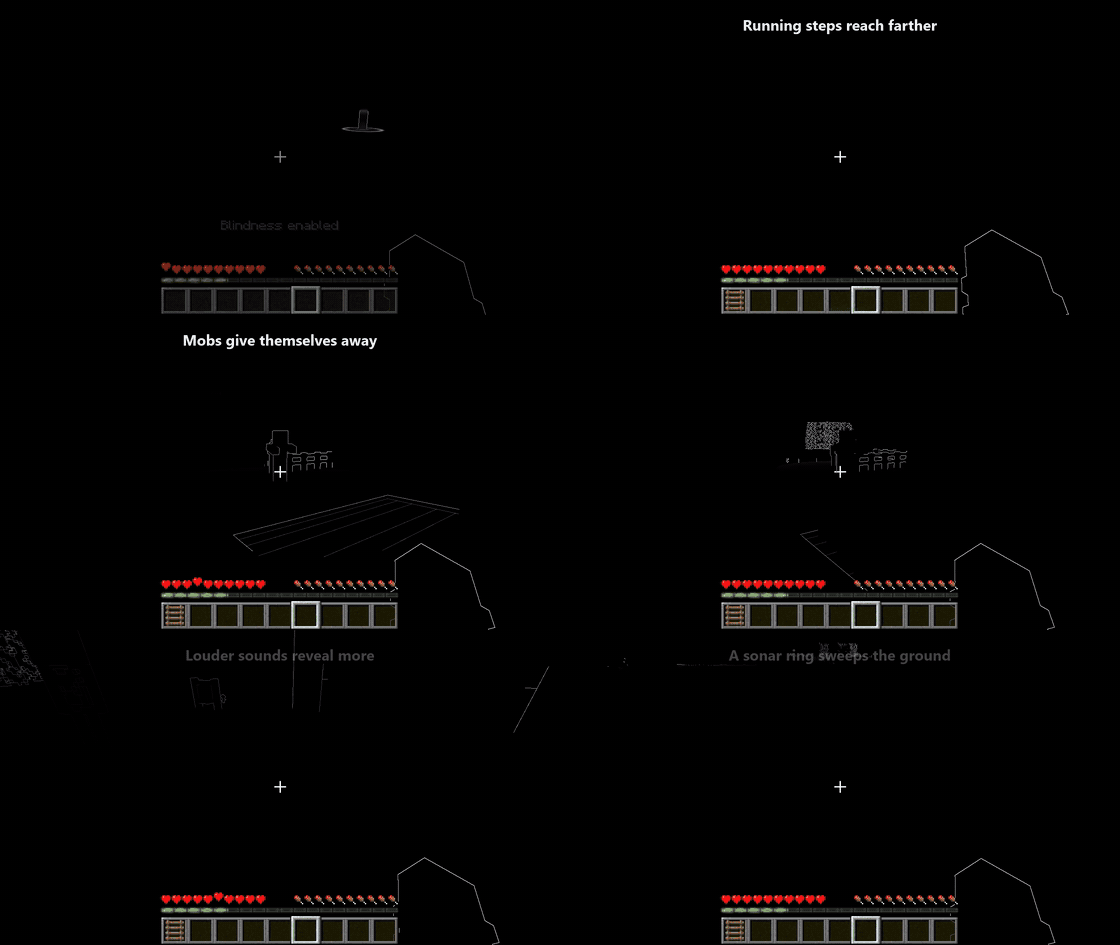
Play Minecraft as a blind character. The world goes black, and you find your way by sound: every footstep, door, mob and explosion sends out a wave that briefly reveals the outlines around it. Or give your character one blind eye instead.
Minecraft 1.20.1 · Forge 47.x · Client-side only · Beta
Features
Full blindness
- The world is black. No textures, no light, no sky. Only what you hear.
- Every sound sends out a wave: steps, doors, chests, mobs, arrows, explosions, sounds from other mods… The wave starts where the sound happened and reveals white outlines of blocks, creatures and items, which then fade back into the dark.
- Louder sounds reach farther. A footstep reveals a few blocks around you, a bell or an explosion lights up the whole area. Running is louder than walking, and looping sounds (bees, minecarts) keep pulsing.
- Sonar ring. A ring sweeps over the ground at each wave front. You can change its colour, brightness and width, or switch it off.
- Water and lava have their own patterns, so you know when you are about to step in.
- Your hand and the item you hold are drawn as outlines, so you always know what you are holding.
One blind eye
Pick the left or right eye. Your vision stays normal, but the blind side reaches less, based on the real field of view of a single eye. Choose how it looks:
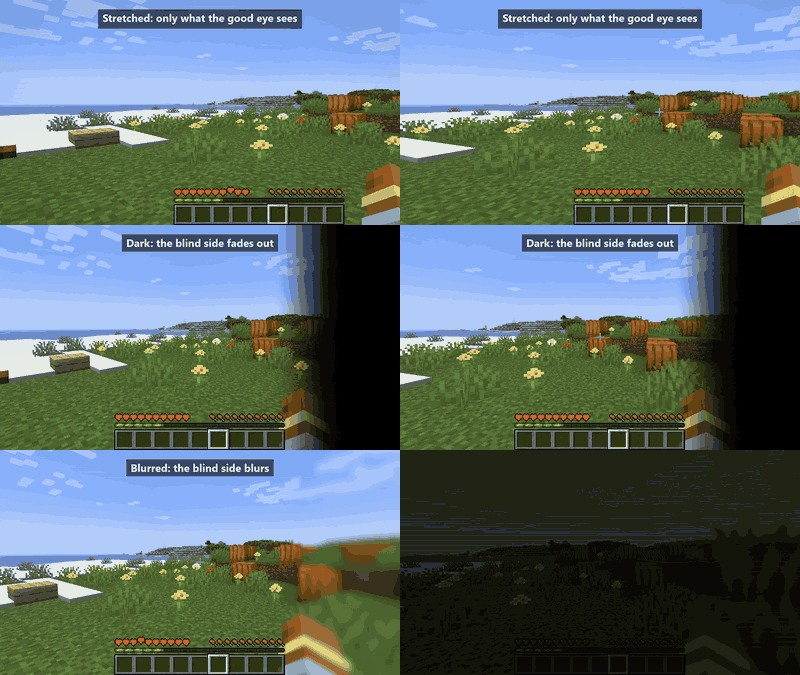
| Stretched | Dark | Blurred |
|---|---|---|
| Only what the good eye sees, edge to edge. The crosshair (and optionally the HUD) follows your gaze. | The blind side fades to black. | The blind side blurs. |
The blind side size goes from 0 % (anatomically realistic) to 100 % (accentuated).
Voices echo too (Simple Voice Chat, optional)
With Simple Voice Chat (2.5.0 or newer) installed, proximity voices make waves as well: whoever talks reveals the area around them, including you. Whispers make smaller waves. Group voice and players out of range never reveal anything.
Controls
| Key | Action |
|---|---|
| F8 | Turn blindness on or off |
| O | Open the settings |
Both keys can be changed in Options → Controls → Key Binds, category Blindness Mod.
Settings
Everything is adjustable in game, in a settings screen with a help panel that explains each option. It also opens from Mods → Blindness Mod → Config.
- General: blindness on/off, which eye(s), blind side style and size, whether sounds make waves, sensitivity.
- Waves: wave size, speed and how long outlines stay visible; sonar ring colour, brightness and width.
- Voice (with Simple Voice Chat): your voice, other players' voices, voice threshold and wave size.
Compatibility
Tested with Embeddium, Oculus (with and without shader packs), AppleSkin and Simple Voice Chat 2.6.
Known limitations:
- In one-eye mode, HUD elements that other mods draw away from the hotbar stay in place.
- With shader packs, the hand outline is dimmer in dark places.
Credits
Author: SatDPhoe


Project description from CurseForge.
Pick your setup
Blindness by Minecraft version and loader
Choose the version and loader you play, then open the matching release.
Check the dependencies, then try the file in a copied instance before changing a world you care about.
Recent files
Blindness versions and loaders
blindness-0.9.2-beta.jar
10 Nov 2026
Client Source doesn’t say Server Source doesn’t say Dependencies No extras listed Listed on Release listing
Check the 1.20.1 · Forge setup 1.20.1Forge beta
Blindness 0.9.1-beta
blindness-0.9.1-beta.jar
8 Nov 2026
Client Source doesn’t say Server Source doesn’t say Dependencies No extras listed Listed on Release listing
Check the 1.20.1 · Forge setup 1.20.1Forge beta
Looking for an older file? The official CurseForge project page is in Resources.
 mod
CurseForge + Modrinth · Minecraft
Animus
Putting more Magic in your Blood Magic.
 mod
CurseForge · Minecraft
Pro Fullbright
A lightweight Fabric mod that makes dark areas fully visible, perfect for caves, mining, and nighttime exploration.
 mod
CurseForge · Minecraft
longquan_dragon
Adds a huge tameable, rideable black dragon with five devastating skills: black fire breath, a dark-red laser, a roar that summons dragons, meteors and purple lightning.