
Minecraft version
Back to mods 
CurseForge · Minecraft mod
Simple Location Marking
Simple Location Marking is a lightweight, client-side location marking mod for Minecraft Fabric, directly inspired by the Waypoints feature of Xaero's Minimap.
Choose a version Pick your version below, then grab the matching file.
Quick answer
Which Simple Location Marking release should I use?
Latest stable file simplelocationmarking-fabric-1.20.1-1.0.0.jar
Game version 1.20.1
Loader Fabric
Simple Location Marking simplelocationmarking-fabric-1.20.1-1.0.0.jar targets 1.20.1 with Fabric. The project page does not say whether this file belongs on the client, dedicated server, or both. No extra mods listed for this file.
Where it goes
Is Simple Location Marking required on the client, server, or both?
The project page does not say whether this file belongs on the client, dedicated server, or both.
Client Source doesn’t say
Dedicated server Source doesn’t say
Loader for this release Fabric
Required install it here Optional supported, not mandatory Not supported do not install here Source doesn’t say do not assume
The source does not explicitly classify this release as client-only or server-only.
What else does Simple Location Marking simplelocationmarking-fabric-1.20.1-1.0.0.jar need?
simplelocationmarking-fabric-1.20.1-1.0.0.jar. Change the file and its required mods may change too.
This file does not list any required mods. Do not add a library just because a different file uses it.
This file does not list any required or optional mods.
Before you install it
Add Simple Location Marking without breaking your instance.
Built for Simple Location Marking simplelocationmarking-fabric-1.20.1-1.0.0.jar. Pick another file and the loader, install side or required mods may change.
- 01
Stick to this file
Use simplelocationmarking-fabric-1.20.1-1.0.0.jar. It targets 1.20.1 with Fabric; another release may have different loader, side or dependency requirements.
- 02
Bring the mods it needs
This file does not list any required mods. Do not add a library just because a different file uses it.
- 03
Put it on the correct side
The project page does not say whether this file belongs on the client, dedicated server, or both.
- 04
Pick the file you checked
Use the “Get this file” button beside simplelocationmarking-fabric-1.20.1-1.0.0.jar. It opens that exact file at the source.
About this project
What does Simple Location Marking add?
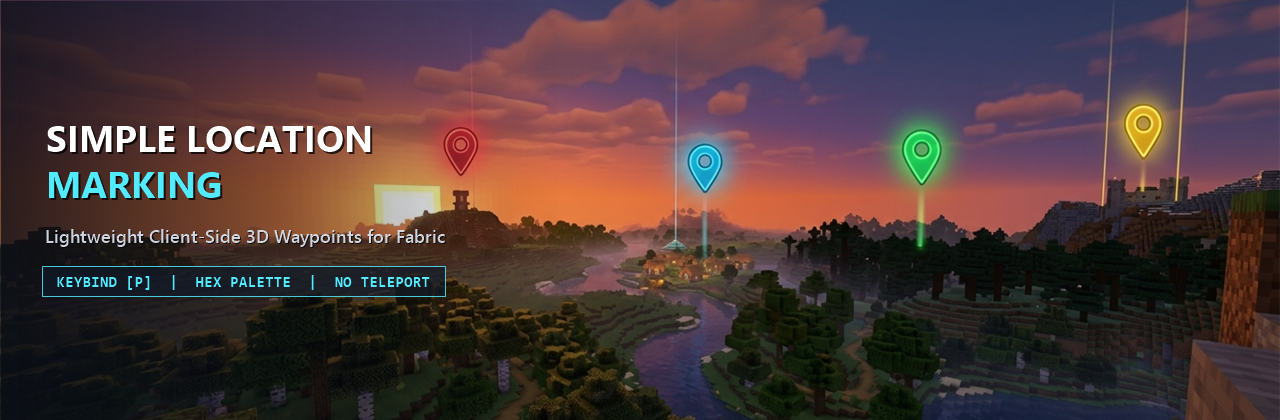
Simple Location Marking
Lightweight, High-FPS Client-Side 3D Waypoints with a Sleek Translucent Dark Glass UI
Overview
Simple Location Marking is a lightweight, client-side location marking mod directly inspired by the Waypoints system from Xaero's Minimap and styled with a modern Translucent Dark Glass aesthetic.
It is designed specifically for players who want clean, readable 3D in-world location markers without installing a heavy minimap overlay or teleportation cheats. Mark important places in seconds, organize them with an MS Paint-style hexagon color palette and live marker preview, and navigate effortlessly at any distance with zero impact on your frame rate.
Key Features
- Translucent Dark Glass In-Game 3D Markers:
- Projects 3D waypoint markers directly onto your HUD anchored to their exact world coordinates
(x + 0.5, y + 1.0, z + 0.5)and visible through terrain. - Constant Screen-Space Size at Any Distance: Projects normalized camera-relative direction vectors onto a unit sphere before applying view/projection transforms, ensuring waypoints at
10m,500m, or50km+(far beyond Vanilla's render distance) never clip and always render at the exact same compact screen-space size. - Compact Default Badge: Displays a sleek
16x16dark glass badge (0xA6101218) with a1pxouter border +2pxtop accent bar in the waypoint's RGB color and the brightly tinted uppercase first letter of the waypoint's name in the center. - Dynamic Crosshair Hover Pill: When you aim your crosshair toward a marker, the badge smoothly expands into a translucent dark glass pill (
0xBF101218) to display the full waypoint name (with its first letter capitalized). - Readable Distance Label (
mandkm): Renders real-time Euclidean distance (<number>mbelow10000m,<number>kmat10000mand beyond) directly below the badge inside a compact0.75x-scaled dark pill (0x80000000,0xFFE0E0E0text) that remains crisp against sky, snow, or lava.
- Projects 3D waypoint markers directly onto your HUD anchored to their exact world coordinates
- MS Paint-Style Hexagon Color Palette & Live Preview:
- Includes a custom interactive honeycomb color picker built from concentric hexagon rings covering the full HSV/RGB spectrum plus a grayscale row at the bottom, with a crisp glowing outline around the selected cell.
- Features a real-time Live Color & Marker Preview Box next to the palette so you can immediately see how both the compact badge and expanded hover pill will look in-game.
- Dimension Isolation:
- Waypoints are strictly separated by dimension (
Overworld,Nether,The End, and custom dimensions). Only markers belonging to your current dimension are listed in the management screen and rendered on the HUD.
- Waypoints are strictly separated by dimension (
- Automatic Per-World & Per-Server Storage:
- Waypoints are saved as JSON files inside
.minecraft/config/simplelocationmarking/. - Separate storage files are generated automatically based on the active Singleplayer world folder name or Multiplayer server IP address so markers never leak across different worlds or servers.
- Waypoints are saved as JSON files inside
- Built-In Localization:
- Includes full English (
en_us) and Vietnamese (vi_vn) translations out of the box.
- Includes full English (
GUI & Controls Guide
1. Main Management Screen (P Key)
- Press
Pin-game (rebindable in Options -> Controls -> Key Binds under Simple Location Marking) to open the Location Management Screen, rendered over a subtle dark translucent overlay (0x7008090C) without opaque dirt backgrounds or color-washing blur shaders. - Header Info Bar: Displays your current Dimension inside an accent-colored pill badge (emerald green for
Overworld, crimson forNether, purple forThe End) and your standing Coordinates (X, Y, Z) in a companion pill box. - Scrollable Waypoint List: Displays every waypoint in your current dimension inside a recessed dark glass viewport (
0x880B0C10) with a slim4pxsemi-transparent scrollbar. Each row card shows:- A glowing colored square swatch with a
1pxborder, the waypoint name, muted gray(X, Y, Z)coordinates, a right-aligned distance badge (m/km), and a distinct amber/red[Hidden]) badge when hidden. - Click any row card to select that waypoint, or double-click a row card to edit it directly.
- A glowing colored square swatch with a
2. Action Buttons
Add(Always Enabled):- Opens the Add Location screen with well-spaced translucent sub-panels for the Location Name field, read-only
X,Y, andZcoordinate fields pre-filled with your current standing block position, and the Hexagon Color Palette + Live Marker Preview Box with a random vibrant color pre-selected. - Click
Add(or pressEnter) to save the new waypoint and return to the main list.
- Opens the Add Location screen with well-spaced translucent sub-panels for the Location Name field, read-only
Edit(Enabled when a waypoint is selected):- Opens the Edit Location screen pre-populated with the selected waypoint's current data.
- Allows you to edit the Location Name, modify the integer
X,Y, andZcoordinates, and choose a new color on the Hexagon Color Palette with live preview feedback. - Click
Submit(or pressEnter) to save your changes.
Hide/Show(Enabled when a waypoint is selected):- Immediately toggles the visibility state of the selected waypoint.
- Hidden waypoints show an amber/red
[Hidden]tag in the management list and are not rendered on the in-game 3D HUD until toggled back on.
Delete(Enabled when a waypoint is selected):- Removes the selected waypoint from the management list, storage file, and in-game HUD.
Performance & Fair-Play Philosophy
- Strictly No Teleportation: Simple Location Marking is built for authentic survival gameplay. There are no teleport buttons or cheat commands, keeping exploration and travel meaningful.
- Zero Per-Frame Allocations: Camera projection math, sorting buffers, and text measurements are cached and reused across frames so the HUD renderer runs with zero garbage collection pressure and zero FPS drops.
- Purely Client-Side: Runs entirely on the client and works seamlessly in Singleplayer worlds as well as on any Multiplayer server without requiring server-side installation.
Installation
- Install the appropriate mod loader and required API library for your game version.
- Download the Simple Location Marking
.jarfile matching your game version. - Place the
.jarfile into your.minecraft/mods/directory. - Launch the game and press
Pin-game to manage your locations.
Support the Project
If you enjoy Simple Location Marking, consider supporting development on Ko-fi:
- Ko-fi: https://ko-fi.com/thaistoanf
Project description from CurseForge.
Pick your setup
Simple Location Marking by Minecraft version and loader
Choose the version and loader you play, then open the matching release.
Minecraft version
1.20.1
1 loader buildCheck the dependencies, then try the file in a copied instance before changing a world you care about.
Recent files
Simple Location Marking versions and loaders
simplelocationmarking-fabric-1.20.1-1.0.0.jar
22 Nov 2026
Client Source doesn’t say Server Source doesn’t say Dependencies No extras listed Listed on Release listing
Check the 1.20.1 · Fabric setup Fabric1.20.1 release
simplelocationmarking-fabric-1.21.11-1.0.0.jar
9 Nov 2026
Client Source doesn’t say Server Source doesn’t say Dependencies No extras listed Listed on Release listing
Check the 1.21.11 · Fabric setup Fabric1.21.11 release
Looking for an older file? The official CurseForge project page is in Resources.
 mod
CurseForge · Minecraft
DragonMine Z - Ascension: Legendary SSJ
A Dragon Mine Z addon inspired by Broly’s mutation, with customizable Saiyan visuals, green transformations, gradual power release, and form-specific bonuses.
 mod
CurseForge · Minecraft
Epic Arcana: Blood & Pure Magic
Draw blood circles, craft spell scrolls, master a 4-branch skill tree and awaken a cursed eye with eclipse powers. Blood magic meets RPG.
 mod
CurseForge · Minecraft
Anima: Total Movement
Slide under beams, roll out of falls, and bring your Minecraft character to life with new movement, combat, and facial animations.