Minecraft version
Back to mods 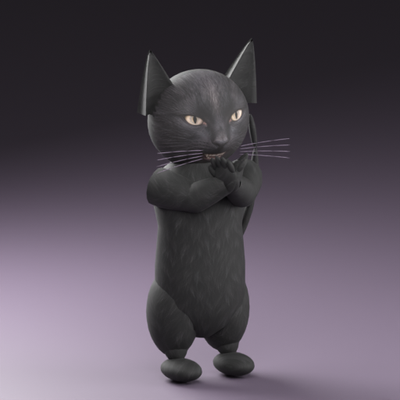
CurseForge · Minecraft mod
Style Models
Transform into animated 3D characters, starting with a black clapping cat, with optional NPC model support.
Choose a version Pick your version below, then grab the matching file.
Quick answer
Which Style Models release should I use?
Latest stable file Style-Models-1.0.8.jar
Game version 1.21.1
Loader NeoForge
Style Models Style-Models-1.0.8.jar targets 1.21.1 with NeoForge. The project page does not say whether this file belongs on the client, dedicated server, or both. No extra mods listed for this file.
Where it goes
Is Style Models required on the client, server, or both?
The project page does not say whether this file belongs on the client, dedicated server, or both.
Client Source doesn’t say
Dedicated server Source doesn’t say
Loader for this release NeoForge
Required install it here Optional supported, not mandatory Not supported do not install here Source doesn’t say do not assume
The source does not explicitly classify this release as client-only or server-only.
What else does Style Models Style-Models-1.0.8.jar need?
Style-Models-1.0.8.jar. Change the file and its required mods may change too.
This file does not list any required mods. Do not add a library just because a different file uses it.
This file does not list any required or optional mods.
Before you install it
Add Style Models without breaking your instance.
Built for Style Models Style-Models-1.0.8.jar. Pick another file and the loader, install side or required mods may change.
- 01
Stick to this file
Use Style-Models-1.0.8.jar. It targets 1.21.1 with NeoForge; another release may have different loader, side or dependency requirements.
- 02
Bring the mods it needs
This file does not list any required mods. Do not add a library just because a different file uses it.
- 03
Put it on the correct side
The project page does not say whether this file belongs on the client, dedicated server, or both.
- 04
Pick the file you checked
Use the “Get this file” button beside Style-Models-1.0.8.jar. It opens that exact file at the source.
About this project
What does Style Models add?
Style Models adds animated 3D characters for roleplay. The first character is a black clapping cat with a textured face, articulated hands and a curved tail.
How to use
Open the Style Models creative tab. Right-click the Clapping Cat model item to transform. The Player item, listed first, returns you to your normal player appearance.
Cat animations
- Z: clap three times.
- X: bring a hand to the mouth.
- C: reach forward. All five animation slots (Z, X, C, B, N) can be rebound in Controls. B and N are reserved and have no cat animation in this version. Walking and sitting use the model’s own poses.
NPC compatibility
The registered style_models:clapping_cat entity can be selected in compatible More Player Models and CustomNPCs entity-model menus. Right-click a compatible CustomNPC with a model item to change its model. Those mods are optional.
For Minecraft 1.21.1 and NeoForge. Install on both client and server so everyone can see the models and animations.
This is an early beta. The logo shows the actual model rendered in a studio; Minecraft lighting can differ. Equipment rendering and mod-specific poses are not fully supported yet.
Project description from CurseForge.
Pick your setup
Style Models by Minecraft version and loader
Choose the version and loader you play, then open the matching release.
Check the dependencies, then try the file in a copied instance before changing a world you care about.
Recent files
Style Models versions and loaders
Style-Models-1.0.8.jar
10 Nov 2026
Client Source doesn’t say Server Source doesn’t say Dependencies No extras listed Listed on Release listing
Check the 1.21.1 · NeoForge setup 1.21.1NeoForge release
Style-Models-1.0.7.jar
10 Nov 2026
Client Source doesn’t say Server Source doesn’t say Dependencies No extras listed Listed on Release listing
Check the 1.21.1 · NeoForge setup 1.21.1NeoForge release
Style Models 1.0.6
Style-Models-1.0.6.jar
10 Nov 2026
Client Source doesn’t say Server Source doesn’t say Dependencies No extras listed Listed on Release listing
Check the 1.21.1 · NeoForge setup 1.21.1NeoForge release
Style Models 1.0.5
Style-Models-1.0.5.jar
10 Nov 2026
Client Source doesn’t say Server Source doesn’t say Dependencies No extras listed Listed on Release listing
Check the 1.21.1 · NeoForge setup 1.21.1NeoForge release
Style Models 1.0.0
Style-Models-1.0.0.jar
9 Nov 2026
Client Source doesn’t say Server Source doesn’t say Dependencies No extras listed Listed on Release listing
Check the 1.21.1 · NeoForge setup 1.21.1NeoForge beta
Looking for an older file? The official CurseForge project page is in Resources.
 mod
CurseForge · Minecraft
MineField Mods Addons
Items and accessories for the MineField Mods Official ModPack
 mod
CurseForge + Modrinth · Minecraft
CreativeCore
a core mod
 mod
CurseForge · Minecraft
ColdBreath
Adds realistic visible breath vapor in cold biomes, caves and mountains, with natural, varied puffs for every player.