Minecraft version
Back to mods 
CurseForge · Minecraft mod
Simply Mirrors Plus
Craftable mirror blocks with live reflections, mirrors that reflect each other, and in-game resolution and FPS settings.
Choose a version Pick your version below, then grab the matching file.
Quick answer
Which Simply Mirrors Plus release should I use?
Latest stable file Simply Mirrors Plus 1.2.0 (NeoForge 26.3)
Game version 26.3
Loader NeoForge
Simply Mirrors Plus 1.2.0 (NeoForge 26.3) targets 26.3 with NeoForge. The project page does not say whether this file belongs on the client, dedicated server, or both. No extra mods listed for this file.
Where it goes
Is Simply Mirrors Plus required on the client, server, or both?
The project page does not say whether this file belongs on the client, dedicated server, or both.
Client Source doesn’t say
Dedicated server Source doesn’t say
Loader for this release NeoForge
Required install it here Optional supported, not mandatory Not supported do not install here Source doesn’t say do not assume
The source does not explicitly classify this release as client-only or server-only.
What else does Simply Mirrors Plus 1.2.0 (NeoForge 26.3) need?
Simply Mirrors Plus 1.2.0 (NeoForge 26.3). Change the file and its required mods may change too.
This file does not list any required mods. Do not add a library just because a different file uses it.
This file does not list any required or optional mods.
Before you install it
Add Simply Mirrors Plus without breaking your instance.
Built for Simply Mirrors Plus 1.2.0 (NeoForge 26.3). Pick another file and the loader, install side or required mods may change.
- 01
Stick to this file
Use Simply Mirrors Plus 1.2.0 (NeoForge 26.3). It targets 26.3 with NeoForge; another release may have different loader, side or dependency requirements.
- 02
Bring the mods it needs
This file does not list any required mods. Do not add a library just because a different file uses it.
- 03
Put it on the correct side
The project page does not say whether this file belongs on the client, dedicated server, or both.
- 04
Pick the file you checked
Use the “Get this file” button beside Simply Mirrors Plus 1.2.0 (NeoForge 26.3). It opens that exact file at the source.
About this project
What does Simply Mirrors Plus add?
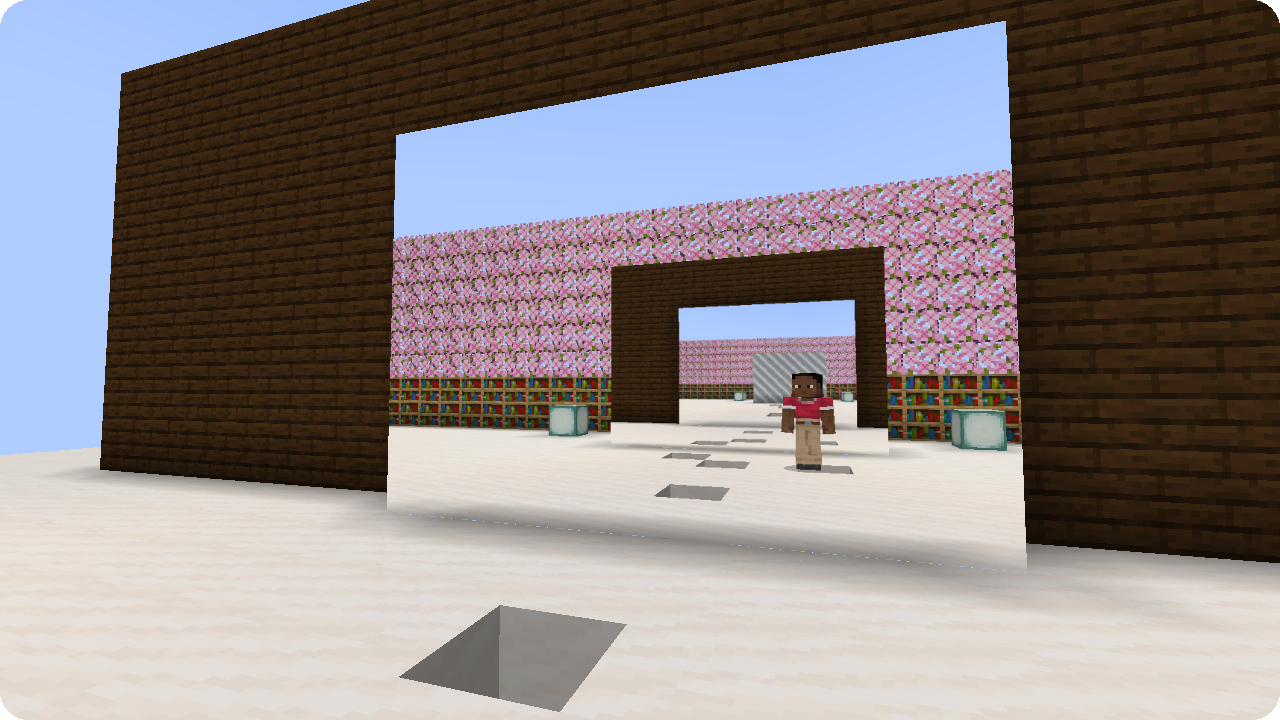
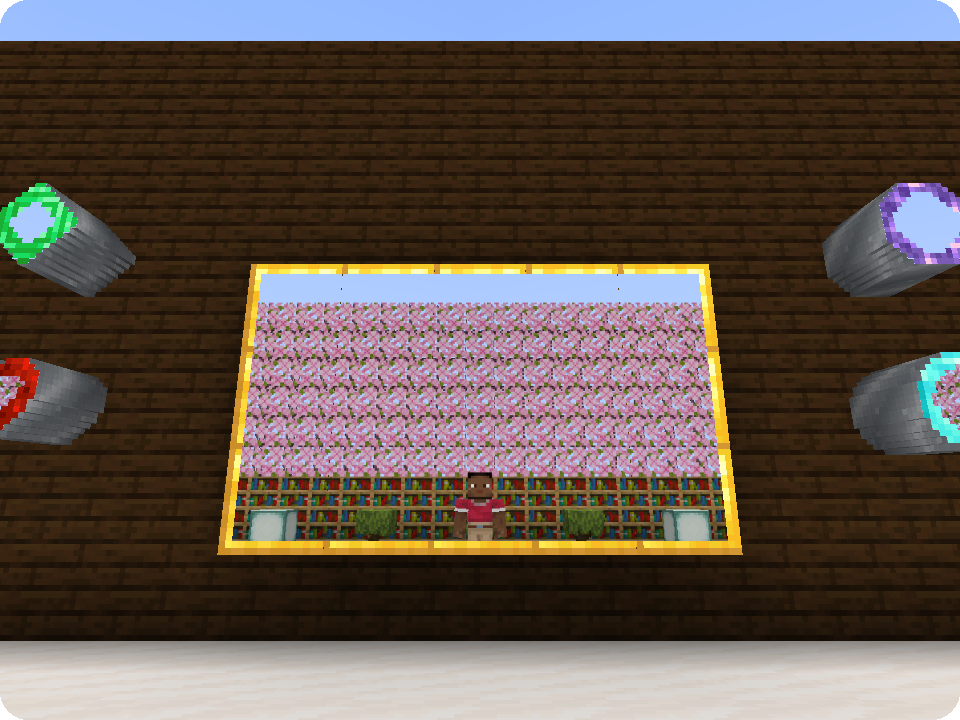
Mirrors that reflect the world live. Every side of a mirror block reflects, mirrors that touch join into one surface, and a mirror you see inside a reflection reflects too. Cut mirrors into 23 forms, frame them with any block, and give each mirror its own settings.
Simply Mirrors Plus is based on Simply Mirrors by NsTut.
Recipes
Mirror
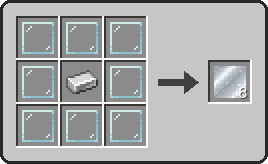
Eight glass blocks around an iron ingot make eight mirrors.
Forms
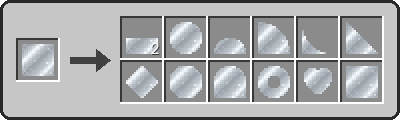
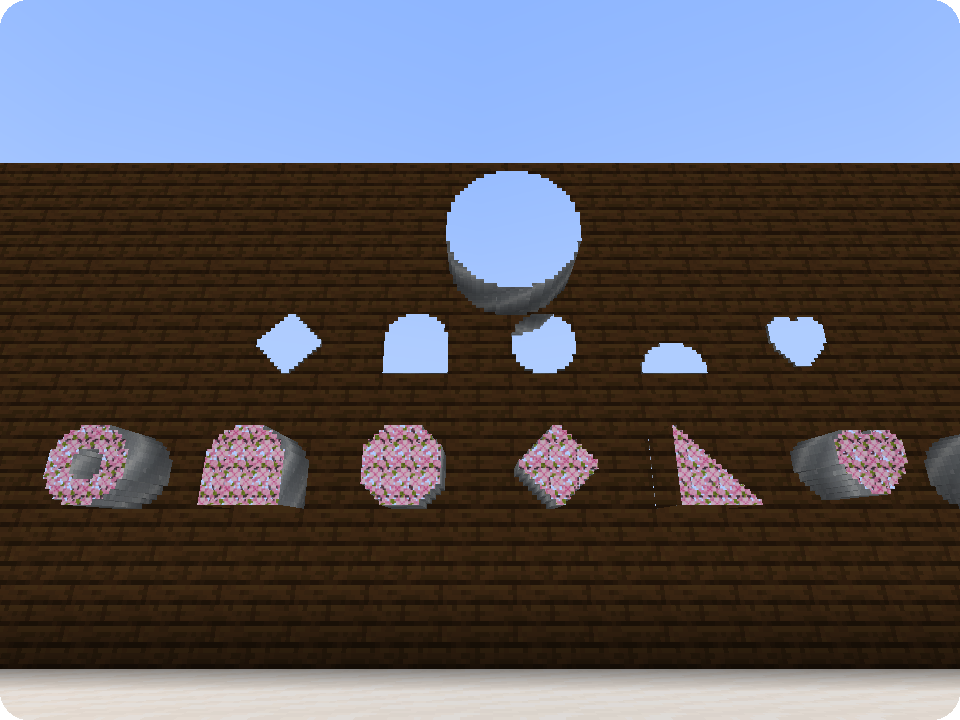
Put a mirror in a stonecutter and pick a form: slab, panel, round, half round, quarter round, corner fill, triangle, diamond, octagon, arch, ring or heart. Each outline comes as a solid block and as a thin panel, and any form can be cut into any other, one for one. A slab is half a block, so a mirror gives two.
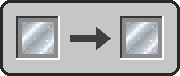
Without a stonecutter, put a single mirror in the crafting grid. It becomes the next form in the list, and the last one becomes the full block again.
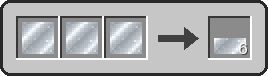
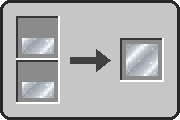
Three mirrors in a row make six slabs, and two slabs on top of each other make a mirror again.
Frame
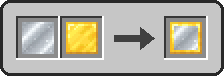
A mirror and any one block, anywhere in the crafting grid. Blocks from other mods work too. The frame shows on the item, in its tooltip and on the placed mirror, and a broken mirror keeps it.
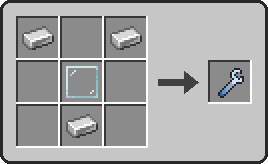
Mirror Wrench
Three iron ingots and a glass block.
Building with mirrors
- A shaped mirror sits on the side of the block you click and turns towards the corner you click.
- Round mirrors join by themselves: placed side by side, only the outer corners of the group stay round. A full mirror block joins them too.
- Two mirror slabs in one block make a full block, like any slab.
- Use the Mirror Wrench on a mirror to turn its outline a quarter. Sneak and use it on a round mirror to make it stand alone, or join again.
- A mirror behind a wall or outside your view is not drawn at all.
- Mirrors sound like glass, break fast with a pickaxe, and drop in their form.
Settings
Press M, or sneak and right-click a mirror with an empty hand to open that mirror's own page. The same screen opens from Mod Menu (Fabric) and from the Forge and NeoForge mod lists.
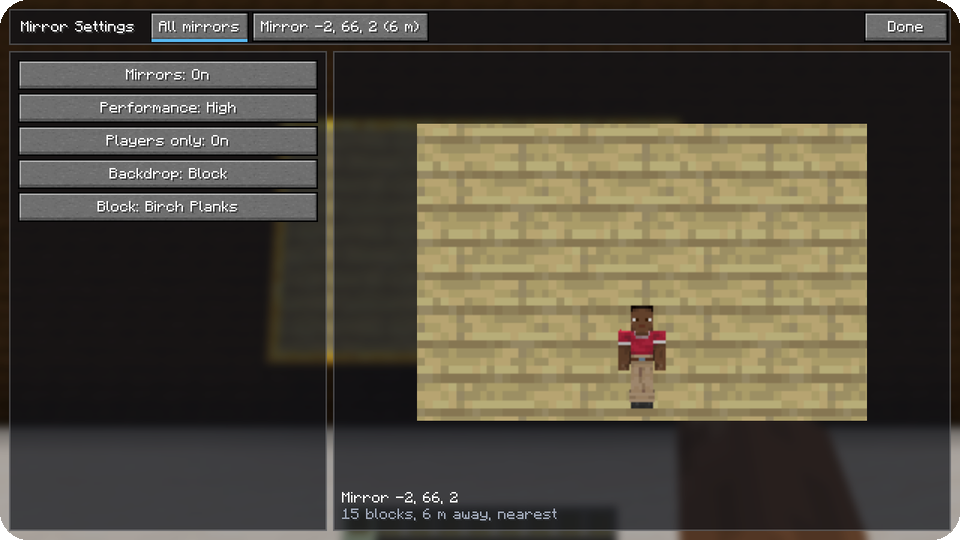
| Setting | Values |
|---|---|
| Mirrors | On or off, for all mirrors |
| Performance | Low, Medium, High or Max |
| Players only | Reflect only players, in front of a backdrop |
| Overwrite default settings | Give one mirror its own name, mode and backdrop |
| Backdrop | End sky, any block, a colour, a gradient, a picture or a panorama |
A mirror in view is redrawn with every frame of the game. Performance decides the resolution, how many mirror surfaces are redrawn each frame, how far away mirrors are found and how many reflections inside reflections are drawn.
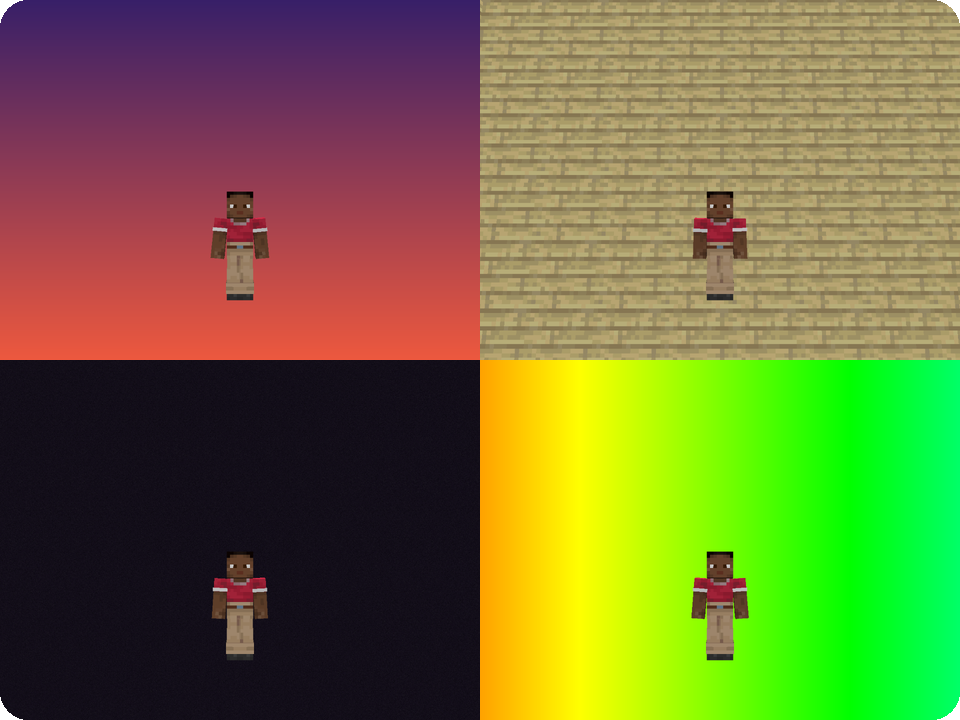
For a picture backdrop, choose a file in the settings, drop picture files on the game window while the settings are open, or put them in config/simplymirrorsplus/backgrounds/.
Other mods
None of these is required.
- Sodium works.
- Iris with a shader pack works. Each mirror surface in view costs one more pass of the shader pack, and shader packs draw one bounce.
- Yes Steve Model works.
- Chisels & Bits: mirrors can be chiselled, and mirror bits reflect.
- Rechiseled and Chisel Reborn: the mirror's forms are registered as one chisel group.
Versions
| Minecraft | Loaders |
|---|---|
| 26.3, 26.2, 26.1.2 | Fabric, NeoForge |
| 26.1.1, 26.1 | Fabric |
| 1.21.11, 1.21.10, 1.21.8, 1.21.5, 1.21.4, 1.21.3, 1.21.1 | Fabric, NeoForge |
| 1.20.6, 1.20.4 | Fabric, NeoForge |
| 1.20.2 | Fabric |
| 1.20.1, 1.19.4, 1.19.3, 1.19.2, 1.18.2, 1.17.1, 1.16.5, 1.15.2 | Fabric, Forge |
| 1.14.4 | Fabric |
Every version has the same features. Each jar is built for one Minecraft version; pick the one that names yours. Fabric builds need Fabric API.
Project description from CurseForge.
Pick your setup
Simply Mirrors Plus by Minecraft version and loader
Choose the version and loader you play, then open the matching release.
Minecraft version
26.2
2 loader buildsMinecraft version
26.1.2
2 loader buildsMinecraft version
26.1.1
1 loader buildMinecraft version
26.1
1 loader buildMinecraft version
1.21.11
2 loader buildsMinecraft version
1.21.10
2 loader buildsMinecraft version
1.21.9
2 loader buildsMinecraft version
1.21.8
2 loader buildsMinecraft version
1.21.5
2 loader buildsMinecraft version
1.21.4
2 loader buildsMinecraft version
1.21.3
2 loader buildsShowing the newest 12 of 25 game versions. Older files are in the list below.
Check the dependencies, then try the file in a copied instance before changing a world you care about.
Recent files
Simply Mirrors Plus versions and loaders
Simply Mirrors Plus 1.2.0 (NeoForge 26.3)
simplymirrorsplus-neoforge-26.3-1.2.0.jar
27 Nov 2026
Client Source doesn’t say Server Source doesn’t say Dependencies No extras listed Listed on Release listing
Check the 26.3 · NeoForge setup NeoForge26.3 release
Simply Mirrors Plus 1.2.0 (Fabric 26.3)
simplymirrorsplus-fabric-26.3-1.2.0.jar
27 Nov 2026
Client Source doesn’t say Server Source doesn’t say Dependencies 1 required · 1 unchecked Listed on Release listing
Check the 26.3 · Fabric setup Fabric26.3 release
Simply Mirrors Plus 1.2.0 (NeoForge 26.2)
simplymirrorsplus-neoforge-26.2-1.2.0.jar
27 Nov 2026
Client Source doesn’t say Server Source doesn’t say Dependencies No extras listed Listed on Release listing
Check the 26.2 · NeoForge setup NeoForge26.2 release
Simply Mirrors Plus 1.2.0 (Fabric 26.2)
simplymirrorsplus-fabric-26.2-1.2.0.jar
27 Nov 2026
Client Source doesn’t say Server Source doesn’t say Dependencies 1 required · 1 unchecked Listed on Release listing
Check the 26.2 · Fabric setup Fabric26.2 release
Simply Mirrors Plus 1.2.0 (NeoForge 26.1.2)
simplymirrorsplus-neoforge-26.1.2-1.2.0.jar
27 Nov 2026
Client Source doesn’t say Server Source doesn’t say Dependencies No extras listed Listed on Release listing
Check the 26.1.2 · NeoForge setup NeoForge26.1.2 release
Simply Mirrors Plus 1.2.0 (Fabric 26.1.2)
simplymirrorsplus-fabric-26.1.2-1.2.0.jar
27 Nov 2026
Client Source doesn’t say Server Source doesn’t say Dependencies 1 required · 1 unchecked Listed on Release listing
Check the 26.1.2 · Fabric setup Fabric26.1.2 release
Simply Mirrors Plus 1.2.0 (Fabric 26.1.1)
simplymirrorsplus-fabric-26.1.1-1.2.0.jar
27 Nov 2026
Client Source doesn’t say Server Source doesn’t say Dependencies 1 required · 1 unchecked Listed on Release listing
Check the 26.1.1 · Fabric setup Fabric26.1.1 release
Simply Mirrors Plus 1.2.0 (Fabric 26.1)
simplymirrorsplus-fabric-26.1-1.2.0.jar
27 Nov 2026
Client Source doesn’t say Server Source doesn’t say Dependencies 1 required · 1 unchecked Listed on Release listing
Check the 26.1 · Fabric setup Fabric26.1 release
Simply Mirrors Plus 1.2.0 (NeoForge 1.21.11)
simplymirrorsplus-neoforge-1.21.11-1.2.0.jar
27 Nov 2026
Client Source doesn’t say Server Source doesn’t say Dependencies No extras listed Listed on Release listing
Check the 1.21.11 · NeoForge setup NeoForge1.21.11 release
Simply Mirrors Plus 1.2.0 (Fabric 1.21.11)
simplymirrorsplus-fabric-1.21.11-1.2.0.jar
27 Nov 2026
Client Source doesn’t say Server Source doesn’t say Dependencies 1 required · 1 unchecked Listed on Release listing
Check the 1.21.11 · Fabric setup Fabric1.21.11 release
Simply Mirrors Plus 1.2.0 (NeoForge 1.21.10)
simplymirrorsplus-neoforge-1.21.10-1.2.0.jar
27 Nov 2026
Client Source doesn’t say Server Source doesn’t say Dependencies No extras listed Listed on Release listing
Check the 1.21.10 · NeoForge setup NeoForge1.21.91.21.10 release
Simply Mirrors Plus 1.2.0 (Fabric 1.21.10)
simplymirrorsplus-fabric-1.21.10-1.2.0.jar
27 Nov 2026
Client Source doesn’t say Server Source doesn’t say Dependencies 1 required · 1 unchecked Listed on Release listing
Check the 1.21.10 · Fabric setup Fabric1.21.91.21.10 release
Looking for an older file? The official CurseForge project page is in Resources.
 mod
CurseForge · Minecraft
ReturnSMP Shenanigans
a mod that adds new emotes, and various assets
 mod
CurseForge · Minecraft
D'Argent & Co.
Bring sophistication to Minecraft with D’Argent & Co. Discover tailored suits, luxurious colognes, exquisite parfums and distinguished cigars. Dress well. Smell exceptional. Live distinguished.
 mod
CurseForge · Minecraft
Yappie
Adds moving eyes and mouth to Palladium, based on SimpleVoiceChat