Minecraft version
Back to mods 
CurseForge · Minecraft mod
rotorworks
This Create 6 rotor addon for MC 1.21.1 adds controllable rotor physics. It features stress-powered shafts, up to 8 blades, Sable lift/torque simulation, 12 control channels, a gyro stabilizer and bilingual GUI.
Choose a version Pick your version below, then grab the matching file.
Quick answer
Which rotorworks release should I use?
Latest stable file rotorworks-0.1.0.jar
Game version 1.21.1
Loader NeoForge
rotorworks-0.1.0.jar targets 1.21.1 with NeoForge. The project page does not say whether this file belongs on the client, dedicated server, or both. No extra mods listed for this file.
Where it goes
Is rotorworks required on the client, server, or both?
The project page does not say whether this file belongs on the client, dedicated server, or both.
Client Source doesn’t say
Dedicated server Source doesn’t say
Loader for this release NeoForge
Required install it here Optional supported, not mandatory Not supported do not install here Source doesn’t say do not assume
The source does not explicitly classify this release as client-only or server-only.
What else does rotorworks-0.1.0.jar need?
rotorworks-0.1.0.jar. Change the file and its required mods may change too.
This file does not list any required mods. Do not add a library just because a different file uses it.
This file does not list any required or optional mods.
Before you install it
Add rotorworks without breaking your instance.
Built for rotorworks-0.1.0.jar. Pick another file and the loader, install side or required mods may change.
- 01
Stick to this file
Use rotorworks-0.1.0.jar. It targets 1.21.1 with NeoForge; another release may have different loader, side or dependency requirements.
- 02
Bring the mods it needs
This file does not list any required mods. Do not add a library just because a different file uses it.
- 03
Put it on the correct side
The project page does not say whether this file belongs on the client, dedicated server, or both.
- 04
Pick the file you checked
Use the “Get this file” button beside rotorworks-0.1.0.jar. It opens that exact file at the source.
About this project
What does rotorworks add?
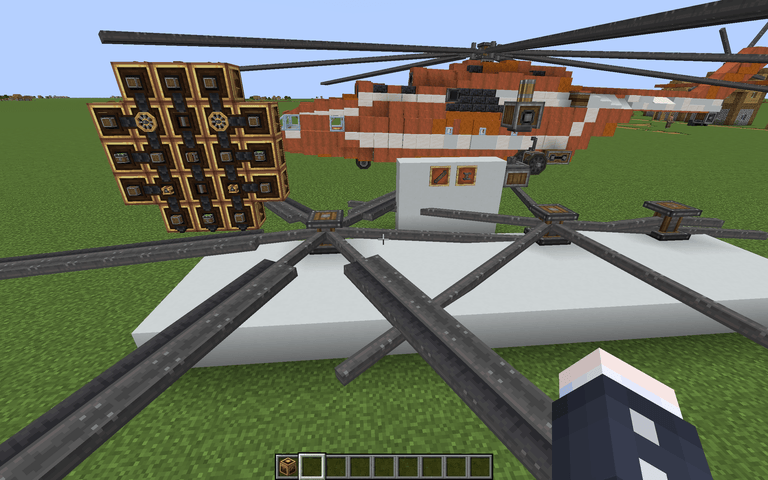
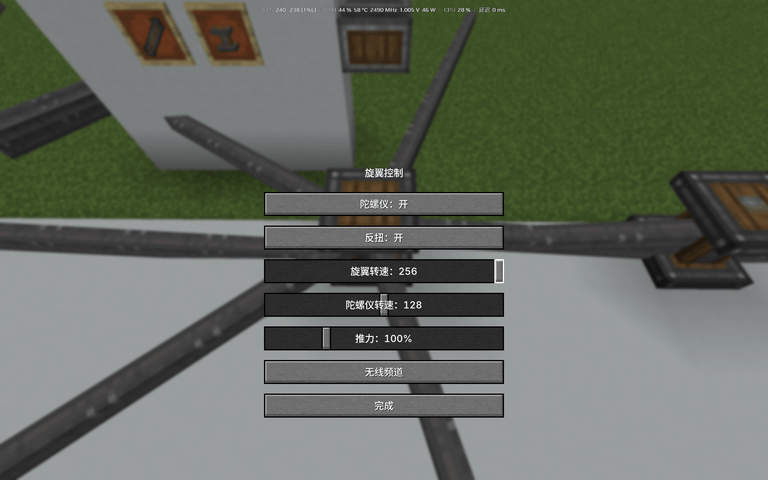
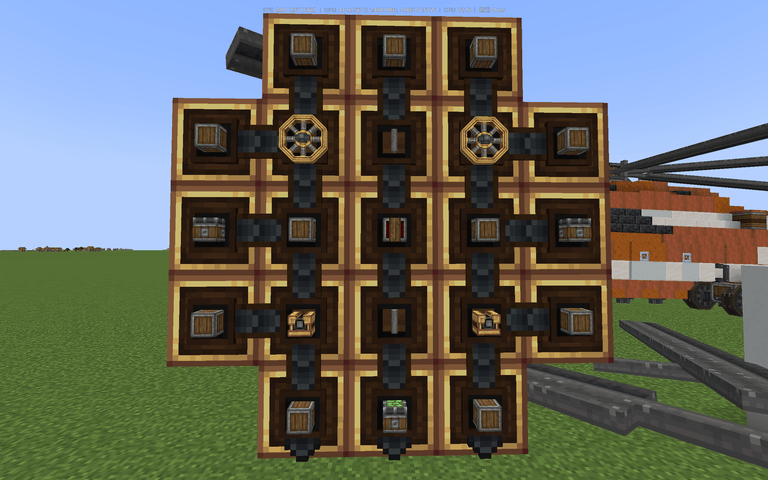
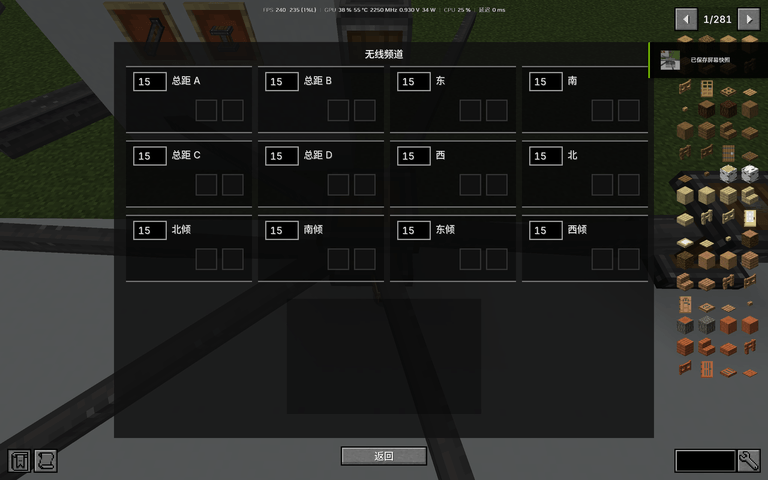
This is a rotor addon for Create 6 and Minecraft 1.21.1. Its core feature transforms Create’s rotational stress system into controllable rotor physics.
- Rotor Shaft
It occupies one full block and is assembled from Andesite Casing, Industrial Iron Blocks and Create’s Shaft.
Power input is at the bottom and output at the top; the top spins in the opposite direction of the bottom.
It requires 3000 SU of available stress to start and consumes roughly 256 SU while running.
The target rotor speed is adjustable from 0 to 256 RPM, with smooth acceleration and deceleration for actual speed.
Rotation direction follows the input shaft; clockwise or counterclockwise rotation changes the lift direction. - Rotor Blades
A maximum of 8 blades can be attached.
Blade length ranges from 2 to 36 blocks in increments of 2 blocks.
2–8 blocks: single-stage narrow blades.
10–36 blocks: narrow for the first 2 blocks, then widened by 1 block afterward.
Vertical rotors hang down by 5 degrees when stationary; horizontal rotors do not sag.
Blades adopt the visual style of Create’s metal beams.
Industrial Iron Blocks are stamped into one base blade using the Stamping Press, and blades can later be merged to extend length. - Rotor Physics
Sable physics are implemented: lift, torque, tilt and counter-torque all apply forces to the airframe.
Lift varies with the square of RPM, collective pitch, blade length and air density.
Rotation direction determines whether lift points upward or downward.
Counter-torque is enabled by default and can be toggled off in the rotor control menu.
The rotor disk can tilt toward north, south, east or west up to a maximum of 45 degrees, and the lift direction tilts together with the disk. - Redstone and Wireless Control
There are 12 wireless channels:
Collective A/B/C/D;
East/South/West/North;
North Tilt / South Tilt / East Tilt / West Tilt.
TOTAL_A / TOTAL_B: positive and reverse collective pitch.
TOTAL_C / TOTAL_D: extra positive and reverse collective pitch. Their values are added to A/B and clamped to ±15.
E/S/W/N have physical redstone faces.
TOTAL and tilt channels work only over wireless links.
Each channel has an input limit box ranging from 0 to 15.
Wireless communication supports Create Redstone Link, with pairing modes such as (A,0) or (A,A).
The wireless GUI is bilingual (Chinese and English), and the top toolbar displays all 12 channels. - Gyroscope
Enabled by default with a default speed of 128 RPM.
It stabilizes toward the world’s up direction and does not control yaw.
A minimum restoring torque (default threshold: 4 degrees) exists even for small angular offsets.
Restoring strength scales with gyroscope RPM.
It can be disabled or its RPM adjusted in the GUI. - Control GUI
Slider for rotor speed from 0 to 256 RPM.
Gyroscope toggle and gyroscope RPM setting.
Thrust scaling from 0% to 400%.
Counter-torque toggle.
Wireless channel entry panel.
Chinese and English interface support.
这是一个 Create 6 / Minecraft 1.21.1 的旋翼 Addon,核心是把 Create 的旋转应力变成可操控的旋翼物理。
- 旋翼轴
占满一个方块,安山机壳 + 工业铁块 + Create 传动杆组合;
底部输入、顶部输出,顶部转向与底部相反;
启动需要 3000 SU 空余应力,运行时约消耗 256 SU;
旋翼目标转速 0–256 RPM 可调,实际转速平滑加减速;
转速方向跟随输入轴:正转/反转会改变升力方向。 - 桨叶
最多 8 片;
长度 2–36 格,按 2 格为单位;
2–8 格:1 阶窄桨叶;
10–36 格:前 2 格窄,之后宽 1 格;
竖直旋翼静止时下垂 5°;水平旋翼不下垂;
桨叶材质使用 Create 金属梁风格;
工业铁块用 冲压机 压成 1 个基础桨叶,后续可合并加长。 - 旋翼物理
Sable 物理:升力、力矩、倾斜、反扭都作用在机体上;
升力随 RPM²、总距、桨叶长度、空气密度变化;
正转/反转决定升力向上还是向下;
反扭默认开启,可在旋翼控制菜单关闭;
盘面可向北/南/东/西倾斜,最大 45°,升力方向一起倾斜。 - 红石与无线
12 个无线频道:
总距 A/B/C/D;
东/南/西/北;
北倾/南倾/东倾/西倾;
TOTAL_A / TOTAL_B:正/反总距;
TOTAL_C / TOTAL_D:额外正/反总距,和 A/B 相加后 clamp 到 ±15;
E/S/W/N 有物理红石面;
TOTAL 和倾斜频道只走无线;
每个频道有 0–15 最大输入限制框;
无线支持 Create Redstone Link,频率可以 (A,0) 或 (A,A) 配对;
无线 GUI 中英双语,顶部工具栏显示全部 12 频道。 - 陀螺仪
默认开启,默认 128 RPM;
世界向上回正,不控制 yaw;
小角度也有最小回正力矩(默认 4°);
回正强度随陀螺 RPM 变化;
可以在 GUI 中关闭或调整 RPM。 - 控制 GUI
旋翼转速 0–256 RPM 滑块;
陀螺仪开关、陀螺仪 RPM;
推力 0–400%;
反扭开关;
无线频道入口;
中文/英文界面。
Project description from CurseForge.
Pick your setup
rotorworks by Minecraft version and loader
Choose the version and loader you play, then open the matching release.
Check the dependencies, then try the file in a copied instance before changing a world you care about.
Recent files
rotorworks versions and loaders
rotorworks-0.1.0.jar
10 Nov 2026
Client Source doesn’t say Server Source doesn’t say Dependencies No extras listed Listed on Release listing
Check the 1.21.1 · NeoForge setup 1.21.1NeoForge release
Looking for an older file? The official CurseForge project page is in Resources.
 mod
CurseForge · Minecraft
Create: Plushie Factory
Create: Plushie Factory adds Create compatibility to automate all your favorite Plushie mods!
 mod
CurseForge + Modrinth · Minecraft
Adventure Item Names
Unique names for weapons, tools, armour and items found throughout your world.
 mod
CurseForge · Minecraft
Q Shop Addon Confluence Compat
Connect a QShop currency to the coin system in Confluence: Otherworld. QShop shops, commands, quests, and scripts can all use the same balance, while players carry that money as Confluence coins.