Minecraft version
Back to mods 
CurseForge · Minecraft mod
Torchbearer
Hold a torch or a lantern and it lights the world around you, for everyone nearby. Server side: works with vanilla clients.
Choose a version Pick your version below, then grab the matching file.
Quick answer
Which Torchbearer release should I use?
Latest stable file Torchbearer 1.0.0 (NeoForge 26.1)
Game version 26.1, 26.1.2
Loader NeoForge
Torchbearer 1.0.0 (NeoForge 26.1) targets 26.1, 26.1.2 with NeoForge. The project page does not say whether this file belongs on the client, dedicated server, or both. No extra mods listed for this file.
Where it goes
Is Torchbearer required on the client, server, or both?
The project page does not say whether this file belongs on the client, dedicated server, or both.
Client Source doesn’t say
Dedicated server Source doesn’t say
Loader for this release NeoForge
Required install it here Optional supported, not mandatory Not supported do not install here Source doesn’t say do not assume
The source does not explicitly classify this release as client-only or server-only.
What else does Torchbearer 1.0.0 (NeoForge 26.1) need?
Torchbearer 1.0.0 (NeoForge 26.1). Change the file and its required mods may change too.
This file does not list any required mods. Do not add a library just because a different file uses it.
This file does not list any required or optional mods.
Before you install it
Add Torchbearer without breaking your instance.
Built for Torchbearer 1.0.0 (NeoForge 26.1). Pick another file and the loader, install side or required mods may change.
- 01
Stick to this file
Use Torchbearer 1.0.0 (NeoForge 26.1). It targets 26.1, 26.1.2 with NeoForge; another release may have different loader, side or dependency requirements.
- 02
Bring the mods it needs
This file does not list any required mods. Do not add a library just because a different file uses it.
- 03
Put it on the correct side
The project page does not say whether this file belongs on the client, dedicated server, or both.
- 04
Pick the file you checked
Use the “Get this file” button beside Torchbearer 1.0.0 (NeoForge 26.1). It opens that exact file at the source.
About this project
What does Torchbearer add?
Torchbearer
Hold a torch and the cave is lit. Hold a lantern and the road is lit. The light is real, so everyone near you sees it and monsters stay away from it, and nobody has to install anything on their client.
How it works
- Any light source in either hand counts: a block shines as brightly as it does when placed, a lava bucket shines at full brightness.
- The light walks with you: an invisible light block sits at your head or feet and moves as you move. Put the torch away and it is gone.
- Under water the light keeps the water around it, and the water comes back when you leave.
- Never replaces a real block: only air and water are used.
- Lights are cleared when you log out and when the server stops. After a hard crash an invisible light may stay where you stood.
Needs
- Minecraft 26.3 (Fabric), or the other versions listed under Files (NeoForge 26.3, Fabric and NeoForge 1.21.1, Fabric and Forge 1.20.1)
- Fabric API on Fabric
- Server side only: players join with a vanilla client. In single player it works too.
MIT licensed. Found a bug? Include logs/latest.log.
Support
These mods are free and always will be. If one saved you time, a coffee keeps updates coming.

Bug or idea? Leave a comment below, or open an issue. We read every one.
Project description from CurseForge.
Pick your setup
Torchbearer by Minecraft version and loader
Choose the version and loader you play, then open the matching release.
Minecraft version
26.1.2
2 loader buildsMinecraft version
26.1
2 loader buildsMinecraft version
1.21.1
2 loader buildsMinecraft version
1.20.1
2 loader buildsCheck the dependencies, then try the file in a copied instance before changing a world you care about.
Recent files
Torchbearer versions and loaders
Torchbearer 1.0.0 (NeoForge 26.1)
torchbearer-neoforge-26.1-1.0.0.jar
11 Nov 2026
Client Source doesn’t say Server Source doesn’t say Dependencies No extras listed Listed on Release listing
Check the 26.1.2 · NeoForge setup NeoForge26.126.1.2 release
Torchbearer 1.0.0 (Fabric 26.1)
torchbearer-fabric-26.1-1.0.0.jar
11 Nov 2026
Client Source doesn’t say Server Source doesn’t say Dependencies 1 required · 1 unchecked Listed on Release listing
Check the 26.1.2 · Fabric setup Fabric26.126.1.2 release
Torchbearer 1.0.0 (Forge 1.20.1)
torchbearer-forge-1.20.1-1.0.0.jar
10 Nov 2026
Client Source doesn’t say Server Source doesn’t say Dependencies No extras listed Listed on Release listing
Check the 1.20.1 · Forge setup 1.20.1Forge release
Torchbearer 1.0.0 (Fabric 1.20.1)
torchbearer-fabric-1.20.1-1.0.0.jar
10 Nov 2026
Client Source doesn’t say Server Source doesn’t say Dependencies 1 required · 1 unchecked Listed on Release listing
Check the 1.20.1 · Fabric setup Fabric1.20.1 release
Torchbearer 1.0.0 (NeoForge 1.21.1)
torchbearer-neoforge-1.21.1-1.0.0.jar
10 Nov 2026
Client Source doesn’t say Server Source doesn’t say Dependencies No extras listed Listed on Release listing
Check the 1.21.1 · NeoForge setup 1.21.1NeoForge release
Torchbearer 1.0.0 (Fabric 1.21.1)
torchbearer-fabric-1.21.1-1.0.0.jar
10 Nov 2026
Client Source doesn’t say Server Source doesn’t say Dependencies 1 required · 1 unchecked Listed on Release listing
Check the 1.21.1 · Fabric setup Fabric1.21.1 release
Torchbearer 1.0.0 (NeoForge 26.3)
torchbearer-neoforge-26.3-1.0.0.jar
10 Nov 2026
Client Source doesn’t say Server Source doesn’t say Dependencies No extras listed Listed on Release listing
Check the 26.3 · NeoForge setup NeoForge26.3 release
Torchbearer 1.0.0
torchbearer-fabric-26.3-1.0.0.jar
10 Nov 2026
Client Source doesn’t say Server Source doesn’t say Dependencies 1 required · 1 unchecked Listed on Release listing
Check the 26.3 · Fabric setup Fabric26.3 release
Looking for an older file? The official CurseForge project page is in Resources.
 mod
CurseForge + Modrinth · Minecraft
Asgard Shield: Reloaded
A Minecraft mod that adds giant swords and shields to the game. A re-make of the original Asgard Shield, made popular by the 1.5 modpack Hexxit.
 mod
CurseForge · Minecraft
Cape Banners
Allows you to equip a banner in your curios slot to use it as a cape
 mod
CurseForge · Minecraft
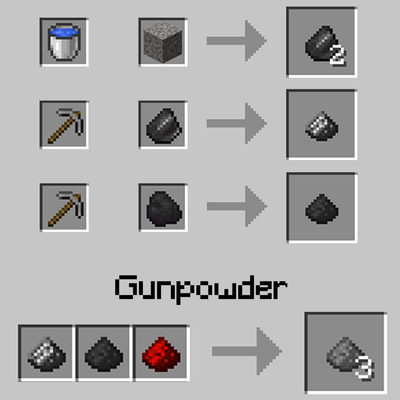
X Craft Gunpowder
Adds a recipe for Gunpowder using Flint Dust, Coal Dust, and Redstone Dust.