Minecraft version
Back to mods 
CurseForge · Minecraft mod
Border Game
A new world option lets you customize the initial border size, and the border will expand as you earn achievements...
Choose a version Pick your version below, then grab the matching file.
Quick answer
Which Border Game release matches 26.3?
Best match for your filters advancement_border-1.0.0-r14.jar
Game version 26.3
Loader NeoForge
Border Game advancement_border-1.0.0-r14.jar targets 26.3 with NeoForge. The project page does not say whether this file belongs on the client, dedicated server, or both. No extra mods listed for this file.
Where it goes
Is Border Game required on the client, server, or both?
The project page does not say whether this file belongs on the client, dedicated server, or both.
Client Source doesn’t say
Dedicated server Source doesn’t say
Loader for this release NeoForge
Required install it here Optional supported, not mandatory Not supported do not install here Source doesn’t say do not assume
The source does not explicitly classify this release as client-only or server-only.
What else does Border Game advancement_border-1.0.0-r14.jar need?
advancement_border-1.0.0-r14.jar on 26.3. Every mod below is checked against that same setup.
This file does not list any required mods. Do not add a library just because a different file uses it.
This file does not list any required or optional mods.
Before you install it
Add Border Game without breaking your instance.
Built for Border Game advancement_border-1.0.0-r14.jar on 26.3. Pick another file and the loader, install side or required mods may change.
- 01
Stick to this file
Use advancement_border-1.0.0-r14.jar. It targets 26.3 with NeoForge; another release may have different loader, side or dependency requirements.
- 02
Bring the mods it needs
This file does not list any required mods. Do not add a library just because a different file uses it.
- 03
Put it on the correct side
The project page does not say whether this file belongs on the client, dedicated server, or both.
- 04
Pick the file you checked
Use the “Get this file” button beside advancement_border-1.0.0-r14.jar. It opens that exact file at the source.
About this project
What does Border Game add?
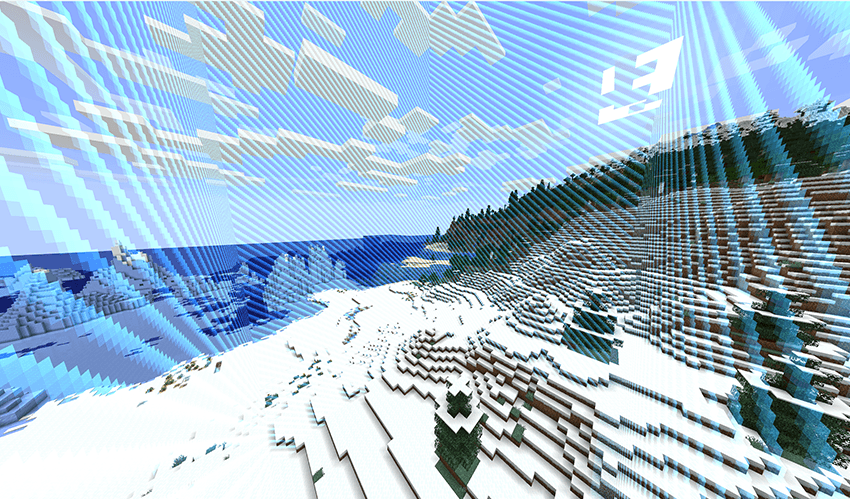
A new world option allows you to customize the initial border size, and the border will expand whenever you earn an achievement...
A new world option has been added, letting you customize game settings on the creation screen. The border expands every time any player earns an achievement. The goal is to defeat the Ender Dragon, and you'll face a choice: break the barrier or continue playing?
【Note: Except for the End dimension, the rules apply to all worlds. The End barrier by default encloses the main island and is not affected by the rules.】
Recommended for multiplayer play and also suggested to use the 【More Advancements】BlazeandCave's Advancements Pack datapack to increase the number of achievements you can earn.
If you want to give feedback, you can contact here: [【Bilibili】](https://space.bilibili.com/34940579?spm_id_from=333.1007.0.0)
Thanks here to [炎炎/时间/林夕] for their support =w=.
一个新的世界选项,可以自定义初始边界大小,当你获得成就后边界会扩张......
新增一个世界选项,可在创建界面自定义游戏配置,任意玩家每获得一次成就边界都会扩张。目标击败末影龙,你会获得抉择,击碎屏障或者继续游戏?
【注意除了末地,规则是对所有世界生效的,末地结界默认是圈住主岛并且不受规则影响。】
推荐多人游玩,也推荐使用 【更多成就】BlazeandCave's Advancements Pack 数据包,来增加你的成就数量。~~~~~~~~~~~~~~~~~~~~~~~~~~~~~~~~~~~~~~~~~~~~~~~~~~~~~~~~~~~~~~~~~~~~~~~~~~~~~~~
想要反馈可以在这里联系:【B站】
在这里感谢[炎炎/时间/林夕]的支持 =w=。~~~~~~~~~~~~~~~~~~~~~~~~~~~~~~~~~~~~~~~~~~~~~~~~~~~~~~~~~~~~~~~~~~~~~~~~~~~~~~~
Project description from CurseForge.
Pick your setup
Border Game by Minecraft version and loader
Choose the version and loader you play, then open the matching release.
Minecraft version
26.2
1 loader buildCheck the dependencies, then try the file in a copied instance before changing a world you care about.
Recent files
Border Game versions and loaders
advancement_border-1.0.0-r14.jar
24 Nov 2026
Client Source doesn’t say Server Source doesn’t say Dependencies No extras listed Listed on Release listing
Check the 26.3 · NeoForge setup NeoForge26.3 release
Looking for an older file? The official CurseForge project page is in Resources.
 mod
CurseForge · Minecraft
Breed faster Happy Ghasts
Breed faster Happy Ghasts, boost flight speed with Speed Potions or Snowballs, and inspect mount stats with a Book and Quill.
 mod
CurseForge · Minecraft
Asterion
Descend into a forgotten Labyrinth, explore a mysterious new dimension, uncover ancient secrets, forge powerful equipment, and defeat the Minotaur.
 mod
CurseForge · Minecraft
Combo Clash
Battlegrounds-style combo PvP: 4-hit M1 strings, uppercuts, air combos, blocks, perfect blocks, dashes and evasives, with made motions.