Minecraft version
Back to mods 
CurseForge · Minecraft mod
Banner Claims
Easy land claims and anti-grief protection: sneak-place a banner to protect a 33x33 area. No menus or wands. Server-side.
Choose a version Pick your version below, then grab the matching file.
Quick answer
Which Banner Claims release should I use?
Latest stable file Banner Claims 1.0.1 (MC 1.21.1)
Game version 1.21.1
Loader Fabric
Banner Claims 1.0.1 (MC 1.21.1) targets 1.21.1 with Fabric. The project page does not say whether this file belongs on the client, dedicated server, or both. No extra mods listed for this file.
Where it goes
Is Banner Claims required on the client, server, or both?
The project page does not say whether this file belongs on the client, dedicated server, or both.
Client Source doesn’t say
Dedicated server Source doesn’t say
Loader for this release Fabric
Required install it here Optional supported, not mandatory Not supported do not install here Source doesn’t say do not assume
The source does not explicitly classify this release as client-only or server-only.
What else does Banner Claims 1.0.1 (MC 1.21.1) need?
Banner Claims 1.0.1 (MC 1.21.1). Change the file and its required mods may change too.
This file does not list any required mods. Do not add a library just because a different file uses it.
This file does not list any required or optional mods.
Before you install it
Add Banner Claims without breaking your instance.
Built for Banner Claims 1.0.1 (MC 1.21.1). Pick another file and the loader, install side or required mods may change.
- 01
Stick to this file
Use Banner Claims 1.0.1 (MC 1.21.1). It targets 1.21.1 with Fabric; another release may have different loader, side or dependency requirements.
- 02
Bring the mods it needs
This file does not list any required mods. Do not add a library just because a different file uses it.
- 03
Put it on the correct side
The project page does not say whether this file belongs on the client, dedicated server, or both.
- 04
Pick the file you checked
Use the “Get this file” button beside Banner Claims 1.0.1 (MC 1.21.1). It opens that exact file at the source.
About this project
What does Banner Claims add?
Works on 26.1.2 · 26.2 · 26.3 · Fabric · Server-side · 💬 Discord
What it does
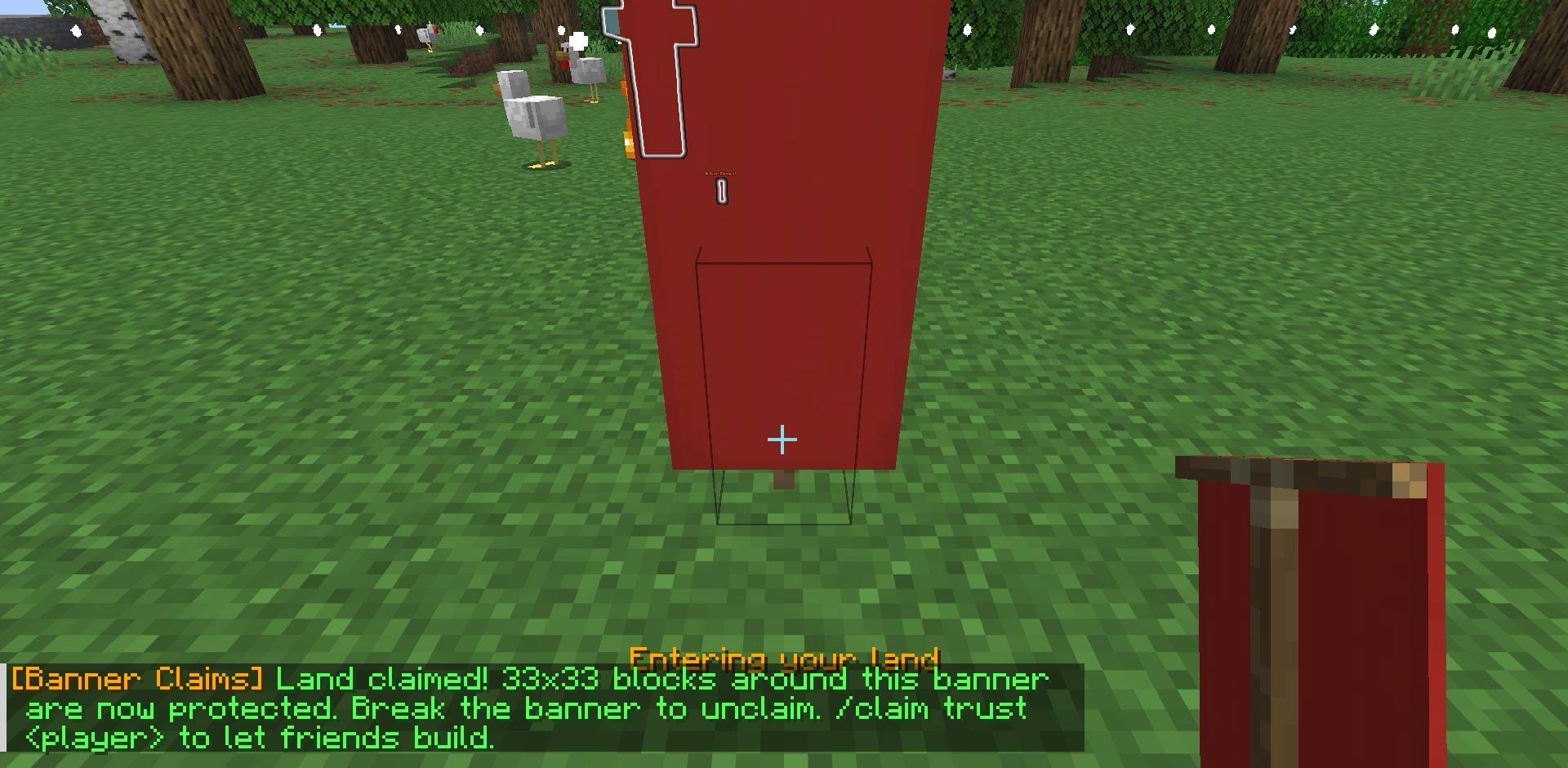
Simple land protection, no menus or wands. Sneak while placing a banner and the land around it is yours.
⭐ Features
| 🚩 Claim with a banner | Sneak-place a banner: 33x33 blocks, full height, are yours. Break it to unclaim. |
| 🛡️ Anti-grief | Others can't break, place, open chests, use buckets or hurt your animals there. |
| 🤝 Trust friends | Let a friend build on all your land. |
| 👋 Welcome message | You see "Entering Max's land" when you walk in. |
| 🚪 Visitor-friendly | Visitors can still use doors, buttons and beds (you can turn that off). Admins can build anywhere. |
⌨️ Commands
/claim- who owns where you stand/claim show- claim borders with particles/claim list- your claims/claim trust [player]- let a friend build/claim untrust [player]- undo
🖥️ Server-side
Only the server needs it. Players join with plain Minecraft.
Not covered yet: explosions, fire spread and pistons.
⚙️ Config
config/bannerclaims.json
claimRadius- size (16 = 33x33)maxClaimsPerPlayer- how many claims each player can havevisitorsCanUseDoors- let visitors use doors, buttons and bedsprotectEntities- protect animals, villagers, item frames, armor standsshowEnterMessages- the "Entering ... land" message
📥 Install
- Install Fabric Loader + Fabric API on your server
- Put Banner Claims in the server's
modsfolder - Start the server. That's it.
More server mods by nobub: Pet Totem · Trader Alert · Weather Vane · Trophy Hunter · Player Mailbox · Player Bounties · Daily Quest Board · Treasure Expeditions · Monthly Wrapped · Eclipse Suite
🤖 Made with help from AI tools. Tested in-game before each update.
Project description from CurseForge.
Pick your setup
Banner Claims by Minecraft version and loader
Choose the version and loader you play, then open the matching release.
Minecraft version
26.2
1 loader buildMinecraft version
26.1.2
1 loader buildMinecraft version
1.21.1
1 loader buildCheck the dependencies, then try the file in a copied instance before changing a world you care about.
Recent files
Banner Claims versions and loaders
Banner Claims 1.0.1 (MC 1.21.1)
bannerclaims-1.0.1-1.21.1.jar
16 Nov 2026
Client Source doesn’t say Server Source doesn’t say Dependencies No extras listed Listed on Release listing
Check the 1.21.1 · Fabric setup Fabric1.21.1 release
Banner Claims 1.0.1 (MC 26.3)
bannerclaims-1.0.1-26.3.jar
11 Nov 2026
Client Source doesn’t say Server Source doesn’t say Dependencies 1 required · 1 unchecked Listed on Release listing
Check the 26.3 · Fabric setup Fabric26.3 release
Banner Claims 1.0.1 (MC 26.2)
bannerclaims-1.0.1-26.2.jar
11 Nov 2026
Client Source doesn’t say Server Source doesn’t say Dependencies 1 required · 1 unchecked Listed on Release listing
Check the 26.2 · Fabric setup Fabric26.2 release
Banner Claims 1.0.1 (MC 26.1.2)
bannerclaims-1.0.1-26.1.2.jar
11 Nov 2026
Client Source doesn’t say Server Source doesn’t say Dependencies 1 required · 1 unchecked Listed on Release listing
Check the 26.1.2 · Fabric setup Fabric26.1.2 release
Looking for an older file? The official CurseForge project page is in Resources.
 mod
CurseForge · Minecraft
PeterWolf's Groundworks Loader
A functional articulated wheel loader for scooping, carrying and loading granular materials.
 mod
CurseForge · Minecraft
Shield Bash Lite
Shield Bash Lite adds a perfect-block mechanic that briefly stuns melee attackers when you raise your shield at the right moment
 mod
CurseForge · Minecraft
TraceScout
Clone of DisclosureMule's Player Trace updated to 26.3