Minecraft version
Back to mods 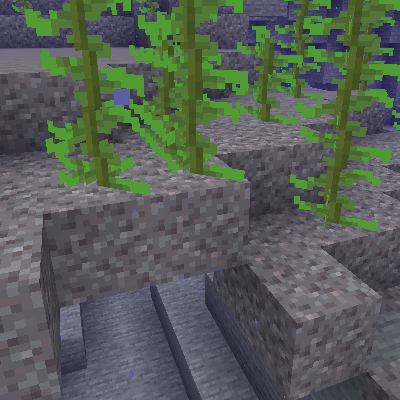
CurseForge · Minecraft mod
Kelp Stop Boom
Gravel with kelp on top stops falling, so ocean floors and kelp forests survive blasts, tunnels, and stray block updates.
Choose a version Pick your version below, then grab the matching file.
Quick answer
Which Kelp Stop Boom release should I use?
Latest stable file 1.0.0
Game version 1.21.1
Loader NeoForge
Kelp Stop Boom 1.0.0 targets 1.21.1 with NeoForge. The project page does not say whether this file belongs on the client, dedicated server, or both. No extra mods listed for this file.
Where it goes
Is Kelp Stop Boom required on the client, server, or both?
The project page does not say whether this file belongs on the client, dedicated server, or both.
Client Source doesn’t say
Dedicated server Source doesn’t say
Loader for this release NeoForge
Required install it here Optional supported, not mandatory Not supported do not install here Source doesn’t say do not assume
The source does not explicitly classify this release as client-only or server-only.
What else does Kelp Stop Boom 1.0.0 need?
1.0.0. Change the file and its required mods may change too.
This file does not list any required mods. Do not add a library just because a different file uses it.
This file does not list any required or optional mods.
Before you install it
Add Kelp Stop Boom without breaking your instance.
Built for Kelp Stop Boom 1.0.0. Pick another file and the loader, install side or required mods may change.
- 01
Stick to this file
Use 1.0.0. It targets 1.21.1 with NeoForge; another release may have different loader, side or dependency requirements.
- 02
Bring the mods it needs
This file does not list any required mods. Do not add a library just because a different file uses it.
- 03
Put it on the correct side
The project page does not say whether this file belongs on the client, dedicated server, or both.
- 04
Pick the file you checked
Use the “Get this file” button beside 1.0.0. It opens that exact file at the source.
About this project
What does Kelp Stop Boom add?
Kelp keeps the seafloor together. Let it.
KelpStopBoom is a tiny, single-purpose mod: gravel with kelp growing on it no longer falls. One check, one mixin, no config screens, no items — and no more ocean floors collapsing out from under a kelp forest because something touched the block below. Which blocks count is up to you: two datapack tags decide it.
The problem
Gravel is a gravity block. In the ocean, kelp grows on top of gravel seafloors, and kelp is only as safe as the block it is rooted in.
Remove the support under that gravel — an explosion tearing a crater in the seafloor, a tunnel dug from a cave below, a ravine opening up, or just a misplaced pickaxe — and vanilla schedules the gravel to fall. The moment it moves, the block below the kelp is no longer gravel, so the whole kelp column above breaks. One block update can quietly erase a kelp forest, and a single explosion in a kelp bed can release dozens of falling-block entities that the server has to tick until they land.
What this mod does
- A gravity block that has a matching "anchor" block directly above it will not start falling, even with nothing underneath.
- The anchor keeps its support, so the column above it stays exactly where it is.
- Everything else is untouched: blocks with no anchor on top still obey gravity as usual, and every other falling block behaves exactly like vanilla.
- No new blocks, items, recipes, or commands. Nothing to configure in-game.
Why you would want it
- Kelp farms stop self-destructing. An unlucky block update or an accidental blast no longer costs you the crop.
- Oceans stay oceans. A hole in a gravel seafloor no longer turns into a slow-motion collapse of everything rooted on it.
- Less surprise lag. Fewer falling-block entities at once in busy ocean areas.
- Yours to tune. Sand, seagrass, a modded giant kelp — add it to a tag and it just works.
Customising with block tags
The mod ships with two block tags under its own namespace. Out of the box they reproduce the vanilla case exactly, and nothing else.
kelpstopboom:blocks_below — the blocks that are held up when something from the other tag sits on top of them.
- Defaults:
minecraft:gravel - Only blocks that are actually gravity blocks are affected; anything else in this tag is ignored.
kelpstopboom:blocks_above — the anchor blocks. Standing directly on top of a blocks_below block keeps it in place.
- Defaults:
minecraft:kelp,minecraft:kelp_plant
To change them, ship a datapack that provides data/kelpstopboom/tags/block/blocks_below.json or .../blocks_above.json. Your file replaces the built-in one, so copy the defaults and add to them:
{
    "values": [
        "minecraft:gravel",
        "minecraft:sand"
    ]
}
The optional-entry syntax is handy for pack authors who want modded blocks to be picked up only when that mod is present:
{
    "values": [
        "minecraft:kelp",
        "minecraft:kelp_plant",
        { "id": "examplemod:giant_kelp", "required": false }
    ]
}
Tags are data, so /reload applies a change immediately — no restart. Removing the anchor block lets the block fall again on the next update, so nothing is permanent.
How it works
A single mixin on FallingBlock#tick intercepts the isFree result: when the block that wants to fall is in kelpstopboom:blocks_below and the block above is in kelpstopboom:blocks_above, the fall is cancelled and the block stays in place. That is the entire mod.
Because it adds no block states, registry entries, or recipes, it is safe to add to an existing world and just as safe to remove — delete the jar and vanilla behaviour returns immediately, with no leftovers.
Details
- Side: both — the check runs in the server-side block tick, and block tags are synced to clients, so a dedicated server with the jar covers every player on it
- License: LGPL v3
- Modpacks: welcome, no permission needed — the tags exist precisely so packs can retune the behaviour without a fork
Defaults and limits
- With the stock tags, this covers gravel under kelp only. Sand, anvils, and modded gravity blocks are left alone until you add them to
kelpstopboom:blocks_below. - The anchor must be the block directly above the falling block; one block of air in between means normal falling.
- Only
FallingBlock-family blocks are hooked. A modded gravity block with its own falling logic is not affected.
FAQ
Does it change world generation? No. It only changes what happens when a gravity block would fall.
Can I add it to an existing world? Yes. And removing it is equally safe.
Can I make sand stay on kelp too? Yes — add minecraft:sand to kelpstopboom:blocks_below in a datapack and /reload.
Does gravel still fall through water? Yes, when there is no anchor block on top of it.
Will it fight other gravity mods? It does not touch blocks, block states, or registries, so conflicts are unlikely. Only another mod that also hooks FallingBlock#tick could overlap with it.
Found a bug, or want a tag default changed? Let me know in the comments.
Project description from CurseForge.
Pick your setup
Kelp Stop Boom by Minecraft version and loader
Choose the version and loader you play, then open the matching release.
Check the dependencies, then try the file in a copied instance before changing a world you care about.
Recent files
Kelp Stop Boom versions and loaders
1.0.0
kelpstopboom-1.0.0.jar
11 Nov 2026
Client Source doesn’t say Server Source doesn’t say Dependencies No extras listed Listed on Release listing
Check the 1.21.1 · NeoForge setup 1.21.1NeoForge release
Looking for an older file? The official CurseForge project page is in Resources.
 mod
CurseForge · Minecraft
geential
Instant co-op world hosting, friends & invites hub, custom profile switcher, 3D wardrobe studio (wings, capes, emotes, Mojang & .PNG skin importer), and weak-PC performance booster for Minecraft 1.20.1 (Forge & Fabric).
 mod
CurseForge + Modrinth · Minecraft
Multi Builder Tool
Build Multiblocks with one click
 mod
CurseForge · Minecraft
Smart Clean
SmartClean is an item cleaner and player-facing trash bin for Minecraft servers