Minecraft version
Back to mods 
CurseForge · Minecraft mod
Jumper: Fast Base Travel
Fast travel inside your own base: save spots, pick one from a wheel, jump. (NeoForge 1.21.1 and Forge 1.20.1)
Choose a version Pick your version below, then grab the matching file.
Quick answer
Which Jumper: Fast Base Travel release should I use?
Latest stable file Jumper 1.0.3 (Forge 1.20.1)
Game version 1.20.1
Loader Forge
Jumper: Fast Base Travel Jumper 1.0.3 (Forge 1.20.1) targets 1.20.1 with Forge. The project page does not say whether this file belongs on the client, dedicated server, or both. No extra mods listed for this file.
Where it goes
Is Jumper: Fast Base Travel required on the client, server, or both?
The project page does not say whether this file belongs on the client, dedicated server, or both.
Client Source doesn’t say
Dedicated server Source doesn’t say
Loader for this release Forge
Required install it here Optional supported, not mandatory Not supported do not install here Source doesn’t say do not assume
The source does not explicitly classify this release as client-only or server-only.
What else does Jumper: Fast Base Travel Jumper 1.0.3 (Forge 1.20.1) need?
Jumper 1.0.3 (Forge 1.20.1). Change the file and its required mods may change too.
This file does not list any required mods. Do not add a library just because a different file uses it.
This file does not list any required or optional mods.
Before you install it
Add Jumper: Fast Base Travel without breaking your instance.
Built for Jumper: Fast Base Travel Jumper 1.0.3 (Forge 1.20.1). Pick another file and the loader, install side or required mods may change.
- 01
Stick to this file
Use Jumper 1.0.3 (Forge 1.20.1). It targets 1.20.1 with Forge; another release may have different loader, side or dependency requirements.
- 02
Bring the mods it needs
This file does not list any required mods. Do not add a library just because a different file uses it.
- 03
Put it on the correct side
The project page does not say whether this file belongs on the client, dedicated server, or both.
- 04
Pick the file you checked
Use the “Get this file” button beside Jumper 1.0.3 (Forge 1.20.1). It opens that exact file at the source.
About this project
What does Jumper: Fast Base Travel add?
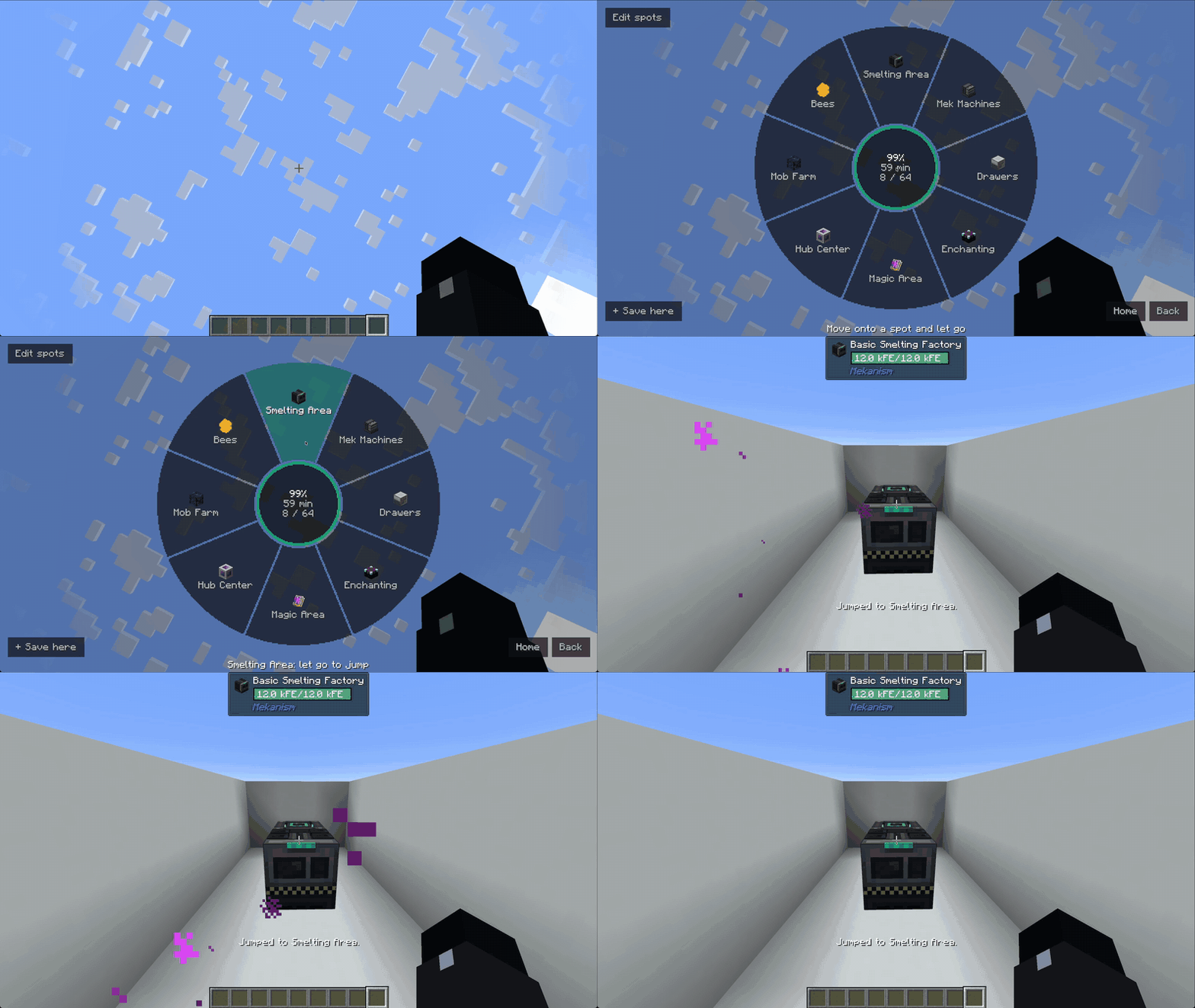
Stop walking across your own base. Place a Jumper Anchor, save the spots you visit most (the farm, the furnace wall, the nether portal) and jump to any of them from a quick wheel.
How it works
- Place and link an anchor. Right-click it and press "Link to this anchor". Your spots belong to the anchor you're linked to.
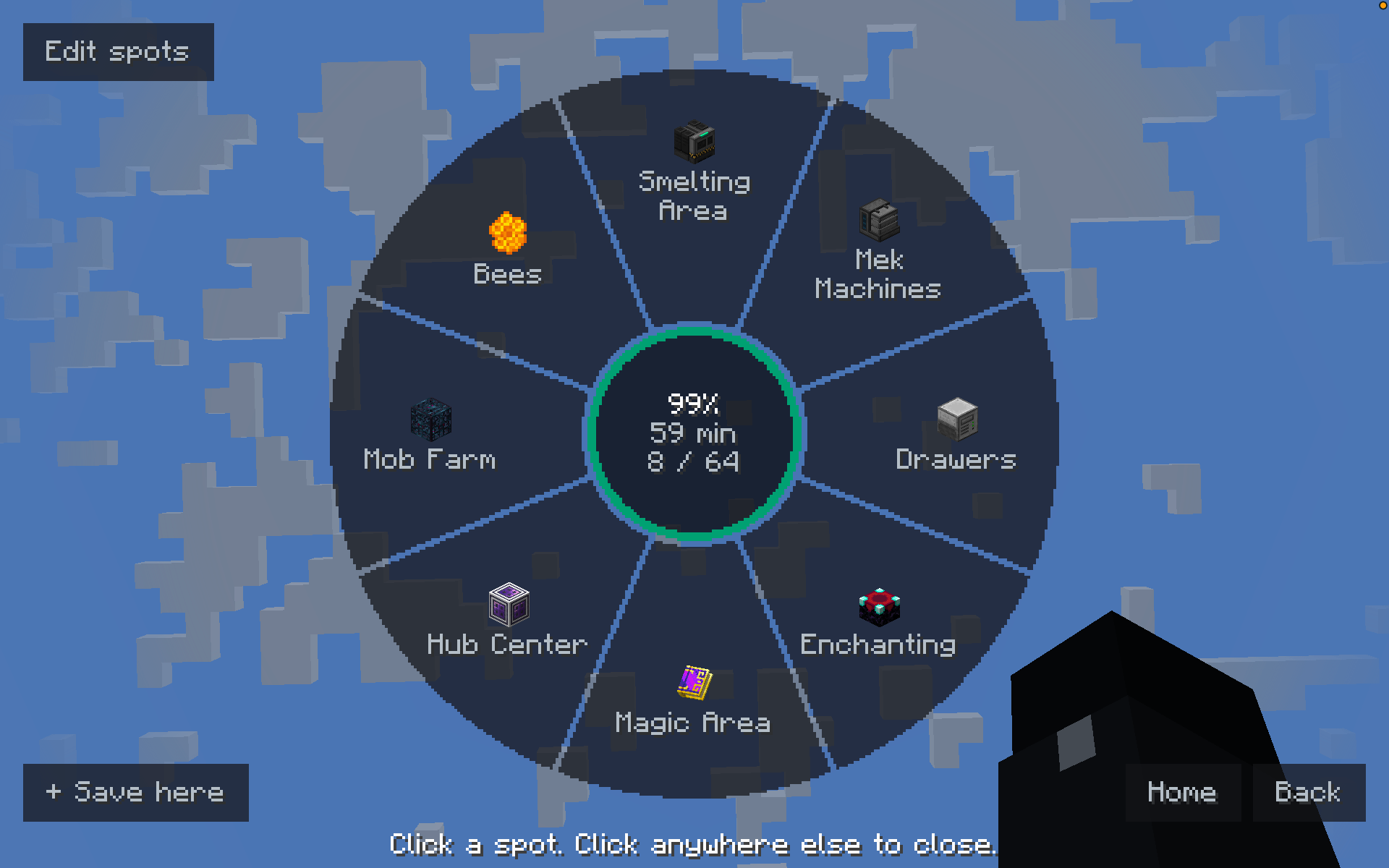
- Save spots. Hold Shift+R for the wheel and click "+ Save here". The name is filled in for you, so you can change it or just press Enter.
- Jump. Hold Shift+R, move onto a spot and let go. Home takes you to the anchor; Back returns you to where you jumped from.
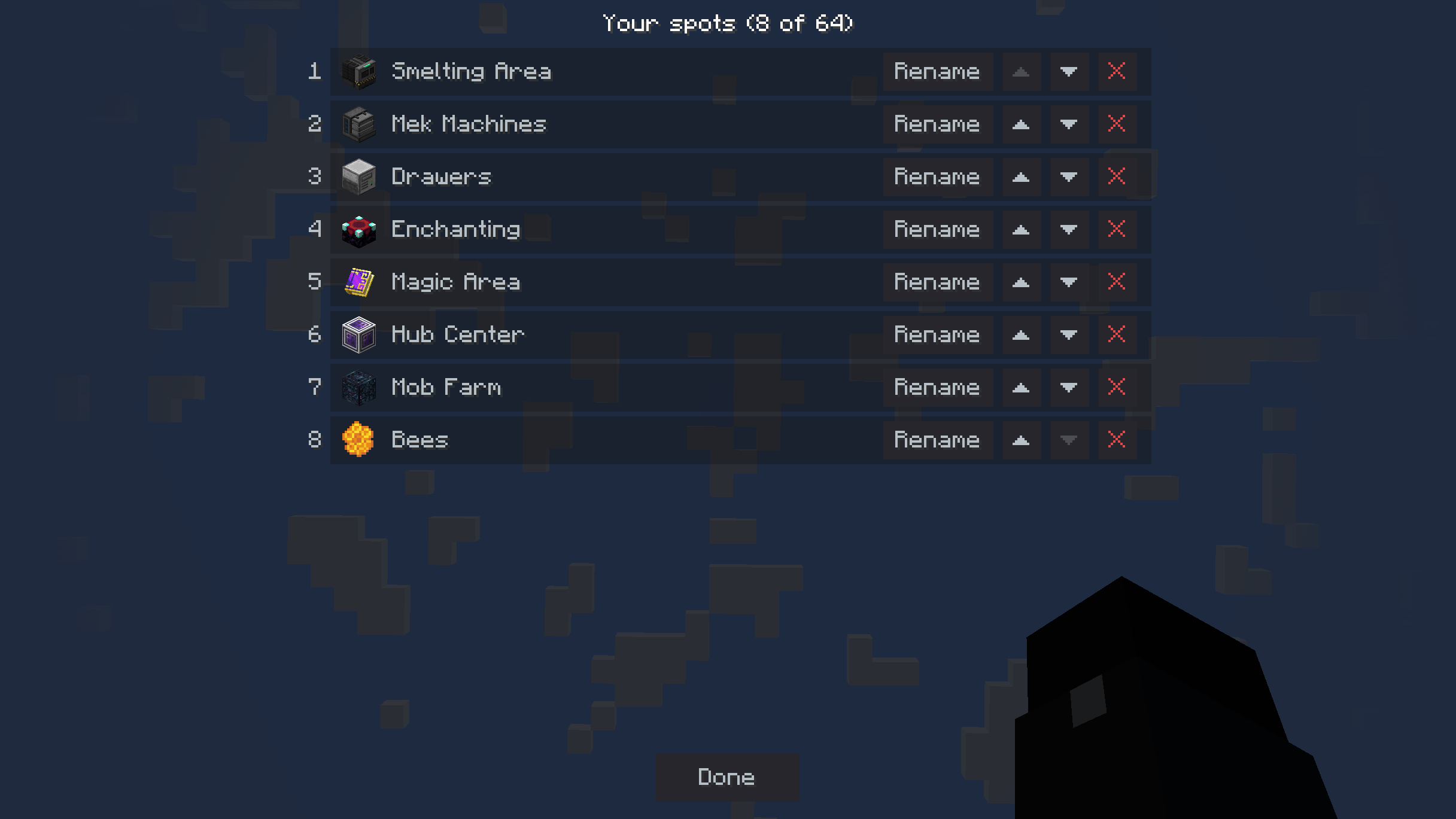
- Tidy up. "Edit spots" lists your spots. Rename them, reorder them, click a spot's picture to pick a new one from any item or fluid. Every change can be undone (Ctrl+Z).
Grow your anchor
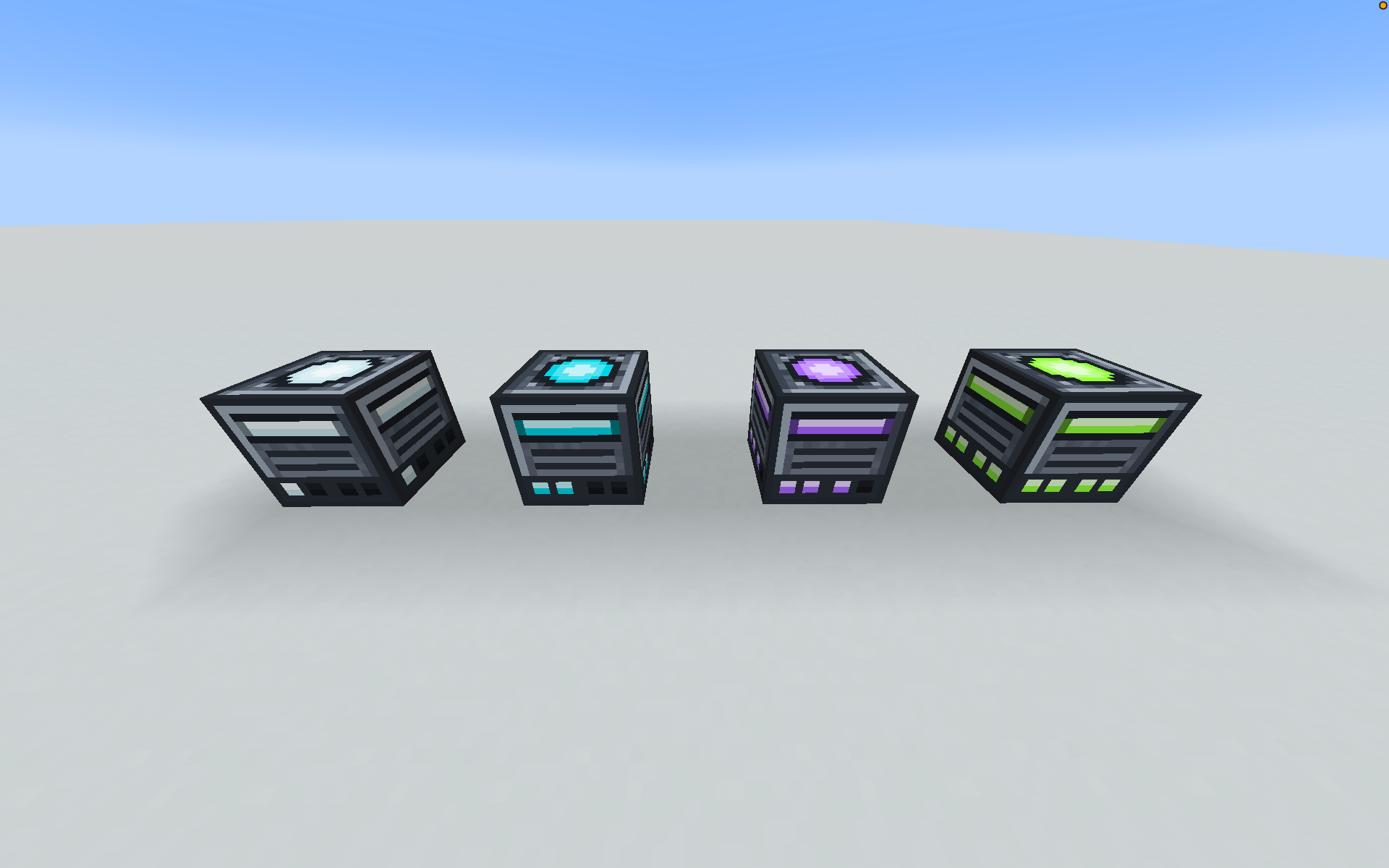
Four tiers, each with more range and more spots. Upgrade by right-clicking the anchor with the next upgrade item. A broken anchor keeps its tier, in the block and in your inventory.
| Tier | Range | Spots per player | Power |
|---|---|---|---|
| 1 | 64 blocks | 8 | none |
| 2 | 256 blocks | 16 | 50,000 FE/t |
| 3 | 2,048 blocks | 32 | 500,000 FE/t |
| 4 | any distance, any dimension | 64 | 5,000,000 FE/t |
(defaults, all changeable by the server; tiers 2 to 4 also use 2 FE/t per saved spot)
- Higher tiers run on FE from any mod's cables or generators. The power is a steady upkeep, not a cost per jump. It stores about 30 seconds' worth and never takes more than twice its upkeep, so it won't drain the rest of your base.
- No power, or base not loaded? The anchor still works like tier 1, and Home always works.
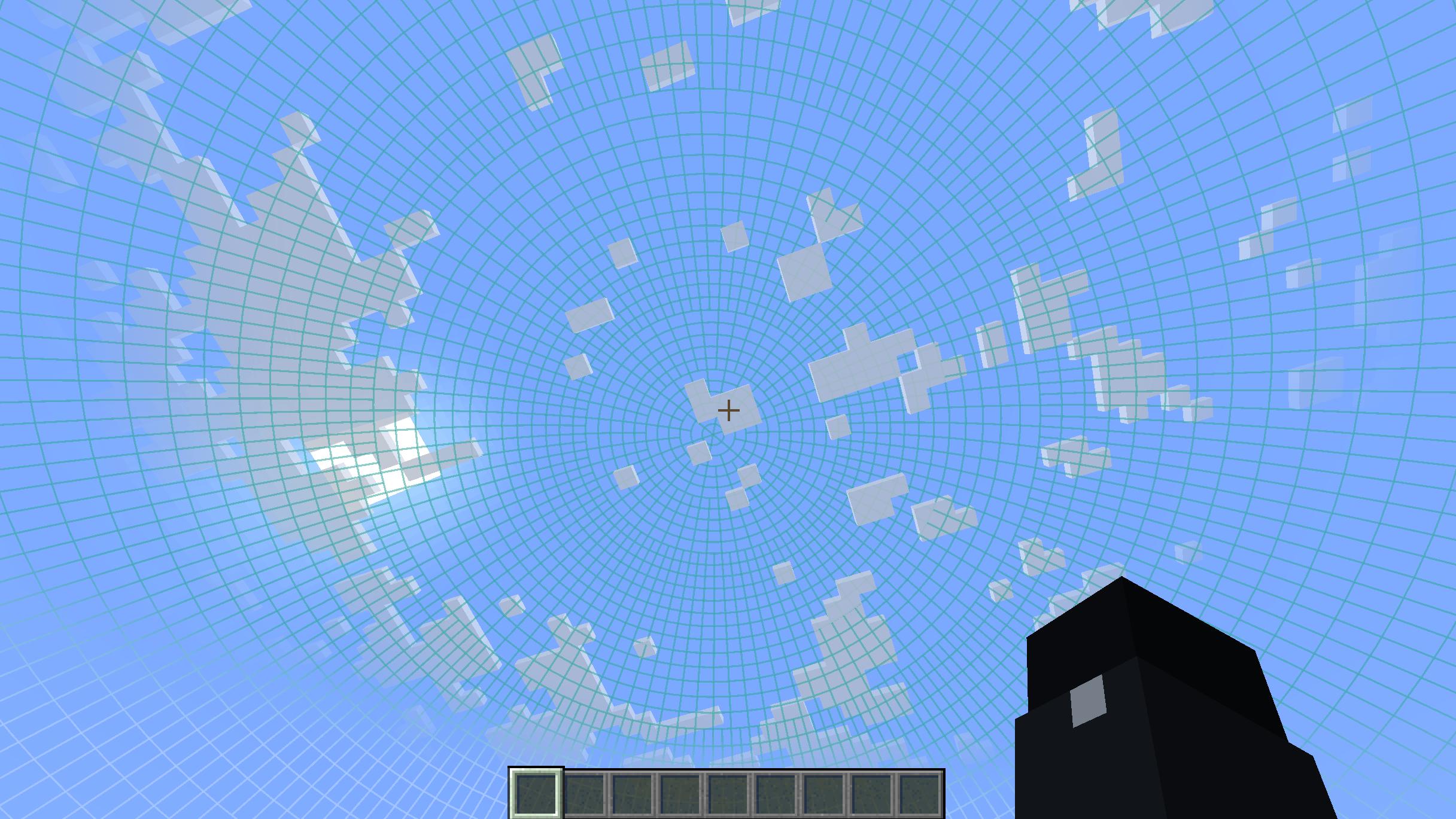
- See your reach. Turn on the range dome in the anchor's menu to see a cage of lines showing how far the anchor reaches.
Fair on servers
- Every jump is checked on the server: in range, a safe landing (no lava, no suffocating), a short cooldown, and no jumping for 5 seconds after hitting a player or being hit.
- Jumps fire the same teleport event as
/tp, so mods that watch teleports can cancel them. - Several players can link to one anchor. Each keeps their own spots.
- Light: 1,024 anchors in one place cost about 0.14 ms per tick (0.27% of the server thread; a tick has 50 ms). An anchor does its work once a second, spread out so they don't all fire on the same tick.
For pack makers and server owners
- Range, spots, power, cooldown and the hit rule are all in
jumper-server.toml, per tier. Operators can change them live with/jumper config, with no restart. - All recipes are standard data-pack recipes, so you can replace them.
- A chunk loader at your base is recommended, but not required. An anchor above tier 1 needs its chunk running; when nobody is near the base, it works as tier 1 until someone is.
Compatibility
- Versions: Minecraft 1.21.1 with NeoForge 21.1.49 or newer, and Minecraft 1.20.1 with Forge 47.2.0 or newer.
- Requires: nothing else. Install on both the server and every client.
- Power: any mod that uses the standard FE energy system (tested with Mekanism).
- Optional: Jade shows the anchor's stored power when you look at it. FE is counted in whole numbers that stop at about 2.1 billion, so for bigger buffers Jade shows the fill level right but the totals capped at that.
FAQ
- My dome turned amber and got smaller. The base's chunk stopped running, or the anchor ran out of power, so it's working as tier 1 for now. A chunk loader or some power fixes it.
- Can I jump to someone else's base? Only to spots you saved yourself, within your own anchor's range.
- Is there a key for Home or Back? Yes. Set "Jump home" and "Jump back" in Controls (unbound by default).
Credits
Made by zerobit. MIT license, all code original.
Project description from CurseForge.
Pick your setup
Jumper: Fast Base Travel by Minecraft version and loader
Choose the version and loader you play, then open the matching release.
Minecraft version
1.20.1
1 loader buildCheck the dependencies, then try the file in a copied instance before changing a world you care about.
Recent files
Jumper: Fast Base Travel versions and loaders
Jumper 1.0.3 (Forge 1.20.1)
jumper-1.0.3-1.20.1-forge.jar
23 Nov 2026
Client Source doesn’t say Server Source doesn’t say Dependencies No extras listed Listed on Release listing
Check the 1.20.1 · Forge setup 1.20.1Forge release
Jumper 1.0.3 (NeoForge 1.21.1)
jumper-1.0.3-1.21.1-neoforge.jar
23 Nov 2026
Client Source doesn’t say Server Source doesn’t say Dependencies No extras listed Listed on Release listing
Check the 1.21.1 · NeoForge setup 1.21.1NeoForge release
Jumper 1.0.2 (Forge 1.20.1)
jumper-1.0.2-1.20.1-forge.jar
23 Nov 2026
Client Source doesn’t say Server Source doesn’t say Dependencies No extras listed Listed on Release listing
Check the 1.20.1 · Forge setup 1.20.1Forge release
Jumper 1.0.2 (NeoForge 1.21.1)
jumper-1.0.2-1.21.1-neoforge.jar
23 Nov 2026
Client Source doesn’t say Server Source doesn’t say Dependencies No extras listed Listed on Release listing
Check the 1.21.1 · NeoForge setup 1.21.1NeoForge release
Jumper 1.0.1 (NeoForge 1.21.1)
jumper-1.0.1-1.21.1-neoforge.jar
22 Nov 2026
Client Source doesn’t say Server Source doesn’t say Dependencies No extras listed Listed on Release listing
Check the 1.21.1 · NeoForge setup 1.21.1NeoForge release
Jumper 1.0.1 (Forge 1.20.1)
jumper-1.0.1-1.20.1-forge.jar
22 Nov 2026
Client Source doesn’t say Server Source doesn’t say Dependencies No extras listed Listed on Release listing
Check the 1.20.1 · Forge setup 1.20.1Forge release
Jumper 1.0.0 (Forge 1.20.1)
jumper-1.0.0-1.20.1-forge.jar
11 Nov 2026
Client Source doesn’t say Server Source doesn’t say Dependencies No extras listed Listed on Release listing
Check the 1.20.1 · Forge setup 1.20.1Forge release
Jumper 1.0.0 (NeoForge 1.21.1)
jumper-1.0.0-1.21.1-neoforge.jar
11 Nov 2026
Client Source doesn’t say Server Source doesn’t say Dependencies No extras listed Listed on Release listing
Check the 1.21.1 · NeoForge setup 1.21.1NeoForge release
Looking for an older file? The official CurseForge project page is in Resources.
 mod
CurseForge + Modrinth · Minecraft
PolyNametag
An extremely customizable nametag mod. By Polyfrost, best with OneClient.
 mod
CurseForge + Modrinth · Minecraft
VanillaHUD
A mod that modifies various vanilla HUD elements, such as the bossbar, action bar, sidebar / scoreboard, hotbar, title / subtitle, and more. By Polyfrost, best with OneClient.
 mod
CurseForge + Modrinth · Minecraft
Hodgepodge
A Hodgepodge of Fixes