CurseForge · Minecraft mod
Quiet Please
Mute music track by track: turn any song in your modpack down or off, build your own playlist, skip songs and keep favorites.
Quick answer
Which Quiet Please release matches 26.1.2?
Quiet Please 1.3.0 (NeoForge 26.1.2) targets 26.1.2 with NeoForge. The project page does not say whether this file belongs on the client, dedicated server, or both. No extra mods listed for this file.
Where it goes
Is Quiet Please required on the client, server, or both?
The project page does not say whether this file belongs on the client, dedicated server, or both.
The source does not explicitly classify this release as client-only or server-only.
What else does Quiet Please 1.3.0 (NeoForge 26.1.2) need?
Quiet Please 1.3.0 (NeoForge 26.1.2) on 26.1.2. Every mod below is checked against that same setup.
This file does not list any required mods. Do not add a library just because a different file uses it.
This file does not list any required or optional mods.
Before you install it
Add Quiet Please without breaking your instance.
Built for Quiet Please 1.3.0 (NeoForge 26.1.2) on 26.1.2. Pick another file and the loader, install side or required mods may change.
- 01
Stick to this file
Use Quiet Please 1.3.0 (NeoForge 26.1.2). It targets 26.1.2 with NeoForge; another release may have different loader, side or dependency requirements.
- 02
Bring the mods it needs
This file does not list any required mods. Do not add a library just because a different file uses it.
- 03
Put it on the correct side
The project page does not say whether this file belongs on the client, dedicated server, or both.
- 04
Pick the file you checked
Use the “Get this file” button beside Quiet Please 1.3.0 (NeoForge 26.1.2). It opens that exact file at the source.
About this project
What does Quiet Please add?
Quiet Please
Explore the mod here
Big modpacks bring a lot of music – and not all of it fits together. Quiet Please lets you decide, track by track, what you actually want to hear.
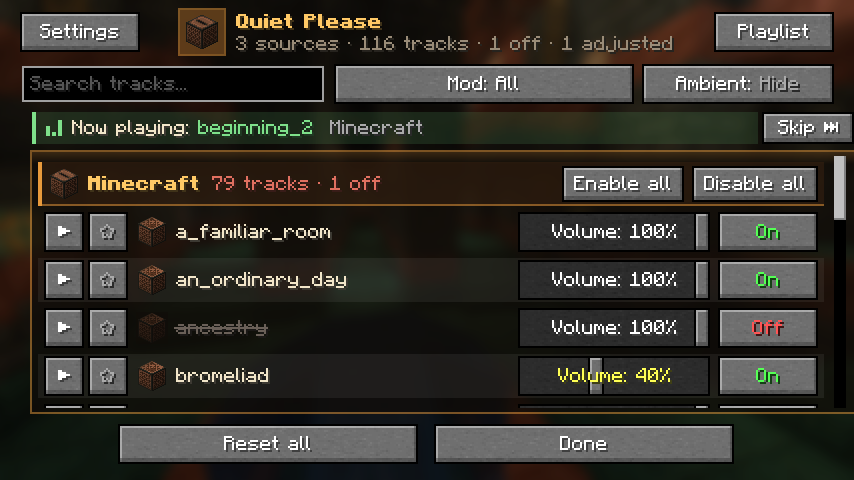
Every music track in one list

All the music in your game, vanilla and modded, grouped by the mod it comes from. On every row:
- On / Off – turn a track off and the game simply picks another one instead
- Volume – set each track anywhere from 0 to 100 %
- Mod volume – one slider in each mod header turns all songs of that mod up or down at once
- Play button – preview the track right in the panel (background music pauses while you listen)
- Star – keep the song in a Favorites group at the top of the list
On top of the list:
- Enable all / Disable all – switch off every track of a mod with one click
- Search box, Mod filter and Ambient – find a track fast, or also show the long ambience loops
- Now playing bar – the song you hear right now, with a Skip button next to it
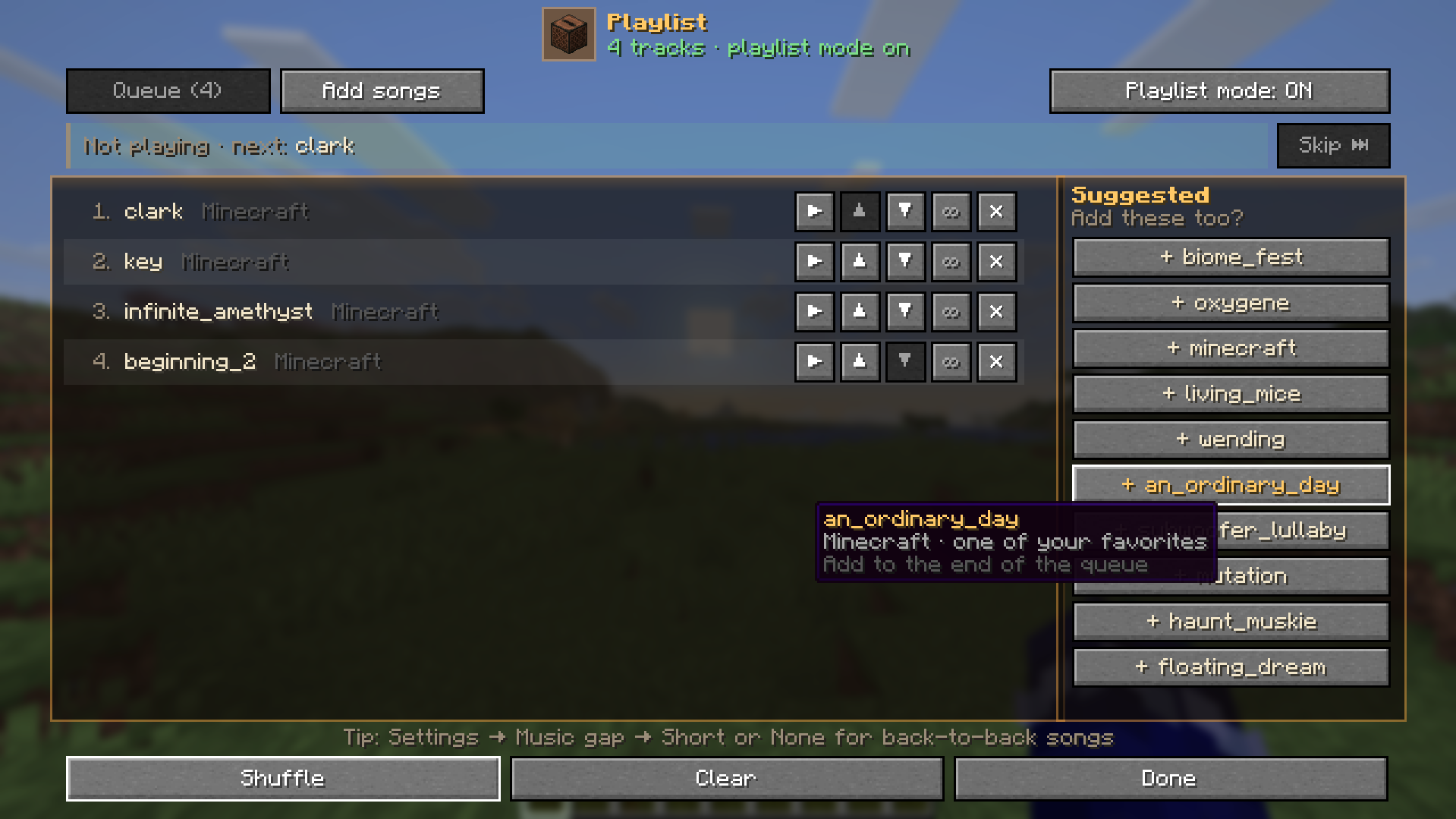
Your own background playlist

Press Playlist and pick the songs and their order, like a music player.
- Every song in the queue has play now, move up, move down, loop and remove buttons
- A song leaves the queue once it has played; turn on its loop button to keep it in its place
- When the queue reaches the end, it starts again from the top
- Suggested on the right: your favorites, songs you added before and well-known Minecraft songs. One click adds a song to the end of the queue, and hovering shows why it was suggested
- Shuffle and Clear at the bottom
- Boss, dragon and credits music still interrupt the playlist
Always know what is playing

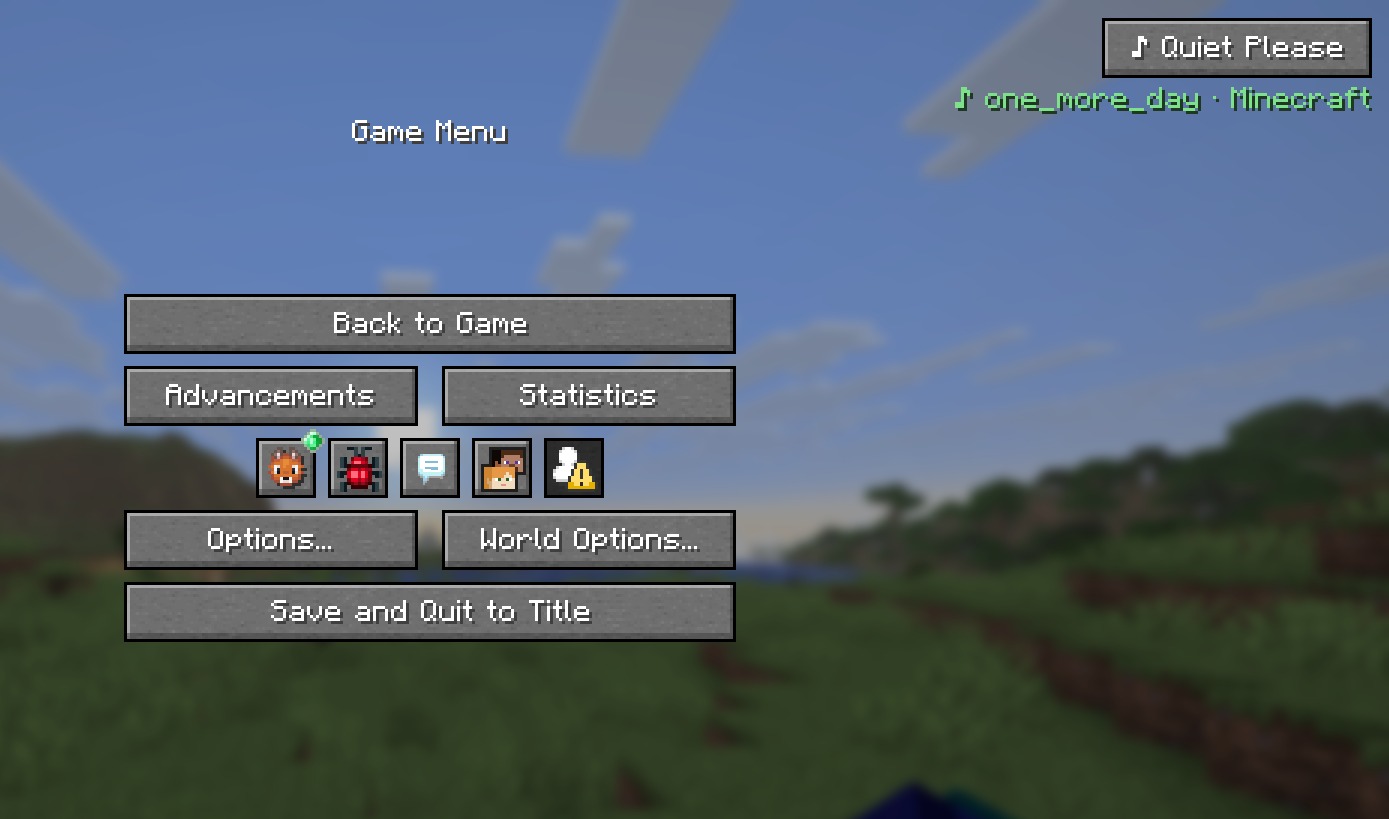
Press Esc and the current song is right under the Quiet Please button, so you can find a song even if you don't know its name. One click opens the panel.
A popup when a new song starts

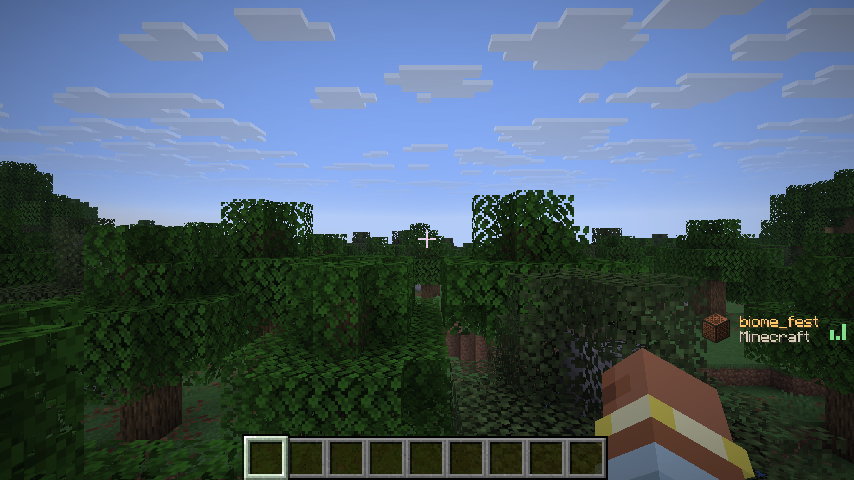
When a new song starts, a small card slides in with the song name and the mod it comes from, then slides out again.

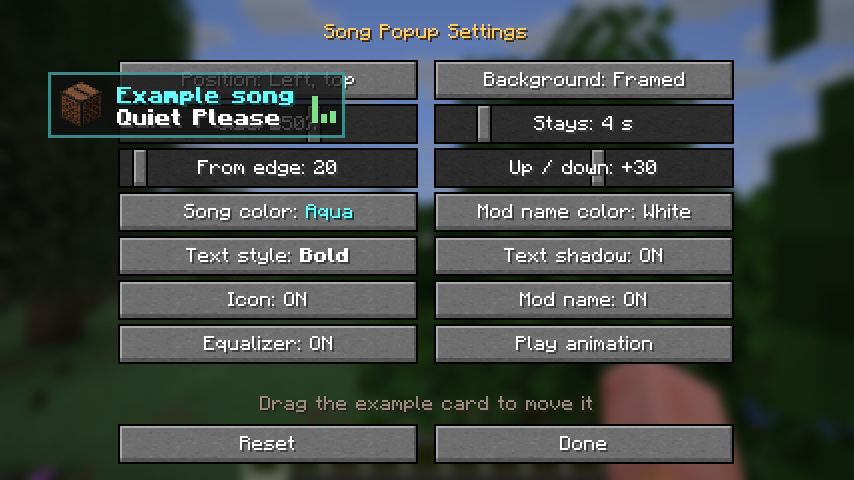
- Six positions, distance from the edge, size and how long it stays
- Song and mod name colors, bold or italic text, shadow and background
- The icon, the mod name and the little equalizer can each be turned off
- Drag the example card in the popup settings to put it exactly where you want it
Music that fits the moment

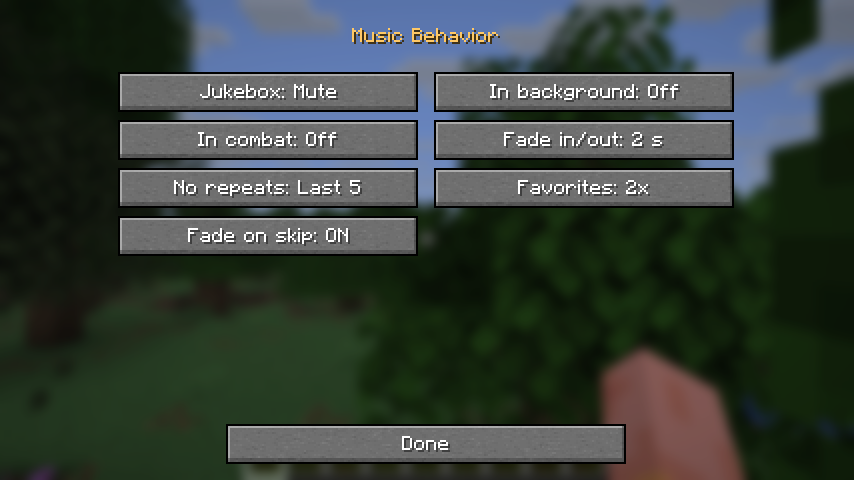
- Jukebox – background music turns down or mutes while a music disc plays nearby, and comes back when the disc ends
- In background – turn the music down when you Alt+Tab out of the game
- In combat – turn the music down when you take damage or a hostile mob is close, so you can hear the fight
- Fade in/out – songs start and end softly instead of cutting in and out
- No repeats – the last 5 or 10 songs are skipped when the game picks the next one
- Favorites – songs with a star come up 2, 3 or 5 times as often, even without the playlist
- Fade on skip – Skip turns the song down smoothly; press it again to stop it at once
Shorter silence between songs

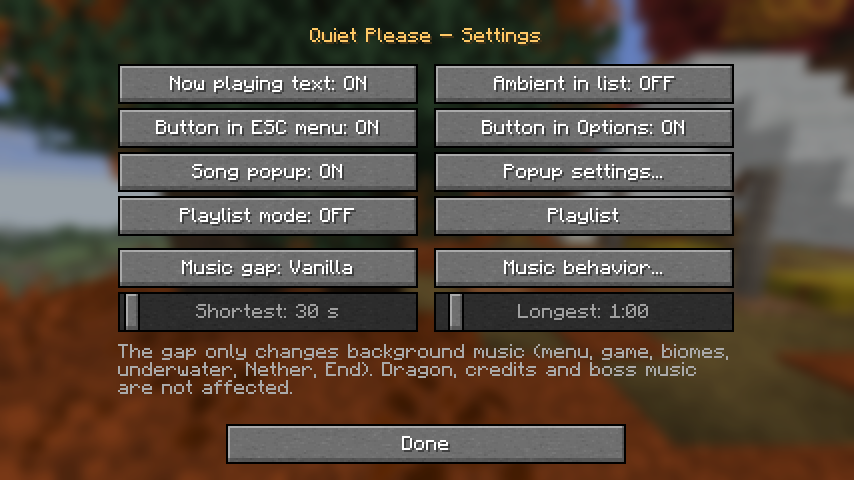
- Music gap – Vanilla, Short, None or Custom with your own shortest and longest wait. It only changes background music; dragon, credits and boss music are not affected
- Turn the now-playing text, the menu buttons or the song popup off
- Turn playlist mode on or off, and choose whether ambient tracks show in the list
- Popup settings… and Music behavior… open the two screens above
Open it from anywhere

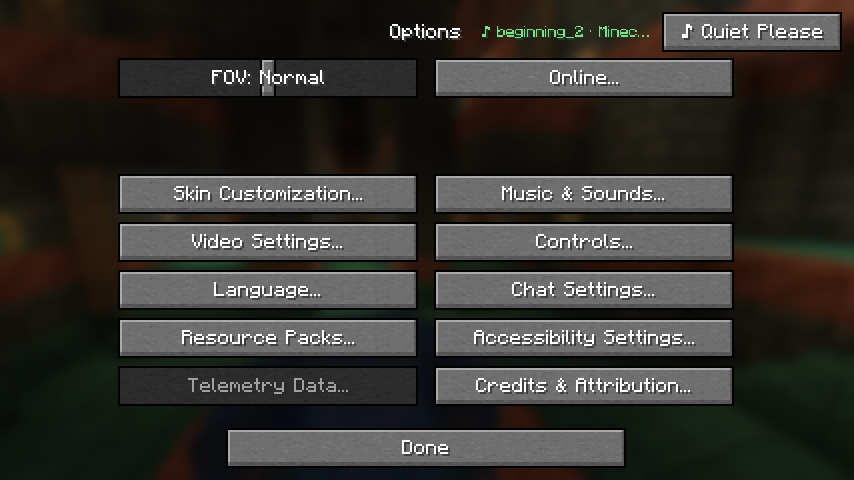
- Esc → ♪ Quiet Please (top-right corner)
- Options → ♪ Quiet Please or Options → Music & Sounds → ♪ Quiet Please
- Mods → Quiet Please → Config
- Key bindings (unbound by default) to open the panel, skip a song, favorite the current song and turn playlist mode on or off: Controls → Key Binds → Quiet Please
- Chat commands:
/quietplease,/quietplease skip,/quietplease mod <mod> volume <0-100>, and/quietplease export <name>/import <name>to share a setup
Supported versions
- Minecraft 1.18.2 – Fabric, Forge
- Minecraft 1.19.2 – Fabric, Forge
- Minecraft 1.20.1 – Fabric, Forge
- Minecraft 1.21.1 – Fabric, Forge, NeoForge
- Minecraft 26.1.2 – Fabric, Forge, NeoForge
- Minecraft 26.2 – Fabric, Forge, NeoForge
- Minecraft 26.3 – Fabric, Forge, NeoForge
- The Fabric versions need Fabric API and also run on Quilt (with Fabric API)
Good to know
- Client-side only. Install it on your own game; servers don't need it, and you can join any server.
- Works for vanilla music, music discs and modded boss and biome music – for example the boss themes of L_Ender's Cataclysm and Mowzie's Mobs.
- Settings are stored in
config/quietplease.json, so modpack makers can ship a pre-tuned file. - English, Turkish, German, Spanish, Russian, Brazilian Portuguese and Simplified Chinese.
AI disclosure
The code of this mod was written with the help of an AI assistant (Claude), and the project icon is rendered from Minecraft's own jukebox and music disc textures. All screenshots on this page are real in-game screenshots.
Project description from CurseForge.
Pick your setup
Quiet Please by Minecraft version and loader
Choose the version and loader you play, then open the matching release.
26.2
4 loader builds26.1.2
4 loader builds1.21.1
4 loader builds1.20.1
3 loader builds1.19.2
3 loader builds1.18.2
3 loader buildsCheck the dependencies, then try the file in a copied instance before changing a world you care about.
Recent files
Quiet Please versions and loaders
Quiet Please 1.3.0 (NeoForge 26.1.2)
quietplease-neoforge-1.3.0-26.1.2.jar
14 Nov 2026
Quiet Please 1.3.0 (Forge 26.1.2)
quietplease-forge-1.3.0-26.1.2.jar
14 Nov 2026
Quiet Please 1.3.0 (Fabric 26.1.2)
quietplease-fabric-1.3.0-26.1.2.jar
14 Nov 2026
Quiet Please 1.2.1 (Fabric 26.1.2)
quietplease-fabric-1.2.1-26.1.2.jar
14 Nov 2026
Quiet Please 1.2.1 (Forge 26.1.2)
quietplease-forge-1.2.1-26.1.2.jar
14 Nov 2026
Quiet Please 1.2.1 (NeoForge 26.1.2)
quietplease-neoforge-1.2.1-26.1.2.jar
14 Nov 2026
Quiet Please 1.2.0 (NeoForge 26.1.2)
quietplease-neoforge-1.2.0-26.1.2.jar
13 Nov 2026
Quiet Please 1.2.0 (Forge 26.1.2)
quietplease-forge-1.2.0-26.1.2.jar
13 Nov 2026
Looking for an older file? The official CurseForge project page is in Resources.