Minecraft version
Back to mods 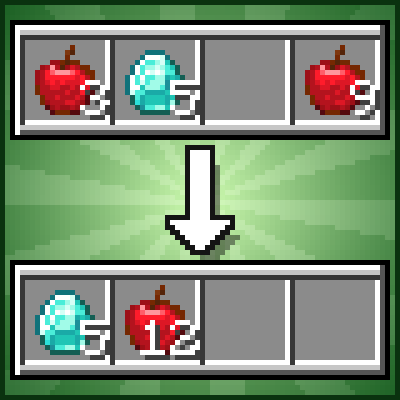
CurseForge · Minecraft mod
Tidy Slots
One small button sorts chests, shulker boxes and your inventory. Works on any server.
Choose a version Pick your version below, then grab the matching file.
Quick answer
Which Tidy Slots release should I use?
Latest stable file Tidy Slots 1.0.0 (NeoForge 26.1–26.3)
Game version 26.1, 26.1.1, 26.1.2
Loader NeoForge
Tidy Slots 1.0.0 (NeoForge 26.1–26.3) targets 26.1, 26.1.1, 26.1.2 with NeoForge. The project page does not say whether this file belongs on the client, dedicated server, or both. No extra mods listed for this file.
Where it goes
Is Tidy Slots required on the client, server, or both?
The project page does not say whether this file belongs on the client, dedicated server, or both.
Client Source doesn’t say
Dedicated server Source doesn’t say
Loader for this release NeoForge
Required install it here Optional supported, not mandatory Not supported do not install here Source doesn’t say do not assume
The source does not explicitly classify this release as client-only or server-only.
What else does Tidy Slots 1.0.0 (NeoForge 26.1–26.3) need?
Tidy Slots 1.0.0 (NeoForge 26.1–26.3). Change the file and its required mods may change too.
This file does not list any required mods. Do not add a library just because a different file uses it.
This file does not list any required or optional mods.
Before you install it
Add Tidy Slots without breaking your instance.
Built for Tidy Slots 1.0.0 (NeoForge 26.1–26.3). Pick another file and the loader, install side or required mods may change.
- 01
Stick to this file
Use Tidy Slots 1.0.0 (NeoForge 26.1–26.3). It targets 26.1, 26.1.1, 26.1.2 with NeoForge; another release may have different loader, side or dependency requirements.
- 02
Bring the mods it needs
This file does not list any required mods. Do not add a library just because a different file uses it.
- 03
Put it on the correct side
The project page does not say whether this file belongs on the client, dedicated server, or both.
- 04
Pick the file you checked
Use the “Get this file” button beside Tidy Slots 1.0.0 (NeoForge 26.1–26.3). It opens that exact file at the source.
About this project
What does Tidy Slots add?

Adds a small sort button to chests, shulker boxes and your inventory. One click and everything is in order.
How it works
- Click the button in the top corner of a chest, double chest, barrel, ender chest or shulker box.
- Your inventory has its own button. The hotbar is never touched.
- Same items go next to each other, partial stacks are merged. The order follows the creative menu: blocks, tools, food and so on.
- Works on any server, even if the server does not have the mod.
- In singleplayer sorting is instant.
- No settings and no key bindings.
Found a bug? Report it here

На русском
Добавляет маленькую кнопку сортировки в сундуки, шалкеры и инвентарь. Один клик — и всё по местам.
- Кнопка в верхнем углу сундука, двойного сундука, бочки, сундука Края и шалкера.
- У инвентаря своя кнопка. Хотбар не трогается.
- Одинаковые предметы встают рядом, неполные стаки сливаются. Порядок как в творческом меню: блоки, инструменты, еда и так далее.
- Работает на любом сервере, даже если на нём нет мода.
- В одиночной игре сортировка мгновенная.
- Без настроек и без новых клавиш.
Project description from CurseForge.
Pick your setup
Tidy Slots by Minecraft version and loader
Choose the version and loader you play, then open the matching release.
Minecraft version
26.2
3 loader buildsMinecraft version
26.1.2
3 loader buildsMinecraft version
26.1.1
3 loader buildsMinecraft version
26.1
3 loader buildsMinecraft version
1.21.11
3 loader buildsMinecraft version
1.21.10
3 loader buildsMinecraft version
1.21.9
3 loader buildsMinecraft version
1.21.8
3 loader buildsMinecraft version
1.21.7
3 loader buildsMinecraft version
1.21.6
3 loader buildsMinecraft version
1.21.5
3 loader buildsShowing the newest 12 of 24 game versions. Older files are in the list below.
Check the dependencies, then try the file in a copied instance before changing a world you care about.
Recent files
Tidy Slots versions and loaders
Tidy Slots 1.0.0 (NeoForge 26.1–26.3)
tidy-slots-1.0.0-mc26.1-26.3-neoforge.jar
12 Nov 2026
Client Source doesn’t say Server Source doesn’t say Dependencies No extras listed Listed on Release listing
Check the 26.3 · NeoForge setup NeoForge26.126.1.126.1.2 release
Tidy Slots 1.0.0 (Fabric 26.1–26.3)
tidy-slots-1.0.0-mc26.1-26.3-fabric.jar
12 Nov 2026
Client Source doesn’t say Server Source doesn’t say Dependencies No extras listed Listed on Release listing
Check the 26.3 · Fabric setup FabricQuilt26.126.1.1 release
Tidy Slots 1.0.0 (NeoForge 1.21.9–1.21.10)
tidy-slots-1.0.0-mc1.21.9-1.21.10-neoforge.jar
12 Nov 2026
Client Source doesn’t say Server Source doesn’t say Dependencies No extras listed Listed on Release listing
Check the 1.21.10 · NeoForge setup NeoForge1.21.91.21.10 release
Tidy Slots 1.0.0 (Fabric 1.21.9–1.21.10)
tidy-slots-1.0.0-mc1.21.9-1.21.10-fabric.jar
12 Nov 2026
Client Source doesn’t say Server Source doesn’t say Dependencies No extras listed Listed on Release listing
Check the 1.21.10 · Fabric setup FabricQuilt1.21.91.21.10 release
Tidy Slots 1.0.0 (NeoForge 1.21.6–1.21.8)
tidy-slots-1.0.0-mc1.21.6-1.21.8-neoforge.jar
12 Nov 2026
Client Source doesn’t say Server Source doesn’t say Dependencies No extras listed Listed on Release listing
Check the 1.21.8 · NeoForge setup 1.21.81.21.61.21.7NeoForge release
Tidy Slots 1.0.0 (Fabric 1.21.6–1.21.8)
tidy-slots-1.0.0-mc1.21.6-1.21.8-fabric.jar
12 Nov 2026
Client Source doesn’t say Server Source doesn’t say Dependencies No extras listed Listed on Release listing
Check the 1.21.8 · Fabric setup Fabric1.21.81.21.61.21.7 release
Tidy Slots 1.0.0 (NeoForge 1.21.5)
tidy-slots-1.0.0-mc1.21.5-neoforge.jar
12 Nov 2026
Client Source doesn’t say Server Source doesn’t say Dependencies No extras listed Listed on Release listing
Check the 1.21.5 · NeoForge setup 1.21.5NeoForge release
Tidy Slots 1.0.0 (Fabric 1.21.5)
tidy-slots-1.0.0-mc1.21.5-fabric.jar
12 Nov 2026
Client Source doesn’t say Server Source doesn’t say Dependencies No extras listed Listed on Release listing
Check the 1.21.5 · Fabric setup Fabric1.21.5Quilt release
Tidy Slots 1.0.0 (NeoForge 1.21.4)
tidy-slots-1.0.0-mc1.21.4-neoforge.jar
12 Nov 2026
Client Source doesn’t say Server Source doesn’t say Dependencies No extras listed Listed on Release listing
Check the 1.21.4 · NeoForge setup 1.21.4NeoForge release
Tidy Slots 1.0.0 (Fabric 1.21.4)
tidy-slots-1.0.0-mc1.21.4-fabric.jar
12 Nov 2026
Client Source doesn’t say Server Source doesn’t say Dependencies No extras listed Listed on Release listing
Check the 1.21.4 · Fabric setup Fabric1.21.4Quilt release
Tidy Slots 1.0.0 (NeoForge 1.21.11)
tidy-slots-1.0.0-mc1.21.11-neoforge.jar
12 Nov 2026
Client Source doesn’t say Server Source doesn’t say Dependencies No extras listed Listed on Release listing
Check the 1.21.11 · NeoForge setup NeoForge1.21.11 release
Tidy Slots 1.0.0 (Fabric 1.21.11)
tidy-slots-1.0.0-mc1.21.11-fabric.jar
12 Nov 2026
Client Source doesn’t say Server Source doesn’t say Dependencies No extras listed Listed on Release listing
Check the 1.21.11 · Fabric setup FabricQuilt1.21.11 release
Looking for an older file? The official CurseForge project page is in Resources.
 mod
CurseForge + Modrinth · Minecraft
VanillaHUD
A mod that modifies various vanilla HUD elements, such as the bossbar, action bar, sidebar / scoreboard, hotbar, title / subtitle, and more. By Polyfrost, best with OneClient.
 mod
CurseForge · Minecraft
PolyCompose
Library mod for building Minecraft screens and HUDs with Jetpack Compose. Made by Polyfrost. Formerly known as Compose Multiplatform.
 mod
CurseForge · Minecraft
Colored Light
This mod turns the light from light sources the color they really are and adds adjustable custom light colors for any block. Works with colored dynamic lights.